Split orders are a tool for stores looking to keep ship-now and pre-order items separate whilst only having the customer check out once. This is in contrast to PreProduct’s “isolated” redirect options, which force separate checkouts for pre-order and ship-now items. Split orders are only supported for charge-upfront pre-orders, and are a Shopify-only feature.
It’s important to note that split orders are only suitable for certain store setups. PreProduct splits orders after they’re first created, which means if your 3PL/ERP/WMS software pulls down orders straight away and does not respect Shopify fulfilment holds, the end result could be duplicate orders in your system. Read the Compatibility with external systems below for more information. For this reason, we strongly recommend testing split orders before going live to customers.
How split orders work #
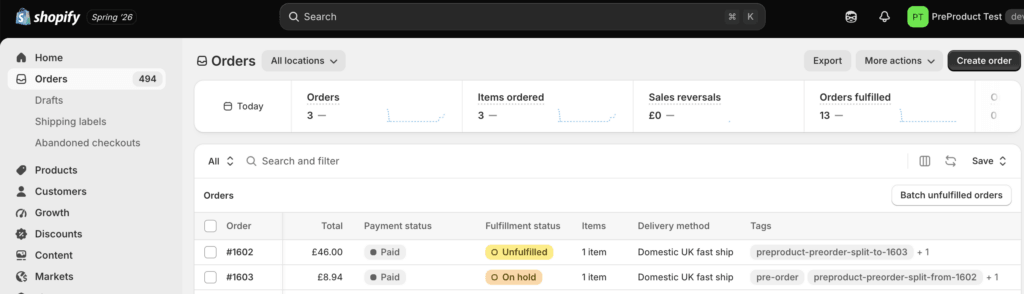
When a customer buys pre-order and ship-now items together, you will end up with two Shopify orders. Unless you’ve opted out of fulfilment holds, the resulting pre-order will have a fulfilment status of “On hold”, where as the original ship-now order will be “Unfulfilled”.
The original order keeps the ship-now items and the payment; the new order holds the pre-order items. The two are cross-referenced by tags and by a note on each.
Finances #
Payout and finance reports reconcile against the original order, where the real transaction lives.
The original order’s timeline will show “$0.00 was refunded” entries. That’s Shopify’s wording for removing line items with no transaction attached; no money goes back to the customer.
When orders split and when they can’t #
Orders will only be split when they contain at least one pre-order item and one ship-now item.
Some order lines can’t be recreated on a new order. Orders containing incompatible pre-order line-items are left as normal mixed orders, with the reason noted on the pre-order. Note, that the following incompatibilities can be true for the ship-now line-items and still split. Incompatible line-item states:
- Gift cards
- Bundles
- Import duties (for example: DDP-enabled stores)
- Pre-orders that aren’t charge-upfront
That said, split orders do support: discounts, taxes, multiple currencies, personalised line-item properties, and orders from any Shopify sales channel.
Compatibility with external systems #
Whether split orders will work for you comes down to two things: the above limitations, and whether your external systems respect fulfilment holds or sync in a non-realtime manner.
Webhook-driven integrations that ignore holds are the risky combination, they can pull the original order before PreProduct has split it. Slower, poll-based integrations are usually fine, because the split has already happened by the time they check. If yours sits in the middle, you’ll need custom rules on your side to exclude or delay pre-order lines.
For those custom rules, the dependable way to identify a pre-order line is the hidden _preorder line item property — every pre-order line carries _preorder: true from the moment the order is created, and it’s carried over automatically onto the new split order. One caveat: the removed lines on the original order remain visible at zero quantity and still carry the property, so rules should also check line quantity (or combine the property with the “pre-order” order tag).
3PL / WMS #
| Provider | Order pull | Respects holds | Custom rules | Split orders? |
|---|---|---|---|---|
| ShipBob | Real-time | ✅ Native | Limited (auto-split, on-hold) | ✅ Safe |
| RyderShip™ | Real-time | ✅ Native | ✅ Rules-based flows, street dates, pre-order status | ✅ Safe |
| SFN | Real-time | ✅ Native | Via Shopify Flow | ✅ Safe |
| ShipHero | Seconds–minutes | ⚠️ Imports held orders, auto-releases after 90 min | Yes | ⚠️ Use “don’t import held orders” setting |
| Extensiv Order Manager | ~15 min poll | ⚠️ On Hold support is beta, CSM-gated | Yes | ⚠️ Rules required |
| ShipStation | Poll, interval undisclosed & not configurable | ❌ Imports On Hold with quantity 0 | ✅ Automation rules (tags, shipping service) | ⚠️ Rules required |
| Shippo | “Real-time or regular intervals” | ❌ Orders come in active | ⚠️ Rules on Pro/Premier plans only | ⚠️ Rules required, paid plan |
| DHL Supply Chain | Auto | ❌ | ✅ Tag-based order flows | ⚠️ Rules required |
| ShipMonk | Auto | ⚠️ Docs contradictory | Unclear | ❌ Verify before use |
| Flexport | Auto | ❌ Not documented; post-creation changes may not sync | ❌ Needs specialist integration | ❌ Not recommended |
| ShipNetwork | Auto | ❌ Not documented | ❌ API/partner only | ❌ Not recommended |
| FedEx Logistics | No native Shopify sync | n/a | Connector’s responsibility | Depends entirely on connector |
ERP / IMS #
| Provider | Order pull | Respects holds | Custom rules | Split orders? |
|---|---|---|---|---|
| Odoo | Cron only — no connector uses webhooks | ❌ Mappable | Tags + metafields | ✅ Poll delay gives natural buffer |
| Cin7 Omni | Poll, min. 2 hours | ❌ | Financial status filter | ✅ Buffer is generous |
| NetSuite Connector (FarApp) | Poll by default (webhook is paid add-on) | ⚠️ Needs mapping | SuiteFlow | ✅ If webhook add-on is off |
| Linnworks | Poll, interval unpublished | ⚠️ Has a “download on hold” toggle | Yes | ⚠️ Untick “download on hold” |
| Cin7 Core | Webhook on Created/Paid/Fulfilled | ❌ Explicitly not native | ✅ “Delay download orders” (minutes) + order exclusion tags | ⚠️ Set download delay |
| NetSuite via Celigo | Webhook, fires on paid | ⚠️ Connector-dependent | SuiteFlow | ⚠️ Rules required |
| Dynamics 365 BC | Webhook → queued job. Auto-sync applies no filters at all | ❌ Not documented | Metafields only; filters need scheduled entries | ⚠️ Use scheduled sync, not auto |
| Acumatica | Real-time or 10-min schedule | ❌ Not native | ✅ Shopify Flow tags | ⚠️ Rules required |
| Brightpearl | “As soon as orders are placed” | ❌ No explicit on-hold status | ⚠️ Automation Engine; tags only via order notes | ⚠️ Rules required |
| Katana | Not documented | ⚠️ Excludes On hold fulfillments; payment-pending off by default | Open API | ⚠️ Test |
| Fulfil | Webhook, claims sub-2s | ❌ Not documented | Tags + metafields | ⚠️ Rules required |
| Zoho Inventory | Auto | ❌ Flatly none | ❌ No native tag/metafield sync at all — needs Zapier | ❌ Not recommended |
| SAP B1 / Sage | Connector-dependent | ⚠️ Custom mapping | Via middleware | ⚠️ Depends on connector |
Accounting with split orders #
All financial transactions live on the original order. Your customer pays once, at checkout, and that payment (items, shipping and tax) stays on the original order’s transaction history forever. When PreProduct splits the pre-order items out, it removes them from the original with a $0.00 refund: the items leave the order, but no money moves and nothing is returned to the customer.
The new pre-order order needs to read as paid (it is, just not on this order), so PreProduct records a “Manual” payment on it, equal to the value of its items. This isn’t new money. It represents the portion of the original checkout payment that belongs to the pre-order items.
What this means for your numbers:
- Sales reports net out correctly. The $0.00 refund books the pre-order items as a return on the original order, and the split order books them as a sale, so across the two orders everything is counted exactly once. The split order is also backdated to the original’s date, so nothing moves between reporting days.
- Payouts are clean. Shopify Payments payouts only ever contain the one real checkout payment. The manual payment never appears in payouts or your bank.
- The “Manual” gateway is the one place you’ll see doubling. In payment summaries (Finance reports), the split order’s manual payment shows under the Manual gateway with no matching bank deposit. If you or your accountant reconcile Shopify payments against the bank, expect Manual-gateway entries equal to your split pre-order values. They’re allocations, not receipts.
- Order counts go up. Each split adds an order, so order-count metrics rise and average order value dips accordingly. Total sales are unaffected.
- Test orders do not affect your metrics. As per usual.
Activating the split orders feature #
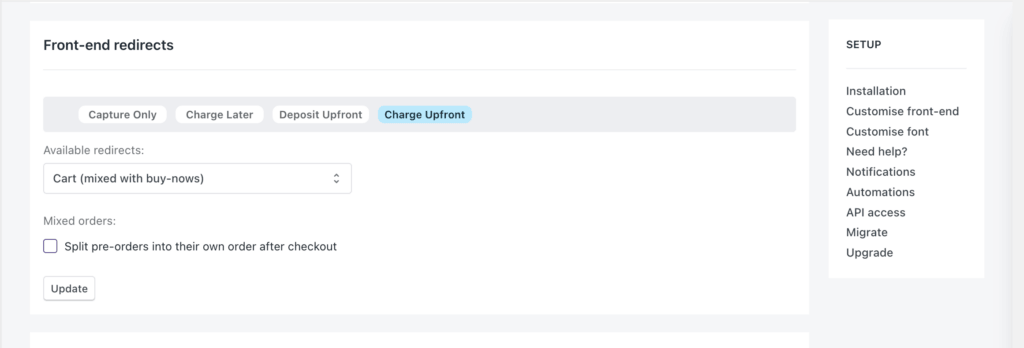
Navigate to PreProduct’s Setup screen, and scroll down to the Front-end redirects section. From there, select Charge-upfront in the grey bar and tick the Split pre-orders into their own order after checkout box, then click the Update button.