PreProduct marks every pre-order with two built-in signals: a “pre-order” order tag and a hidden
_preorderline item property. This doc covers how each works, and which one to use when detecting pre-orders programmatically from ERPs, 3PLs, Shopify Flow or your own code.
The “pre-order” order tag #
PreProduct adds a “pre-order” tag to any Shopify order containing a pre-order line. It’s great for filtering and reporting in the Shopify admin, and for automation rules where timing doesn’t matter.
The tag is applied moments after the order is created though, which means it races the orders/create webhook. ERPs, 3PLs, Shopify Flow and other apps receive that webhook at the same moment PreProduct does, so the tag usually won’t be there yet when they first see the order. The tag is also removed from the original order after PreProduct splits an order.
The _preorder line item property #
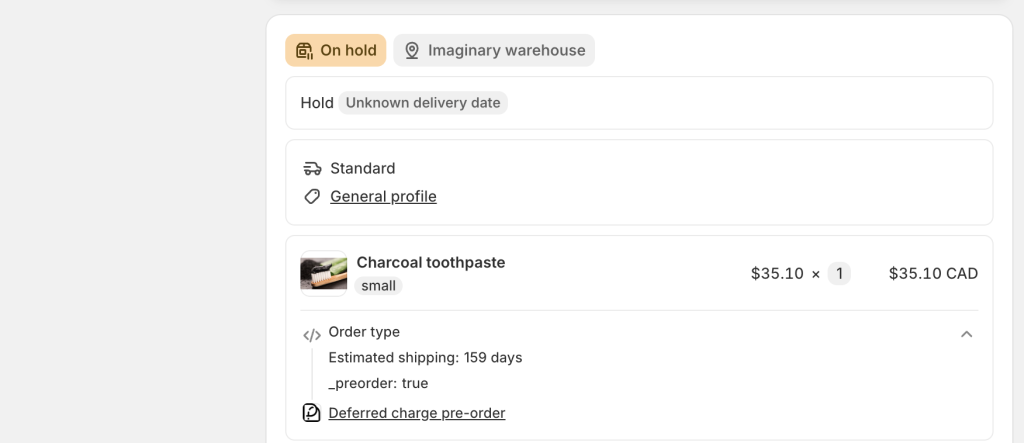
Every pre-order line PreProduct adds to cart carries a hidden line item property: a key of _preorder with a value of "true". It’s added at add-to-cart time across all cart paths (product page, quick-buy and collection buttons, cart flows) as well as by the Shopify POS integration.
The leading underscore means Shopify hides the property from customers at checkout and on order status pages, but it is present in the order data — in the Shopify admin, via the APIs, and on webhooks. Unlike the “Estimated shipping” property (whose key can be renamed via PreProduct’s customise wording screen), the _preorder key is fixed — it can’t be renamed or removed — and it’s immutable once the order exists.
Detecting that an order contains pre-orders #
Check whether any line item carries _preorder: true. The property is present from the instant the order is created, so it’s safe to rely on in orders/create webhooks and order-created Flow triggers — no race with PreProduct’s tagging.
One note on split orders: the property is carried onto the new split order automatically, but the removed lines on the original order remain visible at zero quantity and still carry the property. Automation rules should therefore also check line quantity (or combine the property with the “pre-order” order tag).
Caveats — a positive signal only #
Treat _preorder as a positive signal: its presence proves a pre-order line, but its absence proves nothing. Lines won’t carry the property on:
- Orders placed before the property rolled out
- Capture-only pre-orders completed later via an emailed payment link
- Loop Returns exchange orders
- Migrated or imported historical orders
Our recommendation: use _preorder as the primary line-level signal, with the “pre-order” order tag as a fallback where webhook timing doesn’t matter.
Looking to add your own properties to pre-order lines instead? See our custom line item properties doc.

