Sell past zero.
Without breaking fulfilment.
Keep selling once stock hits zero, but only as far as you can actually deliver. Caps at variant, customer and location level decide how far a campaign can go, and fulfilment holds keep every one of those orders away from your 3PL until you release it.


1 million+ pre-orders processed for stores like yours – get all the insights here to see how you compare 
Some of the brands we work with













Shopify's continue-selling box has no ceiling.
Ticking continue selling when out of stock is a yes or a no. It has no idea how many units are still to be delivered, will not stop at the number you can ship, and does nothing to keep the order away from your 3PL. So the better a launch goes, the more the tools that took the money start working against you. Across the first million pre-orders that ran through PreProduct, the most common stated shipping window was 121 to 150 days. That is four months of selling stock nobody has received yet.
Controlled overselling puts three things around that. Caps at variant, customer and location level, so a campaign stops where your allocation stops. Checkout validation, so nothing gets past those caps or into a cart it should not share. Fulfilment holds, so the order lands in your Shopify admin on day one and reaches fulfilment only when you release it.

PRE-ORDER LIMITS
Sell as far as you can actually deliver, and not one unit further.
Selling past zero is the easy part. Knowing where to stop is the part Shopify leaves to you, because the continue-selling box is a switch with no number attached to it. PreProduct puts the number on. Set a maximum per variant, per customer, or per fulfilment location, and when a variant hits its cap it stops showing any buy buttons on the product page. Lock this in with our Shopify checkout validation: Pre-order max limits enforcement.
For stores selling from multiple warehouses, the location aware listing manager toggles variants on and off pre-order, location by location as stock moves, so a variant that is out at the US warehouse pre-sells to the customers that location serves while staying buy-now everywhere else.
This allows:
- A campaign to stop itself at the number you can ship, without anyone watching it.
- One variant to sell out while every other variant on the product keeps taking pre-orders.
- The same variant to be a pre-order in one region and a normal buy-now in another.
-
A maximum per variant
Cap each variant at the units you have on order. Set them when you create the listing, or edit them later from the By Variant section. If one variant has a limit, they all need one.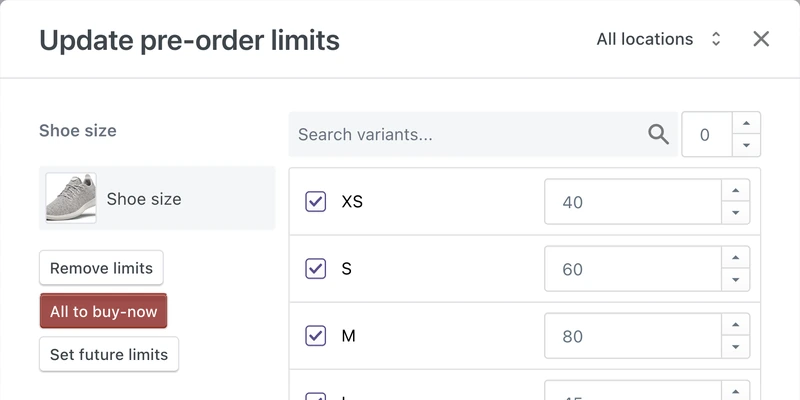
-
A cap per customer
Stop one buyer taking the whole allocation. Useful on anything limited, collectable or resold, and it can be updated mid-campaign from Shopify Flow.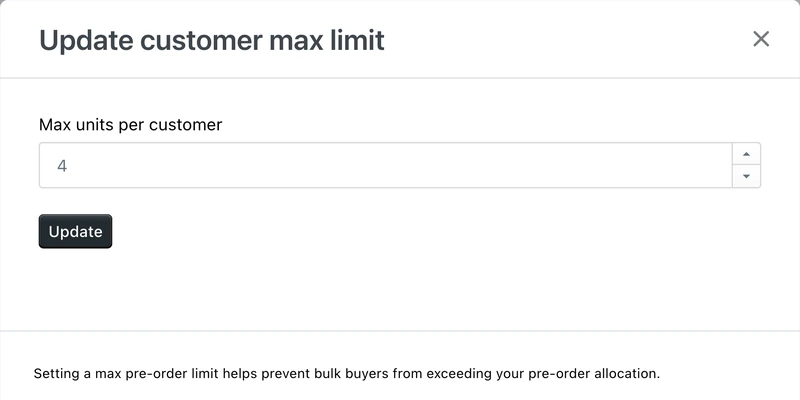
-
Caps per location
Sell from more than one warehouse and the limits pop-up gains a location selector. View every location together, or set one location's caps and pre-order toggles on their own. -
Caps from stock on order
Where Shopify's incoming quantity is populated by purchase orders or an ERP, the automation sets each cap from the units already on order and drops it as pre-orders come in. Hits zero, the variant reads as sold out.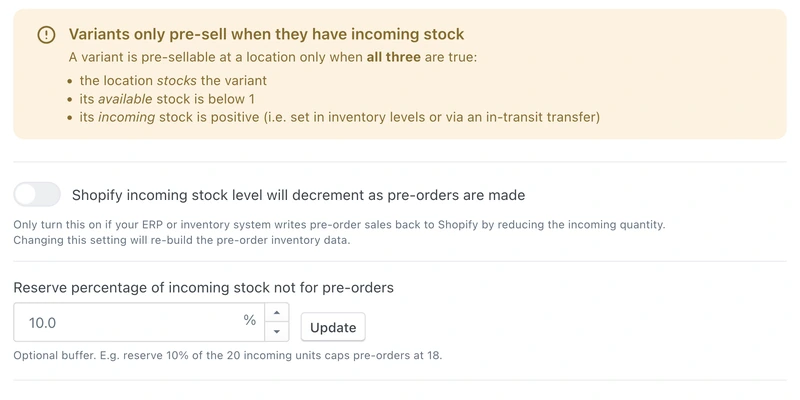
-
Hold a reserve back
Not every inbound unit should be pre-sellable. A reserve percentage keeps a share out of the cap, so 10% on 20 incoming units caps pre-orders at 18 and leaves you two.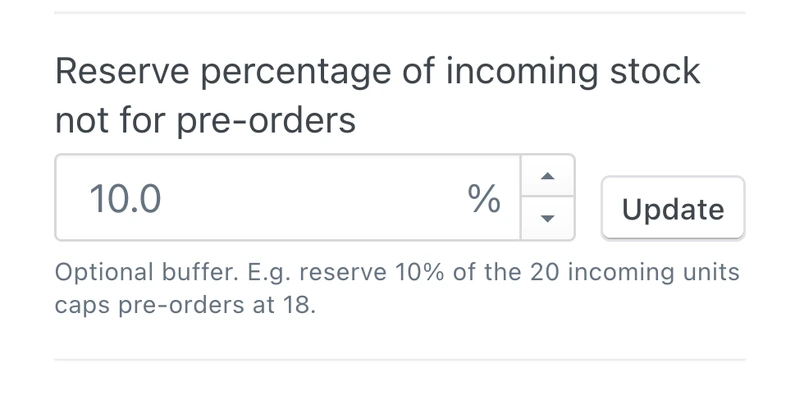
-
The button goes at the cap
At the cap the variant stops offering a pre-order button and a buy-now button both, and PreProduct flips Shopify's continue-selling box back off for it. Nothing to switch off by hand at 2am.
“Awesome support and great flexibility with this app. Perfect for how we want to present our product to customers when we have high-demand and low stock.”

5 stars in the Shopify Appstore

CARTS AND CHECKOUT
Decide what can share a cart, then enforce it at the checkout itself.
Allow mixed carts of pre-order and buy-now items, or forbid them. Either way the rule gets enforced twice. Front-end redirects shape the journey, so a customer does not combine the two by accident: four options, from mixed carts through to sending pre-orders straight to their own checkout.
Then checkout validation enforces the same rule inside Shopify's own checkout code, catching the routes the front end never sees: a third-party upsell app, a stray buy button left in a theme, a cart permalink. It runs on Shopify Functions, so it holds even when something upstream ignores the rules.
This allows:
- Pre-orders and in-stock items to share a cart, or be kept apart, without relying on the customer to get it right.
- A pre-order item to be blocked from going through as a plain buy-now order.
- The cart rules to survive a theme change, an app install, or a link someone shared six weeks ago.
-
Four ways to route the click
Send the click to the cart, leave it where it is, or isolate the pre-order in its own cart or its own checkout. Two of the four keep pre-orders away from buy-now items entirely.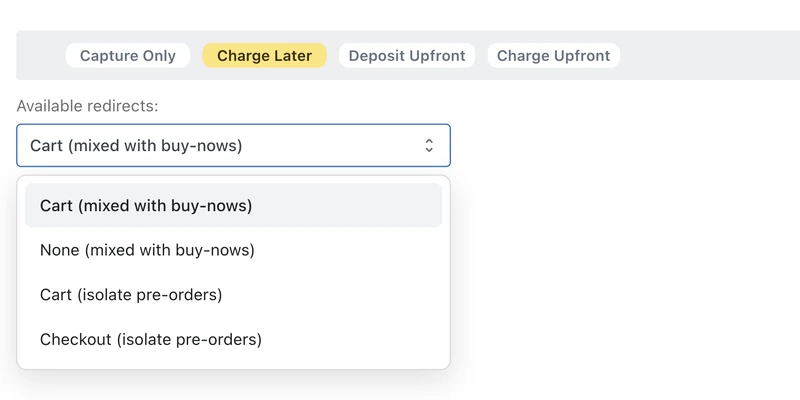
-
Isolated, or mixed
Isolated is cleaner to fulfil and avoids charging shipping twice. Mixed protects average order value. Across the first million pre-orders, 62.1% of stores chose to isolate. -
Validation at checkout
Three rules you switch on one at a time: pre-order items cannot go through as buy-now, pre-order and buy-now items cannot share a cart, and cart quantities cannot exceed the remaining limits.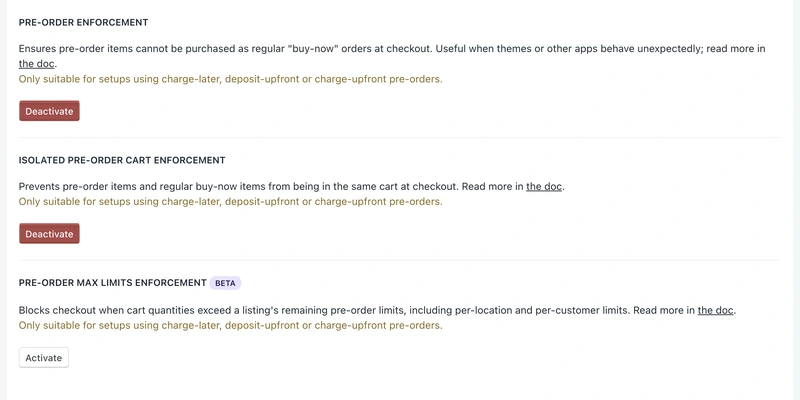
-
Limits held at checkout
The caps also enforce at checkout, per location and per customer, blocking a cart that asks for more than is left.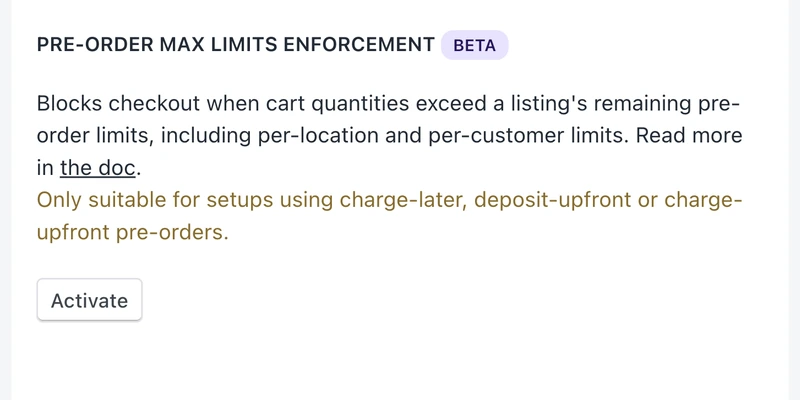
-
Split it, or use fulfilment holds
A mixed basket goes through as one checkout. The pre-order lines hold and the buy-now lines ship, so the half you can send goes out today. Splitting the pre-order lines into their own order afterwards is available on request, on charge-upfront pre-orders.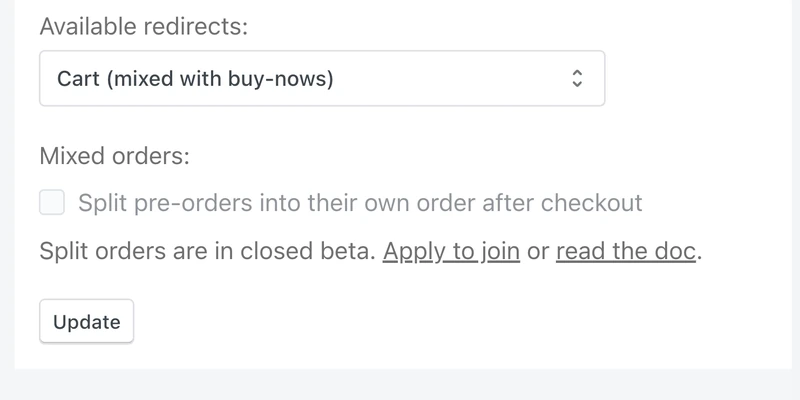
“Pre-Order isolation was key for us, and they pulled it off.”

FULFILMENT HOLDS
The order lands in Shopify today. It reaches your 3PL when you say so.
The reason overselling normally hurts is not the sale, it is what happens next: an order for stock that does not exist walks straight into the same pipeline as everything else. A pre-order line item lands with an on-hold fulfilment status, which is a state your ERP, 3PL and shipping apps can understand and skip. With mixed orders, only the pre-order lines hold while the buy-now lines stay free to go as normal.
Whether you ship that half today is your call: splitting the order lets each half carry its own shipping charge, while plenty of stores wait and ship it once. You release fulfilment when you are ready, by hand or as part of the charge, and where a downstream system does not respect holds, pre-orders are identifiable by order tag and by line-item properties instead.
This allows:
- Pre-orders to sit in your Shopify admin from day one without any of them shipping.
- Your 3PL and ERP to keep working from Shopify, skipping the pre-order lines until you release them.
- Fulfilment to be released a listing at a time, a customer at a time, or a variant at a time.
-
On hold as it lands
Charge-upfront, charge-later and deposit-upfront pre-orders all arrive on hold. No tagging rule to write, no window where the order is fulfillable before something catches it. -
Mixed orders split in two
The pre-order lines hold and the in-stock lines read as unfulfilled, so the half you can ship ships. No splitting the order by hand to get one parcel out.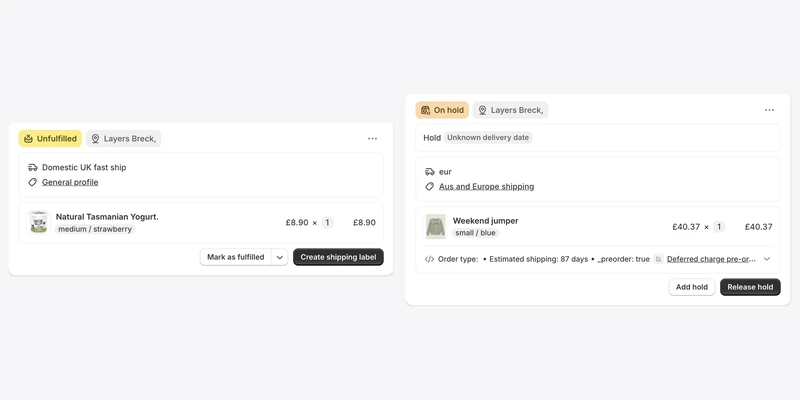
-
Release when you are ready
Release a whole listing, a filtered selection, one customer, or the variants that actually landed. The Shopify order moves to unfulfilled and your normal pipeline takes it from there. -
Or let the charge do it
For deferred-charge pre-orders, a successful charge can release the hold in the same pass. Money in, order fulfillable, one action rather than two. -
Tags and line-item properties
Every pre-order order gets a pre-order tag, and every pre-order line carries properties describing the pre-order. Enough for a system that ignores fulfilment holds to filter on something. -
Flow, and the API
Trigger and release from Shopify Flow or the API, and build your own rules on top: notify a warehouse, tag by lead time, hand off to an ERP.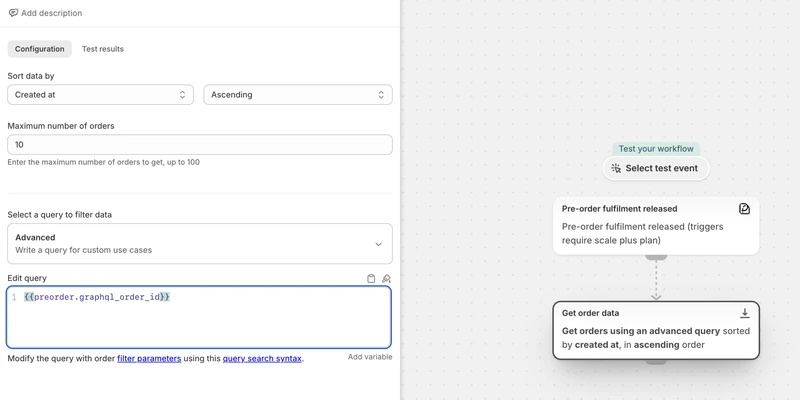
“PreProduct has transformed the way our small team is able to manage pre-orders. It's been a massive operational unlock.”
Pricing
Shopify pre‑order pricing
Starter
Only pay a percentage of pre-order revenue
$0.00
USD / month
+5% of paid pre-order revenue
Take me to the Shopify app
Take pre-orders from your e-commerce/Shopify storefront
Unlimited pre-order listings
Charge customers upfront, later or via deposit
Multi-step payment plans and ad-hoc installments
Customise pre-order front-end & email campaign
Customer portals
Pre-ship upsells add-on available



Scale
For small to medium sized brands
$59.99
USD / month
+0% commission on up to 5k of monthly paid pre-order revenue, then 0.5% afterwards.
Take me to the Shopify app – 7 day free trial
All of Growth features
Listing Manager automation access
API access
15x Shopify Flow actions
10+ Klaviyo events
Priority support
Scale Plus
For medium to large sized brands
$259.99
USD / month
+0% commission
Our top plan with all the features
0% commission
15+ Shopify Flow triggers
Developer support
Controlled overselling FAQ
Can I set a hard cap so the button switches to sold out once we hit it?
Yes, per variant. Once a variant reaches its maximum it stops showing a pre-order button and stops showing a buy-now button, and PreProduct switches Shopify’s continue-selling box back off for that variant so it cannot be oversold. One catch worth knowing before you set them: if one variant on the listing has a limit, every other variant on pre-order needs one too. The pre-order limits doc covers setting and editing them.
Can I limit how many units one customer pre-orders?
Yes. A customer maximum sits on the listing alongside the variant caps, and it can be changed mid-campaign by hand, through the API, or from a Shopify Flow action. It is enforced when the pre-order is placed. To have it enforced at the checkout itself, including on carts assembled by other apps, switch on the max limits checkout validation, which is currently in beta.
Will my Shopify inventory go negative?
Usually, yes, and that is how selling past zero works on Shopify rather than a side effect. Pre-orders pass through your normal checkout, so Shopify decrements the count the way it would for any order. What PreProduct controls is the ceiling: your caps decide how far past zero the product can go, and the continue-selling box goes back off variant by variant as those caps are reached.
Will pre-orders sync to my ERP or 3PL before I am ready to ship?
The order itself lands in your Shopify admin immediately and is visible to the Order API, which is deliberate: your finance and reporting see it, and the customer sees a normal order. What stops it shipping is the fulfilment hold on the pre-order line items, which ERPs, 3PLs and shipping apps skip. If a downstream system ignores holds, filter on the pre-order order tag or the line-item properties instead.
What happens to an order with both pre-order and in-stock items?
Two answers, depending on what you want. Leave it mixed and the pre-order lines are held while the in-stock lines read as unfulfilled, so the ship-now half goes out today. Or use one of the two isolating redirects and the pre-order never shares an order in the first place, which is what 62.1% of stores in our 1 million pre-orders report chose. Splitting a mixed order into two after one checkout is a third option, available on request and on charge-upfront pre-orders only.
Do I need Shopify Plus for any of this?
No. Variant limits, customer limits, per-location limits and fulfilment holds all run on any Shopify plan. Two things are gated differently: the automation that sets caps from your incoming stock needs a paid plan with Listing Manager access, and the three checkout validations need a permissions update in the app before they can be switched on. Fulfilment holds are Shopify-only; on BigCommerce and WooCommerce PreProduct keeps the order out of your platform admin until you release it instead.
Can I test all of this before a launch?
Yes, and it is worth doing in this order: place a test pre-order past zero stock, check the Shopify order arrives with the line item on hold, then hit the variant cap and confirm the button disappears on the storefront. Turn on Shopify Payments test mode for the payment side. Scale and Scale Plus include a free PreProduct instance for a test store, so a whole campaign can be rehearsed away from production.