Every way to charge for a pre-order.
All from your Shopify checkout.
Charge upfront, take a deposit, vault the card and charge later, or split it over months. No third party cart, orders land in your Shopify admin with the correct financial and fulfilment statuses.


1 million+ pre-orders processed for stores like yours – get all the insights here to see how you compare 
Some of the brands we work with













Most pre-orders aren't paid in full at checkout.
Lead times move. Suppliers slip. Asking someone to hand over the full amount months before anything ships is the quickest way to lose the sale, or to be refunding it later. So most brands don't. Across the first million pre-orders that ran through PreProduct, 85% were charged after checkout rather than at it.
Pick the payment type that fits. Short lead time, charge-upfront and lock the cashflow in. Mid range, take a deposit now and the balance when it ships. Long or uncertain, charge-later on a vaulted card so nobody pays a penny until stock lands.

4 WAYS TO CHARGE PRE-ORDERS
Charge for your lead times.
Forget 7 day authorisation windows.
Some pre-order setups hold a card authorisation, and Shopify expires those after 7 days. Anything with a longer lead time quietly breaks.
PreProduct vaults the card with Shopify instead, so nothing is counting down and you can charge whenever stock actually lands. From there it is a question of how much you take and when, and there are four ways to do it.
This allows:
- Lead times measured in months, not days.
- Ship dates to move without anyone re-taking payment.
- Customers to commit today and pay nothing until you are ready.
-
Charge-upfront
Full payment at checkout. Best for short lead times where cashflow matters more than conversion (regular card auth). -
Charge-later
The card is vaulted at checkout and charged when you say. The customer pays nothing today (vaulted card). -
Deposit-upfront
Take a percentage or fixed amount now, collect the balance when stock lands (vaulted card). -
Capture-only
No card taken at checkout. Send a payment link when you are ready to ship (regular card auth). -
Different rules per listing
Run a charge-upfront listing for an incoming restock, as well as a deposit-upfront launch at the same time.
“We've been a very long time looking for the perfect pre order system and can happily report we've found it! The deferred payment options and flexibility are absolute game changers.”

5 stars in the Shopify Appstore

TRIGGERING CHARGES
Collect payment on your terms,
as the stock actually arrives.
Stock rarely lands the way the purchase order said it would, so charging is not one button you press when the container arrives. Charge a whole product, or only the SKUs that turned up. Charge a single line item of an order, or an ad-hoc instalment against the balance. Filter down to the customers you can actually ship to and charge them in bulk, or leave it to an automation and let stock arriving trigger it.
Nothing is counting down while you wait, either. The card is vaulted with Shopify rather than held on a seven-day authorisation.
This allows:
- Charging to follow stock in, SKU by SKU, rather than a date you estimated months ago.
- Part of an order to be charged and released while the rest is still to be delivered.
- Hundreds of pre-orders to be charged in one pass, or one customer at a time.
-
No 7 day expiry
Vaulted cards, not authorisations. A six month lead time works the same as a six day one, and a ship date moving resets nothing.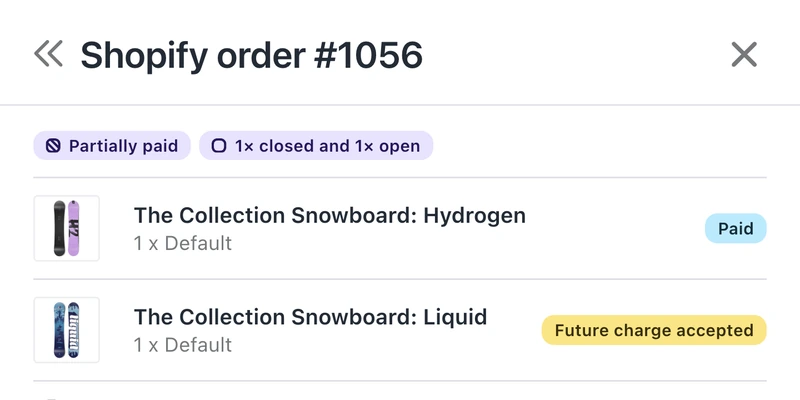
-
Charge the SKUs that landed
Only half the shipment arrived? Charge the customers waiting on those variants and leave the rest vaulted until the next one. -
Charge in bulk
Filter to the pre-orders you want, select them, and charge the lot in one go. Or hand a whole campaign over at once. -
Down to a single line item
Charge one line item of an order rather than the whole thing, or an ad-hoc instalment against what is outstanding. Both need Shopify Plus, or a store on another platform.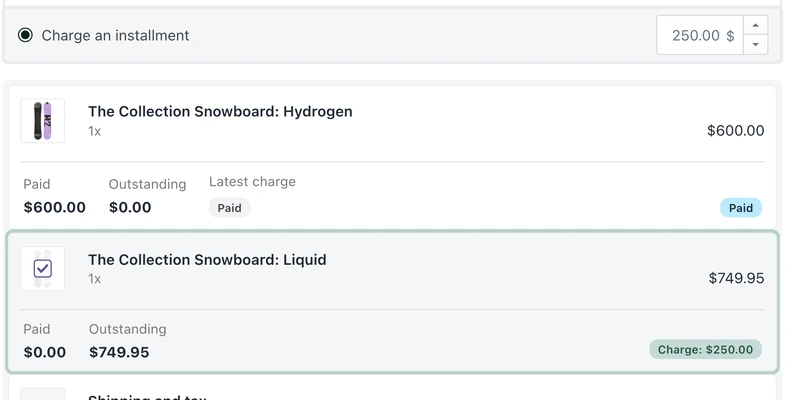
-
Trigger it your way
By hand, automatically as stock is added in your platform admin, or through Shopify Flow or the API. One customer, a filtered selection, or the lot.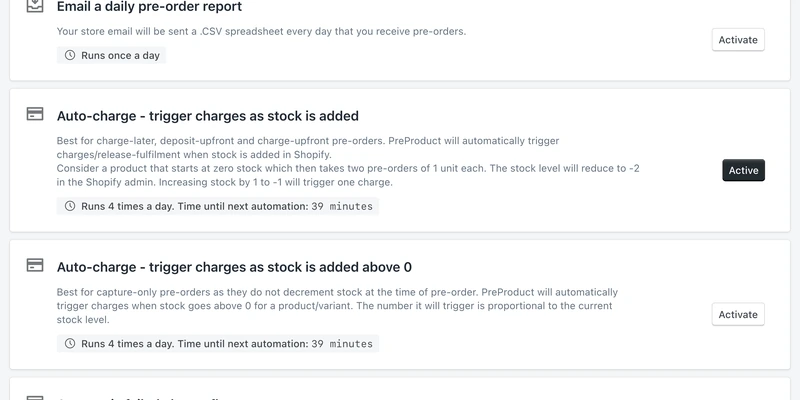
-
When a card fails
The failed-charge flow retries at 24 and 48 hours, emails the customer, and can cancel unpaid pre-orders after ten days. Run it by hand, or switch on the automation and let the first attempt fire itself. Customers can swap card or pay from their portal.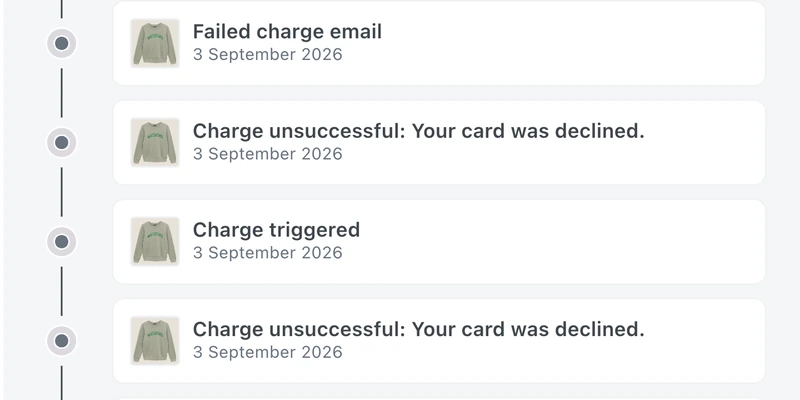
“The ability to defer charging customers for preordered items until we are ready to ship is an amazing feature.”

PAYMENT PLANS, PAY-EARLY AND DISCOUNTS
Sell more with optional incentives.
Pay early, or spread the cost.
One buyer wants the £400 pre-order settled today, especially if there is something in it for them. The next only commits if they can spread the cost. Both are the same sale, and a single payment type only wins one of them.
PreProduct lets you offer pay-early, a multi-step payment plan and a pre-order-only discount alongside the standard option, and the customer picks. It all runs on vaulted cards through your own Shopify checkout, so no BNPL takes a cut, no credit check bounces anyone out, and the money is yours from the first instalment. Multi-step payment plans need Shopify Plus, or a store that isn't on Shopify. Pay-early and pre-order discounts run on any plan.
This allows:
- High ticket products to sell in instalments without handing a slice to a BNPL.
- Cash to arrive months early, from the customers who would rather be done with it.
- A pre-order-only discount to be the reason someone commits now instead of waiting for the restock.
-
Optional payment plans
Off unless you switch it on, per listing. Plenty of brands never will, and the ones that do turn it on for the volume: the customer picks how many instalments, up to a maximum you set, charged daily, weekly or monthly. -
Pay early, discount optional
Offer paying in full as a choice at checkout, and reward it with a discount. Customers can also settle up whenever they like from their portal. No ticket for you either way. -
Pre-order-only discounts
A percentage or a fixed amount off, for pre-orders only. Priced on the product page, applied through your normal checkout.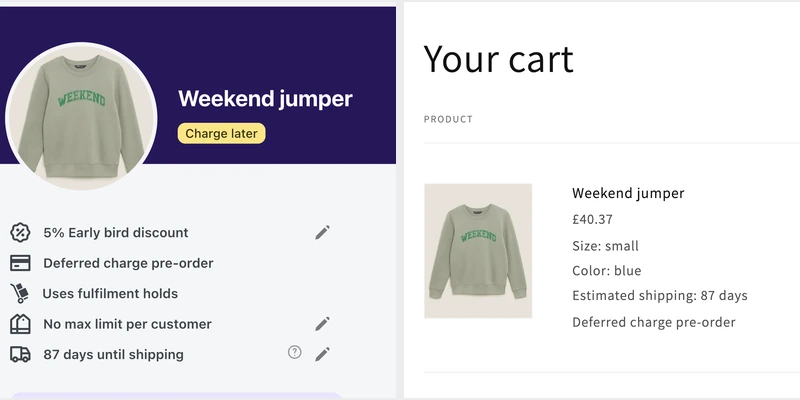
“It is really the best “pre-order now, pay at shipment” Shopify app for businesses that deal with pre-orders. The dev team is constantly adding new features to improve the customer experience, and our company has seen huge growth by allowing pay-later pre-orders.”

PRE-SHIP UPSELLS
Make more from every pre-order.
Add to the order before it ships.
The days before a pre-order ships are when a customer is most excited about it. They have waited, it is nearly here, and a parcel is on its way to them anyway. That is the moment to suggest what goes with it.
Switch on pre-ship upsells and PreProduct can email each customer shortly before their pre-order ships, automatically or whenever you choose to send, with four in-stock add-ons chosen to complement what they have already bought, using their purchase history and your store's buying patterns. Whatever they choose is added to the order they already placed and ships in the same parcel at no extra shipping cost to them.
This allows:
- More revenue from every campaign, from customers you have already won.
- Add-ons to ship in the same parcel, with no second order for your 3PL or ERP to handle.
- Deferred-charge customers to add an item without going back through checkout.
-
Optional, and one email per order
Off until you switch it on. PreProduct emails each order a set number of days before it ships, or send it yourself from a listing or a selection of orders.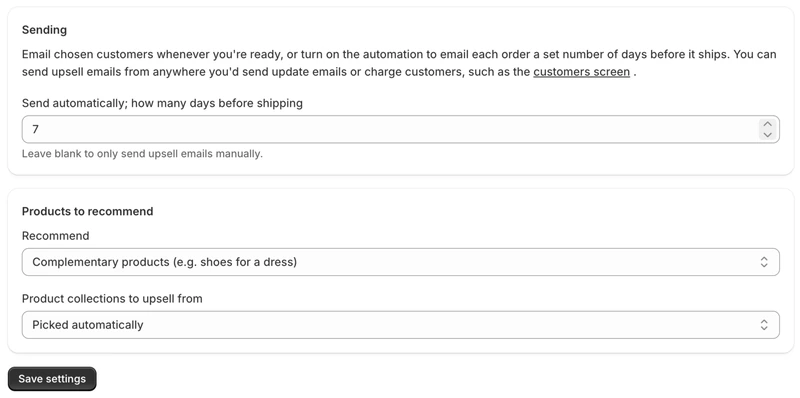
-
Picked for each customer
An AI decision model reads each customer's order history alongside what your other customers buy together, and picks bespoke add-ons to go with their pre-order. Only products in stock at the location fulfilling the order make the list.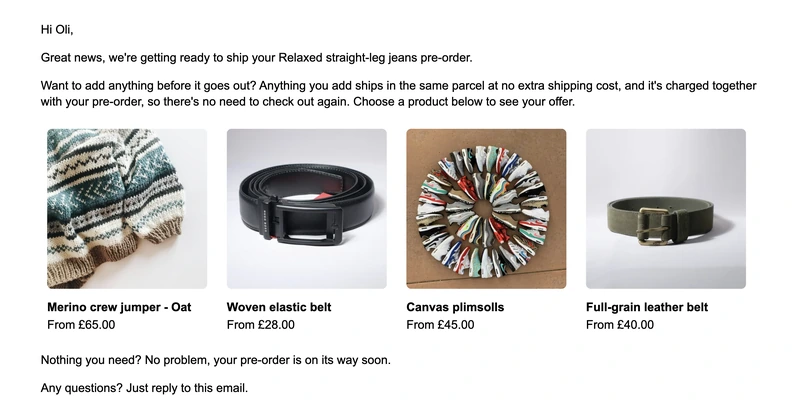
-
Deferred charge, no checkout
The customer picks a variant and quantity, confirms, and the add-on joins their order there and then. It is charged with the remaining balance when you trigger the pre-order charge. -
Paid upfront, pay for the add-on
Customers who have already paid for their pre-order check out for the add-on alone through your Shopify checkout, and it is edited into their original order. -
Same order, same parcel
Added with Shopify order editing, never as a second order, so your 3PL and ERP see one order and pack one box. Each one is tagged, and communicated throughout Shopify and PreProduct.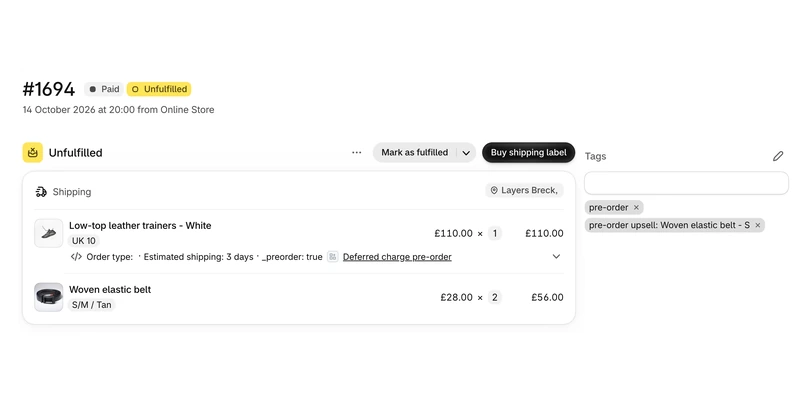
Pricing
Shopify pre‑order pricing
Starter
Only pay a percentage of pre-order revenue
$0.00
USD / month
+5% of paid pre-order revenue
Take me to the Shopify app
Take pre-orders from your e-commerce/Shopify storefront
Unlimited pre-order listings
Charge customers upfront, later or via deposit
Multi-step payment plans and ad-hoc installments
Customise pre-order front-end & email campaign
Customer portals
Pre-ship upsells add-on available



Scale
For small to medium sized brands
$59.99
USD / month
+0% commission on up to 5k of monthly paid pre-order revenue, then 0.5% afterwards.
Take me to the Shopify app – 7 day free trial
All of Growth features
Listing Manager automation access
API access
15x Shopify Flow actions
10+ Klaviyo events
Priority support
Scale Plus
For medium to large sized brands
$259.99
USD / month
+0% commission
Our top plan with all the features
0% commission
15+ Shopify Flow triggers
Developer support
Pre‑order charging FAQ
Which payment gateways support charge-later pre-orders on Shopify?
Card vaulting is the mechanic behind charge-later and deposits, and on Shopify that means Shopify Payments or PayPal. Other gateways cannot store a card for a later charge, so you would run capture-only pre-orders instead and send a payment link when you are ready to ship. Worth checking before you build a campaign around it.
Do I need Shopify Plus to use these pre-order payment options?
No. Charge-upfront, charge-later, deposit-upfront and capture-only all run on any Shopify plan, as do pay-early options and pre-order discounts. Three things need Shopify Plus, or a store on a platform other than Shopify: multi-step payment plans, charging a chosen line item of an order rather than the whole thing, and ad-hoc instalments. See offering multi-step payment plans for the setup.
Will customers be charged automatically if I do nothing?
No. A vaulted card sits there until something triggers the charge, whether that is you clicking it, a Shopify Flow workflow or an auto-charge rule you switched on. Moving a ship date does not charge anyone either. If you want charging to be hands-off, you have to set that up deliberately, and the automations doc lists what each rule does.
What happens if a customer cancels before I take the balance?
Cancel the pre-order in PreProduct and the outstanding charge never fires. PreProduct does not issue refunds itself, so if you are giving a deposit back you do that from the Shopify order in the normal way. Whether deposits are refundable at all is your policy to set, and worth stating on the product page before anyone commits.
Can I take pre-order deposits on Shopify without creating a separate deposit product?
Yes. The customer pays the deposit through your normal checkout as one order, and the balance goes on the same card when you trigger it. No duplicate products, no discount codes, no chasing people to buy the same thing twice. The deposits doc walks through the setup.
Do I pay commission on pre-orders that never get charged?
No. Commission only applies to paid pre-order revenue, so cancelled orders and pre-orders still sitting on a vaulted card do not count. An order where the deposit was paid but the balance never taken is not billed as a paid pre-order either.
Can I test the whole flow before going live?
Yes, and you should. Turn on Shopify Payments test mode, place a pre-order with a test card, then trigger the charge and watch the financial and fulfilment statuses move in your Shopify admin. Scale and Scale Plus also include a free PreProduct instance for a test store, so you can rehearse a campaign without touching production.