Keep pre-order customers assured,
from checkout to doorstep.
Every word a pre-order customer reads is yours to write, and every question they have gets answered before it becomes a ticket. Storefront wording, per-listing ship dates, a self-serve portal on your own domain and a five-email campaign, so nobody has to open a ticket to find out what they bought.


1 million+ pre-orders processed for stores like yours – get all the insights here to see how you compare 
Some of the brands we work with













How to keep pre-order customers happy.
A pre-order is a promise you make at checkout and keep months later. Across the first million pre-orders that ran through PreProduct, the most common stated lead time was 121 to 150 days, and only one in five listings shipped inside a month. That is a long time to leave someone wondering what they bought, when it turns up, and when they get charged.
Cancellations average around 5%, and plenty of them start as a question nobody answered. So answer it up front. Front-end wording that sets the terms before the sale, a customer portal carrying the status and the payment schedule, and an email campaign that keeps customers informed while the stock is still weeks away.

FRONT-END WORDING AND ETAS
Set expectations in your own words, with a ship date on every listing.
You are selling something that has not shipped yet, so the wording has to say when it ships and what they pay today. All the wording on the pre-order front-end is editable: the button, the lines around it, the on-page cart, the checkout copy. You can specify wording by pre-order type, as well as language.
Dynamic variables pull in the product name, shipping statement, discount and deposit amount.
The ship date is set per listing, as a day count that counts itself down or a fixed phrase like “July 2026”, so the promise is specific.
This allows:
- A deposit launch and a charge-later restock to read completely differently on the same storefront.
- A ship date to be updated whenever plans change, with the product page, emails and portal updating alongside it.
- Half a product's variants to carry a later date than the rest.
-
Custom wording by pre-order type
Charge-upfront, charge-later, deposit-upfront and capture-only each get their own wording, and each has a discount variant as well. Switch between them with the badges above the preview and watch the mock-up update as you type.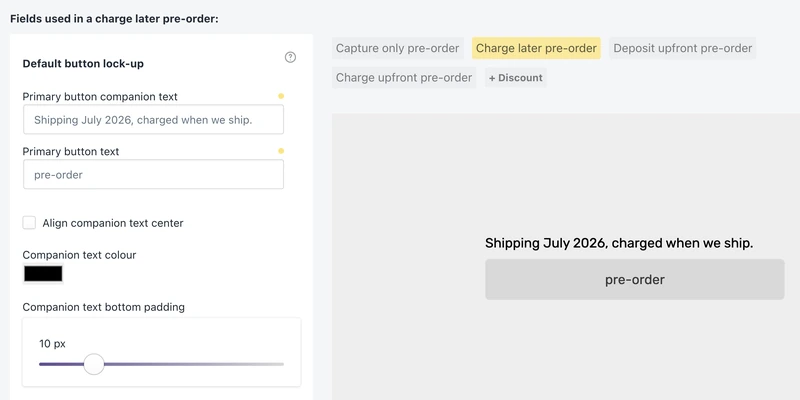
-
Your own button, with custom wording
PreProduct uses your own button for pre-orders, but still lets you edit its wording and the companion text above it, which is where the drop date, the deposit terms and the early-bird discount go. -
Show shipping as a statement or date
Show a specific date, or a more general phrase like “next season” or “June”. Change the statement whenever, and compose the update email from the same modal. -
Shipping on the product or variant level
Only part of the run delayed? Put those variants in their own shipping group with their own statement. It follows them across the storefront, the emails, the portal and your admin, so nobody is told the wrong date.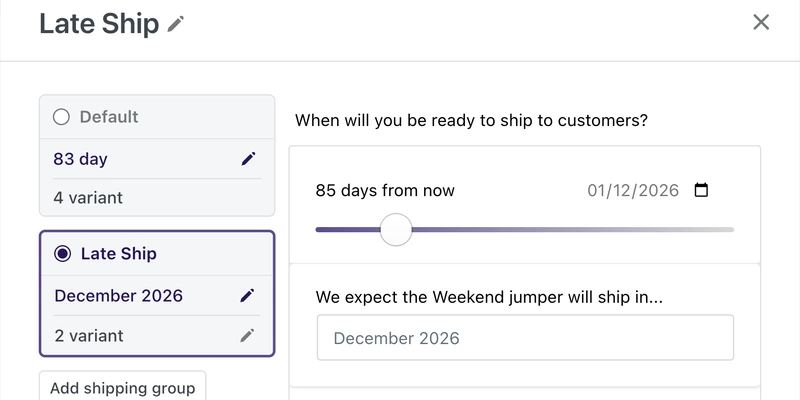
-
Translated to each customer’s language
Specify wording in different languages for your storefront and emails. PreProduct falls back to your primary set where a translation is not set.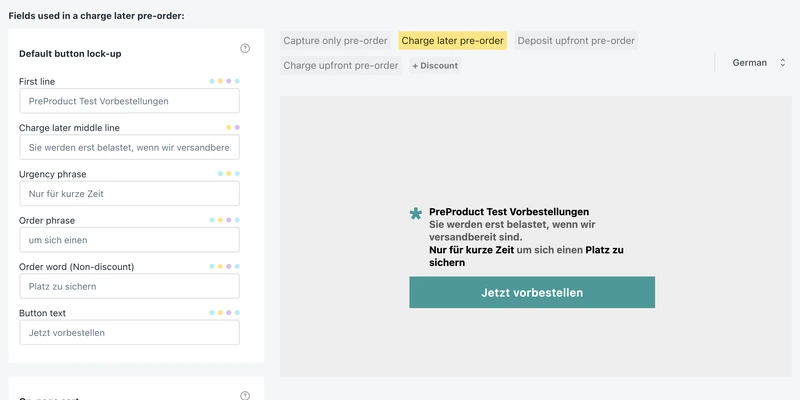
“It’s such a useful tool to quantify product demand and set customer expectations, especially during this current era of supply chain shortages and logistics uncertainties.”

5 stars in the Shopify Appstore

SELF-SERVE AND SUPPORT
Let customers answer their own questions, on your own domain.
“When is it shipping?” is a question that doesn’t need to take up your support team’s time. The customer portal answers it instead: what they ordered, the current shipping statement, what has been paid, what is outstanding, and the full schedule on a payment plan. You can choose to allow customers to edit their own notes and variant quantities, pay early, cancel, or ask to update their card before it expires.
Customer portals live on your domain, so nobody is bounced to a third-party URL. PreProduct also plugs into Shopify’s order status page. And if a ticket does come in, Gorgias shows the pre-order inside it.
This allows:
- A customer portal for pre-order customers to self-serve.
- An expiring card to be replaced by the customer before the charge fails, rather than after.
- A support agent to answer a pre-order question without leaving Gorgias.
-
A pre-order customer portal on your own domain
Served on your own domain, with your own logo and header, translated to the customer’s language. Every email carries their own portal link, and if they lose it they can enter their email address for a fresh one. No account to create, no password.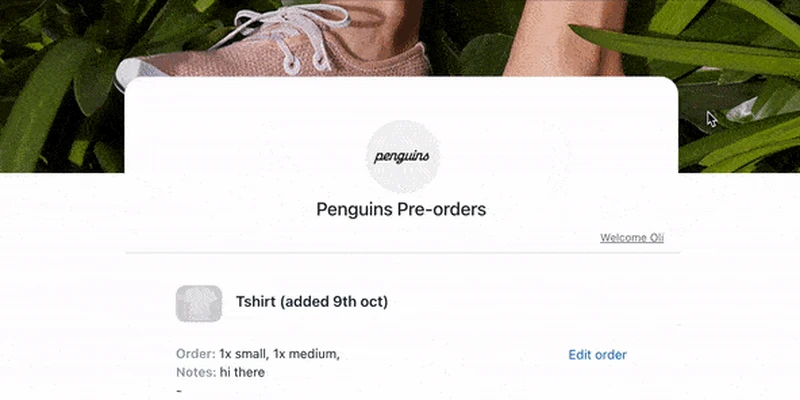
-
Status, ETA and what is outstanding
What they ordered, the shipping statement for their variants, whether the main payment has been taken, whether a deposit is paid, and whether a payment link has gone out. Different ship dates by variant show through, so they see the date that applies to them.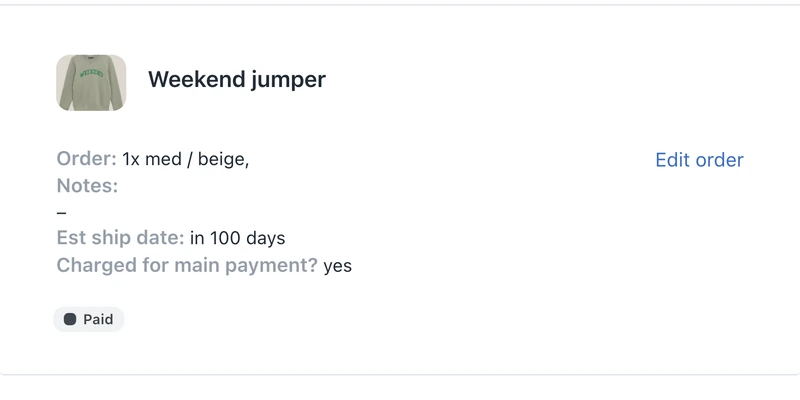
-
Payment plans show schedule and progress
On a multi-step payment plan the portal shows what is paid, what is outstanding, the date of the next charge, how many instalments are left, and the status of every one of them.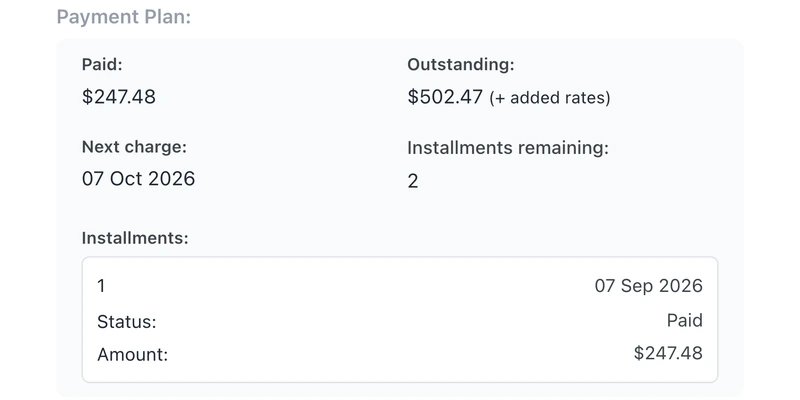
-
Card updates without a ticket
A saved card that expires is a failed charge waiting to happen. The customer asks for an update from the portal and Shopify emails them its own secure update page, so no card details pass through PreProduct and a routine card change never becomes a support thread. -
Shopify order status pages
Add our extension to show a live shipping statement, and an optional pay-early button, on the order status page customers already check. Every label is editable and available in the customer’s own language.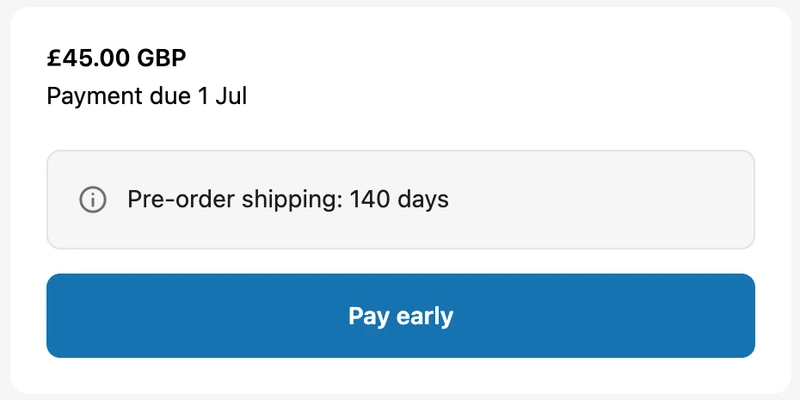
-
Pre-order details inside Gorgias tickets
A pre-orders widget on Gorgias tickets and customer profiles: what is paid, what is outstanding, the shipping statement, the estimated ship date, the variant breakdown, and a link straight to that customer’s portal.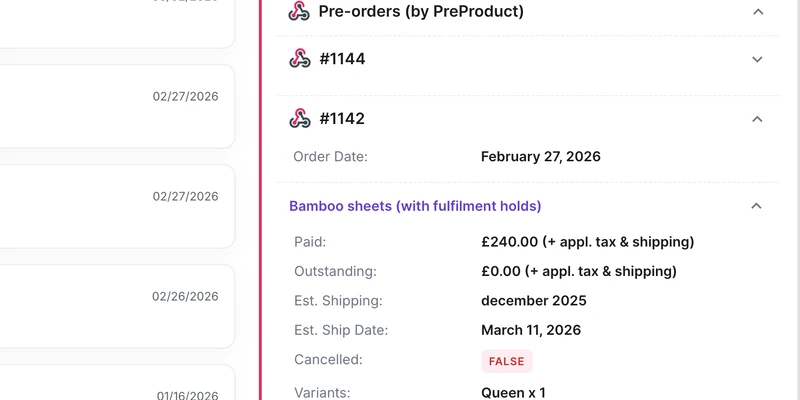
“We also love the feature that allows customers to manage their order’s preorders themselves.”

THE PRE-ORDER EMAIL CAMPAIGN
Pre-order email campaign, via PreProduct or Klaviyo
A pre-order needs a different email programme to a normal order. By default PreProduct sends a confirmation email, and you can opt into update emails for product changes and new ship dates, an upcoming charge email so a deferred payment never lands as a surprise, payment emails carrying the link for capture-only pre-orders, and failed charge emails that name the reason and retry the card. Every template is editable per pre-order type, with sixteen dynamic variables, translations and test sends, and you can connect and send from your own domain.
PreProduct can send your pre-order email campaign, or you can hand it off to Klaviyo via our integration. Dedicated PreProduct events land on each Klaviyo profile, and you can mute PreProduct’s own sends entirely.
This allows:
- An opt-in pre-order email campaign, with just the confirmation message by default.
- Dynamic variables to tailor every email to each customer.
- Pre-order events in Klaviyo, so the campaign can run from your existing flows instead.
-
Pre-order confirmation email
On by default, it confirms the order, says what happens next, and links to the portal. Edit the subject and body per pre-order type, or switch automatic sends off from the Setup screen and send your own.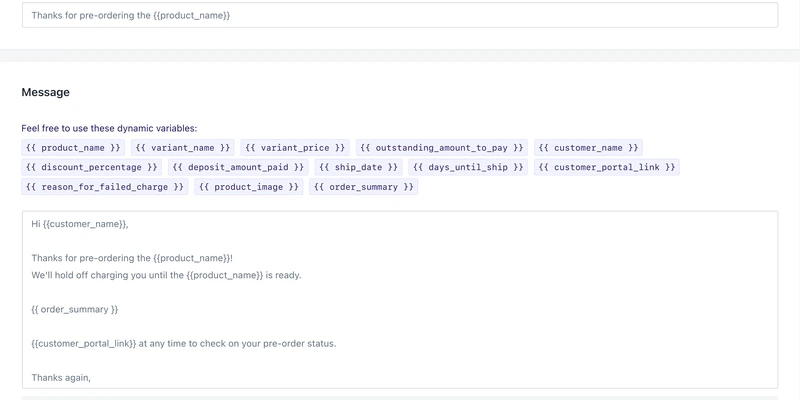
-
Update emails when dates or details change
Send an update from the dashboard whenever there’s a new ship date, a product change, or just to keep people interested. -
Notify of upcoming charges
Set a delay in Setup and PreProduct emails every customer that far ahead of their card being charged. The delay defaults to 0, which leaves the email off, so it is one you switch on deliberately.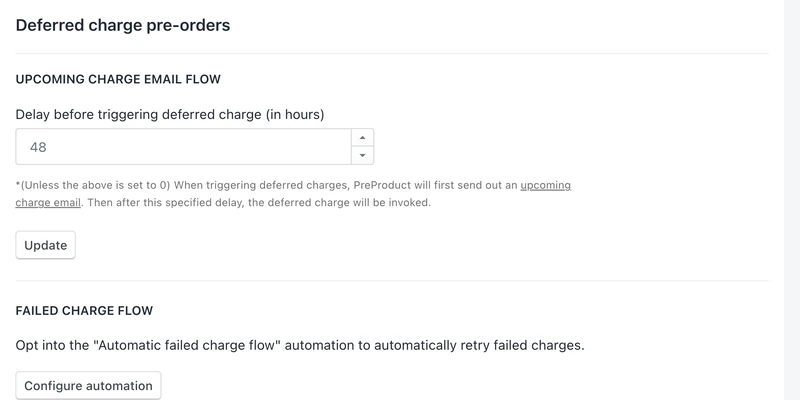
-
Failed charge emails with scheduled retries
The email names the reason, expired card or insufficient funds, and links to the portal to settle it. Tick the boxes before you send and PreProduct schedules retries, then cancels what is still unpaid after ten days. The automation runs a first attempt on its own, without the auto-cancel. -
Or run it all through Klaviyo
Eleven PreProduct events land on the Klaviyo profile: five email events, and six pre-order events from created through to fulfilment released. Mute PreProduct’s own sends and keep the events firing, so pre-order comms live in the same flows as everything else.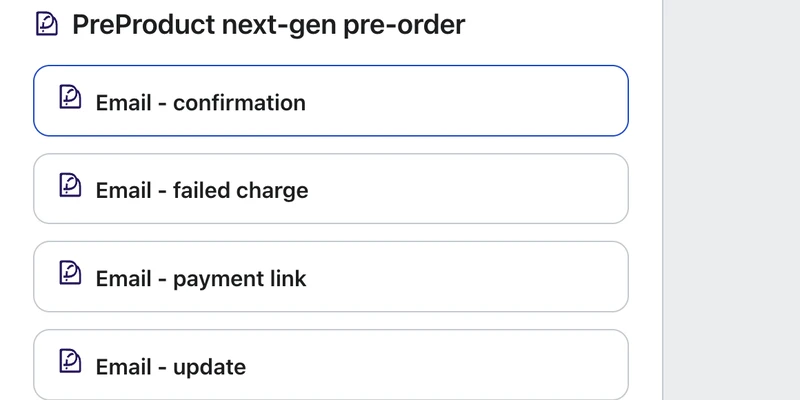
“The integrated communications functionality is perfect for letting me send out payment links in batches of 10-20 customers at a time, as my inventory allows.”
Pricing
Shopify pre‑order pricing
Starter
Only pay a percentage of pre-order revenue
$0.00
USD / month
+5% of paid pre-order revenue
Take me to the Shopify app
Take pre-orders from your e-commerce/Shopify storefront
Unlimited pre-order listings
Charge customers upfront, later or via deposit
Multi-step payment plans and ad-hoc installments
Customise pre-order front-end & email campaign
Customer portals
Pre-ship upsells add-on available



Scale
For small to medium sized brands
$59.99
USD / month
+0% commission on up to 5k of monthly paid pre-order revenue, then 0.5% afterwards.
Take me to the Shopify app – 7 day free trial
All of Growth features
Listing Manager automation access
API access
15x Shopify Flow actions
10+ Klaviyo events
Priority support
Scale Plus
For medium to large sized brands
$259.99
USD / month
+0% commission
Our top plan with all the features
0% commission
15+ Shopify Flow triggers
Developer support
Pre‑order communication FAQ
Do customers need an account to see their pre-order?
No. Every PreProduct email carries that customer’s own portal link, and if they lose it they can enter their email address on the portal to be sent a fresh one. There is no Shopify account to create and no password. The portal is served on your domain through Shopify’s app proxy, so the link looks like the rest of your store. See the customer portal doc.
Can pre-order emails come from my own domain?
Yes, on the Scale and Scale Plus plans, which include a custom email sender domain for deliverability and for keeping the from-address consistent with the rest of your email. On the Starter plan PreProduct sends on your behalf, still carrying your logo and header colour. Either way the templates are transactional rather than fully designed, so the styling options are a header colour, text alignment and a logo.
Can I turn PreProduct’s emails off and send everything from Klaviyo instead?
Yes. Toggle “Mute email sending from PreProduct” on the Klaviyo card and PreProduct stops emailing customers while every event keeps firing into Klaviyo, so your flows still have their triggers. There is also a “Disable automatic customer email” option on the Setup screen if you only want to stop the confirmation. Klaviyo needs the Scale or Scale Plus plan; see the Klaviyo integration doc.
What happens if a customer’s card has expired when I charge it?
The charge fails and the failed charge email goes out naming the reason, with a link to the portal so the customer can pay it off there instead. Retries and a cancellation after ten days are checkboxes on the way out, or the automation can fire a first attempt for you. Customers can also head off the whole thing by requesting a payment-method update from their portal before the charge runs. More in the failed charge emails doc.
Will customers know it is a pre-order at checkout and on their order?
Yes. The pre-order line carries an “Estimated shipping” property through checkout and onto the order, and you set what that key and value say from the wording screen. Shopify may also show its own purchase options agreement label above the payment button, which is edited in your theme’s default content rather than in PreProduct: the checkout terms label doc covers where.
Can I change a ship date after customers have already pre-ordered?
Yes, and this is the normal case rather than an exception. Update the shipping statement on the listing whenever the date moves, and the new one shows on the product page, in the emails, in the portal and in your admin. The edit modal offers to compose the customer update email at the same time. If only some variants slip, put those in their own shipping group so the rest are not told the wrong thing. See updating the shipping statement.
Can I keep my own add-to-cart button rather than PreProduct’s?
Yes, and PreProduct tries your native button first. Turn on native button mode and you edit your own button’s wording plus the companion text above it, which is where lead times, deposit terms and early-bird discounts go. The trade-off is that the default PreProduct button’s longer lock-up, with its own headline, urgency phrase and order phrase, is not available in native mode. The native button doc covers the setup.