Best Shopify Backorder Apps in 2026: Picks by Use Case
TLDR: The best Shopify backorder app depends on two things: how long customers wait, and who ships the order. For a short wait and in-house packing, a low-cost app that adds a ship date, a limit and an order tag is enough; Timesact covers all three, and Globo and Dibs cover most of it. If a 3PL or ERP picks up orders automatically, or the wait runs into months, you need fulfilment holds and control over when the customer is charged. That is where PreProduct fits.
Shopify will let you sell a product you don’t have. Tick “continue selling when out of stock” and the order goes through. What it won’t do is tell the customer when it ships, stop you selling 400 units against a purchase order of 200, or keep the order away from your warehouse until the stock lands. That is the job of a Shopify backorder app.
The trouble is that almost every app in the category calls itself something else: a pre-order app, a back-in-stock app or an inventory tool. Searching the Shopify App Store for “backorder” returns pre-order apps, alert apps, barcode scanners and an ERP, and most round-ups rank their own app first.
We make PreProduct, a Shopify pre-order app, so we’re not neutral. To keep this fair, we’ve ranked the apps by use case rather than one overall score, given competitors the categories they’re stronger in, and stated the six questions we judged them on.
Best Shopify Backorder Apps at a Glance
-
01
Backorders that go through a 3PL or ERP
App:
 PreProduct
- Free plan
- Yes, plus 5% of paid pre-order revenue
- Paid plans from
- $59.99/mo
- Rating
- 4.9 (108)
-
02
Long waits, charged when it ships
App:
PreProduct- Free plan
- Yes, plus 5% of paid pre-order revenue
- Paid plans from
- $59.99/mo
- Rating
- 4.9 (108)
-
03
Backorders plus back-in-stock alerts
App:
 STOQ
STOQ- Free plan
- 10 pre-orders/mo
- Paid plans from
- $10/mo
- Rating
- 5.0 (3,813)
-
04
Pay-as-you-go pricing at low volume
App:
 Timesact
- Free plan
- 20 orders/mo
- Paid plans from
- $5/mo plus per-order fee
- Rating
- 5.0 (2,107)
-
05
Free plan for occasional backorders
App: Dibs
- Free plan
- Free
- Paid plans from
- Free
- Rating
- 5.0 (143)
-
06
Simple delivery notes and order tags
App:
 PreOrder Globo
- Free plan
- First 20 orders
- Paid plans from
- $9.90/mo
- Rating
- 4.9 (1,949)
Prices and ratings change. Check each listing before you install.
What a Shopify Backorder App Adds to Continue Selling When Out of Stock
Shopify’s own answer to backorders is a single checkbox. Its help centre lists “you have stock coming soon and you want to continue selling before it arrives” as a reason to use it. Tick it on a variant and inventory goes negative as orders come in. Minus 40 means 40 units owed. Our continue-selling doc explains how it interacts with a pre-order app.
What the checkbox leaves to you:
- The promise. The button still says “Add to cart” and nothing tells the customer when it ships.
- The ceiling. There’s no cap, so a variant can go to minus 400 when you only have 200 inbound.
- The handoff. The order looks like any other, so a 3PL or ERP that pulls orders the moment they’re placed will try to ship it.
- The charge. The customer pays in full at checkout, however long the wait.
A Shopify backorder app picks up some or all of those four jobs. Which ones you need decides which app you need.
Backorder vs Pre-order: Same Mechanism, Different Promise
On Shopify, a backorder and a pre-order run on the same mechanism: selling past zero. The difference is the promise. A backorder means “this product was in stock and has sold out, but we’re still taking orders because more is on the way”. A pre-order means “this product is new, or this version, size or SKU isn’t available yet”.
So a backorder is a restock, and a pre-order is a release. What decides the tool you need is the same for both: how long the wait is and who ships the order. A restock can be a two-week top-up from your warehouse or a 12-week reorder from the factory, and a long backorder needs the same ship dates, holds and charge control as a pre-order. That is why the best backorder app for Shopify is often a pre-order app, and why most backorder apps on the App Store describe themselves as pre-order apps.
There’s also a legal reason to set a ship date. In the US, the FTC’s Mail, Internet, or Telephone Order Merchandise Rule expects you to ship within the time you state, or within 30 days if you state nothing. If you can’t, you need the customer’s consent to the delay or a refund.
How We Evaluated Shopify Backorder Apps
Most round-ups compare pricing and stop at “supports partial payments: yes”. These six questions decide whether your Shopify backorder management runs smoothly after checkout.
-
01
Ship Date Per Variant
Can you show an expected ship date on the product page, and can it differ by variant? Size medium might restock next week while size large waits a month. A single store-wide lead time works for simple catalogues and falls apart fast on larger ones. Look for the date on the product page, the cart and the confirmation email.
-
02
Quantity Limits Against Incoming Stock
Can you cap a variant at the quantity on your purchase order, then have the button switch back to sold out? Without a cap, a backorder can quietly become an oversell. The better apps go further: they turn backorders on as stock runs out and back off as it returns, so nobody has to remember.
-
03
Fulfilment Holds and Order Tags
When the order lands, does anything stop it shipping? Shopify has a native fulfilment hold status that third-party systems can read and skip, but whether your 3PL or ERP does depends on the provider and how the integration is configured, so test it. An order tag or line-item property is the backup: most warehouse systems can filter on one even if they ignore holds. For any store with automated fulfilment, this is the most important question on the list.
-
04
Mixed or Isolated Carts
Can a customer put a backordered item and an in-stock item in the same cart, and what happens to that order if they do? Your 3PL, ERP or ops team will usually have a firm view. If your fulfilment setup can split an order, a mixed cart is fine: the in-stock items ship today and the backordered line waits. Plenty of setups can’t split, and then a mixed order either sits until the backorder lands or ships as two parcels you pay postage on twice. Look for an app that lets you choose how backorders flow, rather than one that decides for you. A redirect or a warning keeps most shoppers on track, but express checkouts can skip them. A Shopify checkout validation is the only rule that can’t be got around.
-
05
When Customers Are Charged
Charging in full at checkout is fine for a two-week wait. For longer waits, many merchants would rather take a deposit or store the card and charge when the order ships. That’s the norm: the majority of pre-order listings in our One Million Pre-orders report charge later or take a deposit rather than charging in full upfront. Check whether an app offers charge-later on a vaulted card (no seven-day authorisation window to run out), deposits or only partial payments. Then check whether you can trigger the charge yourself or have it fire automatically when stock arrives.
-
06
Pricing at Your Volume
Backorder apps price in four different ways: flat monthly fees, per-order fees above a monthly allowance, plans capped by pre-order revenue or total store orders and a percentage of revenue. A plan that looks cheap at 20 orders a month can cost more than a flat fee at 2,000. Price the app on your busiest month, not your quietest.
Best Shopify Backorder App by Use Case
Best for Backorders That Go Through a 3PL or ERP: PreProduct
If orders flow into a 3PL or ERP automatically, an unheld backorder line is a shipping error waiting to happen. PreProduct puts a fulfilment hold on pre-order lines so they wait until stock lands, and adds a pre-order order tag and line-item properties for systems that filter on those instead. In-stock and backordered items can share a cart, with only the backordered line held, or you can keep them in separate orders. For anything the external system needs beyond the order itself, PreProduct’s Shopify Flow actions and triggers pass pre-order events on: triggers fire when a pre-order is created, charged or released for fulfilment (Scale Plus), and actions let a workflow trigger charges and fulfilment (Scale and up). All of it runs through your native Shopify checkout. See how controlled overselling combines caps, carts and holds.
Best for Long Waits, Charged When It Ships: PreProduct
Once a wait runs past a few weeks, charging in full at checkout ties up the customer’s money and invites cancellations. PreProduct offers charge-later on a vaulted card, deposits and charge-upfront, set per listing. You decide whether charges fire by hand or automatically as stock lands (auto-charge is on Scale and up). Flexible charging covers each option.
Best for Backorders Plus Back-in-Stock Alerts: STOQ
STOQ bundles pre-orders, backorders and back-in-stock alerts in one app, with 3,813 reviews at 5.0. Its listing covers partial payments, order limits, availability dates, multiple locations and B2B pre-orders. If you want one app for the whole out-of-stock journey, it’s the strongest all-in-one. Our STOQ alternative page compares it with PreProduct in detail.
Best Pay-As-You-Go Pricing at Low Volume: Timesact
Timesact prices by usage. The free plan covers 20 orders a month, then CORE Flex starts at $5 a month plus $0.20 per order above the limit, with no transaction fees. That $5 plan already includes an order hold, deposits and zero-down pre-orders, and pre-orders set by product tag or CSV upload. Its listing also covers an inventory manager that turns pre-orders and restocks on or off with stock levels, order tagging, presale limits, shipping dates and charge-on-fulfilment on PRO Flex (from $7). For a store with a small, steady backorder volume, it’s a low-cost way in. See our Timesact alternative page for a feature-by-feature comparison.
Best Free Plan for Occasional Backorders: Dibs
Dibs, from Logbase, is listed as free and carries “Backorders” in its app name. The listing covers “book now pay later”, partial deposits, payment reminders, inventory limits with checkout validation and a backorder button on collection and search pages as well as product pages. It’s a sensible starting point for occasional backorders on a small catalogue.
Best for Simple Delivery Notes and Order Tags: PreOrder Globo
Globo switches pre-orders on by inventory level or on a schedule, shows a delivery note such as “Delivery in 21-30 days” and tags orders with labels like “preorder” or the shipping date. That tag is often all an in-house packing team needs to keep a backordered item off the shelf. Paid plans start at $9.90 a month. See our Globo alternative page for the specifics.
Shopify Backorder App Cards
PreProduct
PreProduct is a Shopify pre-order app built for established brands running pre-orders at scale: a 3PL or ERP that picks up orders the moment they’re placed, a checkout wired into the rest of the stack, and often thousands of SKUs moving in and out of stock alongside in-stock items. For backorders, that means:
- Ship dates and wording you can edit per listing, shown on the product page and in the cart.
- Limits per variant and per customer, with the continue-selling box switched back off as each cap is hit.
- Mixed or isolated carts, set to match how your ops team wants orders to flow: let backorders share a cart with in-stock items and hold only the backordered line, keep them in a backorder-only cart or send each one straight to checkout as its own order. Charge-upfront orders can also be split into two orders after checkout.
- Shopify checkout validation rules (all plans, opt-in) turn those decisions into rules nobody can get around: block mixed carts, block a backorder bought without its pre-order option and block checkout when quantities go over your variant, location or per-customer limits. They run on Shopify Functions, so express checkouts and other apps can’t bypass them.
- Fulfilment holds and order tags that your 3PL or ERP can read to tell what’s ready to ship.
- Charge upfront, later or by deposit, triggered by hand or automatically (Scale and up).
- Listing automation that opens a listing as a variant sells out and closes it when stock returns (Scale and up). The automation feature page covers the full set, including Shopify Flow.
- Location-aware pre-orders that show the button only in countries where stock is out (Scale Plus).
Pricing: Starter is free to install plus 5% of paid pre-order revenue. Scale is $59.99 a month, with 0% commission up to $5,000 of monthly paid pre-order revenue and 0.5% after that. Scale Plus is $259.99 a month with 0% commission and a developer setup check before go-live.
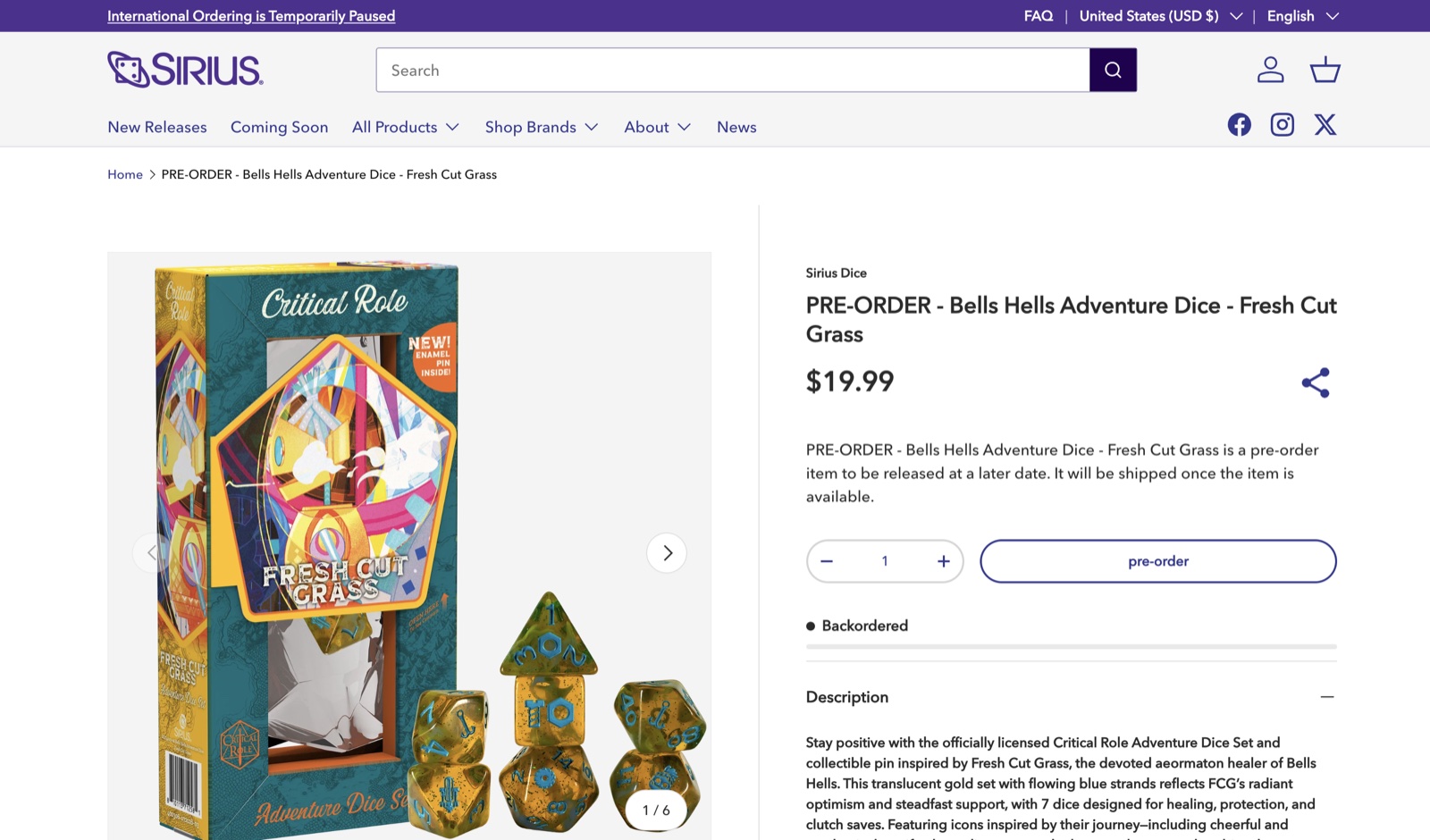
Sirius Dice, a PreProduct customer, sells its upcoming dice sets on pre-order and keeps them together in a permanent “Coming Soon” collection. Each product page shows “Backordered” under the pre-order button, so shoppers can see at a glance that the set isn’t in stock yet. The same setup works for restocks: when a set sells out, it can go straight back on sale with its own ship date.
STOQ
STOQ (Artos Software) is a pre-order and back-in-stock app with partial payments, a deferred-payments option, order limits, availability dates, multiple locations, markets and B2B pre-orders, plus Flow and POS support. The free plan covers 10 pre-orders a month. Lite is $10, Pro $29 and Unlimited $69, with per-order fees above each plan’s allowance.
Timesact
Timesact (Kairock Partners) has a free plan for 20 orders a month, then flexible plans from $5 a month plus a per-order fee, or fixed plans priced by your Shopify plan. Its listing covers deposits and zero-down pre-orders, charge on fulfilment, an order hold, order tagging, limits, shipping dates, markets and locations, Flow and back-in-stock alerts.
Dibs
Dibs (Logbase) is listed as free and launched in March 2025. It covers partial and full payment, “book now pay later”, deposits, payment reminders, inventory limits with checkout validation, mixed carts and shipping-update emails.
Early Bird
Early Bird (Shopside) takes no commission. Plans run from a free tier of 5 pre-orders a month to $99 for 1,000. Its listing covers partial pay or $0 deposits with auto-collected deferred payments, expected delivery dates, delay emails and Flow triggers on paid plans. For mixed carts, you choose to ship the in-stock items now or hold the whole order.
PreOrder Globo
Globo has been on the App Store since 2017. It’s free for the first 20 presale orders, then $9.90 or $19.90 a month. It covers inventory-based or scheduled pre-orders, delivery notes, automatic order tags, partial payments, CSV import, Flow and back-in-stock alerts.
Essent
Essent has a free plan for 25 pre-orders a month and paid plans from $4.95, up to $59 for unlimited volume. Its listing covers deposits, deferred payment and payment schedules, blocking mixed carts, B2B, Markets, Flow and back-in-stock alerts.
Preorder Wolf
Preorder Wolf (Boss Apps) prices by monthly pre-order revenue, from $4.99 a month for up to $500. It can switch pre-orders on and off depending on stock or incoming inventory, limit quantities and show delivery text on the product, cart and checkout pages. Deposits and deferred payments are listed as features.
 Notify Me!
Notify Me! is a back-in-stock app first, with 3,904 reviews. Pre-orders and backorders sit alongside alerts, wishlists and low-stock notices. Plans run from a free tier of 5 pre-orders to $39.90 a month, with no transaction fee.
Newer Backorder-Only Apps
A handful of apps launched in 2026 lead with backorders rather than pre-orders: Backordr, Smart Backorder Manager and Bagel Back Order. Their listings focus on ship dates, order tags and holding or splitting orders, plus filling the earliest orders first when stock returns. None of them lists a deposit or charge-later option, and at the time of writing each has between 0 and 14 reviews. Worth watching. Test them on a development store before trusting one with a peak season.
Feature Comparison
A dash means the feature isn’t stated on the app’s listing or help docs, not that it can’t be done. Check with the developer if it matters to you.
| Feature | PreProduct | STOQ | Timesact | Dibs | Early Bird | Globo | Essent | Wolf |
|---|---|---|---|---|---|---|---|---|
| Ship date or delivery message | Yes | Yes | Yes | Yes | Yes | Yes | – | Yes |
| Quantity limits | Yes | Yes | Yes | Yes | – | – | – | Yes |
| Switches on and off with stock | Yes | – | Yes | – | – | Yes | – | Yes |
| Fulfilment hold | Yes | – | Yes | – | Yes | – | – | – |
| Order tagging | Yes | – | Yes | – | – | Yes | – | – |
| Native Shopify checkout | Yes | Yes | Yes | Yes | Yes | Yes | Yes | Yes |
| Backorder-only or one-per-order carts | Yes | Partial | – | – | – | – | Partial | – |
| Shopify checkout validation | Mixed carts, limits, purchase option | – | Mixed carts | Limits | – | – | Mixed carts | – |
| Charge later or on fulfilment | Yes | Yes | Yes | Yes | Yes | – | Yes | Yes |
| Deposits or partial payments | Yes | Yes | Yes | Yes | Yes | Yes | Yes | Yes |
| Back-in-stock alerts | – | Yes | Yes | – | Yes | Yes | Yes | – |
| Shopify Flow | Yes | Yes | Yes | – | Yes | Yes | Yes | – |
| Multi-location | Yes | Yes | Yes | – | – | – | – | – |
| Free plan | Yes, plus 5% | 10/mo | 20/mo | Free | 5/mo | 20 orders | 25/mo | Test stores |
How to Choose a Backorder App for Your Store
If You Pack Orders In-House and Waits Are Short
You need a ship date, a cap and something that tells your packers to leave the order alone. Timesact covers all three. Globo adds the ship date and the tag, and Dibs the ship date and the cap, both at low cost. If you are only out of stock now and then, a free plan is a reasonable start.
If a 3PL or ERP Picks Up Orders Automatically
Put fulfilment holds and order tags first, and test them with your provider before go-live. Some systems respect Shopify’s hold status and some don’t, so you may need to filter on the tag instead. Ask your ops team how backorders should flow, too: in the same order as in-stock items, or always in an order of their own. Then pick an app that can do it. This is the setup PreProduct is built around.
If Waits Run Past a Month
Look hard at how and when the customer is charged. Charge-later on a vaulted card or a deposit keeps the customer committed without holding their money for months. Our doc on the types of pre-orders compares each charge model.
If You Want More Control Over How Customers Pay
Most backorder apps stop at a deposit or a partial payment. PreProduct goes further, and every option is opt-in, so you only switch one on when a listing needs it:
- Ad hoc instalments: charge any amount against an outstanding balance, as many times as you need until it’s paid.
- Line-item charging: charge only the items that have landed and release just those for fulfilment (Shopify Plus).
- Multi-step payment plans: set a schedule of charges up front (Scale Plus, on Shopify Plus).
- Pay early: let customers settle their balance before the ship date, with an optional discount (Scale Plus).
Flexible charging covers each option in more detail.
If You Want Back-in-Stock Alerts in One App
Choose a bundled app. STOQ is the strongest of them, and Timesact, Globo, Early Bird and Essent also include alerts.
If Hundreds of SKUs Go In and Out of Stock
Manual listing won’t keep up. Choose an app that opens and closes backorders as stock changes, with limits that follow your incoming purchase orders. PreProduct’s Listing Manager and Timesact’s inventory manager both do this.
For launches and new products rather than restocks, our round-up of the best pre-order apps for Shopify covers the wider field.
Frequently Asked Questions
Does Shopify Have Backorders Built In?
Partly. “Continue selling when out of stock” lets a variant sell past zero, but it adds no ship date, no cap, no fulfilment hold and no choice of when to charge. A Shopify backorder app adds those.
Which Shopify Backorder Apps Have a Free Plan?
Dibs is listed as free outright. STOQ, Timesact, Globo, Essent and Early Bird all have free tiers capped by order count. PreProduct’s Starter plan is free to install, plus 5% of paid pre-order revenue.
Can I Charge Customers When a Backorder Ships Instead of at Checkout?
Yes, with an app that supports deferred charges. PreProduct stores the card at checkout and charges it when you trigger it, or automatically when stock lands on Scale and up. Timesact lists charge-on-fulfilment on its PRO Flex plan, and Early Bird lists auto-collected deferred payments.
How Do I Stop My 3PL Shipping a Backordered Item?
Use an app that puts a fulfilment hold on the backordered line, then confirm your 3PL respects it. If it doesn’t, filter on the order tag or line-item property instead.
Should I Use a Backorder App or a Pre-order App?
It depends on what you’re selling. Restocking products you already sell is a backorder; selling something new, or a version that isn’t available yet, is a pre-order. For a short restock packed in-house, a simple backorder app is enough. For long waits, or when a warehouse system takes orders automatically, choose an app with fulfilment holds and charge control. Most apps in this list handle both.
Final Pick: Start From Your Fulfilment Setup
Choosing a Shopify backorder app comes down to what happens after checkout.
- A short wait and in-house packing need a ship date, a cap and an order tag. Timesact covers all three at low cost; Globo and Dibs cover most of it.
- Back-in-stock alerts in the same app point to STOQ.
- A 3PL or ERP, long waits or hundreds of SKUs cycling through backorder need fulfilment holds, limits and control over when customers are charged. That points to PreProduct.
PreProduct is built for exactly that: backorders and pre-orders charged and fulfilled when you say so, through your native Shopify checkout. Install PreProduct free and set up your first backorder listing, then run a test order through your 3PL before the next restock.