Mixed Cart Pre-orders: When to Isolate and When to Combine
TLDR: Mixed cart pre-orders happen when a customer puts an in-stock item and a pre-order item in the same basket. You get three options: isolate pre-orders into their own order, combine and ship the in-stock half now, or combine and hold the lot until the pre-order lands. Two questions decide it, in order. Can your 3PL or WMS actually split an order, and how long is the customer waiting? If you have long lead times and can split cleanly, splitting is the best answer available. If your flow can’t do mixed fulfilment and lead times are long, isolate. Across the first million pre-orders we’ve processed, 62.1% of stores keep pre-orders out of mixed carts.
“How do I prevent customers from adding an instock item and a pre order item into the same cart? … This is so that we can move in stock items out of the warehouse rather than hold onto them until pre order stock arrives.”
Five years on, that thread still has no replies.
It isn’t an unusual question. The same forum board carries a handful of near-identical ones, all with reply counts in the single digits. What makes it worth answering properly is the reason given. This isn’t a tidiness problem. It’s a pallet of goods that could have left the building today, sitting still because one line on the order isn’t ready.
Mixed cart pre-orders are the decision you make once, ideally before the orders start arriving rather than after your 3PL calls. This guide covers what a mixed basket does to an order, the three ways to handle it, and the two questions that decide which one is yours to pick. Then what changes downstream in your warehouse, your ERP and your charge schedule.
What Mixed Cart Pre-orders Do to an Order
Shopify will take the order without complaint. It doesn’t separate products by availability, and there’s no native rule stopping a customer adding a September delivery and a today delivery to the same basket.
So one checkout produces one order with two ship dates on it. In your admin that looks harmless. The problem starts one system further down, at whatever picks that order up.
A 3PL or ERP syncing orders out of Shopify sees a single order and treats it as a single job. Unless something tells it otherwise, one of two things happens. Either it ships the in-stock line and flags the pre-order line as missing stock, leaving an exception for your ops team to clear manually. Or it waits for the whole order to become fulfillable, and your in-stock goods sit on the shelf for as long as the pre-order takes.
That second outcome is the expensive one, and for a lot of stores it’s the only one on offer. You’ve sold something you have, taken the money for it and then chosen not to ship it, for reasons the customer never agreed to.
Which is why mixed carts come up more often in ops conversations than marketing ones. The upside is real, customers spend more when they can add to a pre-order. But the cost lands in a different department to the benefit.
Three Ways to Handle a Mixed Cart
There are three workable answers. Every store lands on one of them, whether deliberately or by default.
Isolate: Keep Pre-orders in Their Own Order
An isolated pre-order cart never shares a basket with in-stock items. A customer buying both checks out twice.
Operationally this is the clean one. Every order is either all pre-order or all ready to ship, and nothing gets held that didn’t need holding. The cost is at the till: a second checkout is friction, and you lose the attachment sale a mixed basket would have picked up.
Isolation works by redirecting the pre-order click, and PreProduct offers four front-end redirect options, two of which isolate. Front-end rules leak though, through a third-party upsell app, a cart permalink or a stray buy button left in a theme, so the same rule is enforced inside Shopify’s own checkout code. A rule that only exists in your theme isn’t a rule.
Combine and Split: Ship the In-Stock Half Now
Allow the mixed basket, then treat the two halves differently after checkout. The pre-order lines get held, the in-stock lines ship today.
Best customer experience, best AOV, and the most demanding of your operations: you pay to ship twice, and every downstream system has to understand that half an order is deliberately not moving. It’s also the option you don’t always get to choose, because plenty of fulfilment stacks can’t ship half an order at all.
Combine and Hold: Ship It All Together Later
Allow the mixed basket and hold everything until the pre-order is ready, then send one parcel.
One shipping charge, one pick, no partial fulfilment logic to build. It’s the simplest way to say yes to mixed carts, and it’s the option that makes the 2021 forum question inevitable, because the in-stock goods are now hostage to the slowest line on the order.
How to Choose: Can You Split, and How Long Is the Wait?
Most articles present this as a balanced trade-off between average order value and operational sanity. It isn’t, quite. Two questions decide it, and the order matters, because the first one can remove options the second would have chosen.
First: Can Your Fulfilment Flow Split an Order?
This is the gate, and it’s the question the rest of the internet skips. Combining only works if something downstream can send half an order and leave the rest alone.
A lot of 3PLs, warehouse management systems and in-house fulfilment processes treat an order as one indivisible job: it either goes or it doesn’t. Partial fulfilment is often either unsupported, or supported in the admin but not in the integration your warehouse works from. Our guide to managing pre-orders on your 3PL, covers which providers handle it natively and which need a workaround.
Payment model narrows it again. Splitting a Shopify order cleanly is straightforward when the pre-order was charged upfront, because the money is already collected and each half can carry its own charge and its own shipping. When the pre-order line is still unpaid, you’re dividing an order where part of it has no payment attached, and that’s where splits stop being clean.
If your flow can’t split, combining means holding, whatever the lead time says.
Then: How Long Is the Customer Waiting?
The figures from our first million pre-orders set the stakes. The most common shipping timeframe is 121 to 150 days, covering 28.1% of pre-orders. Holding a t-shirt someone bought today for four months so it can travel with a jacket isn’t a fulfilment policy, it’s a support ticket with a delay built in.
Only 20.6% of pre-orders ship within 30 days. That’s the band where holding everything is defensible, because “we’ll send it all together in a few weeks” is a sentence a customer will accept.
Putting the Two Together
Long lead time, and you can split. Split, without hesitation. This is the best outcome on the table: the average order value of a mixed basket, and the in-stock goods still leave today. If your stack supports it, take it.
Long lead time, and you can’t split. Isolate. Holding stock for four months to keep one parcel together isn’t a trade-off, it’s a slow-motion complaint, and combining without the ability to split is how you get there.
Short lead time. Lower stakes either way. Combining and holding is reasonable, and splitting costs a second shipping charge for a couple of weeks of benefit. Margin usually decides it: high-ticket categories absorb the extra shipment, consumables don’t.
Across the dataset, 62.1% of stores keep pre-orders out of mixed carts. That’s 4,757 of 7,658 stores making the same call, which is worth reading as reassurance rather than as a constraint. Isolating isn’t the timid option or a stepping stone to something better. For most stacks and most lead times it’s the correct answer, and you can always relax it later once split fulfilment is something your operations handle without thinking.
Split Shipping on Shopify: What Happens if You Combine
If you allow mixed baskets, Shopify split shipping is the mechanism you’ll be working with, so it’s worth knowing how it behaves before you switch anything on.
Pre-orders are one of the order types Shopify explicitly splits. Per Shopify’s documentation, fulfilment divides into multiple shipments when a cart contains pre-orders, subscriptions, products shipping from different locations, products on different shipping profiles, or Buy with Prime items. The setting sits under Settings, then Shipping and delivery.
Pricing follows your location grouping: one flat rate within a location group, charged per shipment across different groups or shipping profiles. That second case is where the customer sees two shipping lines and your margin takes the hit.
Four constraints matter if you’re running a customised Plus checkout:
Accelerated checkouts are excluded. Split shipping isn’t available for accelerated checkout buttons, so the Shop Pay and express routes your customers actually use behave differently to the standard flow.
Customers can’t choose the grouping. They can pick methods per shipment, but not how their basket is divided.
Shipping Scripts can’t access it. Any custom rate logic you’ve built there won’t see the split.
Some third-party fulfilment apps aren’t compatible. Shopify’s own guidance is to test with eligible items or check with the developer first.
That last one is the one to take seriously, because it’s the one you discover during a launch rather than during setup.
What Your 3PL and ERP Do With a Half-Held Order
This is the part the rest of the internet skips, and it’s the part that determines whether combining works.
The reason a mixed order is dangerous isn’t the sale, it’s what happens next: an order containing something you can’t ship walks into the same pipeline as everything else. The fix is to make the two halves legible to systems that were never told about pre-orders.
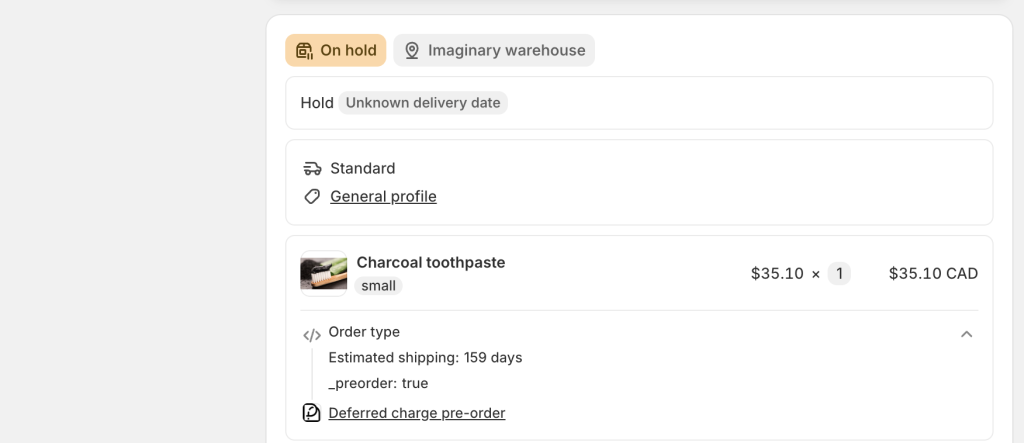
With PreProduct, a pre-order line item lands with an on-hold fulfilment status while the in-stock lines read as unfulfilled and stay free to go. On hold is a native Shopify state rather than a flag your app invented, so any system reading Shopify order statuses can understand it and skip those lines. You release fulfilment when you’re ready, by listing, by customer or by variant.
Whether a given system respects it is something to test, not assume. Plenty don’t. Some skip held lines out of the box, some need a routing rule written before they behave, and a few will pull the order whatever its status says. It varies by provider and by how the integration is configured, so this belongs on the pre-launch checklist right next to the split question.
Which is what the tag and the line-item property are for. Every pre-order order carries a pre-order tag and each pre-order line carries its own properties, so a system that ignores fulfilment status can still filter on something. Our controlled overselling page covers holds, tags and the Flow triggers for handing off to a warehouse or ERP.
If your stack cleared the split test earlier, you can go further and divide a mixed order into two orders after checkout, on charge-upfront pre-orders. The original keeps the ship-now items and the payment, the new order holds the pre-order items, and the two are linked by tags and notes. Each half then carries its own shipping charge and its own lifecycle. A few line-item types block the split and leave the order mixed, gift cards, bundles and import duties among them, with the reason logged on the pre-order. The splitting orders documentation covers the compatibility detail.
Charge timing came up as a constraint on splitting. It’s worth a section of its own, because it changes the mixed order after checkout too, not just your ability to divide it.
If everything is charged upfront, the mixed order is purely a fulfilment problem. Money is collected, and the only question is what leaves the warehouse and when.
If the pre-order line is charge-later, it’s a billing problem too. One order now carries a line that’s paid and a line that isn’t, with a charge firing weeks or months after the card details were captured. That’s the common case rather than the exotic one. Only 25% of pre-orders are charged at day 0, so three quarters of the time a mixed basket means a split payment timeline as well as a split ship date.
Two things follow. The customer needs to understand that the amount on their confirmation isn’t the total they’ll pay, and your finance side needs the pre-order revenue to land in the right period. Both are easier when the pre-order sits in its own order rather than tangled with a paid one, which is one more reason isolating keeps winning. Our charge later guide covers the deferred charge mechanics in full.
Telling Customers Before They Check Out
Whichever option you pick, the customer needs to know before they pay, not after.
Scotch Porter do the loud version well. Below a full-width pre-order button, the product page carries this:
“⚠️ PRE-ORDER NOTICE (Beard Oil + Beard Balm Only): These items must be purchased in a separate order.”
“If you check out with a pre-order item in your cart, your entire order will be held until that pre-order item is ready to ship. Place separate orders if you want in-stock items shipped right away.”
What makes it work is the last sentence. It tells the customer what to do, not just what will go wrong. A warning with an action attached reads as helpful; the same warning without one reads as a deterrent. It also sits below the call to action, so it informs without blocking.
Gretchen Scott take the opposite approach and it’s equally valid: a clean product page with the pre-order terms one click away in a pop-up. Loud on the page, or deferred to a pop-up, both put the terms in front of the buyer before checkout. That part isn’t optional.
One thing to keep straight: the button itself stays a call to action. “Pre-order” is the button; the ship-date and charge-timing answers belong in the wording around it. If you want the copy worked out for you, we’ve collected what a thousand stores actually write in our guide to pre-order messages.
Frequently Asked Questions
Can Customers Buy Pre-order and In-Stock Items Together on Shopify?
By default, yes. Shopify doesn’t separate products by availability, so a customer can put a pre-order item and an in-stock item in the same basket and check out once. Preventing it requires a pre-order app that enforces isolation, ideally at checkout as well as on the storefront.
How Do I Stop Pre-order and In-Stock Items Sharing a Cart?
Redirect the pre-order click into an isolated cart or a pre-order-only checkout, then enforce the same rule inside Shopify’s checkout so it holds when a customer arrives by another route. PreProduct handles both through its cart isolation settings.
Will a Mixed Cart Delay My In-Stock Items?
Only if you hold them, and that isn’t always a choice. A mixed order can be set up so the pre-order lines are held and the in-stock lines ship immediately, but this depends on your 3PL or WMS supporting partial fulfilment. Where it doesn’t, most systems wait for the whole order to become shippable, which delays goods you already have.
Does a Mixed Cart Get Charged Shipping Twice?
It can. With Shopify’s split shipping active, items from different location groups or shipping profiles are charged per shipment. Items from multiple locations in the same location group attract a single flat rate.
Do Mixed Carts Increase Average Order Value?
They tend to, because customers add in-stock items to a pre-order they were already making. Whether that gain survives a second shipping charge and the extra fulfilment handling depends on your margin and your 3PL.
Making the Call
Mixed cart pre-orders look like a customer experience question and behave like an operations one. That’s why the decision is worth making on purpose rather than discovering it during a launch.
The short version:
Check whether you can split before anything else. Many 3PLs and WMS platforms can’t ship half an order, and an unpaid pre-order line is harder to split cleanly than a paid one. That answer removes options before lead time gets a say.
Long lead time and a stack that splits? Split. You keep the mixed-basket order value and the in-stock goods still go out today.
Long lead time and a stack that doesn’t? Isolate. Holding stock for months to keep one parcel together is a complaint waiting to happen.
Isolating is the normal choice, and 62.1% of stores make it. It isn’t a compromise.
Tell the customer before checkout, and give them an action rather than just a warning.
If you want the decision to be a setting rather than a project, that’s what PreProduct’s cart isolation and mixed order handling does. Four ways to route the pre-order click, the same rule enforced inside Shopify’s checkout, and per-line fulfilment holds when you’d rather combine. As STRAYE put it: “Pre-Order isolation was key for us, and they pulled it off.”