Feature update (July – August 2026): Checkout Limits and Split Orders
TLDR:
- Pre-order max limits enforcement is now in beta, blocking checkout when a cart exceeds a listing’s remaining allocation, including per-location and per-customer limits.
- Split orders are in closed beta, separating charge-upfront pre-order items into their own order after a single checkout.
- Bulk actions now show a live progress banner, so you can see how far a big email or charge run has actually got.
- Customer details are editable from the pre-orders drawer, with shipping address edits on BigCommerce and WooCommerce.
- Pre-order prices are now locked in variant by variant at the time of sale, so later catalogue price changes never move an existing pre-order’s reporting (charges would have always been accurate, as we pre-request the current state of the order).
Introduction
The last few weeks have been about one thing: making sure the pre-order rules you set in PreProduct actually hold up everywhere else. Limits that live in your dashboard are only useful if a customer can’t get past them at checkout. An order that mixes pre-order and ship-now items is only manageable if your 3PL can tell the two apart.
So most of what landed this July and August 2026 pushes your settings further out into the places where real orders happen: Shopify checkout, your order feed, your customer records and your fulfilment queue. Two of the bigger releases are in beta, and we’ve flagged which is which below.
Pre-order max limits enforcement at checkout
Max limits are not new. You’ve been able to cap how many units of a variant go on pre-order, cap those units per location and cap how many units a single customer can take. What’s new is that Shopify checkout now enforces them.

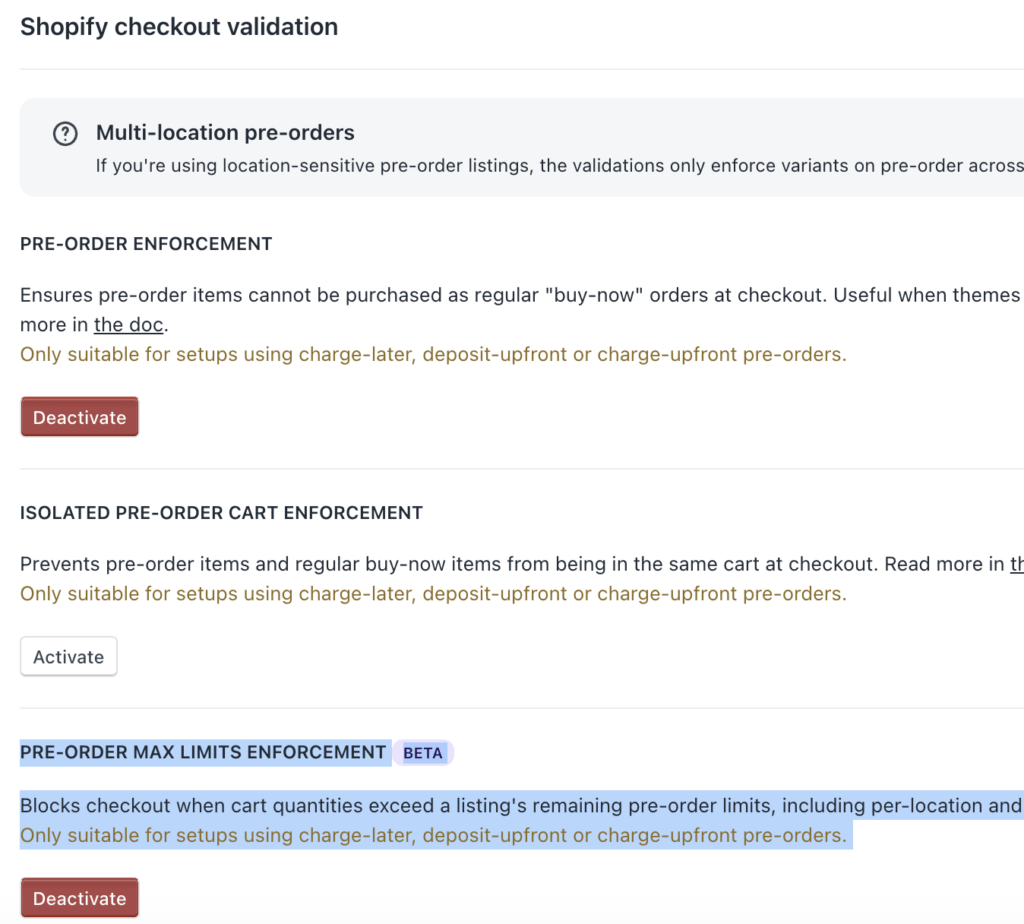
Turn it on and PreProduct keeps a running count of remaining units on your product, which a Shopify checkout validation reads on every cart. If someone tries to check out with more units than are left, checkout is blocked with a clear message asking them to reduce the quantity.
The enforcement follows the same rules your listing does. Buy-now lines are ignored, so only actual pre-order lines count against an allocation. Location rows are matched on the delivery country, an exact country match beats a rest-of-world row, and where more than one row serves a country the strictest remaining number wins. Your max units per customer limit is checked against the whole cart for that product.
The checkout message is translated into eight languages, so an international customer sees it in their own language.
Where to find it
Setup, then the Shopify checkout validation card. It sits alongside pre-order enforcement and isolated cart enforcement, and it carries a Beta badge. You’ll need your app permissions up to date for checkout validations, and PreProduct will prompt you if they aren’t.
Availability
Shopify only, in beta. It’s built for charge-later, deposit-upfront or charge-upfront pre-orders that use fulfilment holds. Capture-only listings are not covered. There’s more detail in the enforcement doc.
Split orders for charge-upfront pre-orders
Mixed carts are the classic pre-order ops headache. A customer buys a t-shirt that’s in stock and a jacket that ships in October, pays for both up front, and now you have one order that your warehouse can neither ship nor sit on.
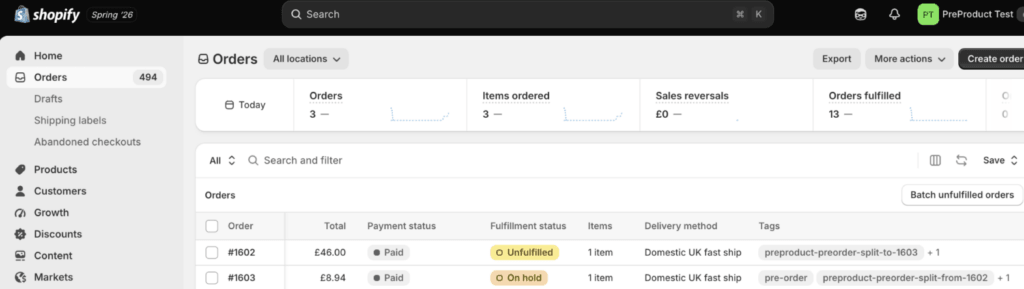
Split orders take a different route to the isolated cart redirects you may already use. Instead of forcing two checkouts, the customer checks out once, and PreProduct then moves the pre-order lines into their own separate order behind the scenes. The original order keeps the ship-now items and can go straight out. The new pre-order order is tagged, linked back to the original by order number and placed on a fulfilment hold until you release it.
No money moves during the split. The pre-order lines are written off the original order without refunding the customer, so the charge they already approved stays exactly as it was.
There are guardrails. Splitting only runs on fully paid orders with a shipping delivery method, it skips orders created by hand from a draft, and if anything about an order means it can’t be reconstructed cleanly, PreProduct leaves it alone rather than making a mess of it.
Availability
Shopify only, closed beta, and it only affects charge-upfront pre-orders. You’ll find the toggle under Setup, in the front-end redirects section, labelled “Split pre-orders into their own order after checkout”. If it’s greyed out, you’re not in the beta yet. We’d strongly suggest reading the splitting orders doc and testing before you go live, then emailing hello@preproduct.io to apply.
Progress banners on bulk actions
Bulk actions once meant crossing your fingers. You’d trigger charges on 400 pre-orders, the page would carry on as normal, and you’d refresh a few times hoping something was happening.
Now a banner appears at the top of the page with a live count: “Triggering charges in background. 47 of 412 processed”. It updates every few seconds and clears itself when the run finishes, refreshing the page so you see the final state.
The banners cover the bulk runs that take the longest:
- Bulk creating listings and bulk finishing listings from the Listing Manager
- Payment and charge runs triggered from a listing’s pre-orders page
- Update emails and failed charge emails
- The metafield sync that runs when you activate a checkout validation
The counts are deliberately cosmetic. If the progress tracking ever hiccups it can’t fail or retry an email or a charge, and the counters true themselves up from your actual pre-order data rather than drifting.
Availability
Shopify, BigCommerce and WooCommerce.
Customer details, editable from your pre-orders
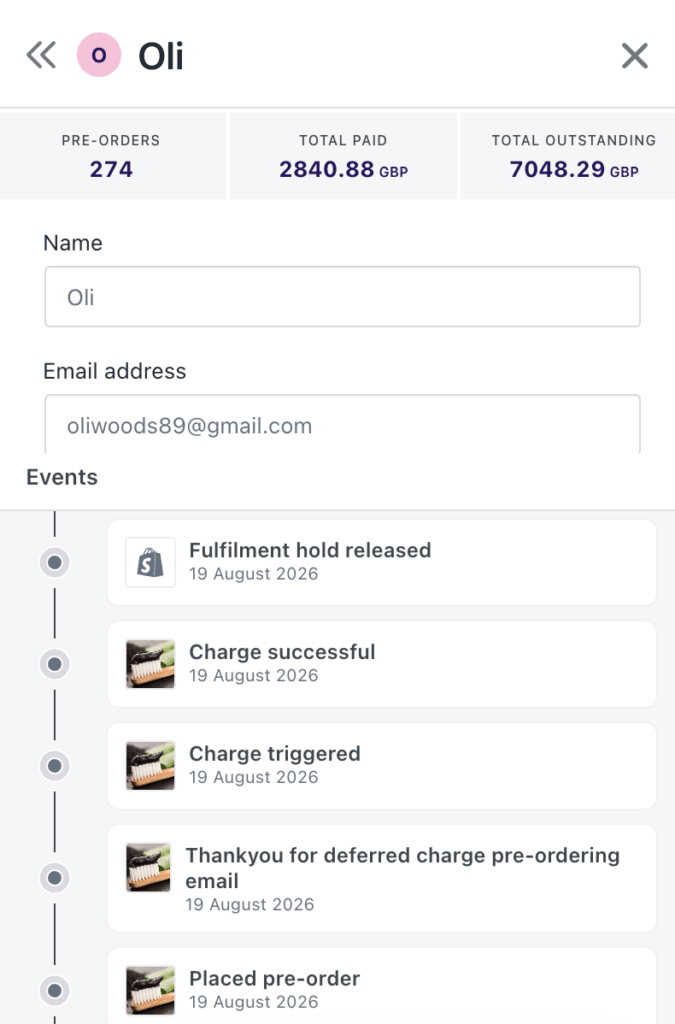
Click a customer’s avatar on any pre-order and you now get a proper customer drawer rather than a name and an email address.
At the top there are three numbers: how many pre-orders that customer has with you, what they’ve paid so far and what’s still outstanding across all of them. Below that, their name and email are editable in place. Change either and PreProduct applies it across every pre-order that customer holds at your store, so you’re not fixing the same typo eight times. If you’re connected to Stripe, the change is pushed to their Stripe customer record too, which matters when a charge-later email is going to land in the corrected inbox months from now.
Underneath sits their event timeline, so you can see what’s already been sent and charged without leaving the drawer.
Shipping address edits on BigCommerce and WooCommerce
On BigCommerce and WooCommerce, where the order is created in your platform at charge time rather than at checkout, you can also correct the shipping address from the same drawer. It applies to every one of that customer’s orders that hasn’t been pushed to your platform yet, and syncs to Stripe. Once an order has been pushed, PreProduct tells you so rather than letting you edit something that’s already left the building.
Availability
The customer drawer and profile editing work across Shopify, BigCommerce and WooCommerce. Shipping address editing is BigCommerce and WooCommerce only, because on Shopify the order already exists and is edited there.
Pre-order pricing reporting now captures a snapshot
Pre-orders have always charged the right total, we check against the e‑commerce platform’s order record before taking payment, so you won’t ever overcharge because a variant price changed later.
What’s new is that we now store each variant’s price at the time of sale (not just the order total). That means any reporting, and any emails that reference line item / variant prices, will match what the customer actually committed to, even if you reprice products, add variants, or restructure the listing before a charge-later or deposit balance is collected.
Discounts still apply on top at charge time, from the terms the pre-order captured, so a listing discount behaves exactly as the customer was shown. This mostly matters if you charge later, split charges across variants or run listings that stay live for months. If you charge everything up front, you won’t notice a difference, which is the point.
Availability
Shopify, BigCommerce and WooCommerce.
Listings now tidy up after themselves
If you delete a pre-order purchase option in your Shopify admin, or detach a product from one, PreProduct now hears about it and finishes the affected listings automatically.
Before this, a deleted selling plan group left listings looking active in PreProduct with nothing behind them on Shopify, which is a confusing state to debug. Now the listing finishes cleanly and your dashboard matches what Shopify actually has.
Availability
Shopify only.
Smaller improvements
- Click the product image on the listing dashboard to jump straight from a listing to its live product page.
- Checkout validation activation now shows its own progress banner while your product data syncs.
- Checkout limit messaging ships translated into eight languages out of the box.
Wrapping up
The theme this time is trust in your own settings. A limit that holds at checkout, a mixed order that arrives at your warehouse already split, a price that stays put and a customer record you can fix in one place. None of it is flashy, all of it is the sort of thing that quietly stops a launch week going sideways.
Two of these are in beta, so if split orders or checkout limit enforcement would change how you run pre-orders, get in touch and we’ll talk through whether your setup is a fit.
Start taking pre-orders with PreProduct.
Pre-sell With PreProduct
7 day free trial with all plansMigrate pre-orders
