Pre-Orders vs Backorders vs Waitlists: Ultimate Comparison

Running out of stock doesn’t have to mean lost sales, but should you take pre-orders vs backorders vs build a waitlist? Each approach serves different business needs, timelines, and customer expectations. The right choice depends on factors like product availability, cash flow requirements, and how much commitment you need from customers.

Based on insights from over $85.3 million in pre-order sales, this guide breaks down the key differences between pre-orders, backorders, and waitlists. You’ll learn exactly when to use each strategy, how they impact your cash flow, and what customers expect from each approach.

What Are Pre-Orders, Backorders, and Waitlists?

Before diving into comparisons, let’s define each approach clearly.

Pre-Orders: Selling Before Stock Arrives

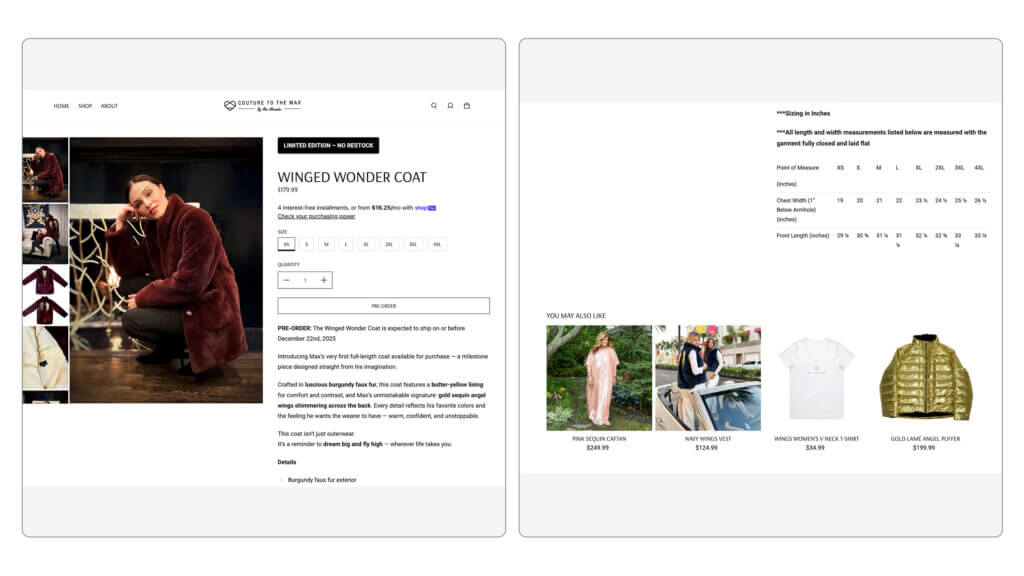
Pre-orders let customers purchase products before they’re manufactured or released. This is an advance sale where customers commit to buying something that doesn’t physically exist yet in your warehouse. For example, a fashion brand might open pre-orders for a new seasonal collection 90 days before production completes.

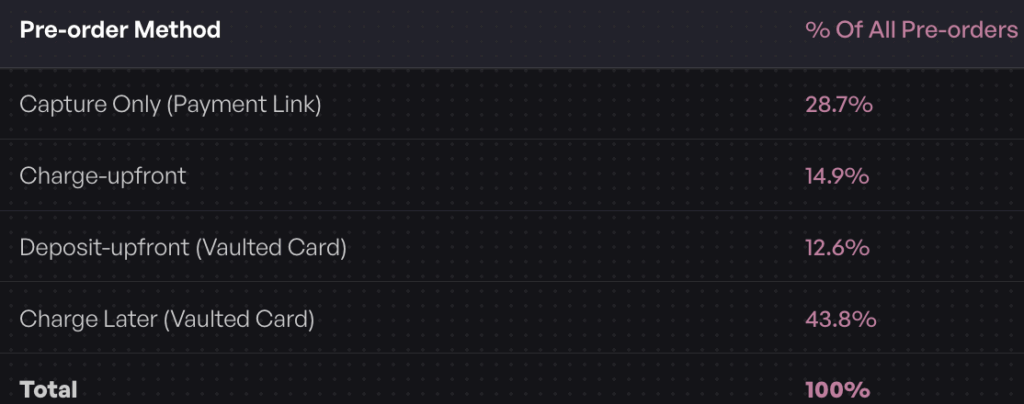
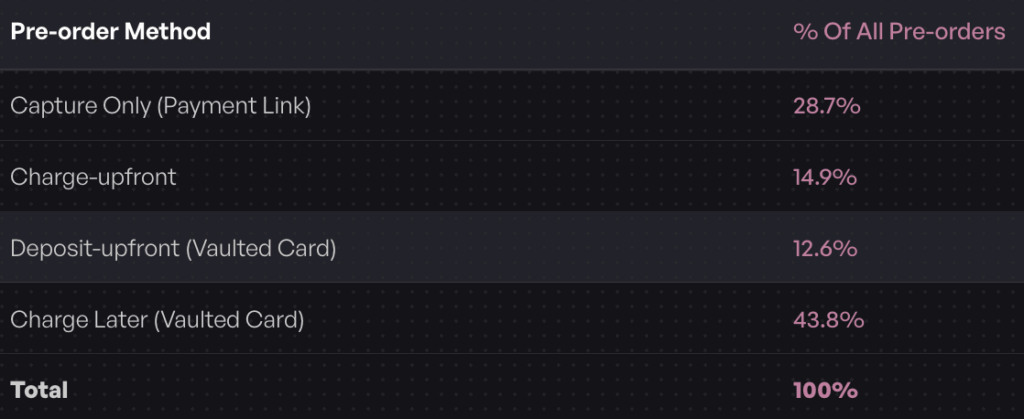
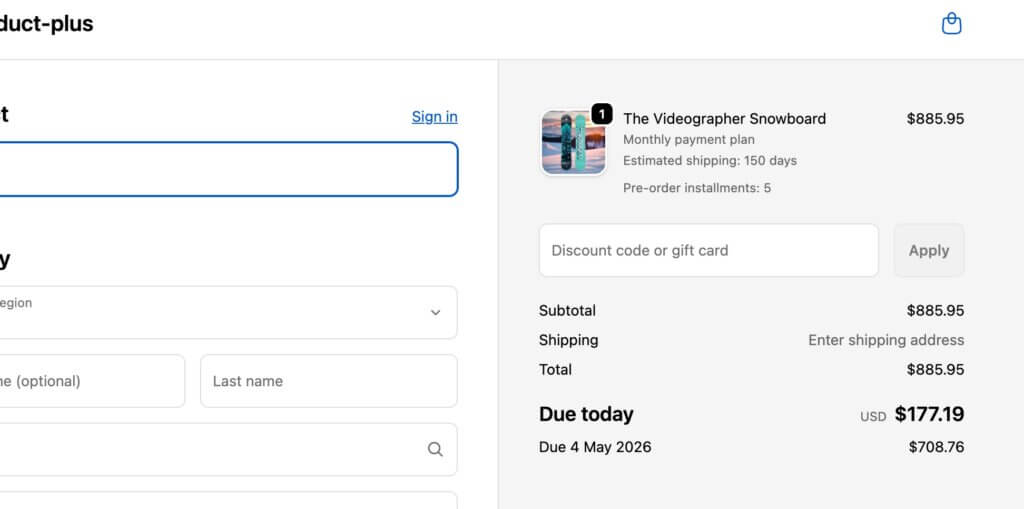
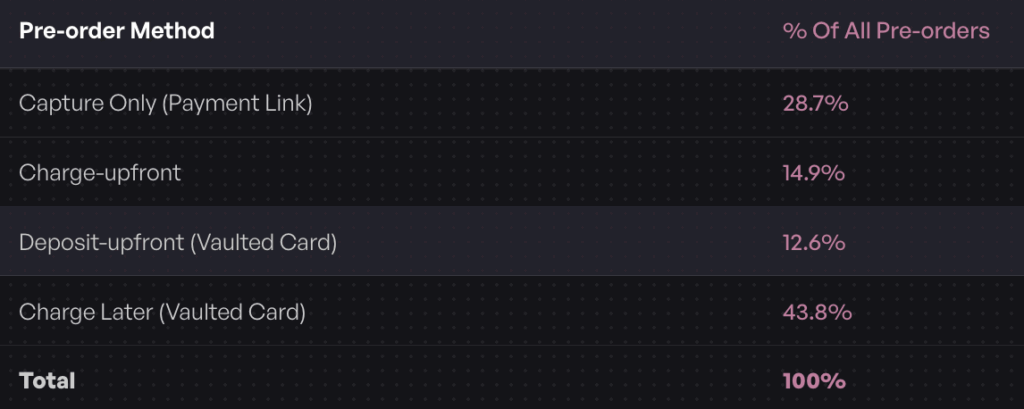
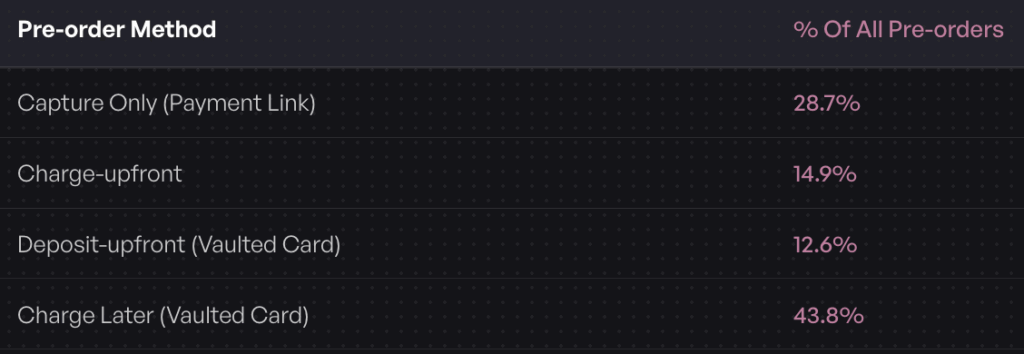
Pre-orders work particularly well for new product launches, limited edition releases, or made-to-order items where you want to validate demand before committing to inventory. According to our analysis of over one million pre-orders, 43.8% of merchants use charge-later payment models, meaning customers provide payment details but aren’t charged until the product ships.

Backorders: Selling Temporarily Out-of-Stock Items

Backorders are orders taken for products that were previously available but are temporarily out of stock. The key difference from pre-orders is timing: these products have already been released and sold before, and customers expect them to be restocked soon. Think of a popular electronics item that sells out faster than expected but will be replenished within 2-3 weeks.

Backorders are reactive rather than proactive. They help you capture demand during unexpected stockouts while you wait for replenishment. Most backorders require full payment upfront since the product is proven and the restock timeline is typically shorter and more certain.

Waitlists: Capturing Interest Without Commitment

Waitlists enable customers to sign up for notifications about when products become available or launch. Unlike pre-orders and backorders, waitlists don’t involve immediate purchases. Instead, customers provide their email address to be notified when the product is ready to buy.

Waitlists work well for demand testing, uncertain timelines, or building anticipation for upcoming launches. They’re particularly valuable for email list building, as waitlists almost always collect contact information. The trade-off is lower customer commitment: signing up for a notification requires far less commitment than completing a purchase.

Quick Comparison Table

ApproachProduct StatusPayment TimingCustomer CommitmentBest For
Pre-OrderNot yet manufactured/releasedFlexible (upfront, later, or deposit)HighNew launches, validating demand
BackorderTemporarily out of stockTypically upfrontMedium-HighFast-moving items with known restock
WaitlistUpcoming or uncertainNo payment (notification only)LowTesting demand, building email lists

The Key Differences: Timing, Psychology and Cash Flow

Understanding when and why to use each approach requires looking at three critical factors: timing, customer psychology, and financial impact.

Timing: When Each Approach Makes Sense

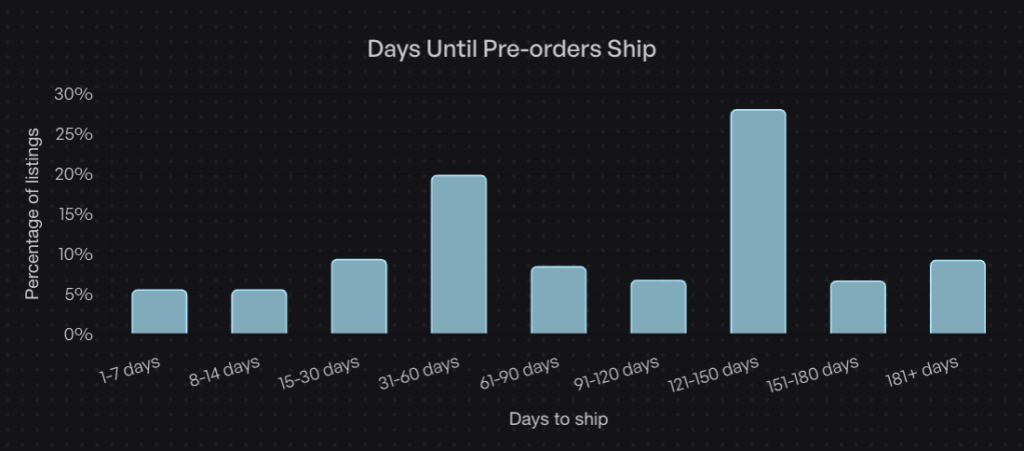
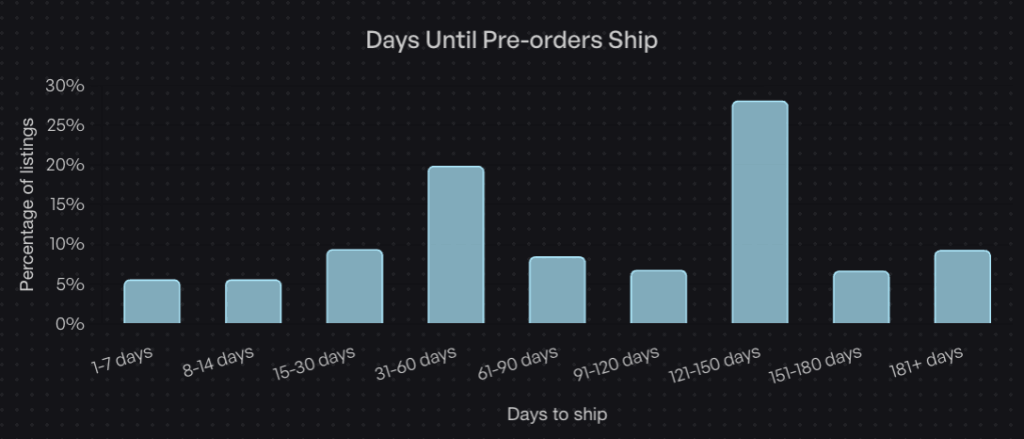
Pre-orders work best when you have a planned launch with a known or estimated arrival date. Most pre-orders in our dataset have shipping timeframes averaging 121-150 days, though this varies widely by industry. Fashion brands might run 60-90 day pre-order windows, while custom manufacturers might need 6+ months. The key is having enough certainty to set customer expectations, even if the exact date shifts slightly.

Backorders are reactive solutions to stockouts. Use them when you have a clear replenishment timeline, typically within 2-8 weeks. Backorders make sense for core catalog items you’ll definitely restock. They work less well for seasonal products or items with uncertain supply chains. If you can’t confidently say “back in stock by [date range],” a waitlist might be safer.

Waitlists are ideal when timelines are uncertain or you’re testing whether to produce something at all. They’re also powerful for drop culture brands that want to build anticipation before opening sales. Use waitlists when you need to gauge interest before committing to production or when supply chain uncertainty makes it risky to take payment.

Customer Psychology and Expectations

Each approach taps into different psychological motivators and creates distinct expectations.

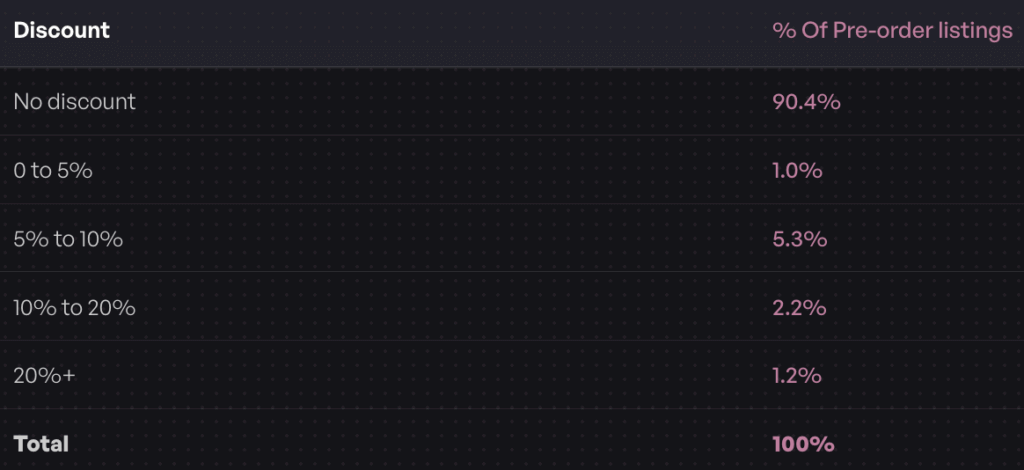
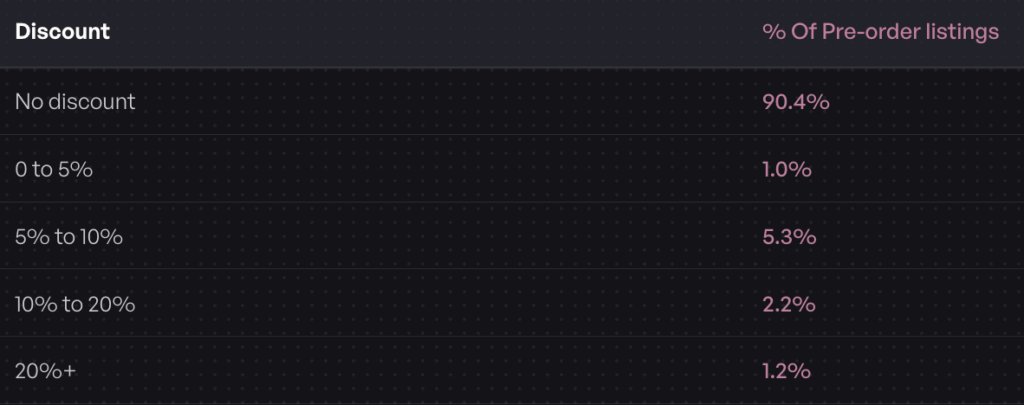
Pre-order psychology centers on anticipation, exclusivity, and being “first.” Customers who pre-order often want early access to new releases or limited editions. They’re willing to wait because they’re excited about the product and don’t want to miss out. According to our data, 90.4% of pre-orders carry no discount, showing that access matters more than price for most pre-order customers.

The average pre-order cancellation rate sits at 5.4%, relatively low considering the long wait times involved. This suggests that when customers commit to a pre-order, they generally follow through. Clear communication about shipping dates and regular updates help maintain this commitment.

Backorder psychology requires patience rather than excitement. Customers making backorder purchases typically want a specific item they know and have decided to buy. They’re willing to wait because they’ve already decided this is the product they want. The key difference from pre-orders is that backorder customers expect a shorter wait and a more certain timeline since the product already exists in the market.

Waitlist psychology leverages FOMO (fear of missing out) and scarcity. Signing up for a waitlist makes customers feel like they’re part of an exclusive group who will get first access. The low commitment barrier (just an email) means more people will join, but fewer will convert compared to pre-orders. Waitlists work particularly well for building anticipation and collecting qualified leads for future marketing.

Financial Impact and Cash Flow

The three approaches have dramatically different effects on your cash flow and financial risk.

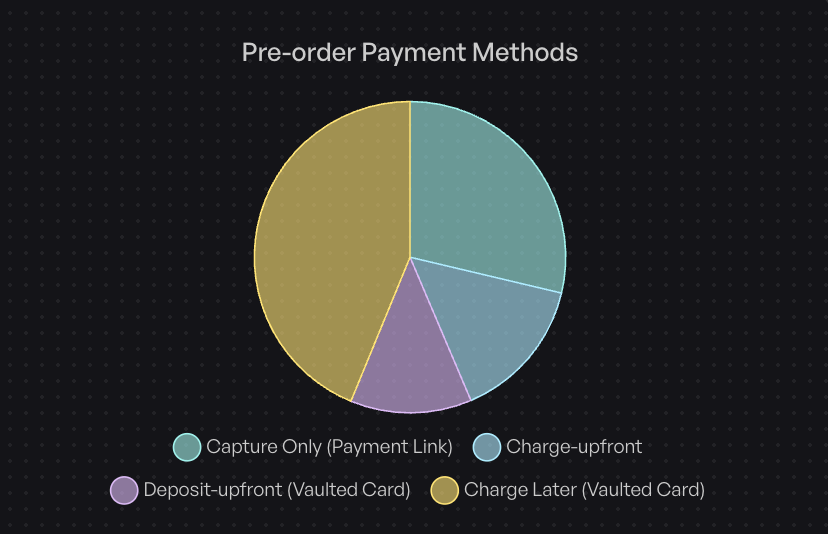
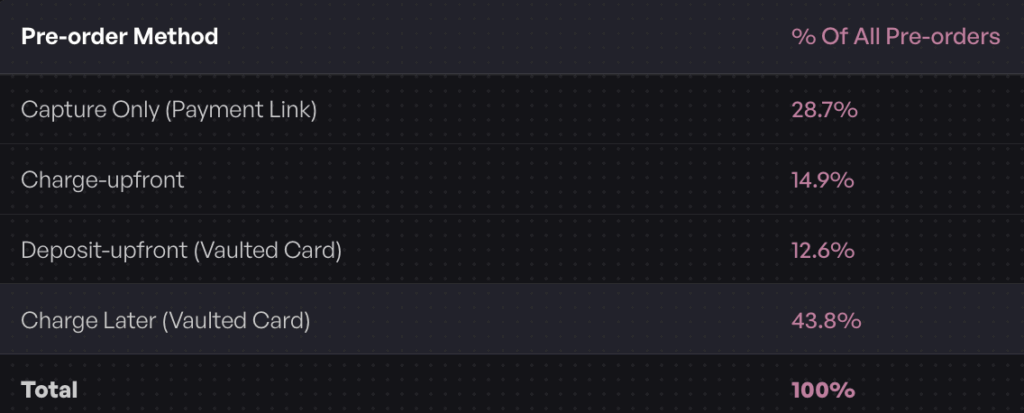
Pre-orders offer the most flexibility in payment timing. Based on our analysis of over one million pre-orders:

  • 43.8% use charge-later (customers aren’t charged until shipping)
  • 28.7% use capture-only (payment link sent when ready)
  • 14.9% charge upfront (immediate payment)
  • 12.6% use deposit-upfront (partial payment now, balance later)

This flexibility lets you match payment timing to your cash flow needs and customer comfort level. Charge-later pre-orders reduce refund risk since customers haven’t paid yet if timelines change. Upfront payments provide immediate revenue to fund production. Deposits offer a middle ground that shows customer commitment while lowering the barrier to purchase.

Backorders typically require full payment upfront. Since the product is proven and the restock timeline is shorter, customers expect to pay immediately. This provides faster cash flow than charge-later pre-orders but less flexibility. The shorter timeline reduces cancellation risk compared to long pre-order windows.

Waitlists generate no immediate revenue. They’re an investment in future sales and email list growth. The value comes from demand validation and the qualified leads you capture. You’ll need to convert waitlist signups to actual purchases later, which typically happens through email campaigns announcing availability.

When to Use Pre-Orders

Pre-orders work best in specific scenarios where you want to validate demand, take revenue earlier, or build anticipation before a product physically exists.

Best Use Cases for Pre-Orders

1. New Product Launches
Pre-orders let you validate demand before committing to large production runs. This is particularly valuable for brands testing new product lines or designs. By taking pre-orders, you get real purchase commitments (not just survey responses) that help you make informed inventory decisions.

2. Limited Edition Releases
When releasing limited or exclusive items, pre-orders build hype and ensure your most dedicated customers don’t miss out. Pre-orders also help you set the right production quantity for limited runs.

3. High-Value Items
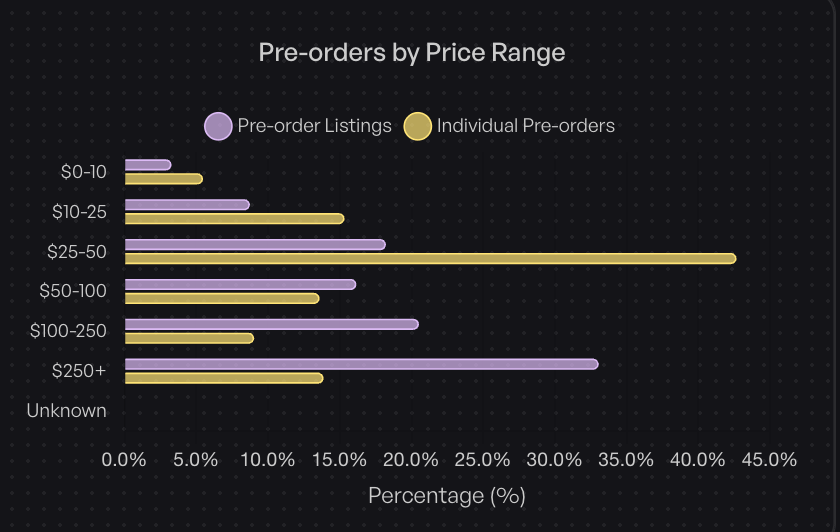
For products over $250 (which represent 26.8% of pre-order listings in our data), deposits can lower the barrier to purchase while still securing customer commitment. A 20-30% deposit shows serious intent without requiring customers to part with the full amount months in advance.

4. Seasonal Collections
Fashion and seasonal brands can open pre-orders before production completes, allowing them to adjust quantities based on actual demand rather than forecasts. This reduces the risk of overstock that needs to be discounted later.

Payment Options for Pre-Orders

One of pre-order’s biggest advantages is payment flexibility. Here’s how merchants use different payment models:

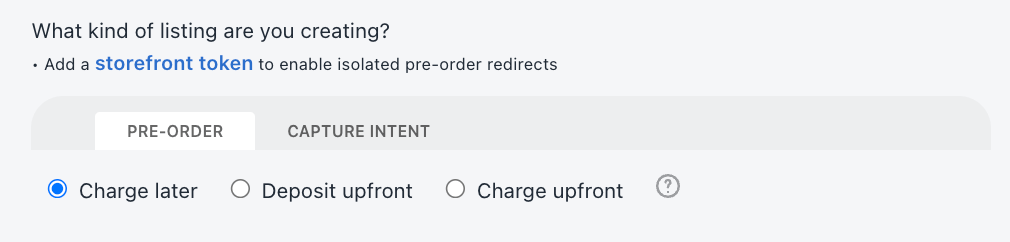
Charge-Later (43.8% of listings) works well when timelines are uncertain or longer than 90 days. Customers provide payment details but aren’t charged until you’re ready to ship. This reduces refund risk if timelines shift and makes customers more comfortable committing to purchases months in advance.

Charge-Upfront (14.9% of listings) provides immediate cash flow to fund production. Use this when you have reliable timelines and need upfront capital. It’s most common with shorter pre-order windows or established brands with high customer trust.

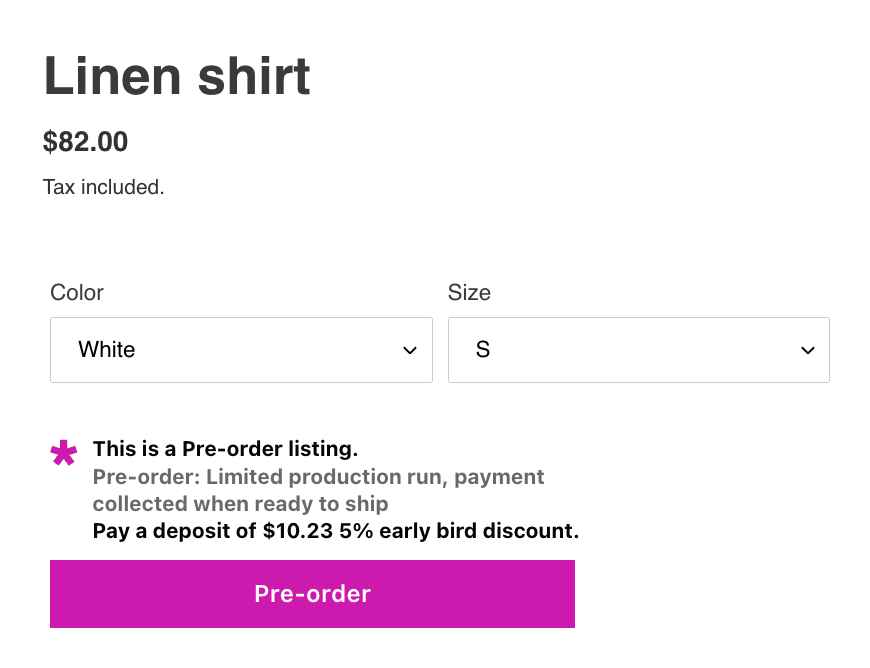
Deposit-Upfront (12.6% of listings) offers a middle ground. Collect 20-50% now to gauge commitment and fund initial production, then charge the balance when shipping. Deposits work particularly well for higher-ticket items where full upfront payment creates too much friction.

Capture-Only (28.7% of listings) delays even authorization until you’re ready to ship. You send a payment link when the product is ready. This creates the least customer friction but provides no revenue until fulfillment.

Pre-Order Best Practices

To run successful pre-orders:

Set Clear Expectations
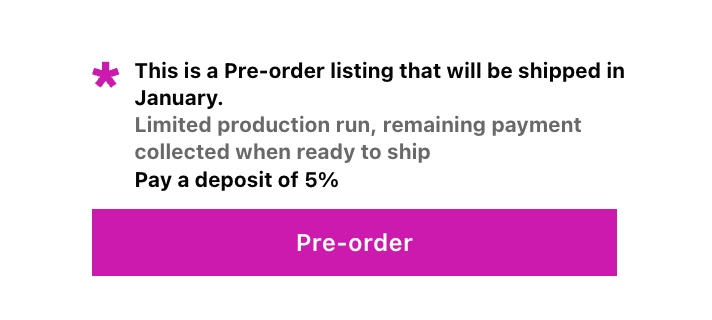
Display expected shipping dates prominently on product pages. Most pre-orders average 121-150 day shipping windows, but transparency matters more than specific duration. If your timeline is “late spring,” say that rather than guessing a specific date you might miss.

Use Dedicated Messaging
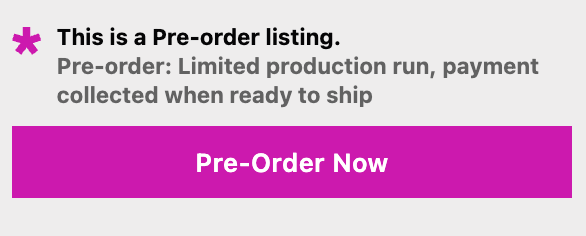
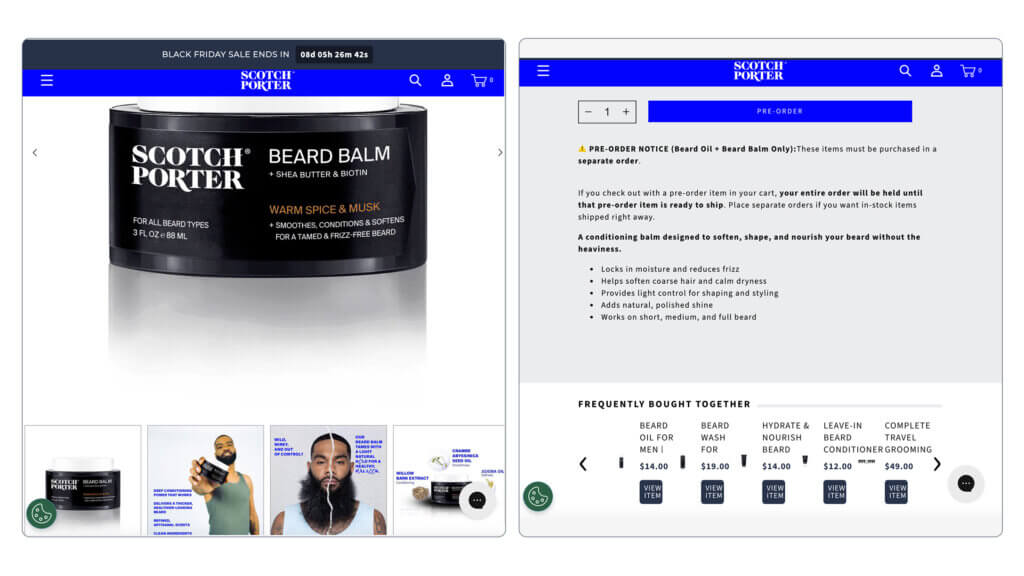
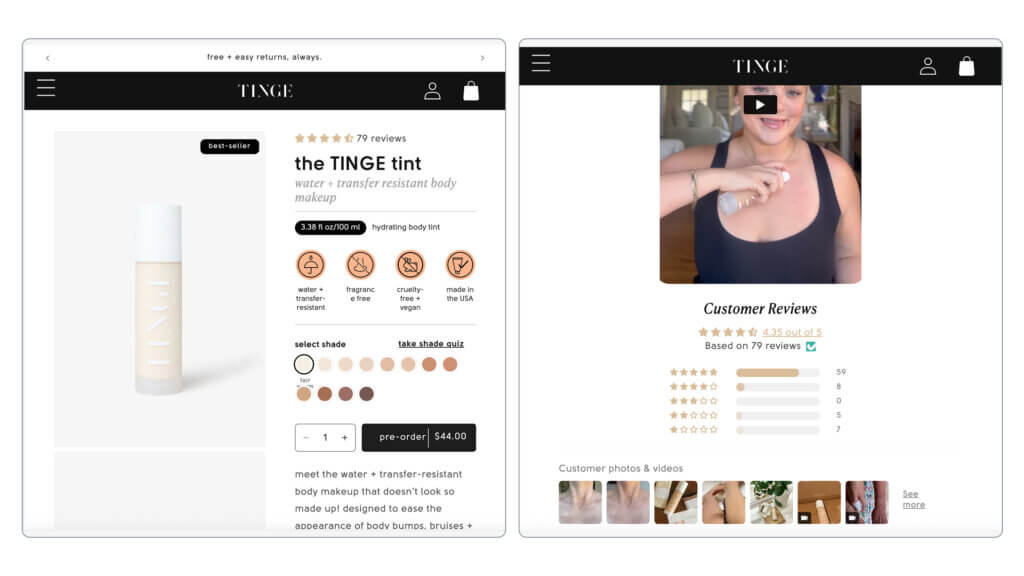
Replace generic “Add to Cart” buttons with clear “Pre-Order” buttons that indicate the purchase is for a future-dated product. This reduces confusion and sets proper expectations from the start.

Communicate Proactively
Keep customers updated throughout the pre-order period. Send confirmation emails, progress updates, and immediate notification of any timeline changes. Transparent communication maintains trust during long wait periods.

Consider Mixed Carts Carefully
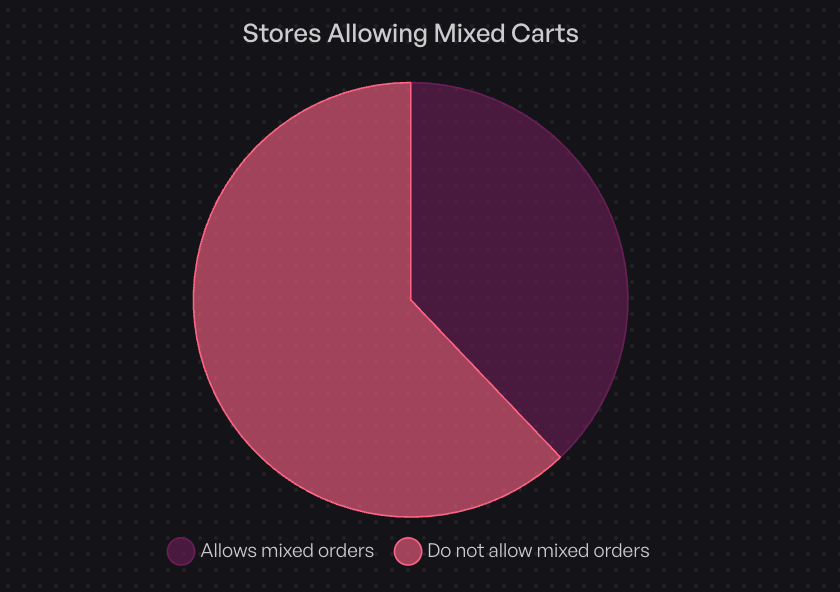
According to our data, 37.9% of stores allow customers to mix pre-order items with in-stock products in the same cart. This can increase average order value but complicates fulfillment. Decide based on your operational complexity: isolated pre-order carts simplify logistics, while mixed carts improve customer experience.

For detailed implementation guidance, see our guide on how to set up pre-orders on Shopify.

When to Use Backorders

Backorders serve a different purpose than pre-orders: capturing demand during temporary stockouts of proven products.

Best Use Cases for Backorders

1. Fast-Moving Bestsellers
When a popular item sells out faster than expected, backorders let you continue taking orders rather than losing sales. This works best when you have reliable suppliers and predictable restock timelines.

2. Core Catalog Items
Backorders make sense for staple products you’ll definitely restock. If it’s a core part of your catalog that consistently sells, capture that demand even during temporary stockouts.

3. Short Restocking Windows
Use backorders when you know the restock timeline and it’s relatively short, typically 2-6 weeks. The shorter the window, the better backorders work because customer patience has limits.

4. Preventing Lost Sales
The primary benefit of backorders is capturing revenue that would otherwise go to competitors. When customers want your specific product and are willing to wait a few weeks, backorders prevent them from buying elsewhere.

Backorder Best Practices

Only Offer for Reliable Restocks
Don’t charge backorders upfront unless you’re confident in a shorter replenishment timeline. Broken promises damage customer trust more than saying “out of stock” upfront. Instead take charge-later back-orders where you collect payment until the product is ready to ship.

Set Clear Expectations
Display the expected restock date or date range prominently. “Back in stock by March 15” or “Expected restock: 2-3 weeks” sets clear expectations. Update this date if timelines change.

Use Dedicated Buttons
Like pre-orders, use clear “Backorder” or “Pre-order (Restock)” buttons instead of generic “Add to Cart.” This immediately signals that the item isn’t available for immediate shipment.

Consider Backorder Limits
For items with uncertain restock quantities, consider capping backorders to avoid over-committing. This prevents situations where you can’t fulfill all backorders when stock arrives.

When NOT to Use Backorders

Avoid backorders in these situations:

  • Seasonal items unlikely to restock this season
  • Uncertain supply chains Especially when charging upfront, where you can’t commit to timeframes
  • Very long wait times beyond 90 days (use pre-orders with charge-later instead)
  • Products being discontinued or phased out

When to Use Waitlists

Waitlists serve a different function: capturing interest without the commitment of a purchase.

Best Use Cases for Waitlists

1. Demand Testing
When considering whether to produce a new product, waitlists let you gauge interest before committing. The number of signups gives you directional data about potential demand, though actual conversion will be lower than pre-orders since there’s no payment commitment.

2. Drop Culture Brands
Brands built on limited drops and scarcity can use waitlists to build FOMO and anticipation. Waitlist members become your launch day audience, creating initial sales momentum.

3. Uncertain Timelines
When you can’t commit to specific dates or aren’t sure if a product will be produced at all, waitlists provide a safe way to capture interest without the legal and customer service burden of taking payment.

4. Email List Building
Waitlists “almost always collect email addresses,” making them valuable for growing your marketing list with qualified, interested prospects. These contacts have already expressed interest in specific products, making them highly targeted leads.

5. Inventory Planning
Waitlist signup numbers help inform production quantities and inventory decisions. While not as reliable as pre-order commitments, they provide useful directional guidance.

Waitlist Best Practices

Make Signup Frictionless
Only ask for essential information (typically just email). The easier it is to join, the more signups you’ll get.

Set Clear Expectations
Tell customers what happens next and approximately when. “We’ll email you when pre-orders open in March” or “You’ll get 24-hour early access when we launch” manages expectations and reduces support questions.

Create Scarcity Perception
Position waitlist membership as exclusive access. “Join the waitlist for first access” or “Waitlist members get 24-hour early access” creates additional motivation to sign up.

Plan Your Conversion Strategy
Have a clear plan for converting waitlist signups to purchases. Will you offer early access? A discount? A limited time window? Plan this before building your list.

Converting Waitlists to Sales

Waitlist signups aren’t revenue until you convert them. Effective conversion tactics include:

  • Time-limited early access (24-48 hour exclusive window)
  • Exclusive discounts for waitlist members (10-15% off)
  • Transition to pre-order when timeline becomes clearer
  • Scarcity messaging (“Only 500 units available for waitlist members”)

The Decision Framework: Which Approach to Choose

Choosing between pre-orders, backorders, and waitlists requires evaluating several factors specific to your situation.

Decision Tree

1. Is the product already manufactured or available somewhere?

  • No (it doesn’t exist yet) → Consider pre-orders or waitlist
  • Yes, but currently out of stock → Consider backorders or waitlist

2. Do you have a clear restocking or shipping timeline?

  • Yes, under 30 days → Backorders or charge-upfront pre-orders work well
  • Yes, over 30 days → Pre-orders with charge-later preferred
  • No or uncertain → Waitlist or charge-later pre-order is safer; no payment commitment reduces risk

3. What are your cash flow needs?

  • Need immediate revenue → Pre-orders with upfront payment or deposits
  • Flexible cash flow → Charge-later pre-orders or waitlists
  • Want to reduce refund risk → Waitlists or charge-later pre-orders

4. What’s your product price point?

  • High-ticket (>$250) → Deposits reduce purchase barrier (26.8% of pre-orders are >$250 in our data)
  • Mid-range ($50-250) → Any payment model works; choose based on timeline certainty
  • Low-ticket (<$50) → Full payment upfront is typical; administrative overhead of deposits often not worth it

5. What level of customer commitment do you need?

  • High commitment (need to make production decisions) → Pre-orders with payment or deposit
  • Medium commitment (proven product, just out of stock) → Backorders
  • Low commitment (just testing interest) → Waitlists

Real-World Scenarios

Scenario 1: Fashion Brand Seasonal Launch
A clothing brand is releasing a new spring collection in 90 days. Production hasn’t started yet, and they want to gauge demand before finalizing quantities.

Recommendation: Pre-orders with charge-later payment. This captures real purchase commitments (better data than waitlist signups) while minimizing refund risk if production timelines shift. The 90-day window aligns with typical fashion pre-order periods.

Scenario 2: Electronics Retailer Surprise Stockout
A popular gaming console accessory sells out unexpectedly. The supplier confirms restock in 2-3 weeks.

Recommendation: Backorders with full payment upfront. The short, certain timeline and proven product make backorders ideal. Customers know what they’re getting and are willing to pay for a brief wait.

Scenario 3: Indie Maker Testing New Product Idea
A creator has designed a new product but isn’t sure if there’s enough demand to justify production. They want to test interest before committing to manufacturing.

Recommendation: Waitlist initially, then transition to pre-orders if interest is strong. Start with a waitlist to gauge interest without the legal obligations of taking payment. If 500+ people sign up, transition to pre-orders with deposits to confirm actual purchase intent before manufacturing.

Scenario 4: Limited Edition Collectible
A brand is releasing a limited run of 200 collectible items. Demand is expected to exceed supply significantly.

Recommendation: Pre-orders with upfront payment or deposit. The limited quantity and high demand justify requiring payment commitment. Use deposits if the price is high enough to create friction. Close pre-orders once you hit 200 orders (or your production capacity).

Using Multiple Approaches Together

The three strategies aren’t mutually exclusive. Many successful brands use them in combination.

Pre-Orders + Waitlists

Start with a waitlist to build anticipation and capture emails. When you’re ready to open sales, give waitlist members early access to pre-order before opening to the general public.

This two-stage approach builds your email list while rewarding early interest with exclusive access. The waitlist creates anticipation, then pre-orders convert that interest into revenue. Many brands offer waitlist members a 24-48 hour exclusive pre-order window or a small discount (10% off) as a reward for signing up early.

Pre-Orders + Mixed Carts

Our data shows 37.9% of stores allow customers to mix pre-order items with in-stock products in the same cart. This can increase average order value and improve customer experience by letting them order everything they want in one transaction.

The trade-off is operational complexity. Mixed carts typically require split shipments: you ship in-stock items immediately and pre-order items later. This means additional shipping costs and more complex fulfillment workflows. It also requires clear communication so customers understand they’ll receive multiple shipments.

For guidance on integrating pre-orders with your fulfillment operations, see our guides on managing pre-orders with your 3PL and managing pre-orders with your ERP.

Backorders + Pre-Orders

Use both approaches for different parts of your catalog. Run backorders for core items with quick, predictable restocks. Use pre-orders for new releases, seasonal items, or products with longer lead times.

The key is using different messaging and buttons so customers clearly understand which type of purchase they’re making. “Backorder (ships in 2 weeks)” versus “Pre-Order (ships in June)” sets clear expectations.

Platform Implementation: Shopify, BigCommerce, WooCommerce

The technical implementation varies by ecommerce platform.

Shopify Pre-Orders and Backorders

Shopify offers basic built-in functionality through inventory settings, but most merchants need more advanced features. The “continue selling when out of stock” checkbox lets products pass through checkout at zero inventory, which works for simple backorders.

For more sophisticated pre-order management, specialized apps like PreProduct offer:

  • Flexible payment timing (charge-upfront, charge-later, deposits, capture-only)
  • Automatic fulfillment holds to prevent premature shipping
  • Customer communication tools and portals
  • Shopify Flow integration for automated workflows
  • Inventory-based automations

PreProduct’s charge-later capability uses Shopify’s vaulted card technology, letting you capture payment details without charging until you’re ready to ship. This is particularly valuable for pre-orders with uncertain timelines.

BigCommerce Considerations

BigCommerce has native backorder support through inventory settings, but pre-order functionality typically requires third-party apps like PreProduct. The platform’s checkout flexibility allows for custom pre-order implementations, including charge-later models through Stripe integration.

For BigCommerce stores, focus on:

  • Clear product page messaging about pre-order status
  • Expected shipping date display
  • Email communication workflows
  • Integration with your existing fulfillment systems

WooCommerce Options

WooCommerce pre-orders typically work through plugins that extend the platform’s functionality like PreProduct. The open-source nature of WooCommerce means more customization flexibility but requires more technical setup.

Key WooCommerce considerations:

  • Payment gateway compatibility (ensure your gateway supports tokenization for charge-later)
  • Plugin compatibility with your theme and other extensions
  • Email notification customization
  • Stock management integration

Headless and Custom Implementations

For brands with custom storefronts or headless commerce setups, pre-orders require API-based solutions or supporting apps like PreProduct. Stripe pre-orders offer flexibility for charge-later implementations through Stripe’s payment intents and customer tokenization.

Custom implementations provide maximum flexibility but require development resources to build:

  • Payment capture and tokenization logic
  • Customer communication workflows
  • Order management and fulfillment holds
  • Reporting and analytics

Customer Communication and Transparency Best Practices

Success with pre-orders, backorders, and waitlists depends heavily on clear communication.

Setting Clear Expectations

Product Page Messaging
Use clear, prominent labels: “Pre-order,” “Backorder,” or “Join Waitlist.” Avoid generic language like “Add to Cart” that doesn’t signal the purchase type.

Display expected shipping dates or ranges prominently. “Ships in June 2025” or “Expected restock: 2-3 weeks” tells customers exactly what to expect. If you don’t have specific dates, provide ranges: “Ships in 3-4 months.”

Explain What Happens Next
Tell customers what the purchase process looks like. “You’ll be charged today, and we’ll ship when your item is ready” versus “We’ll hold off charging you until we’re ready to ship” makes the experience clear.

Cancellation Policies
State your cancellation and refund policies upfront. Customers are more likely to commit when they know they can cancel if needed. For charge-later pre-orders, make it clear that customers can cancel before being charged with no penalty.

Email Communication Strategy

Order Confirmation
Send immediate confirmation with timeline expectations. Include the expected shipping date or date range, what payment was collected (if any), and how customers can check their order status.

Progress Updates
For pre-orders with long timelines, send periodic updates. “Your spring collection pre-order is on track for March delivery” or “Production is underway and everything is on schedule” maintains excitement and reduces support inquiries.

Proactive Delay Communication
If timelines change, communicate immediately. Don’t wait for customers to ask. “Due to shipping delays, your order will arrive in April instead of March. You can cancel for a full refund if you prefer” maintains trust even when things don’t go according to plan.

Shipping Notifications
When items ship, send tracking information and estimated delivery dates. This is the payoff moment customers have been waiting for.

Legal and Regulatory Compliance

FTC Guidelines
In the United States, the FTC’s Mail or Telephone Order Rule requires you to ship within the timeframe stated or, if no time is stated, within 30 days. For longer pre-order timelines, you must clearly state the expected shipping date and get customer consent.

State Consumer Protection Laws
Various states have specific requirements around pre-orders, deposits, and refunds. Ensure your terms and conditions comply with applicable laws in jurisdictions where you sell.

International Considerations
Different countries have different consumer protection requirements. EU consumer protection laws, for example, require specific cancellation rights and refund timeframes. If you sell internationally, ensure compliance with relevant regulations.

Clear Refund Policies
State your refund policy clearly in your terms and conditions. Be specific about when customers can cancel, how refunds are processed, and what happens if you can’t fulfill an order.

Risk Management: When Things Don’t Go As Planned

Even with careful planning, complications arise. Being prepared reduces stress and maintains customer trust.

Common Challenges

Supply Chain Delays
Manufacturing or shipping delays are the most common pre-order challenge. COVID-19 demonstrated how quickly global supply chains can be disrupted.

Lower-Than-Expected Demand
Sometimes pre-order demand doesn’t meet expectations, requiring production adjustments or minimums you can’t meet.

Higher-Than-Expected Demand
The opposite problem: more orders than you can fulfill. This creates allocation challenges and potential customer disappointment.

Product Quality Issues
Discovering quality problems before shipping means delaying launch to fix issues or accepting returns after shipping.

Mitigation Strategies

Buffer Your Timelines
Under-promise and over-deliver. If you think production takes 90 days, quote 120 days. Early delivery delights customers; delays frustrate them.

Use Charge-Later for Uncertain Timelines
When you’re not confident in timing, charge-later pre-orders reduce refund risk. Our data shows 43.8% of pre-orders use this model, precisely because it provides flexibility when timelines are uncertain.

Maintain Clear Cancellation Policies
Make cancellation easy and fast. This encourages people to commit initially, knowing they can back out if needed. Our data shows just a 5.4% cancellation rate, meaning most customers follow through even when cancellation is easy.

Communicate Transparently
When problems arise, communicate immediately and honestly. Customers are remarkably understanding when you’re transparent, but they’re unforgiving when they feel misled or ignored.

Set Realistic Expectations
Don’t promise what you can’t deliver. It’s better to set conservative expectations and beat them than to promise aggressive timelines you miss.

When to Cancel and Refund

Sometimes the best choice is canceling orders and issuing refunds:

  • Indefinite delays beyond 6 months past original estimates
  • Product quality doesn’t meet standards and can’t be fixed in reasonable time
  • Can’t fulfill all orders due to production issues (consider partial fulfillment or allocation)
  • Supplier goes out of business or can’t deliver

While disappointing, handling cancellations professionally preserves your brand reputation for future launches.

Key Takeaways

Choosing between pre-orders, backorders, and waitlists depends on your specific situation:

Pre-orders work best for new launches and planned releases where you have known (or estimated) timelines. They offer maximum payment flexibility and help validate demand before committing to inventory. Use charge-later for uncertain timelines, upfront payment when you need immediate cash flow, or deposits for high-ticket items.

Backorders are ideal for temporary stockouts of proven products with quick, reliable restock timelines. They prevent lost sales when popular items sell out faster than expected. Keep backorder windows short (under 90 days) and only offer them when you’re confident in restocking.

Waitlists serve demand testing and email list building when timelines are uncertain or you’re not sure if you’ll produce something at all. They create low-commitment interest capture that you can later convert to pre-orders or direct sales.

All three can work together in your overall strategy. Use waitlists to build initial interest, convert to pre-orders when timing is clearer, and run backorders for core items with temporary stockouts.

Success requires clear communication, realistic timelines, and proper technical implementation. Our analysis of over one million pre-orders shows that when executed well, these strategies work: 43.8% of merchants use charge-later payments, 90.4% offer no discount (access matters more than price), and cancellation rates average just 5.4%.

The data proves that pre-orders, backorders, and waitlists all work when matched to the right situations and executed with transparency and clear customer communication.

Ready to start taking pre-orders? PreProduct offers flexible payment options, fulfillment holds, and automated workflows for Shopify, BigCommerce, and WooCommerce stores. Learn more about our Shopify pre-order solution or explore insights from $85M in pre-order sales.

Pre-sell With PreProduct

7 day free trial with all plans

The best Shopify pre-order plugin

Before evaluating the best pre-order plugins, I just wanted to highlight that I personally run a Shopify pre order plugin, PreProduct.

We also have a YouTube video on ensuring a great Shopify pre-order plugin experience for your customers here.

Introduction

Shopify offers many pre-order plugin options within the Shopify app store. A pre-order is an arrangement where a customer agrees to buy a product before it is officially released or becomes available for general sale. This can involve paying for the product upfront or paying at a later stage, or may require a deposit and the remaining amount to be paid later.

Pre-orders can be used for many different scenarios including; for out of stock products, new product releases, limited edition releases and made to order products. Pre-orders can help to boost sales, and increase revenue, additionally, as well as to help businesses gauge demand for their products and adjust production accordingly, and reduce wastage.

There are many benefits of using a Shopify pre-order plugin to manage preorders including; boosting cashflow, managing the pre-order process in an organised manner, gauging demand and reducing risk, whilst building hype and excitement around new product releases and re-stocks. When you sell out of stock, a pre-order plugin will allow you to still collect orders/revenue and avoid losing customers to a competitor.

The best pre-order plugins often allow merchants to market benefits or incentives for those customers who place an order, such as exclusive behind-the-scene updates, special editions, or discounts, to assist in convincing customers to purchase a product before its public release date.

Pre-order features

There are many possible features that pre-order manager plugins for Shopify offer, including;

  • Deposits/partial payments: allows you to charge an initial amount up-front and the remaining payment at a later date when suits your business.
  • Pre-order discounts: allows a discount to be offered on pre-order campaigns, rewarding customers for supporting your product launch, and incentivising them to make the pre-order.
  • Custom pre-order button & companion wording: Customisation to ensure the pre-order button follows your business branding, whilst the wording above the pre-order button allows you to communicate important information like estimated shipping date.
  • Different pre-order types: charge upfront pre-order, charge later pre-order, capture only pre-order, and deposit pre-order (as mentioned above).
  • Pre-order limits: if you have limited stock coming in, you may want to limit variants/products as to manage overselling.
  • Automations: some plugins will automate certain processes, saving you time. For example, the ability to schedule pre-orders or manage pre-orders automatically according to product stock levels.
  • Reporting: allowing pre-order management by viewing and updating pre-order, as well as pre-order items.
  • Pre-order listings with specific variants: allow you to list only specific variants for pre-order.
  • Isolating pre-order and buy-now items: allowing you to isolate buy-now products from pre-order products in the cart if required, and vice versa. This helps with the “double shipping” pre-order problem.
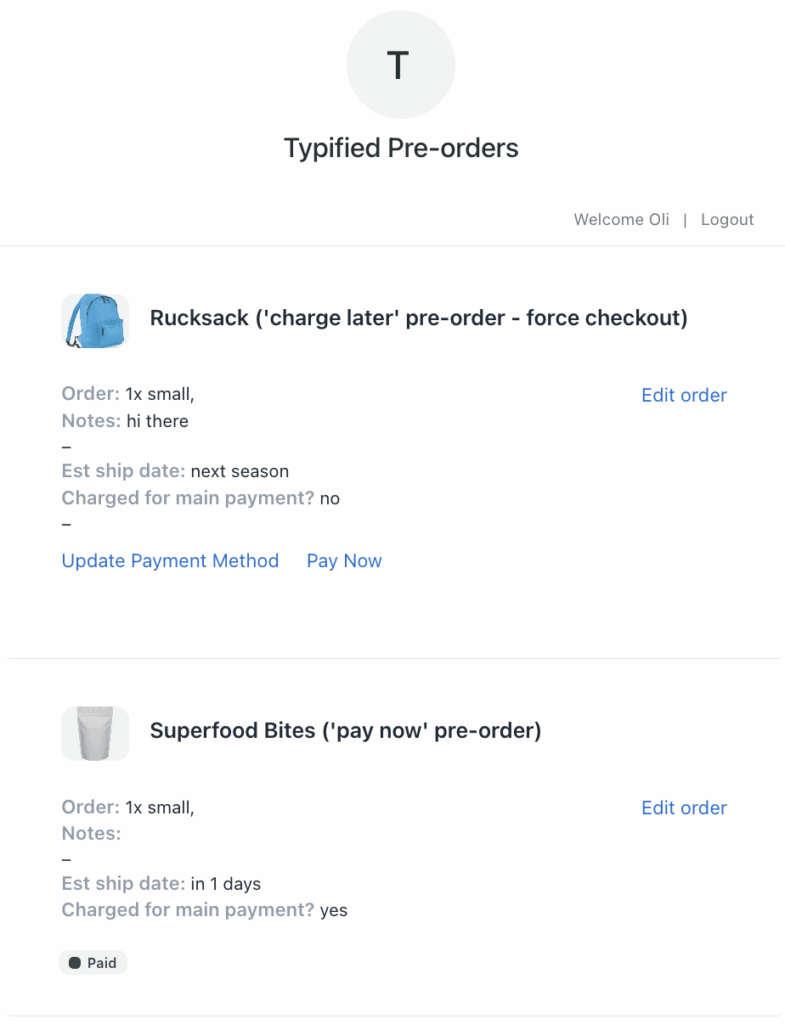
  • Customer portals: Allows customers to view their pre-order and to view shipping updates etc.
  • Comprehensive pre-order settings: Flexible shipping statements, discounts and manage which variants are on pre-order as opposed to buy-now.

Questions to ask yourself before picking a Shopify pre-order plugin

There are many pre-order plugins available in the Shopify app store, so it is important to work out which features from the above section you require. The questions we recommend asking yourself to determine this include:

  • Checking for comprehensive guides/docs for reference when setting up a pre-order campaign, along with helpful plugin support.
  • Checking for customisation and keeping on brand.
  • Is flexible pre-order charging important to you? Or will you shipping pre-orders out quickly?
  • Do you want to double-down on customer communication points, portals, emails, custom wording etc? Or are you more concerned with keeping the buyers journey as simple as possible.
  • What are your requirements in terms of business needs and size, if you have a small business you may not need an plugin that allows you to list hundreds/thousands of products with deep ERP integrations, but communication and flexibility may be important to you. If you have a business with many SKUs/product you may need a pre-order plugin that allows you list thousands of products, with automation functionality.

This article will analyse the current best Shopify pre-order Shopify plugins available on the app store, and recommend the best pre-order plugins based on 3 categories; Free, Beginner Friendly and Premium/comprehensive.

Top pre-order plugins

Premium/comprehensive pre-order plugins

PreProduct next‑gen pre‑order


Obviously as this is our plugin, we are biased, but we do believe it is the best pre-order plugin available in the Shopify app store.

PreProduct lets brands capture pre-orders for upcoming product launches at any point in the new product cycle, along with listing out-of-stock products for pre-order, so you don’t miss out on sales.

There are many amazing functions and features available in PreProduct, with a few of them listed below.

PROS:

  • Communicate via custom front-end wording, customer portals and an email campaign.
  • Full customisation available for pre-order button, wording/messaging, email campaign.
  • Charge when ready; pay-later, pay-now & deposit-based (partial payment option) pre-orders supported
  • Capture only pre-orders allow you to gauge customer interest
  • Offer pre-order discounts
  • Deferred charges let customer’s approve a future payment in advance
  • Fulfilment holds stop premature fulfilment.
  • Accept mixed-carts or opt in to isolating pre-orders in their own carts/orders.

Notify! Back in Stock|PreOrder


Pre order with partial payment for presale products. Send auto restock alerts to waiting lists.

PROS:

  • Customization options, such as personalized email templates and product variant selection for back in stock notifications
  • Get reports about lost sales and revenue recovered with reminders to convert.

DC Pre‑orders | Preorder NOW


DC Preorders simplifies pre-orders, backorders, and B2B pre-sales.

PROS:

  • Manage inventory levels easily & handle complex ordering scenarios
  • Offer flexible preorder purchase options – pay later, deposits & partial payment

Beginner friendly pre-order plugins

EZ PreOrder: Presale Manager


Start accepting pre orders on any products regardless of inventory levels, all with one click.

Unlimited pre-orders for $5 per month, for bulk listing functionality it is $10 per month.

PROS:

  • 3 pre-order rules based on inventory.
  • Easy to view all of your pre-orders, sort by fulfilment status and see order total.

Preorder Wolf | Pre order now


Preorder Wolf lets you accept orders for products you don’t have at hand right away. While setting the correct expectations with your customers regarding when will they get their order. You can enable Preorders for specific products/variants, Collections or All Products.

PROS:

  • No Coding required, 24/7 quick and professional support.
  • Effective pre-order functionality, easy setup, and customization options.

Pre-order NOW WOD


Ideal for print-on-demand stores, this tool lets you gauge interest in new designs without inventory risk, manage demand surges with ease, and offer exclusive discounts for preorders.

PROS:

  • Easy to use, with seamless integration and customization options.
  • Replace out-of-stock products with pre-order buttons, enhancing inventory management and pre-order conversion rates.

Free pre-order plugins

At the time of writing, we’re testing a commission-only plan for PreProduct where you don’t pay anything unless you successfully receive paid pre-orders.

Timesact Pre order Notify Me Pre‑Order 


Timesact helps you easily toggle between between in-stock and pre-order offerings for your customers.

The plugin offers the FIRST 10 presale orders for free.

PROS:

  • 24/7 support to help you get set-up quickly
  • Save time by turning pre-orders & restocks on/off based on inventory levels
  • Build hype with countdown timers on coming soon, drops, pre-sales & restocks

PreOrder Globo | Back in Stock


Merchants value this plugin for its reliable pre-order and out-of-stock notification features, along with customization options and pricing flexibility.

First 10 pre-sales FREE, so allows you test out using pre-orders and see if it is beneficial for your business.

PROS:

  • The support team is recognized for their efficiency and responsiveness.
  • Easy to configure pre-orders based on inventory, date time start/end preorder.

Appikon – Pre-order


Automatically create waitlists or pre order lists for sold out, out of stock, and coming soon products.

It’s ideal for new businesses, offering a free plan for the first product.

PROS:

  • The plugin swaps Add-to-Cart buttons with Pre Order buttons so very simple to set-up with a very user-friendly interface.
  • Create preorders & waitlists to sell more “coming soon” & “out of stock” items.

Summary

In this article we have discussed what a pre-order is and the many features that pre-order plugins will offer.

We then looked at the questions you need to answer regarding the needs of your business, your business size, your specific use case situation, in order to determine which Shopify plugin will best meet your needs.

After this, we explored some of the currently available options on the Shopify app store, breaking them down by three categories: Premium/comprehensive, Beginner friendly and Free. We recommended our top three plugins for each of these categories.

Hopefully this article has been helpful for deciding which pre-order plugin to move forwards with. As a general rule, experimenting by putting a test product on pre-order first before rolling out anything to customers will ensure you’re comfortable with your chosen solution before going live and can iron out any issues.

If you have any outstanding questions/concerns, feel free to leave a comment below or email me personally: eliza(at)preproduct.io

Pre-sell With PreProduct

7 day free trial with all plans

Pre-orders for Sustainability: Mastering Made-to-Order Sales Through Shopify

Introduction

Before we get into pre-orders for sustainability, some quick stats: Did you know that the fashion industry is responsible for approximately 10% of the world’s carbon emissions? That’s a significant chunk, considering it includes everything from making clothes to shipping them and eventually getting rid of them. The quick and constant turnover of trendy items in the fast fashion world is a big part of the problem, leading to more waste and environmental harm. This is effecting buyer behaviour; According to a survey from McKinsey & Co., 66% of all respondents and 75% of millennial respondents say that they consider sustainability when they make a purchase.

The concept of sustainability in fashion and online retail revolves around adopting practices that prioritize environmental, social, and ethical considerations throughout the entire supply chain and product life cycle.

I am Eliza, a co-founder at PreProduct, which is a pre-order app for ecommerce brands where I work on many fashion and made-to-order pre-order campaigns.


Made-to-order production provides a more responsive and sustainable approach to fashion manufacturing, addressing issues related to overstocking, heavy discounting, and the disposal of excess stock into landfills. It aligns production with actual demand, reduces waste, and promotes a more environmentally and economically viable business model.

Pre-orders serve as a mechanism in e-commerce to effectively implement a made-to-order model. Pre-orders allow for demand forecasting, customization options, cash flow management, and production efficiency, as they allow you to take order interest upfront reducing the risk of over or under supply, along with reducing wastage.

Shopify is one of the leading e-commerce platforms that enables individuals and businesses to create and manage online stores. I will be focusing on it for the article, as it’s the go-to solution for online fashion brands today.

The Rise of Sustainable Fashion

Consumers

Sustainable fashion is about creating, making, and wearing clothes in a way that thinks about how it impacts the planet, people, and communities at every step of the process. The goal of sustainable fashion is to minimize the negative effects associated with the fashion industry, which traditionally has been resource-intensive, environmentally damaging, and sometimes associated with poor labor practices.

A survey of 10,281 global consumers showed that 78% of consumers feel that sustainability is important and that 55% of consumers are willing to pay more for eco-friendly brands

Consumer trends towards sustainability and ethical consumption have become increasingly prominent, reflecting a growing awareness and concern about the environmental and social impact of products. This shift in consumer behavior is noticeable at various levels, including individual purchasing decisions, industry practices, and global business strategies.

Consumers are more informed about environmental and social issues related to the products they buy. This awareness is being driven by social media, online platforms, and awareness campaigns by environmental and ethical organizations.


Industry

There is also a rising demand for transparency in supply chains. Consumers want to know where and how products are made, whether fair labor practices are followed, and the environmental impact of the production process. This has led to an increase in companies providing detailed information about their sourcing and manufacturing practices.

Whilst this has been going for quite a while already, it shows signs of growing to even more front-of-mind. This rundown on Gartner’s top trends for 2023 describes sustainability as one of the technologies that will drive disruption and opportunity over the next five to 10 years.

The popularity of brands with a strong commitment to sustainability and ethical practices has grown. Consumers are actively seeking out and supporting companies that prioritize these values, leading to the rise of eco-friendly and socially responsible brands.


Some examples of exciting sustainable focussed fashion brands include; Alohas (the Spanish footwear brand that works to an on-demand business model meaning they never over-produce and only make what is actually needed, Aligne (a womenswear brand that focused on using conscious materials and using ethical factories) & Riley Studio (Gender-neutral clothing made from waste materials and natural fibres. On a mission to change mindsets and make conscious consumerism the norm).

https://www.alohas.io/products/manhattan-black-sandal?variant=37680289546433

Pre orders for sustainability

Pre-orders work by allowing customers to reserve and purchase or commit to purchase a product before it is officially available.

Stages of pre-orders

  1. Customer clicks a pre-order button
  2. Customer chooses variant/quantity and is redirected to cart/checkout where they are charged or accept a future charge (depending on the pre-order type)
  3. Customer receives optional confirmation email.
  4. Time…
  5. If …
    • Charging upfront, brand releases fulfilment. Customer receives an optional shipping email, and brand ships the pre-order item.
    • Charging later, brand triggers deferred charge. Customer receives optional upcoming charge email, after a delay the customer’s card is charged.
  6. Campaign cycle
    • If you’re a made-to-order brand, you might operate a perpetual pre-order campaign. Which is to say; constantly taking new pre-orders and fulfilling existing ones.
    • For a more standard model fashion brand that plans to pre-sell ahead of time and have a limited quantity or order might be more of a one-off campaign. i.e. taking pre-orders for a set amount of time before stock arrives, then fulfilling all pre-orders together.

Whether you’re an independent merchant, boutique or larger fashion brand, made-to-order can dramatically reduce your excess stock. Meaning zero (or close to it) stock has to go to landfill.


Benefits of pre-orders for both consumers and businesses

Benefits to merchants

  • This strategy for sustainability doesn’t impact how your products are designed, made or sourced; meaning it can be one of the easier ways to increase your brands sustainability.
  • Leading on from the above point, sustainability via pre-orders is a lot cheaper than a product audit and overhaul. It can also be better for cashflow, due to receiving purchases upfront or when you’re ready to ship.
  • A low risk tactic for reaching your sustainability targets. We recommend experimenting with a pre-order campaign for an upcoming product first. Once you’ve iterated on your pre-order setup and standard-operating-procedure, you can then roll pre-orders out on a larger scale.

Benefits to consumers

  • Customers can buy from one of their favourite brands (you!), whilst feeling good about their purchasing decision.
  • By purchasing from a business who is using pre-orders to be more sustainable there will be a reduction on the environmental impact associated with unnecessary production, as well as a lower carbon footprint.
  • Modern pre-order technology like PreProduct allows for more flexible types of pre-orders, for example charge-later pre-orders, where the customers card is ‘vaulted’, meaning they’re only charged when you’re ready to ship.
  • Being able to participate on a less abrupt buying journey. Emailing pre-order customers to keep them in the loop and communicate how their purchase is coming along is a great way to build brand affinity. You can see this dynamic with Kickstarter campaigns; backers love following along with the journey.


Integrating & setting up Pre-orders with Shopify

Step-by-step guide on setting up a pre-orders on Shopify

  1. To get started and set up pre-orders on Shopify, visit the Shopify App Store and search for “pre-order”, then select the app you wish to install (surprisingly, we recommend PreProduct).
  2. Once you have located the app, click on it to access the app listing page, and then select the “Add app” option.
  3. To grant the app access to your Shopify admin account, click “Install app” and authorize its use.
  4. Integrating the App with Your Storefront: We have an in-depth guide on the installing a pre-order app here and would absolutely recommend reaching out to customer support if you’re at all uncomfortable with HTML/Liquid coding.
  5. If you have a Shopify “store 1.0” theme, then you’ll need to add a snippet to your online store’s product page theme file. For themes from 2022 onwards, the introduction of Shopify 2.0 themes means that app blocks can now seamlessly integrate into the Shopify admin’s drag-and-drop theme customizer.

Listing Pre-orders on Shopify

Once you’ve completed the above steps to integrate the app with your Shopify storefront, you can now start listing products for pre-orders. Begin by listing a product in your selected pre-order app. Most if not all pre-order apps sit on top of your existing Shopify product listings. Once listed in the app, the pre-order product page’s cart button text should be replaced with a pre-order version, accompanied by any other front-end additional information, i.e. special pre-order messaging.

You will need to decide which type of pre-order to use (as explained below), along with the shipping time frame and whether to offer any discount. The general pre-order types are:

  • Charge upfront pre-order – 100% charged upfront (Most apps will offer this).
  • Charge Later pre-orders – 100% charged later when you trigger the charge.
  • Deposit-based pre-orders – A percentage paid upfront, with the outstanding charged later.
  • Capture-only pre-orders – A payment link is sent once you’re ready to send customers through your payment gateway.

Besides the terms of payment for your pre-order listing, there are many other other useful features available that are worth considering before you choose an app to go forwards with.

  • Listing specific variants
  • Setting max pre-order limits for variants
  • Early bird discounts that are exclusive to pre-orders
  • Custom text in and around the pre-order button
  • Email campaigns to keep customers in the loop with their pre-order
  • Isolating pre-order items from buy-nows in orders
  • Fulfilment holds so items aren’t prematurely pushed to your shipping/ERP platform
  • Automatic listing of out of stock products for pre-order
  • Automatic charging of pre-orders as stock comes in
  • And many more!

Marketing Your Made-to-Order Products


When marketing made-to-order products, ensure you highlight the unique aspects of customization, personalization, and the tailored experience. Below are some of the strategies to consider including;

  • Emphasize Customization: Highlight the ability for customers to customize their products according to their preferences. Showcase the range of options available, whether it’s color choices, materials, sizes, or features.
  • Tell a Unique Story: Craft a compelling narrative around the made-to-order process. Explain the craftsmanship, attention to detail, and the personalized journey each customer undergoes when ordering a product.
  • Educate on the Process: Provide transparent information about how the made-to-order process works. Explain the steps involved, the craftsmanship behind it, and the benefits of choosing a personalized item over mass-produced alternatives.
  • Limited Edition Releases: Create a sense of exclusivity by framing made-to-order products as limited edition releases. This can evoke a feeling of uniqueness and urgency, encouraging customers to place orders promptly.
  • Social Media Engagement: Leverage social media platforms to showcase the customization process, share behind-the-scenes glimpses of craftsmanship, and engage with your audience through polls, Q&A sessions, or live videos.
  • Adopt a more boutique look and feel: Reflecting an environmentally conscious, “human” business through storytelling and additions like optional staff tips at checkout can all be ways to create a more compelling offering.
  • Utilize Email Marketing: Build an email marketing campaign to nurture leads and inform customers about the benefits of made-to-order products. Include visuals, success stories, and exclusive offers to encourage conversions.

Pre-order and made-to-order product launches can unlock a whole new set of strategies for marketing:

  • Launching your product more than once. Once when you open pre-sales, then once when it’s in stock.
  • Having multiple sales pushes for your made-to-order products as sales/stock goes up and down. There are many artists that are really effective with this approach, for example Kimmy Hogan an Australian print and ceramic designer will often post multiple times a week as new editions become available or are pre-released.

Case Study: Frahm Jackets

  • Frahm is a UK men’s jacket company, that focuses on high quality and timeless style.
  • Frahm uses a pre-order process, to ensure they are not left with excess stock, as over buying impacts the quality they can product. Each jacket design is only made once a year, every year, so if you place a pre-order with them before they have placed their order with the factory then you are guaranteed your choice of size and colour.

https://frahmjacket.com/collections/jackets/products/ripstop-puffer-jacket-2024

Overcoming Challenges in Pre-order and Made-to-Order Models

Potential challenges you may experiences when using pre-order and made-to-order models include;

  • Production timing issues – if you experience any production delays or inventory management issues, ensure you keep customers up to date. This can be done by email, as well utilising the customer portal both should be available in the pre-order app you choose to use. Clear communication about expected delivery dates is crucial to managing customer expectations, as is setting realistic delivery timelines to avoid over-promising and under-delivering.


  • Quality control – is crucial as products are often produced based on individual customer specifications. Consistency is key. Similar to product timing issues, ensure customers are kept informed of any changes.


  • Cancellation and returns – customers might cancel orders, leading to revenue fluctuations and potential inventory management challenges. Ensure you have a refund/cancellation policy that you are happy with and works for your business.
  • Cash Flow Management – the production process often requires upfront costs, therefore managing cash flow becomes crucial as expenses may need to be covered before revenue is generated. Therefore is very important to choose the type of pre-order that will work for your business.

If it is your first time using pre-orders, and you feel apprehensive about the process, and have any doubts on production timings/fulfilment, we would recommend starting with charge-later pre-orders to begin with so that you’re not charging any money upfront; generally customers will be much more tolerant of delays when they haven’t paid anything yet.

Conclusion

This article has highlighted that there are many benefits of using pre-orders for sustainability, including;

Reduced Overproduction:

  • Pre-orders allow you to gauge customer demand accurately. By producing items based on confirmed orders, the risk of overproduction is significantly reduced. This helps in minimizing excess inventory, which can be wasteful and environmentally harmful.

Resource Efficiency:

  • With pre-orders, resources such as raw materials and energy are used more efficiently. Manufacturers can plan production based on actual demand, optimizing the use of resources and reducing the environmental impact associated with unnecessary production, this will also contribute to a lower carbon footprint.

Extended Product Lifecycles:

  • Pre-orders can contribute to the creation of products that are more timeless and have longer lifecycles. Instead of following fast fashion or other trends that lead to rapid product turnover, pre-orders can encourage the production of durable and lasting goods, reducing overall waste.

Financial Stability for Sustainable Investments:

  • The cash flow generated through pre-orders can provide financial stability for your business, allowing you to make long-term investments in sustainable practices.

We strongly encourage businesses to look into and adopting these practices for a more sustainable future in retail. If you find pre-orders intimidating, we recommend merchants start with a single product as an experiment and use a ‘charge-later’ strategy so that you’re not charging customers until you’re comfortable.

Pre-orders for Sustainability FAQ

Pre-orders help in reducing overproduction, which is a major issue in the fashion industry. By producing only what is pre-ordered, brands can minimize waste and reduce their environmental footprint. This approach ensures resources are used more efficiently, leading to a more sustainable production process.

How do pre-orders actually contribute to sustainability in fashion?

Absolutely! Shopify’s platform is user-friendly and scalable, making it ideal for brands of all sizes. Pre-orders can help small or emerging brands manage inventory more effectively, reduce upfront costs, and build a customer base interested in sustainable fashion.

Can implementing pre-orders on Shopify be beneficial for small or emerging fashion brands?

Common challenges include managing production timelines, setting realistic delivery dates, and maintaining customer communication. To overcome these, plan your production schedule carefully, set clear and transparent communication channels with your customers, and use Shopify’s tools to keep track of orders and inventory efficiently.

What are the key challenges I might face when setting up pre-orders on Shopify, and how can I overcome them?

Leveraging social media, creating email marketing campaigns, and engaging in storytelling about your brand’s commitment to sustainability are effective strategies. Also, consider offering exclusive perks for pre-order customers, like early access to new products or special discounts.

Are there any specific marketing strategies that work best for promoting pre-order campaigns on Shopify?

Transparency is key. Keep your customers informed about the status of their orders. If delays occur, communicate them promptly and offer options like order modifications or cancellations if needed. Building trust through clear communication can turn a potential negative experience into a positive one.

How can I ensure a positive customer experience with pre-orders, especially when there are delays?

Pre-sell With PreProduct

7 day free trial with all plans

Best practises for pre-selling a limited edition on Shopify

Introduction

Pre selling a limited edition on shopify refers to the release of products/variants in a restricted quantity, for a specified period or both. A limited drop can be used in many situations, such as for highly collectable item/s, for coveted items, for items that have only a small supply, and for products that have a large lead time.

There are many benefits that a company can see by offering limited drops of a product on Shopify, such as increased sales, creating brand loyalty, fostering growth and community as well as reducing financial risk and assisting overall business success.

The below article will discuss pre-selling a limited edition on Shopify, and the best practises for a successful campaign.


Limited edition shoe drop

Preparing for a limited edition drop

Building hype and anticipation

  • Marketing and promotion of your limited edition product is imperative for success. Companies often use limited edition drops as a marketing strategy to generate buzz, build anticipation, and drive sales.
  • Limited Editions in e-commerce offer several appealing aspects that can attract and engage customers. Limited editions imply scarcity, which can create a sense of urgency. The fear of missing out can drive people to make a purchase sooner rather than later, increasing the likelihood of a sale.
  • Limited editions are also often designed to be unique or exclusive, providing customers with a product that not everyone can have. This exclusivity can make customers feel special and privileged, enhancing their perception of the product. Offering limited edition via pre-order, can allow your customers to place their order and secure the product before it is available.
  • The use of weekly drops or monthly drops in small batches can also help with the buzz around your ecommerce brand.


Optimizing your Shopify store for limited edition drops

  • There are a few technical and strategic tips we recommend when setting up your Shopify store for limited edition releases.
  • One product page optimization that can be really effective is the use of a countdown timer. This is an app/widget that allows you to set a specific amount of time and counts down towards the moment your drop goes live (or is available for sale). The countdown timer typically displays the remaining time in hours, minutes, and seconds.
  • Another product page optimization is the use of a waitlist. Waitlist software can manage and automate the process of creating and managing customers who sign up to hear about new release or out of stock products. It will allow you to embed a section on your website to collect potential customers email and other details, which you can then use to advise customers when the product is released.
  • Using a pre-order app can be a good way to go and will also allow you to collect pre-orders in advance before the product is available, allowing you to manage customer expectations and charge on your terms (whether that be charging upfront when the pre-order is placed, collecting a deposit, or charging the full amount at a later date when you are ready).
  • Email newsletters/SMS broadcasts as well as updating information on your website can all be helpful to promote and communicate to customers when the limited drop will be released. Here you can also explain why the new drop is special/unique and create a buzz around the new product.
  • One trick for SEO and Google ranking is to launch the landing page in a ‘placeholder’ state weeks/months before the drop goes live. This is a way to give Google a chance to rank the page ahead of you promoting it and starting to take sales.


Leveraging social proof and scarcity

  • Both the psychology of scarcity and social proof plays a significant role in influencing consumer behavior and can be powerful tools to boost sales. Limited drops are a perfect situation to put some of these dynamics to work.

Scarcity:

Scarcity is the principle that limited availability increases perceived value. When something is perceived as scarce or in short supply, people tend to assign it higher value and are more motivated to acquire it. Here’s how scarcity influences consumer behavior:

  • Urgency and FOMO (Fear Of Missing Out): Scarcity creates a sense of urgency, triggering the fear of missing out. Consumers are more likely to make a purchase when they believe the opportunity is time sensitive, leading to quicker decision-making.
  • Perceived value: Limited availability often increases the perceived value of a product or service. Customers may feel that they are getting something exclusive or special, which justifies a higher price point.
  • Competitive advantage: Brands can gain a competitive advantage by strategically employing scarcity. Limited editions, time-limited promotions, and low stock notifications are common tactics.

Social proof:

Social proof is a phenomenon in which individuals observe and consider the actions and behaviors of others as a guiding influence on their own decision-making processes. When individuals see that others are engaging with a product in a positive manner, they are more likely to purchase said product. Here’s how social proof contributes to boosting sales:

  • Trust and credibility: Positive reviews, testimonials, and user-generated content create a sense of trust and credibility. When potential customers see that others have had a positive experience, they are more likely to trust the brand and make a purchase.
  • Influence on decision-making: Our decisions are often influenced by the behavior of those around us. If a product is popular or endorsed by either someone the potential customers trust or a significant number of people it signals to potential customers that it’s a worthwhile choice.
  • Reducing uncertainty: Social proof helps reduce the perceived risk of making a purchase. When individuals see that others have successfully used a product, it minimizes uncertainty and increases confidence in their own decision.
  • Word-of-Mouth marketing: Positive experiences shared by customers through word-of-mouth or online reviews can serve as powerful marketing tools. Recommendations from friends, family, or online communities carry significant weight.


Integrating scarcity and social proof into sales strategies can be highly effective. For instance, presenting a product with limited availability and emphasizing its positive reviews not only creates a sense of urgency but also strengthens trust and credibility.


Capturing pre-orders

Pre-orders are where a store allows customers to reserve and purchase a product before it is officially in stock or available for general sale. This approach serves multiple purposes, including gauging interest, and generating buzz.

Here’s how pre-orders can achieve these objectives:

Gauging demand:

  • Early interest measurement: Pre-orders provide a tangible way to measure initial interest and demand for a product.
  • Market validation: A high number of pre-orders can validate the market appeal of a product. It helps brands ascertain whether there is a sufficient customer base willing to commit to a purchase before the product is physically available.
  • Inventory planning: By gauging interest through pre-orders, brands can also make more informed decisions about how much inventory to produce for future releases to limit waste and optimize supply chain management.

Generating excitement:

  • Anticipation and buzz: The concept of pre-orders creates anticipation and buzz around a product. It allows businesses to build excitement by highlighting features, benefits, or exclusive offerings associated with pre-orders.
  • Exclusive incentives: Offering exclusive incentives for pre-orders, such as early access, special pricing, or limited-edition bonuses, adds a feeling of excitement. Customers feel a sense of privilege and exclusivity by being among the first to acquire the product.
  • Marketing opportunities: Pre-orders provide a natural opportunity for marketing campaigns. Brands can utilise the period leading up to the official release to engage with their audience, share teasers, and create a narrative around the product. They also let you effectively launch twice; once when pre-sales go live and once when buy-now sales do.
  • Customer engagement: The pre-order phase encourages customer engagement as potential buyers express their interest and commitment. This engagement can extend to social media, reviews, and discussions, further increasing the product’s visibility.
  • Building brand loyalty: Customers who participate in pre-orders may develop a stronger connection with the brand. Their early commitment reflects a level of trust and loyalty, especially if the pre-order experience is positive and seamless.


Implementing a limited drop on Shopify

Setting up product listings in Shopify (step by step guide)

  • Step 1: Go to the Products section on your Shopify Admin.
  • Step 2: From the Products page, click Add product.
  • Step 3: Add a Title (include limited edition statement)
  • Step 4: Include a Description (ensure you include further information about the limited edition drop)
  • Step 5: Add Images.
  • Step 6: Include Pricing.
  • Step 7: Enter your Inventory.
  • Step 8: Add Shipping Details.
  • Step 9: Enter Variants.

Using a pre-order app to run limited edition drops

As mentioned previously using a Pre-order app can be beneficial when running limited edition campaigns.

To initiate the process of setting up pre-orders on Shopify, begin by navigating to the Shopify App Store. Perform a search for “pre-order” and choose the desired app for installation.

After identifying the app, click on it to access its listing page, and opt for the “Add app” selection.

Grant the app permission to access your Shopify admin account by clicking “Install app” and providing authorization for its use.

Next you will need to integrate the app with your theme, the app you choose should provide step-by-step instructions.

Once the app is integrated, you will be able to now list the limited edition product/s for preorder in your chosen app. You will be able to choose what kind of preorder to offer based on what will best suit your specific online shop. Options include; Charge later, Charge up-front or Deposit based. You will be also able to add additional information/messaging regarding the product being a limited edition drop etc.

After listing the product in the app, the pre-order product page’s cart button text should be replaced with a pre-order button.


Managing inventory

  • Accurate inventory management is crucial for the overall success and efficiency of a business. Here are several reasons highlighting the importance of maintaining accurate inventory:
    1. Meeting customer demand:
      • Accurate inventory levels ensure that products are available to meet customer demand. This helps prevent product being out of stock, backorders, and unhappy customers who might turn to your competitors if the desired products are not available.
    2. Optimizing stock levels:
      • Efficient inventory management allows brands to optimize stock levels. Maintaining the right amount of inventory helps prevent overstocking and under stocking.
    3. Cost control:
      • Accurate inventory management contributes to cost control. Overstocking ties up funds in unsold goods, while understocking can result in a reduction in sales/revenue.

Who does it best? Learning from past successful limited edition drops

Case studies

Below are some examples of brands who have successfully used limited edition drops to sell more, and increase revenue.

Supreme

  • Supreme, a streetwear brand, regularly releases limited edition clothing items. The scarcity of these products, combined with strategic collaborations and unique designs, has made Supreme a highly sought-after brand. Their limited drops generate significant hype and often sell out quickly.

Air Jordan

  • Nike and its subsidiary, Jordan Brand, are well-known for their limited edition sneaker releases. The Air Jordan line often features exclusive colorways, collaborations with artists and designers, and limited quantities. This strategy has helped create a devoted sneakerhead community and maintain high interest for their products.


Fenty Beauty

  • Rihanna’s Fenty Beauty brand has achieved considerable success through the strategic use of limited edition drops. The brand consistently releases distinctive collections and engages in collaborations with influencers and celebrities, cultivating an aura of exclusivity that captures consumer attention.


Maximizing revenue with limited edition drops

Pricing strategies

Pricing plays a crucial role in creating perceived value and exclusivity for products and services. The way a product is priced can significantly influence consumer perceptions, shaping their opinions about the quality, exclusivity, and overall value of what is being offered.

Here are key aspects of the role of pricing in establishing perceived value and exclusivity:

  • Limited edition pricing:
    • Products released as limited editions often come with a premium price. The scarcity of these items, coupled with the notion that they are unique and exclusive, justifies a higher cost. If utilising limited edition drops, then it makes sense to also implement limited edition pricing as this contributes to the perception that the product is a rare and highly desired possession.
  • Premium pricing for exclusivity:
    • Setting your prices at a higher rate can assist in creating a the feeling of exclusivity and high quality. Consumers often associate a higher price with better craftsmanship, materials, and overall product excellence.
  • Pricing tiers and tiered offerings:
    • Offering different pricing tiers allows brands to more efficiently capture value from their various customer segments. By providing more premium or exclusive versions of a product at a higher price, companies can appeal to consumers seeking a more elevated experience or additional features.


Upselling and cross-selling

Utilising upselling and cross-selling (using an app like Adoric) during a limited edition drop can be very potent and result in increased purchases and revenue. Below are some steps to ensure you effectively utilise upselling and cross-selling;

  • Create bundles or sets:
    • Bundle the limited edition item with related items, creating sets that offer additional value. For example, if the limited edition product is a clothing item, offer a bundle with matching accessories or complementary items. Clearly communicate the value of purchasing the set.
      You can even use a combined listings app like LinkedOption to offer many Products from the same page without bundling them.


  • Strategic product placement:
    • Display related items prominently on the product page of the limited edition item. Use visually appealing layouts and compelling copy to draw attention to the complementary items. Highlight the benefits of purchasing the additional items alongside the limited edition product.
  • Limited-time promotions:
    • Introduce time-sensitive promotions for related products during the limited edition drop. For example, offer a discount on a second item if purchased within a specific timeframe. This creates a sense of urgency and encourages customers to make additional purchases.
  • Personalized recommendations:
    • Leverage customer data and artificial intelligence to provide personalized recommendations. Tailor product suggestions based on the customer’s purchase history, preferences, and browsing behavior. This enhances the relevance of upsell and cross-sell offers.


Summary

Limited edition drops can be a very effective strategy for Shopify store owners. They can be used for many different types of products, allowing merchants to create hype, boost revenue and launch with a splash.
In this article, we explored proven strategies that can elevate the success of your upcoming limited edition launch. If there’s any we’ve missed, please reach out as we’d love to hear them.

Limited edition FAQ

Yes you can use Shopify for limited edition clothing drops, you can either run these normally via your usual product template, or you can choose to use a pre-order app to assist you in running the campaign.

Can you use Shopify for limited edition clothing drops?

Limited editions tend to have a higher demand, due to their perceived exclusivity and the fear of missing out.

Do limited editions sell more?

Yes we highly recommend the use of pre-orders for a limited edition release, in particular the utilisation of a pre-order app.

Can I use pre-orders for a limited edition?

Yes limited editions work, by leveraging scarcity and social proof they can build hype and excitement.

Do limited editions work?

Limited editions can increase sales, establish brand loyalty, foster growth and community as well as reducing financial risk and assisting overall business success.

What are the benefits of limited editions?

Pre-sell With PreProduct

7 day free trial with all plans

Boosting Your Sales with a Shopify Waitlist App

Shopify waitlists are software applications or platforms that are designed to help merchants handle product and variant waitlists, and send stock alerts to customers when items are back in stock. They can also be used for pre launch, to generate buzz, grow demand and capture potential leads.
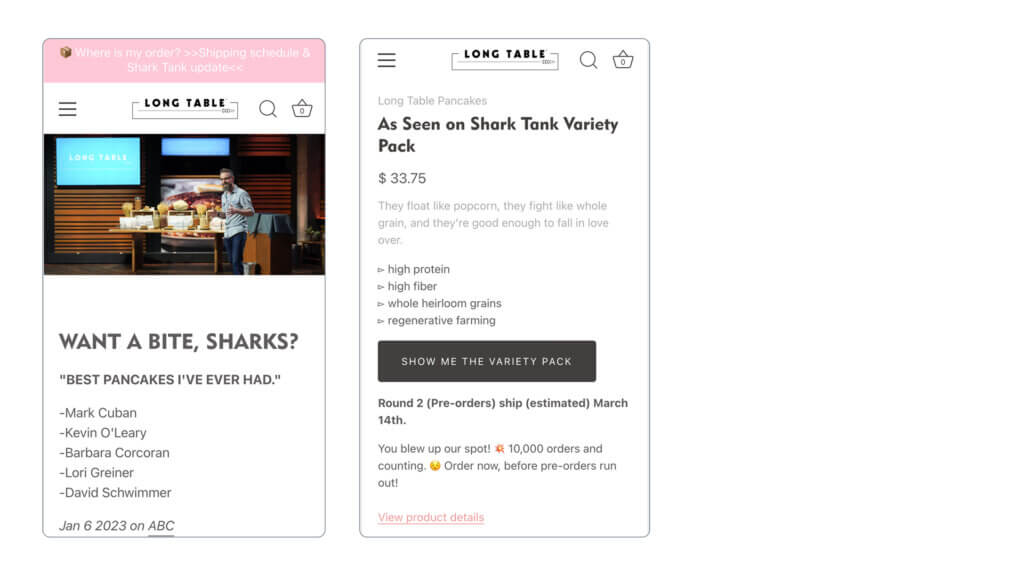
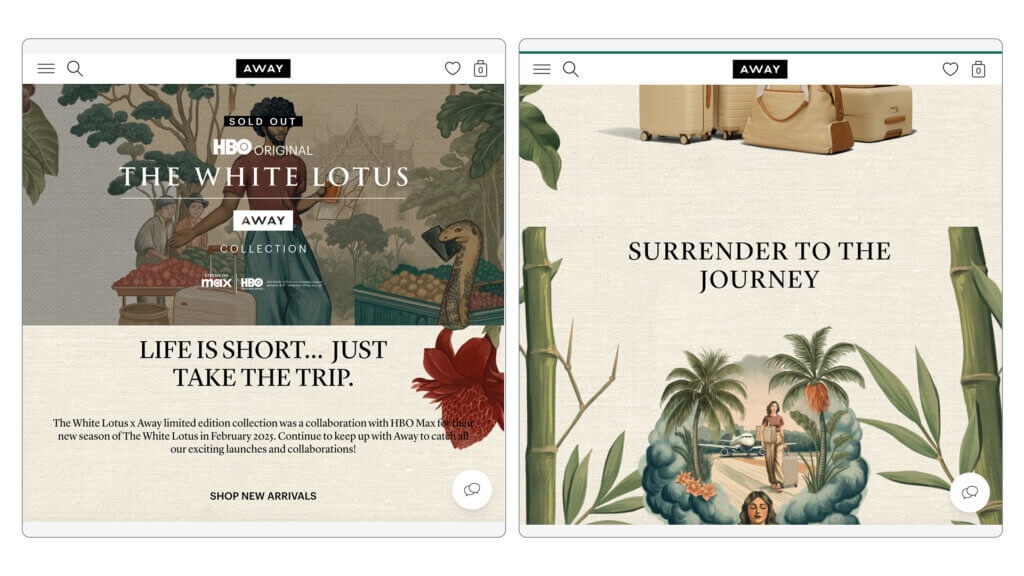
You can improve inventory management as well as boost sales by collecting a list of interested customers prior to receiving stock.

This guide will explain the reasons you might implement a Shopify waitlist, as well as how to make sure it’s successful. We’ll also touch on how to choose an app and how to set it up.


Key Takeaways

  • A Shopify Waitlist can help Shopify stores grow their customer base, increase customer loyalty, manage inventory and drive sales growth. It can also be a useful technique for a new product launch.
  • Selecting the right app is essential.
  • Implement a waitlist strategy that can be improved and optimised over time. To do this you’ll need to setup integrations with your main email marketing tool, so you can leverage segmentation and personalization strategies.

The Power of Waitlists for Your Shopify Store

Waitlists can be a win-win addition to your Shopify store, if you’ve currently got live out-of-stock product pages on your storefront. By letting customers know when their chosen products come back in stock, you’re marketing to the ‘converted’, and this can encourage customers to complete a purchase.

Customer Retention and Loyalty

Waitlists are a great way to nurture loyal customers, increase customer satisfaction and retention. When products are unavailable, customers can join the product waitlists in order to get early access when it returns into stock. This sense of special treatment from early access, can help sales increase and by streamlining the waitlist experience, casual shoppers may be more inclined to purchase.

Inventory Management

Waitlists can be great tool by providing valuable data on your Shopify store products which aids in making informed choices for inventory management as well as product selection.

By reviewing this valuable data, you will be able to understand highly requested products better so they can be properly stocked according to demand.

This ensures there won’t be any overselling issues as well as preventing frustrating shopping experiences for buyers or inadvertently training shoppers to look elsewhere. Having a soundly-managed stock flow has the power to heighten customer commitment plus increase overall profits too.

Through more advanced techniques like referral marketing you can motivate individuals to recommend products to their friends, by offering them an exclusive incentive, such as securing a prime spot at the head of the waiting lists.

Sales optimisation and capturing intent

Waitlisting can be an important factor to help increase sales. Allowing customers to join waiting lists for out-of-stock items, as well as for new products pre-launch, is a huge buying signal. And one that you can and should take advantage of. Collecting customer interest will allow you to specifically market towards these potential customers, growing hype and converting this interest into sales, as well as assisting you to grow your customer base.


Choosing the Right Shopify Waitlist App

The Shopify app store has many different Shopify waitlist apps available for Shopify store owners. So when deciding which app to utilise for your Shopify store, it’s important to look into features, pricing and user reviews.

Essential Features

When you analyze a Shopify waitlist app, it is vital to ensure it has the following essential features:

  • Customer registration – Easy registration process for customers to join the waitlist, that captures all the details you need.
  • Notifications – Automated notifications via the method you choose (email, sms etc).
  • Customer engagement – Marketing features to allow you to engage with customers, and generate excitement.
  • Analytics and reporting – Insights into customer behaviour and preferences for better decision-making regarding future product selection.
  • Customization options – Important to allow you to customize the join waiting list button as well as the notifications/emails sent to customers.

Pricing and Reviews

When selecting a Shopify waitlist application, cost is an an important factor and one that can indicate to you the the level of support and extent of the features the app may offer.

App reviews also offer insight on the quality of service and other stores experiences using the app as well as positive and negative aspects of the app, so you can make an educated decision about which waitlist app best suits your Shopify store.


Top Shopify Waitlist Apps to Boost Sales

For merchants seeking to boost sales and improve inventory management, we’ve compiled a short list of some of the top waitlist apps in the Shopify app store that you can utilise in your online store.

Each application provides their own exclusive set of capabilities and benefits – from tracking who’s on your waiting list to automated emails when products become available – meaning it’s really important that stores find which suits them best before investing in any platform.

Appikon ‑ Back In Stock: Overview and Benefits

Appikon ‑ Back In Stock app states that it helps you automatically notify customers when previously out of stock products become available. Highlights of this app includes; Automatic back in stock notifications & back order reminders via email and 100% customizable SMS and Signup form is compatible with all themes.

Krtbite: Back in Stock|Restock

Krtbite: Back in Stock|Restock app states that it creates the out-of-stock & price drop waitlists to see products in demand. Highlights of this app are that they allow alerts/notifications for back-in-stock alerts, price drop alerts, abandoned cart alerts and is also fully customisable.


Setting Up Your Waitlist

Below is a step by step guide for setting up a waitlist app on your Shopify store:

  1. Choose a waitlist app from the app store.
  2. Install your chosen waitlist app: click the “Add app” button on the app’s page in the Shopify App Store. Follow the prompts to install the app on your Shopify store.
  3. Configure the app: access the app from your Shopify admin. Configure the app settings, including appearance, notification preferences, and integration with your store.
  4. Enable product waitlists, in the app settings, specify which products or variants should have waitlist functionality enabled. This is typically done by selecting products in your Shopify product catalogue.
  5. Customize the waitlist: customize the appearance and functionality of the waitlist to match your Shopify store’s branding and design. You can typically adjust colours, text, and notification templates.
  6. Customer sign up and notifications: set up the customer sign-up process. Ensure customers can easily join the waitlist by clicking a button or filling out a form. Configure the notification system to send alerts to customers when waitlisted items become available.
  7. Testing: Thoroughly test the waitlist functionality to ensure it’s working as intended. Place test orders and have friends/family join the waitlist to experience the process from a customer’s perspective.
  8. Promotion and communication: Promote the waitlist feature to your Shopify customers. Use various marketing channels, such as email, social media, and on-site banners, to inform them about the benefits of joining the waitlist.
  9. Monitor and optimize: Keep a close eye on the performance of your waitlist. Monitor customers engagement, conversion rates, and the impact on your sales. Make adjustments based on data and customer feedback.

Managing and Analyzing Shopify Waitlist Data


Monitoring waitlist sign-ups, conversions and engagement with the collected data enables businesses to make informed decisions when it comes to inventory management, product offerings and marketing.

The analysis of this info allows one to identify trends regarding high demand products, enabling companies to adjust their stock levels as well as sales approaches accordingly.

The usage of said data can facilitate more personalized email campaigns designed for particular audiences. This is really powerful when putting together a successful strategy to boost both user interaction and commercial transactions rates.


Leveraging Referral Waitlists

Referral-based waiting lists are an effective way to boost customer loyalty and engagement, while generating new leads.

By incentivizing customers for sharing your products and to invite friends to join the list, you can generate a buzz that attracts potential customers interested in what you offer.

To ensure success of this approach, strategies should be employed to motivate referrals as well as promote the referral program itself.


Integrating Waitlists with Email Marketing Campaigns

One way to engage and encourage customers which will result in more sales is by combining waitlist data with email marketing. Segmenting the subscriber list based on this information gives you an opportunity to personalize emails for your audience, using promotions or updates that are specific and relevant.

Below some of the techniques of segmentation are highlighted and how it can be used in personalized campaigns as well as providing helpful tips on best practices when connecting waitlists with email marketing initiatives, to assist with a seamless integration.


Segmentation and Personalization

Using waitlist information to segment and customize email marketing efforts is an effective way of heightening customer engagement as well as boosting sales.

By distinguishing your customers into smaller categories on the basis of their past activity, interests or place in the queue, you can refine what content reaches each group for maximum resonance. Including details such as a person’s name or favorite product preferences (based on past purchases) enhances engagement with emails resulting in great rewards.

We recommend using an email marketing software (such as Klaviyo) to collate and store all of your waitlist data. Centralized email marketing will allow you to gather and store all subscriber data in one place making it easier to analyze, segment, and use the data to tailor your email campaigns and marketing strategies effectively.

When subscribers are centralized, you can segment your email lists more accurately. This enables you to send targeted and relevant content to specific groups of subscribers, increasing engagement and conversion rates.

Centralized email marketing services often provide comprehensive analytics and reporting, giving you a unified view of email campaign performance. This can be beneficial for making data-driven decisions.

Best Practices for Email Marketing with Waitlists

For successful email marketing with waitlists, it’s essential to comply with relevant regulations such as CAN-SPAM Act and GDPR.

To help maximise sales conversions from your waiting lists, you should take steps like:

  • Sending emails/SMS about product availability or possible alternatives (if not planning to re-stock).
  • Extending promotional offers based on the data from waitlist customers’ preferences.
  • Creating personalized content that develops customer relationships.
  • A/B testing your waiting list front-end and email campaign wording for better conversion rates.

By using these best practices in conjunction with law compliance measures, you can put yourself in better stead for a successful Shopify waiting list setup.


Why you might opt for offering pre-order over using a waiting list app

What level of order intent do you want to capture?

While waiting list apps offer an avenue to notify customers when a product becomes available, the level of commitment from the customer tends to be relatively low. Enter pre-orders.

If your goal is to capture more genuine interest and initiate a transaction that remains flexible without charging upfront, offering pre-orders might be the best way forward.

How pre-orders are different?

By embracing a pre-order system that supports pay-later pre-orders, you can gauge a customer’s true intention to purchase even before a product becomes available.

This approach provides a more accurate measure of product demand compared to simple waiting list notifications. …and maybe more importantly, you’ve got everything ready to charge customers once you’re ready.

Benefits of offering pay later pre-orders

-High customer commitment; as the customer commits to the pre-order and enters their card details, they are less likely to cancel their order.

-Less risk; as customers have committed to the pre-order.

-Flexibility; as you choose when to trigger the charge.

How pre-orders work

Pay-later pre-orders allow customers to pre-order your out of stock, soon to launch, and limited availability products.

The customers pre-order and provides their personal details, and then at check-out they provide their card payment details and agree to be charged at a later date. Shopify then vaults these card details, and then at a later stage when you the store owner are ready you can trigger these deferred charges.

Notifying customers of any updates (such as shipping delays or when there card will be charged) is easy via fully customizable email campaigns offered by most apps.


Summary

In summary, a waitlist app can be an invaluable asset for Shopify store owners who are looking to collect customer feedback on out-of-stock products to improve inventory management while increasing the number of sales opportunities.

Before committing Shopify waitlist app it is important to consider the features, and ensure it will work well with your online store. You may also want to consider whether Shopify pre-orders may instead work better for your business.


Shopify Waitlist FAQs

Shopify offers many waitlist apps in the Shopify App Store that allow customers to create an alert for out-of-stock items and receive notifications when the app has replenished their favoured products. As of this writing, there isn’t a native way to do it.

Is there a waitlist option on Shopify?

To create a waiting list you will need to download a waiting list app from the app store. You will then need to setup and configure the app to start collecting data.

How do I create a waiting list?

When products are out of stock, customers can join a waitlist to be notified when they become available again. This helps the store build loyalty and satisfaction from customers.

Keeping track of demand for these particular goods also lets the retailer stock up on the right products, as they’re getting real market feedback on demand.

How can waitlists improve customer satisfaction and loyalty?

There are many factors to consider when choosing an app, some of the most factors include; customer registration, customization options, and analytics and reporti

What factors should I consider when choosing a Shopify waitlist app?

Customers join waitlists by clicking on the waitlist button and providing their details.

How can customers join waiting lists

Pre-sell With PreProduct

7 day free trial with all plans