Pre-order automations that fit
how your store already runs
Automate the parts of a pre-order that repeat, and opt in one at a time. Listings that open and close themselves, charges that trigger as stock is added, plus 15 Shopify Flow actions and 16 triggers for the workflows only your store needs.


1 million+ pre-orders processed for stores like yours – get all the insights here to see how you compare 
Some of the brands we work with













Pre-orders considered at every level of your stack.
A pre-order is not a normal order, and every system it reaches has to be told so. Inventory, fulfilment, your ERP/3PL and your email platform each need the difference handled rather than assumed, or something ships early, charges early or emails the wrong thing. So each automation here does one job at one level, and every one of them is off until you switch it on.
List a few by hand first, then automate only what you trust; turn on the listing manager once you are happy with how listings get created, enable auto-charge when you trust the timing, and run scheduled reports from day one, since all they do is read. Use Shopify Flow for the rule that only makes sense in your business, which was never going to be in anyone's settings screen.

LISTING MANAGER
Listings that open as stock runs out, and finish when it comes back.
Somebody has to notice a variant went to zero, and notice again when it came back. Set the pre-order up once as a conditional template and the listing manager does the noticing. A template holds the pre-order type, the deposit, the discount and the ETA, plus the rule for when it applies: a tag, or something in the product title.
From then on PreProduct creates listings as stock runs out and finishes them when it comes back, reading Shopify's product and inventory webhooks rather than a nightly sync. It only ever touches products with an applicable template, so nothing goes on pre-order by accident, and it works per fulfilment location, so a variant can be on pre-order for American customers while it stays buy-now for European ones.
This allows:
- A restock to go back on sale on its own, without anyone watching the stock count.
- Fifty products to run under one set of rules, while the exceptions keep theirs.
- A variant that is out at the US warehouse and in stock in Europe to pre-sell only where it has run out.
-
Control and manage with templates
Set a template up per purchase order and every listing waiting on that shipment shares one ETA, so when the date moves you move it in one place. Or use them purely to opt products in. Either way a template holds the pre-order type, deposit, discount and shipping estimate, plus the condition for which products it applies to, and everything linked to it is managed from that one spot.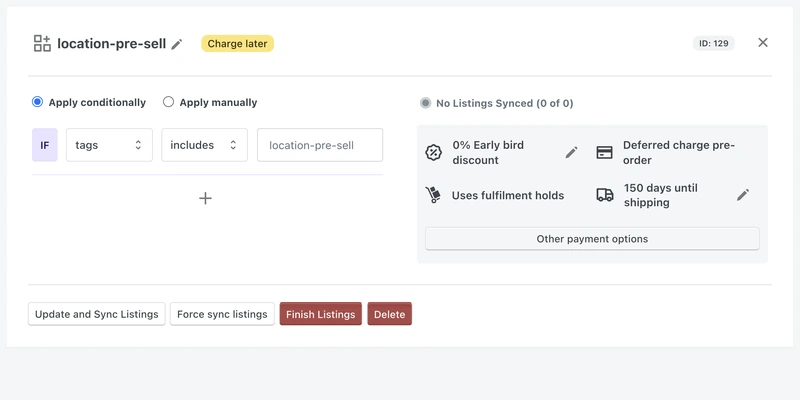
-
Reacts to your live Shopify inventory
A variant's available stock hits zero in Shopify and the pre-order listing is created on its template's terms, staying synced to that template rather than copied from it. It follows your live inventory levels through Shopify's webhooks, so nothing waits for a nightly sync. -
Stops pre-selling when stock arrives
Stock comes back on every variant, the listing finishes, and the product is a normal buy-now again. Next time round a finished listing is reactivated rather than rebuilt, so its pre-orders and history stay attached to it. -
Warehouse level dependent pre-selling
Ship to different parts of the world from different warehouses and the manager decides per fulfilment location, reading your Shopify locations, shipping profiles and zones. Out at the US warehouse but in stock in France, with profiles that keep the two apart, means pre-order for US customers and buy-now for French ones.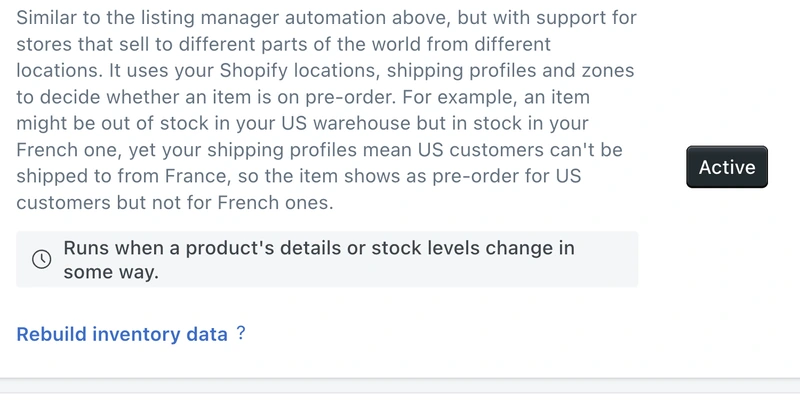
-
Set caps from incoming inventory
If you use Shopify's incoming inventory field, each variant's per-location cap can be set from the units already on a purchase order. It is optional: this is the one listing manager that reads that field, and with the rule on a variant only pre-sells when it has stock incoming. A reserve percentage holds a share back, always rounded in your favour, so 10% of 20 inbound units caps pre-orders at 18.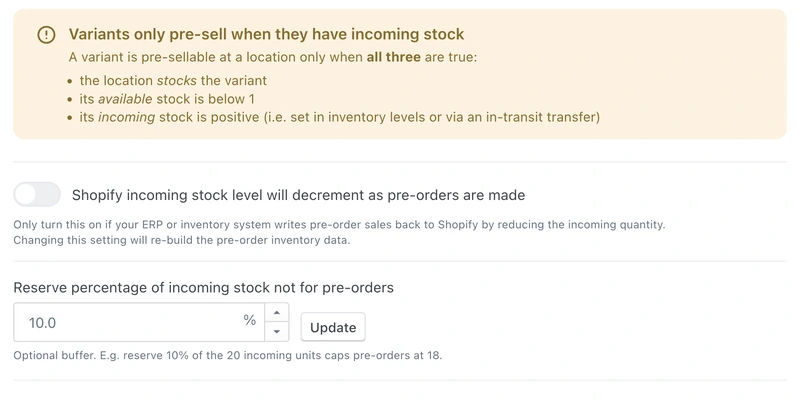
-
Toggle sales channels by pre-order status
Not every sales channel understands a pre-order. Name the ones that do not and PreProduct unpublishes the product from them while the listing is live, then puts it back when the listing finishes.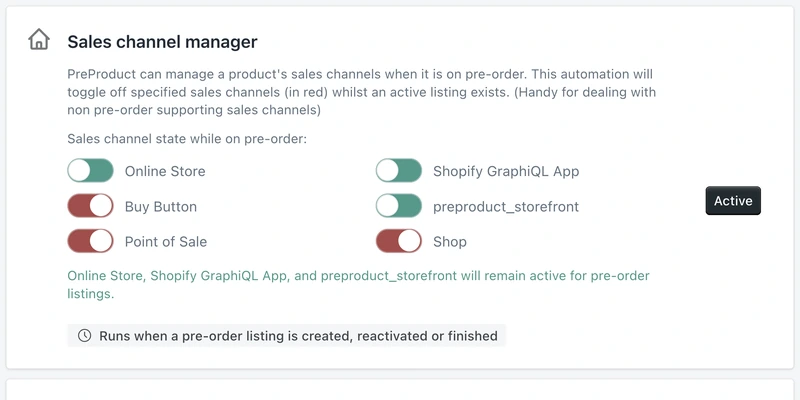
“There's a lot of edge cases and varying requirements and scenarios entailed in a pre-order campaign, and the PreProduct team seems to have anticipated pretty much all of them. The app works great and can do absolutely everything you need.”

5 stars in the Shopify Appstore

AUTO-CHARGE AND REPORTS
Charge and/or fulfil as stock lands
Stock rarely arrives all at once, and the fair way to allocate a partial delivery is to whoever pre-ordered first. Auto-charge does exactly that: add stock in your Shopify admin and PreProduct charges the customers waiting on it in the order they pre-ordered, as far as the new stock goes, and releases their fulfilment holds.
It works on charge-later, deposit-upfront and charge-upfront pre-orders, with a second rule for capture-only, which takes no card and so never decrements stock. Rules run on a schedule several times a day, so a charge lands close behind the inventory update without being instant. Reporting runs the same way: weekly pre-order and listing CSVs and a daily pre-order CSV, emailed to your store address so nobody has to export them.
This allows:
- A partial delivery to be charged first come, first served, with no allocation spreadsheet.
- A shipment that lands in three parts to charge in three parts, on its own.
- Friday's numbers to be in the inbox before anybody exports anything.
-
Charge as stock is added
Best for charge-later, deposit-upfront and charge-upfront. A product sitting at minus two takes stock in: raise it by one and the earliest pre-order is charged and released. Raise it by ten and the next ten are. -
Capture-only specific flow
Capture-only pre-orders take no card at checkout, so they never decrement stock and the rule above cannot see them. This one charges as stock goes above zero instead, proportional to the level you set.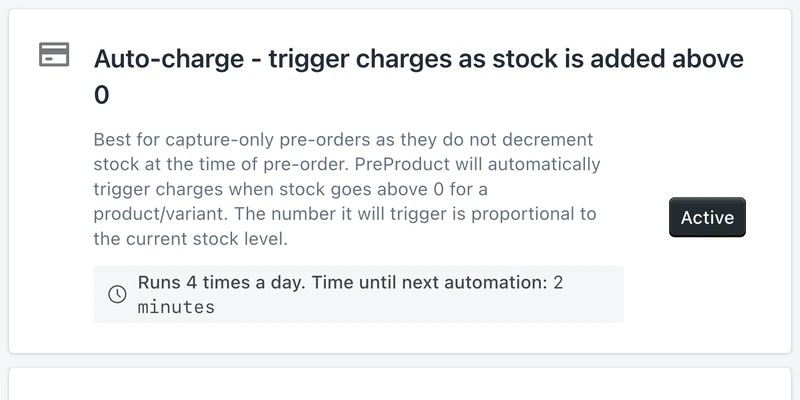
-
Fulfilment released on successful charge
Successful deferred charges automatically release fulfilment, so a paid pre-order becomes a normal unfulfilled order your 3PL can pick up. Nothing sits on hold that has already been paid for. -
Automated pre-order reports
Weekly and daily pre-order and listing reports, emailed to your store address as CSVs. Between them you stay on top of what has been pre-ordered, what is due and which listings have changed, without anyone exporting a thing.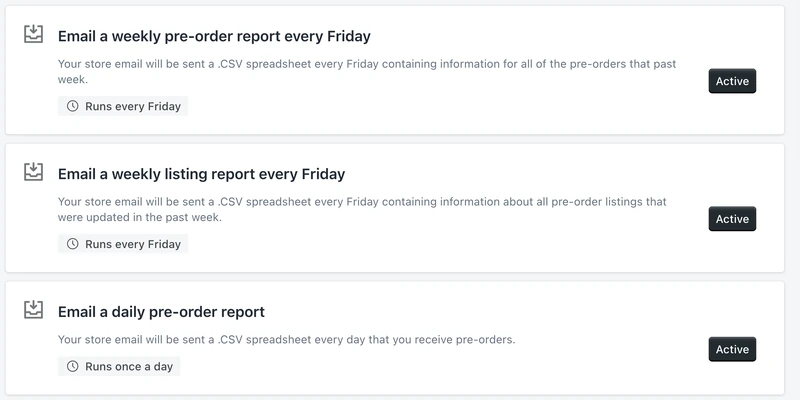
-
Automated dunning flows for failed charges
A card expires or a payment bounces, and the failed-charge flow is enqueued three days later without you touching it, emailing the customer so they can swap card from their portal. It covers the first attempt on charge-later and deposit-upfront pre-orders.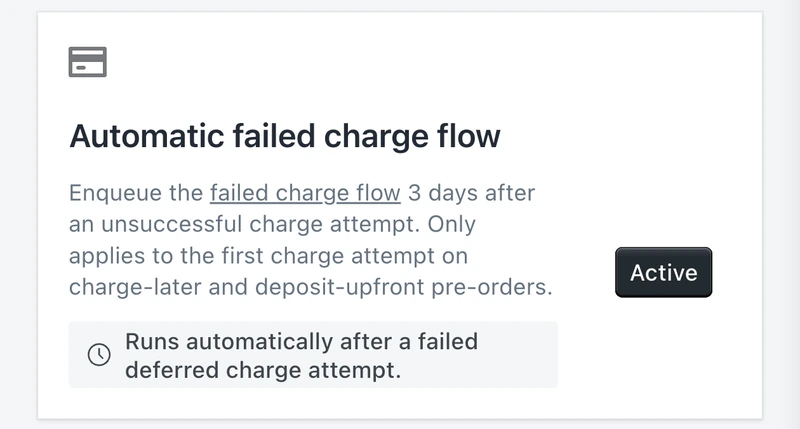
“Having the flexibility to take a deposit, full payment or simply track pre-orders was great. The auto-emailing also worked flawlessly.”

SHOPIFY FLOW, KLAVIYO AND REST API
31 Shopify Flow triggers and actions, with an API for everything else.
The automations above cover common pre-order scenarios. Anything specific to how your business runs can be plugged into Shopify Flow. PreProduct ships 15 Flow actions and 16 Flow triggers spanning listings, pre-orders, charges, fulfilment, limits and emails, so a workflow can put a variant on pre-order, charge and fulfil an order, raise a customer's limit, or start the moment a variant hits its cap.
PreProduct also comes with seven ready-made workflow templates to use or adapt. The same eleven pre-order events are sent to Klaviyo if you would rather send the email from there, and a REST API covers everything Flow cannot reach.
This allows:
- Charging and fulfilment to run inside a Shopify Flow workflow you already have.
- A pre-order to fire an email your marketing team owns, rather than one of ours.
- Custom pre-order logic for your store, without waiting for us to add a setting for it.
-
15 Shopify Flow actions
Create a listing or finish one. Put a variant on pre-order or take it off. Update a deposit, a discount, a shipping date or a customer limit. Trigger charges and fulfilment. Read listings and pre-orders back out again for the rest of the workflow to use.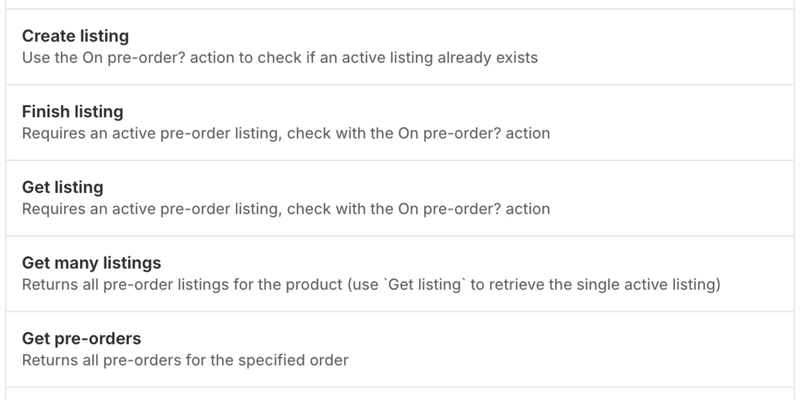
-
16 Shopify Flow triggers
Listing created, listing finished, shipping five days out, a variant limit reached, every limit reached, pre-order created, cancelled, paid, charge succeeded, charge failed, fulfilment released and each of the five emails PreProduct would have sent.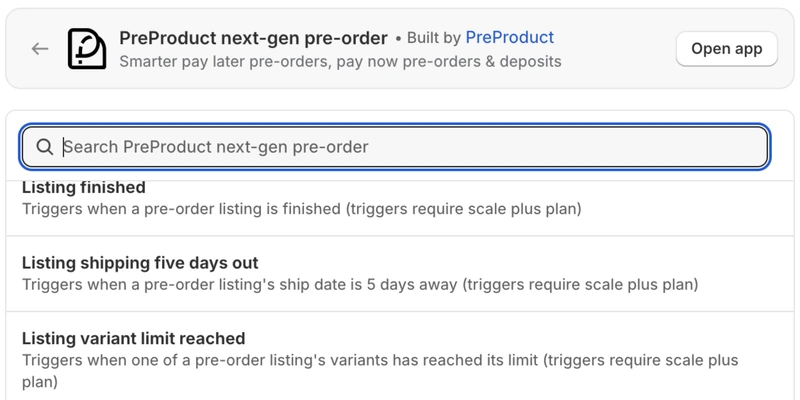
-
Charge and fulfil from Shopify Flow
One action covers both: trigger the charge, release the fulfilment, or do the two together. Trigger it from a product tag, a purchase order closing, or anything else Flow can see in your store. -
Eleven Klaviyo events
Six pre-order events plus the five emails PreProduct would have sent, pushed onto the customer's Klaviyo profile. Switch PreProduct's own emails off and Klaviyo sends every pre-order email instead, in your templates rather than ours.
-
A REST API for everything else
Listings, charges, orders, due listings and a pre-order lookup, over a REST API with a token you rotate yourself. Headless storefronts and internal tools can create listings, trigger charges and read pre-orders back without going through Flow.
“Love how they have an integration with Klaviyo. We're able to create a branded pre-order email, which was a must for our brand!”
Pricing
Shopify pre‑order pricing
Starter
Only pay a percentage of pre-order revenue
$0.00
USD / month
+5% of paid pre-order revenue
Take me to the Shopify app
Take pre-orders from your e-commerce/Shopify storefront
Unlimited pre-order listings
Charge customers upfront, later or via deposit
Multi-step payment plans and ad-hoc installments
Customise pre-order front-end & email campaign
Customer portals
Pre-ship upsells add-on available



Scale
For small to medium sized brands
$59.99
USD / month
+0% commission on up to 5k of monthly paid pre-order revenue, then 0.5% afterwards.
Take me to the Shopify app – 7 day free trial
All of Growth features
Listing Manager automation access
API access
15x Shopify Flow actions
10+ Klaviyo events
Priority support
Scale Plus
For medium to large sized brands
$259.99
USD / month
+0% commission
Our top plan with all the features
0% commission
15+ Shopify Flow triggers
Developer support
Pre‑order automation FAQ
Do I have to automate any of this?
No, and we would rather you did not on day one. List a few pre-orders by hand first and watch what reaches your 3PL, your ERP and your email platform, because every level it reaches has to handle it differently. Once the process is one you trust, switch the automations on one at a time. The automations doc covers what each one does before you turn it on.
How quickly do the automations react?
It depends which one. The listing manager runs off Shopify’s product and inventory webhooks, so a variant selling out or coming back is picked up in near real time rather than on a sync cycle. Auto-charge is different: it runs on a schedule, several times a day, so charging follows stock closely without ever being instant, and the app shows you when the next run is due. The reports are checked on that same pass but send on their own gate: the two weekly CSVs go out on a Friday, and the daily one on any day you actually took pre-orders.
Will the listing manager put products on pre-order that I have not told it about?
No. It only ever acts on products that match a conditional template, so a product with no applicable template is left alone however low its stock goes. Two other things it skips: on Shopify, products with more than 100 variants, and on BigCommerce or WooCommerce, products that are not tracking inventory. The templates doc covers writing the conditions.
Can I automate most products and still set some listings up by hand?
Yes, and this is the normal way to run it. A template can be marked apply manually instead of conditionally, and the automation leaves those alone: it is your template, applied when you say. Listings created by hand are untouched too. One limit worth knowing: only one listing manager automation can be active at a time, so you pick between the single-location version, the location-aware version, and the location-aware version that sets caps from incoming stock.
Which plan do I need for the automations?
The pricing table further down this page has it plan by plan, which is a better place to check than a paragraph here. The one worth knowing before you design a workflow around it: Shopify Flow triggers sit on the top plan. The Flow actions do not.
Does auto-charge work with every pre-order type?
Between the two rules, yes. The main rule charges as stock is added in your Shopify admin and suits charge-later, deposit-upfront and charge-upfront pre-orders. Capture-only takes no card at checkout, so it never decrements stock and needs the second rule, which charges as stock goes above zero. Charging and fulfilment release happen together either way. See triggering deferred charges for what happens on each type.
Can I test an automation before pointing it at real products?
Yes, and it is worth rehearsing in this order: create a template against a tag no real product carries, tag one test product, and watch the listing appear. Then take a pre-order with Shopify Payments in test mode, add stock, and confirm the charge fires and the fulfilment hold comes off. Scale and Scale Plus include a free PreProduct instance for a test store, so a whole campaign can be run through away from production.