Subscriptions, Pre-orders, or Try Before You Buy: How Shopify Purchase Options Work
TLDR: Shopify purchase options are ways of selling a product other than “pay now, ship now”. There are three of them: subscriptions, pre-orders and try before you buy. All three run on selling plans, and Shopify doesn’t let you create a selling plan from the admin. You need an app for every single one. Shopify has its own free app for subscriptions, but nothing first-party for pre-orders or try before you buy, so those two are entirely on third-party apps.
Introduction
Scroll down a product page in your Shopify admin and you’ll find a section called “Purchase options”. For most merchants, it’s empty. There’s no dropdown, no toggle, nothing to configure.
That’s not a bug, and you haven’t missed a setting. Shopify built the shelf. It didn’t build most of the things that go on it.

Shopify purchase options are the framework behind three ways of selling that break the normal “pay now, ship now” pattern: subscriptions, pre-orders and try before you buy. The framework is good. But it’s a set of rails for apps to run on, not a feature you switch on. Understanding that saves you some time rooting through your settings for something that was never there.
This guide covers what each of the three purchase options actually does, why the terminology is confusing (your admin says one thing, every error message says another), and how to work out which one you’re actually looking for. We build pre-order software for Shopify, so we’ll be upfront: we do one of these three well and we’ll point you elsewhere for the other two.
What a Purchase Option Actually Is
A purchase option is any arrangement where payment and delivery don’t both happen right now.
Normally, a customer pays at checkout and you ship the item. Money and goods change hands at roughly the same time. A purchase option breaks that link deliberately: either the payment happens later, the delivery happens later, or both happen repeatedly on a schedule.
Shopify documents three types: subscriptions, pre-orders and try before you buy. The last two are grouped together as “deferred purchase options”, because both involve a payment that lands after checkout.
That’s the whole taxonomy. If you’re trying to do something that isn’t one of those three, purchase options aren’t the mechanism you need.
One Purchase Option Per Cart Item
A product or variant can have several purchase options attached to it. Any single cart item can only use one.
So you can offer the same jacket as a charge-later pre-order and as a deposit pre-order and let the customer choose which one they want at the point of adding to cart. What you can’t do is have them buy both versions of it in one go. Shopify is explicit that customers “can’t combine different purchase options on the same product in a single checkout”, and subscriptions and pre-orders can’t be offered together on the same product at all.
It’s a small rule with a real design consequence: purchase options are a choice the customer makes, not a stack you build up. If you’re planning something where a product needs to behave two ways at once in the same cart, that isn’t what the framework does.
Purchase Option vs Selling Plan: Same Thing, Two Vocabularies
Something to bear in mind: Your Shopify admin says “purchase options”. Almost everything else says “selling plan”.
The developer docs say selling plan. App settings say selling plan. Error messages say selling plan. Competitor help articles say selling plan. If you’ve ever searched for what a Shopify selling plan is and come away more confused, this is why: you were reading about the same thing you’d been looking at in your admin, under a different name.
A selling plan is the underlying record that defines the terms: when the customer pays, when you deliver, what the pricing is. A purchase option is what that record looks like from the merchant and customer side. One is the plumbing, the other is the tap. When someone tells you to “create a selling plan”, they mean set up a purchase option.
Worth knowing because it changes how you search for help. If a doc or a support thread only talks about selling plans, it’s still relevant to you.
And Sometimes Your Pre-order Gets Called a “Subscription”
There’s a third name to watch for. Parts of the Shopify interface label selling plans as subscriptions regardless of what the plan actually does, so a pre-order can turn up filed under a heading that says subscription.
That’s history rather than logic. Subscriptions were the first purchase option Shopify supported, they’re the one it built its own app for, and they get the bulk of the mindshare, the documentation and the support attention. Purchase options is the parent category. Subscriptions is the big brother who gets talked about most, and the labelling hasn’t fully caught up.
If you’re looking at a pre-order sitting under the word “subscription”, nothing has gone wrong. It’s a naming quirk, not a misconfiguration.
The Three Purchase Options, Side by Side
| What it does | When the customer pays | When you ship | |
|---|---|---|---|
| Subscriptions | Recurring orders on a schedule | Every cycle, or prepaid upfront | Every cycle |
| Pre-orders | Sell before stock exists | Later, upfront, or a deposit now and the balance later | When stock lands |
| Try before you buy | Customer tries first, pays after | On a set future date, after they’ve decided | Immediately |
The pattern is easier to see when you line them up. Subscriptions repeat. Pre-orders delay the shipment. Try before you buy delays the payment while shipping straight away. They solve different problems, and they’re built by different sets of apps.
Subscriptions, and Why This Page Isn’t About Them
Subscriptions are the recurring one: coffee every month, refills every six weeks, a box every quarter. Shopify supports both pay-per-delivery and prepaid models.
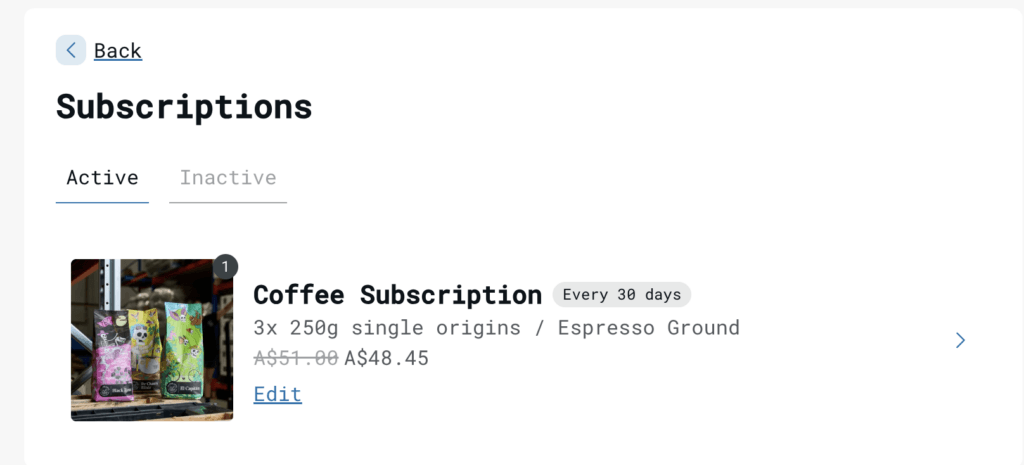
This is the one slot Shopify fills itself. Shopify Subscriptions is a free first-party app, and there’s a mature ecosystem of third-party alternatives if you need more. If you sell something people consume and rebuy on a cadence, that’s your path, and it’s a well-served market.
We don’t build subscription software, so that’s as much as we’ll usefully tell you. The rest of this guide is about the other two.
Why All Three Purchase Options Need an App
This is the part Shopify’s own documentation buries.
Shopify’s purchase options help page introduces all three types without ever mentioning that you need software to use them. You have to click through to the pre-orders sub-page to find it stated plainly: “To use pre-orders, you need to install a pre-order app from the Shopify App Store”.

The developer documentation is blunter. Shopify’s guide for app builders describes the workflow as: “The merchant creates a pre-order or TBYB option through the app and adds products and variants to the selling plan”. The whole category is filed under “custom purchase options” and “purchase option apps”. Apps aren’t an optional extra here. They’re the only way in.
Which leaves an asymmetry worth naming. Shopify built the framework, then filled exactly one of the three slots with its own free app. Subscriptions are covered. Pre-orders and try before you buy, the two options merchants ask about most often, have no first-party tool at all. The rails exist, the train doesn’t.
There’s a practical constraint too. Deferred purchase options only work with Shopify Payments or PayPal Express, because those are the gateways that can securely store a customer’s payment method and charge it later. If you’re on a different gateway, no app can work around that.
“Continue Selling When Out of Stock” Is Not a Purchase Option
This one catches a lot of people, so it’s worth being direct.
Ticking “Continue selling when out of stock” on a variant lets inventory go negative. That’s all it does. It doesn’t create a selling plan, doesn’t defer payment, doesn’t hold fulfilment and doesn’t tell anyone the item is a pre-order. Your customer pays full price today for something that may not exist for four months, and the order flows straight to your 3PL like any other.
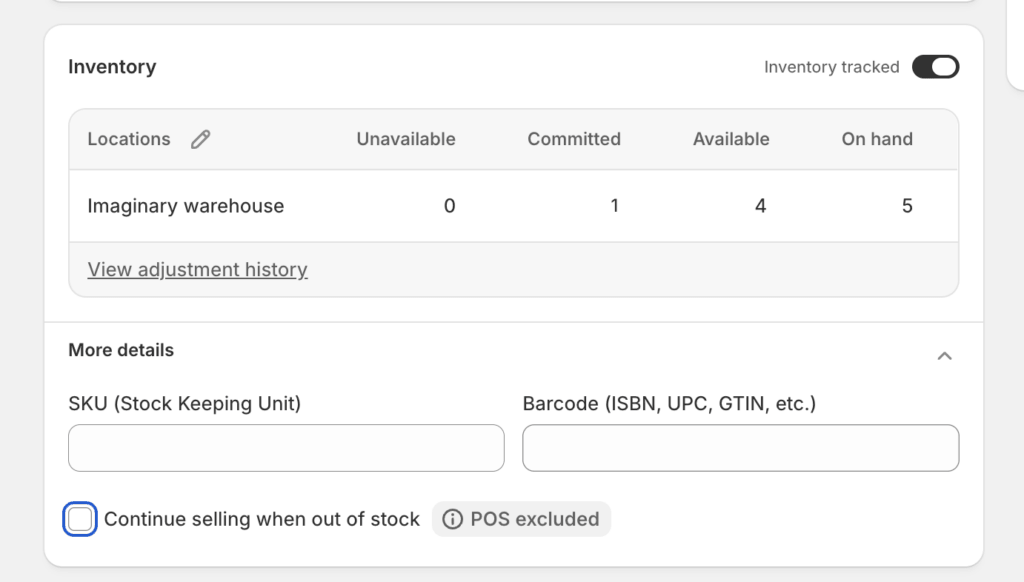
It’s a useful checkbox, and most pre-order apps toggle it for you. It just isn’t pre-orders. If you want the full picture of what that setting does and doesn’t cover, we’ve written about running backorders on Shopify in detail.
Pre-orders: The Deferred Purchase Option Most Merchants Land On
Pre-orders let customers buy something before it’s ready to ship. It’s the option most stores end up wanting, because it covers new launches, restocks, made-to-order pieces and anything with a lead time.
The mechanic that makes it work is card vaulting. Instead of taking the money at checkout, the payment method is stored securely and charged when you decide. That’s different from a payment authorization, which expires. Vaulting doesn’t, which matters when your lead time is measured in months rather than days. We’ve covered the difference in our guide to Shopify authorization periods.
From there you have four ways to structure the money:
- Charge later. Nothing at checkout, full amount when you’re ready to ship.
- Charge upfront. Full payment at checkout, like a normal order.
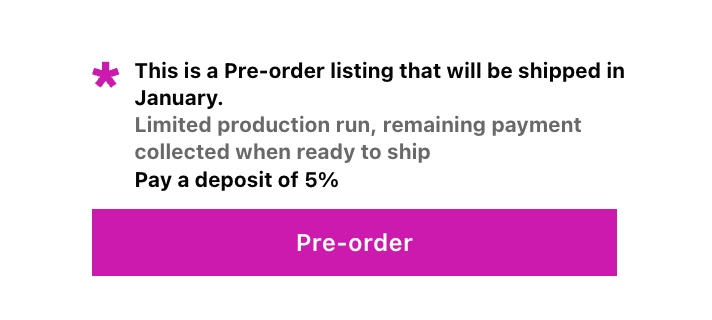
- Deposit. A percentage now, with the balance collected automatically when stock arrives.
- Capture only. Payment details captured at checkout, charged on your trigger.
Merchants don’t spread evenly across these. Across more than 1 million pre-orders worth over $85 million, 43.8% of listings used charge-later, making it the most popular model by some distance. That’s 75,781 listings. Capture-only accounts for 28.7% and deposits for 12.6%.
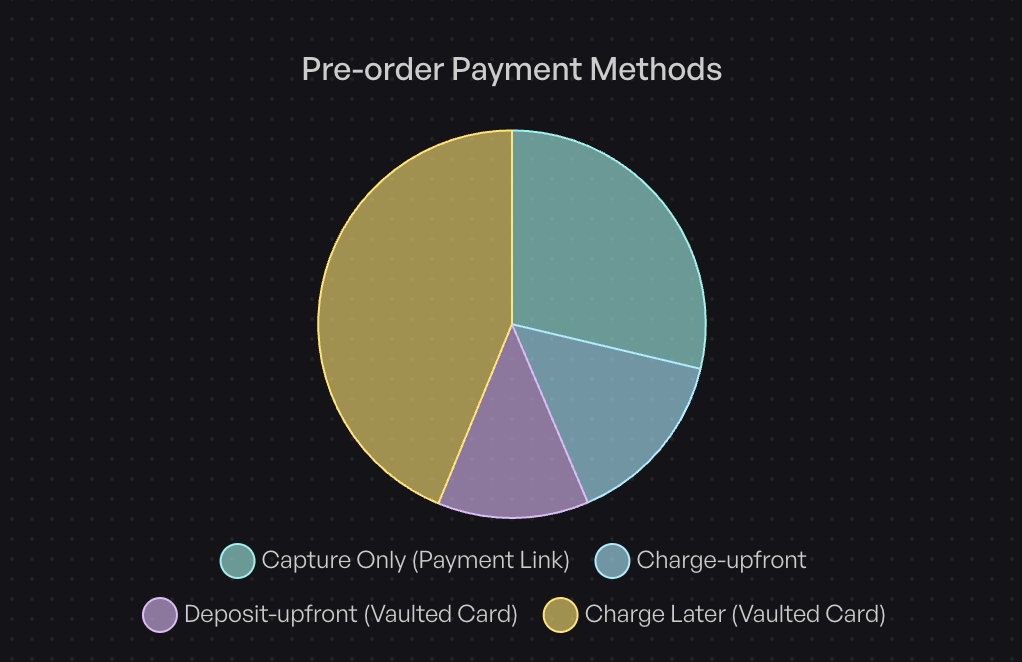
A few other numbers from that dataset are worth having in mind before you pick:
- Only 25% of pre-orders are charged at day 0, and 47.8% are charged within 30 days, so most pre-orders are charged later, and more than half aren’t charged within the first month.
- 90.4% of listings run with no discount at all, which quietly kills the idea that pre-orders need a price cut to convert.
- Cancellations sit at 5.4%, low enough that deferred payment isn’t the risk it sounds like.
- 62.1% of stores keep pre-orders in isolated carts rather than mixed with in-stock items.
Our full breakdown of pre-order payment models goes deeper on matching a model to your lead time, and the charge later guide covers the deferred mechanic specifically.
One thing to flag: Shopify’s purchase options framework handles the payment timing, but not the operations around it. Fulfilment holds, per-variant caps, delivery estimates and customer messaging all sit with whichever app you choose. That’s the gap between “technically possible on Shopify” and “actually runnable”, and it’s where apps differ most. Our complete guide to pre-orders on Shopify walks through the operational side.
Requirements and Restrictions Worth Knowing First
Shopify’s pre-order setup documentation carries a requirements and restrictions section that’s easy to skim past and expensive to discover mid-launch. The points that matter most:
- Accelerated checkouts are blocked. Customers can’t buy a pre-order with Shop Pay, Apple Pay or Google Pay.
- Some local payment methods don’t work either, including Klarna, mollie iDEAL, Wero and Sofort.
- Online Store and custom storefronts only. Pre-orders aren’t supported on Shopify’s other sales channels.
- Subscriptions and pre-orders can’t be combined on the same product.
- Buy X Get Y discounts don’t apply to pre-order purchases.
- Shop Promise isn’t available on pre-order products.
- Delivery timing is an obligation, not a hope. You need reasonable grounds to believe you’ll ship within the timeframe you’ve stated, or within 30 days if you haven’t stated one. If the date slips, you have to tell customers the revised date and remind them they can cancel for a refund.
None of these are app limitations. They sit in the framework, so no pre-order app can engineer around them. The last one is worth taking seriously: a clear, honest ship estimate on the product page is both the legal position and the thing that keeps cancellation rates down.
The “Only Sell This Product With These Purchase Options” Checkbox
Underneath the purchase options card on a product you’ll find a checkbox labelled “Only sell this product with these purchase options”. Tick it and the product can no longer be bought the ordinary way. Every add to cart has to go through a selling plan.
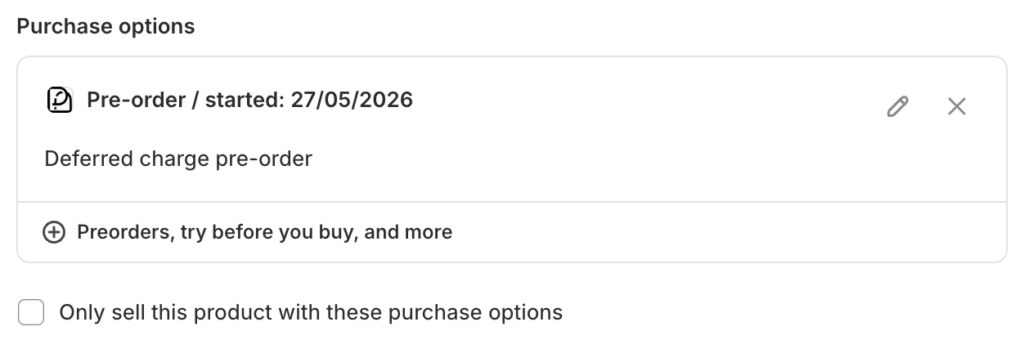
For a pre-order launch that sounds like exactly what you want. We’d steer you away from it, for two reasons.
It isn’t variant sensitive. The checkbox sits at product level, so ticking it forces every variant down the purchase options route, including the sizes and colourways still sitting in your warehouse that you’d happily sell and ship today.
And it’s very easy to forget it’s on. It’s one checkbox on a product page you might not open again for months, and the consequences are quiet rather than loud. Shopify also warns you at the point of ticking that the product will be pulled from any sales channel that doesn’t support purchase options, so the product simply stops appearing in places you weren’t watching.
If what you actually want is “nobody buys this without going through the pre-order option”, that’s a checkout problem, not a product setting. PreProduct handles it with a pre-order enforcement Checkout Function, which blocks checkout when a pre-order variant reaches the cart without a valid purchase option attached and sends the customer back to pick one. It follows the variant’s actual pre-order state, so in-stock variants keep selling normally and there’s no stale checkbox to remember.
Try Before You Buy: The Mirror Image of a Pre-order
Try before you buy is the one people most often confuse with pre-orders, and it’s almost exactly backwards.
A pre-order delays the shipment. You take the commitment now, ship when stock lands, and charge somewhere in between. Try before you buy delays the payment. You ship immediately, from stock you already hold, and the customer pays on a set future date once they’ve decided to keep the item.
Same underlying framework, opposite problem. Pre-orders solve “I don’t have it yet”. Try before you buy solves “they’re not sure yet”. It’s most common in apparel and anything where fit or feel decides the sale, and it’s a returns strategy as much as a payment one.
We don’t build try before you buy software. PreProduct works on products that aren’t in stock yet, and try before you buy is inherently an in-stock, ship-first model. If that’s what you need, TryNow is the established option in the Shopify App Store and the better place to start.
Which Purchase Option Do You Actually Need
Three questions get most merchants to the right answer.
Is the product ready to ship today? If not, you want a pre-order. This covers pre-launch, restocks, made-to-order and anything waiting on a production run. It’s the most common answer by a distance.
Is it ready, but customers hesitate to commit? That’s try before you buy. Ship first, charge later, let the product do the selling.
Do customers buy it again on a predictable cycle? That’s a subscription. Consumables, refills, replenishment.
If you’re somewhere between, lead time is usually the deciding factor. Short waits can sometimes be handled with clear messaging and a normal order. Once you’re past about a month, you want a proper pre-order with deferred payment, fulfilment holds and a customer who knows exactly what they’ve bought. Selling before you have stock is a strategy in its own right, and we’ve written about running a Shopify pre-sale if that’s the direction you’re heading.
Frequently Asked Questions
Do I need an app for Shopify pre-orders?
Yes. Shopify states directly that you need to install a pre-order app from the App Store. There’s no native way to create the selling plan a pre-order depends on, and no first-party Shopify app for it.
What’s the difference between a selling plan and a purchase option?
They’re two names for the same thing. “Purchase options” is what you see in your Shopify admin. “Selling plan” is what the underlying record is called in the docs, in app settings and in error messages.
Can I sell subscriptions on Shopify?
Yes. Subscriptions are the one purchase option Shopify covers itself, through its free Shopify Subscriptions app, alongside a large third-party ecosystem.
Who offers try before you buy?
It’s supported by Shopify’s purchase options framework and delivered by third-party apps, with TryNow the best-known option. PreProduct doesn’t offer it, because we work with products that aren’t in stock yet.
Does “continue selling when out of stock” create a pre-order?
No. It only lets inventory go negative. It doesn’t defer payment, hold fulfilment, cap quantities or label the order as a pre-order.
Which payment gateways work with purchase options?
Deferred purchase options need Shopify Payments or PayPal Express, because they require the ability to store a payment method and charge it later.
Can customers pay for a pre-order with Shop Pay or Apple Pay?
No. Shopify blocks accelerated checkouts on pre-orders, which covers Shop Pay, Apple Pay and Google Pay, along with local methods like Klarna, mollie iDEAL, Wero and Sofort.
Can a product have more than one purchase option?
Yes. A product or variant can carry several, and the customer picks one. What they can’t do is combine two purchase options for the same product in a single checkout, and subscriptions and pre-orders can’t be offered on the same product at all.
Wrapping Up
The short version: Shopify purchase options are real, well-built and almost entirely unfilled by Shopify itself.
- There are three of them: subscriptions, pre-orders and try before you buy.
- All three run on selling plans, which is the same thing your admin calls a purchase option.
- Every one requires an app. Shopify ships a free app for subscriptions and nothing for the other two.
- “Continue selling when out of stock” is an inventory checkbox, not a purchase option.
- Pre-orders are the option most stores are actually looking for, and charge-later is how most of them run it.
If it’s pre-orders you need, that’s the only thing we do. PreProduct runs pre-orders at scale, charged and fulfilled when you say so. It handles charge-later, deposits, capture-only and upfront payments, with fulfilment holds so nothing ships early and customer messaging so nobody’s guessing. You can start taking pre-orders on a free plan and only pay a percentage of what you actually collect.
And if it turns out you need a subscription tool or a try-before-you-buy app instead, you now know which shelf to look on.
Pre-sell With PreProduct
7 day free trial with all plansMigrate pre-orders
