Putting products on pre-order in Shopify is a great way to build hype, improve cash flow, and validate demand before you commit to inventory. But many merchants run into the same question: what’s the best way to incorporate pre-orders into my business?
That’s where PreProduct comes in. PreProduct gives you multiple ways to put products on pre-order in Shopify — from quick manual listings to fully automated workflows. Each approach has its own strengths and trade-offs, depending on how many products you’re managing and how hands-on you want to be.
In this post, we’ll walk through five different ways of putting a product on pre-order in Shopify with PreProduct.
1. Manual Listing
The most straightforward way of putting a product on pre-order is to create a listing manually in PreProduct. You can set deposits, lead times, and customize variant availability. It’s perfect if you want complete control over the details of each pre-order.
The trade-off? It’s slower when managing more than a handful of products.
If you want to put multiple products on pre-order at once, PreProduct’s bulk product lister makes it simple. You can apply pre-order settings across batches of products in just a few clicks.
This is ideal for mid-sized catalogs where setting each product individually would be too time-consuming.
For stores managing hundreds or even thousands of products, templates are the best way to scale pre-orders. Instead of configuring each product, you define rules — for example: “apply deposit upfront pre-orders to all products tagged ‘Pre-Sale’.”
PreProduct’s Listing Manager builds on templates to deliver full automation. Once your templates are in place, the Listing Manager will automatically apply them to new or updated products as variants go in and out of stock.
This is ideal for large catalogs where products frequently go in and out of stock, saving hours of repetitive admin work.
If you need complete flexibility, PreProduct’s Admin API is the most powerful way to put products on pre-order. It allows developers to programmatically create, edit, or remove listings, integrate with your backend, and sync pre-order data with external systems like ERPs or custom apps.
This route is for teams with technical resources who want pre-orders deeply embedded in their existing workflows.
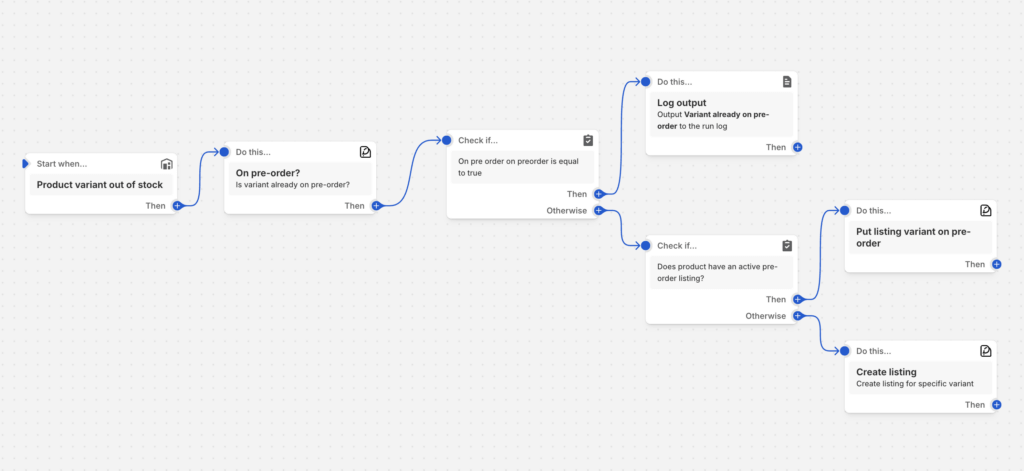
Shopify Flow is a free Shopify app that allows you to build automation workflows across your store. PreProduct integrates directly with Flow, enabling over 30 pre-order related triggers and actions:
“Put listing variant on pre-order”
“Link listing to template”
This opens up powerful automation without needing to write code, though it does require a system-thinking approach to set up correctly.
When it comes to putting products on pre-order in Shopify with PreProduct, the right method depends on your stage and scale:
Best for getting started: Manual listing
Best for 10–100 products on pre-order: Bulk lister or listing manager
Best for automation: Start with Listing Manager, then add Shopify Flow if needed
Wrap-Up
Putting products on pre-order is a low-risk way to improve cash flow and capture demand before stock arrives. Whether you’re just listing a single product manually or building full-scale automations, PreProduct supports every workflow — from fine-grained control to mass automation.
Want to learn more? Check out the PreProduct docs for step-by-step guides on putting products on pre-order in Shopify.
Managing pre-orders manually drains time small teams don’t have. Tracking inventory thresholds, sending customer emails, coordinating fulfillment, updating product availability, these repetitive tasks consume hours each week. Shopify Flow pre-order automation eliminates this operational overhead, letting merchants build sophisticated pre-order systems without developers or ongoing maintenance costs.
Whether you’re running simple restock campaigns or complex charge-later pre-orders with deposits, automation transforms manual processes into hands-free workflows that scale with your business. This guide shows you how to automate pre-orders using native Shopify Flow, then extend functionality with PreProduct’s 15 custom actions and 16 custom triggers for complete pre-order lifecycle management.
Why Use Shopify Flow for Pre-orders?
Pre-order operations involve multiple interconnected processes: inventory monitoring, product availability updates, customer communications, pricing adjustments, and fulfillment coordination. Without automation, merchants manually check inventory levels, toggle product settings, send emails, and track when to charge customers or release orders.
Shopify Flow automates these touchpoints, creating intelligent workflows that:
Save operational time. Instead of manually enabling pre-orders when items sell out, Flow does it automatically within seconds of inventory hitting zero.
Reduce human error. Automated workflows execute consistently every time, eliminating forgotten steps or missed communications.
Scale without headcount. Small teams can manage hundreds of pre-orders with the same efficiency as large operations departments.
Enable sophisticated logic. Combine multiple conditions to create nuanced workflows that adapt to different scenarios (product type, customer segment, inventory status).
For merchants running pre-orders, Flow transforms a labor-intensive process into a hands-free operation that runs 24/7 without intervention.
Shopify Flow Pre-order Automation: Key Benefits
Before diving into specific workflows, understanding the strategic advantages helps you design automation that aligns with your operational goals.
Instant pre-order activation. When high-demand products sell out, Flow can activate pre-order mode within seconds, capturing demand instead of losing sales to “out of stock” messages.
Automatic inventory management. Flow monitors inventory levels continuously and toggles between buy-now and pre-order modes based on stock availability, eliminating manual threshold monitoring.
Coordinated customer communication. Trigger email sequences, update customer segments, or send notifications based on pre-order events, keeping buyers informed throughout the pre-order journey.
Flexible fulfillment control. Automatically apply fulfillment holds to charge-later pre-orders, then release orders when stock arrives or you manually tag items as ready-to-ship.
Conditional logic for complex scenarios. Build workflows that behave differently based on product tags, metafields, inventory levels, or customer attributes, handling exceptions without manual intervention.
These capabilities compound when combined, creating end-to-end automation that manages pre-orders from stockout detection through final fulfillment release.
What Flow offers small teams:
Automation across products, inventory, orders, customers, and more.
No need for manual scripts or recurring app maintenance.
The ability to scale smarter, not just headcount.
Qualified stores can use the HTTP request action to call out to third party services like ERP’s, marketing services or AI context aggregators.
In essence, Flow gives you the building blocks to operate like a much larger team – without hiring.
Part 1: Native Shopify Flow Pre-order Automation (Free)
You can build functional pre-order automation using only Shopify Flow’s native capabilities, no apps required. This approach works well for basic scenarios and helps you understand Flow’s fundamentals before adding advanced features.
Example Workflow: Activate Pre-order When Inventory Reaches Zero
This workflow automatically enables pre-orders when variants sell out, then reverses the process when stock is replenished.
➡️ Trigger: Product variant inventory equals 0
Flow monitors all product variants in your store. When any variant’s available inventory hits exactly zero, this trigger fires.
➡️ Condition: Product has tag “can-pre-order”
Not every product should become available for pre-order when it sells out. This condition checks if the product has been tagged “can-pre-order” by your team, giving you manual control over which items are pre-order eligible.
You might tag seasonal items, bestsellers, or products with predictable restock timelines as “can-pre-order” while excluding one-off or discontinued items.
➡️ Action 1: Enable “Continue selling when out of stock”
Using an HTTP request action (Shopify Plus) or manual product setting update, enable the “continue selling when out of stock” option for the variant. This allows customers to add the item to their cart and checkout even though inventory is zero.
➡️ Action 2: Update product metafield with pre-order messaging
Set a metafield on the product (e.g., custom.pre_order_message) with customer-facing text like “Ships mid-March” or “Pre-order now, shipping in 4-6 weeks.” Your theme reads this metafield to display pre-order information on product pages.
Reversal Workflow: Disable Pre-order When Stock Returns
When inventory is replenished, automatically disable pre-order mode and return to normal buy-now behavior.
➡️ Trigger: Product variant inventory is greater than 0
This trigger fires when stock levels increase above zero (restock occurs).
➡️ Condition: Product has tag “can-pre-order” AND metafield custom.pre_order_message exists
Only reverse products that were previously in pre-order mode (indicated by the presence of the pre-order metafield).
➡️ Action 1: Disable “Continue selling when out of stock”
Turn off overselling so the product returns to standard inventory behavior.
➡️ Action 2: Remove pre-order metafield
Delete the custom.pre_order_message metafield to stop displaying pre-order messaging on the product page.
Limitations of Native Flow for Pre-orders
While native Shopify Flow handles basic scenarios, it has constraints for sophisticated pre-order operations:
No pre-order-specific triggers. Native Flow doesn’t know when a pre-order is created, charged, or fulfilled, it only sees standard Shopify events (inventory changes, order creation, product updates).
Limited charge control. Flow can’t trigger deferred charges for charge-later pre-orders or coordinate payment timing with inventory arrival.
No fulfillment hold management. Native Flow can’t automatically apply or release fulfillment holds to prevent premature shipping of charge-later pre-orders.
Manual pre-order listing creation. You need to manage pre-order configurations (deposit amounts, ship dates, customer limits) outside of Flow.
These limitations create the case for extending Flow with pre-order-specific capabilities, which is where PreProduct’s custom triggers and actions come in.
Part 2: Extending Shopify Flow with PreProduct (31 Custom Capabilities)
PreProduct adds 31 specialized triggers and actions specifically designed for pre-order automation. While native Flow handles general Shopify events, PreProduct’s extensions give you granular control over the entire pre-order lifecycle, from listing creation through charge initiation and fulfillment release.
Why PreProduct Extends Flow
Native Shopify Flow provides infrastructure but lacks pre-order domain knowledge. PreProduct bridges this gap by introducing events and actions that understand charge-later pre-orders, deposits, customer limits, shipping notifications, and fulfillment holds.
For example, native Flow can detect when inventory hits zero, but it can’t create a pre-order listing with specific deposit amounts, ship dates, and customer limits. PreProduct’s “Create listing” action handles this complexity in a single step.
Similarly, native Flow can trigger when an order is created, but it can’t distinguish between regular orders and charge-later pre-orders, or trigger charges when inventory arrives. PreProduct’s “Charge created” trigger and “Trigger charges and/or fulfilment” action provide this pre-order-specific logic.
15 Custom Actions
PreProduct’s actions let you programmatically manage pre-order operations from within Flow workflows:
Listing Management
Create listing: Programmatically create pre-order listings with all configuration (deposit, ship date, limits, discounts)
Get listing: Retrieve listing details to use in conditional logic
Get all listings: Access multiple listings for bulk operations
Variant Control
Add variants to pre-order: Enable pre-orders for specific variants within a listing
Remove variants from pre-order: Disable pre-orders for variants (e.g., when discontinuing)
Configuration Updates
Update customer limit: Adjust maximum quantity per customer during campaigns
Native action: Tag product “high-demand-pre-order”
Native action: Add product to “Trending” collection (for homepage visibility)
This workflow automatically launches pre-order campaigns, then alerts you when demand is high so you can increase production quantities.
Real Workflow Examples: Shopify Flow Templates
Let’s walk through detailed implementations of common pre-order automation scenarios.
Workflow 1: Automatic Pre-order Activation on Stockout
Business Scenario: You sell seasonal products that frequently sell out between restocks. Instead of losing sales, you want to automatically offer pre-orders and notify customers of the estimated ship date.
➡️ Trigger: Variant inventory quantity = 0
➡️ Conditions:
Product has tag “auto-pre-order-enabled”
Product does NOT have metafield preproduct.listing_id (prevents duplicate listings)
➡️ Actions:
Check if variant is on pre-order (PreProduct action)
If already on pre-order, end workflow (prevent duplicates)
Create listing (PreProduct action)
Use template: “Standard restock pre-order”
Deposit: 0% (charge-later)
Ship date: +30 days from today
Customer limit: 5 units
Add product to collection (Native action)
Collection: “Pre-order Items”
Makes pre-orders discoverable on your site
Send Klaviyo event (Integration action)
Event: “Product on pre-order”
Triggers email campaign to waitlist subscribers
Result: When bestsellers sell out, they automatically become available for pre-order with a 30-day estimated ship date. Customers on your waitlist receive notification emails, and the product appears in your “Pre-order Items” collection.
pre-order workflow template
Workflow 2: Charge & Fulfill When Inventory Arrives
Business Scenario: You’re running charge-later pre-orders. When inventory arrives, you want to automatically trigger charges for all waiting pre-orders and release orders for fulfillment simultaneously.
➡️ Trigger: Product tagged “inventory-arrived”
Your team applies this tag when stock hits the warehouse, initiating the charge and fulfillment process.
➡️ Conditions:
Product has metafield preproduct.listing_id (confirms active listing exists)
➡️ Actions:
Get listing (PreProduct action)
Retrieve listing details using preproduct.listing_id
Remove “inventory-arrived” tag (prevents workflow re-triggering)
Result: A single tag application bulk-processes all pre-orders for a product, charging customers and releasing orders for shipment. Your team receives Slack confirmation and can monitor charge success rates.
Workflow 3: VIP Customer Priority Fulfillment
Business Scenario: You want to manually prioritize certain pre-orders for early fulfillment (VIP customers, influencers, early bird orders).
➡️ Trigger: Order tagged “priority-fulfillment”
Your team manually applies this tag to orders that should be fulfilled first.
➡️ Conditions:
Order has tag “priority-fulfillment”
Order line items include products with metafield preproduct.listing_id
Business Scenario: You want fine-grained control over which products become pre-orders, using metafields to define eligibility rules (minimum price, specific vendors, certain product types).
If product type = “Apparel”: Use “Apparel pre-order template” (30% deposit)
If product type = “Electronics”: Use “Electronics template” (50% deposit)
Ship date pulled from metafield custom.expected_restock_date
Update metafield (Native action)
Set custom.pre_order_active = “true”
Your theme uses this to display “Pre-order” badges
Result: Only high-value, house-brand products automatically become pre-orders, with deposit amounts tailored to product category and ship dates sourced from your internal restock planning metafields.
Advanced Shopify Flow Automation Strategies
Once you’re comfortable with basic workflows, these advanced strategies unlock additional operational leverage.
🤖 Multi-Condition Logic for Targeted Automation
Combine multiple conditions to create nuanced automation that handles different scenarios appropriately.
Example: Deposit amount varies by product price tier
Products $0-$100: 0% deposit (pure charge-later)
Products $101-$300: 25% deposit
Products $301+: 50% deposit
Build conditional branches in Flow:
If product price ≤ $100 then create listing with 0% deposit template
Else if product price ≤ $300 then create listing with 25% deposit template
Else create listing with 50% deposit template
This tailors payment structure to product value without manual intervention.
📫 Marketing Integration via Klaviyo & Shopify Flow
Trigger sophisticated email campaigns based on pre-order events, keeping customers engaged throughout extended lead times.
Example: Automated pre-order nurture sequence
Trigger: Pre-order created (PreProduct trigger)
Action: Send Klaviyo event “pre_order_placed”
Klaviyo flow triggered with 3-email sequence:
Day 0: Order confirmation + what to expect
Day 14: Production update + behind-the-scenes content
Charge date – 3 days: “Charge coming soon, update payment method if needed”
Trigger: Listing shipping in 5 days (PreProduct trigger)
Expired vaulted cards (lead time exceeded card expiration)
Insufficient funds in customer accounts
Payment method removed by customer
Resolution: PreProduct can send ‘failed charge’ emails that can be used as a dunning process, but you can enhance this with Flow:
Trigger: Charge failed (PreProduct trigger)
Wait: 24 hours
Action: Send customer email
Subject: “Update payment method for your pre-order”
Include link to customer portal for card updates
Wait: 48 hours
Action: Send internal Slack notification
Alert team to manually follow up with high-value orders
Testing Workflows Without Affecting Customers
Challenge: You want to test workflows before enabling them for real traffic.
Best Practices:
Use test products: Create duplicate products tagged “test-product” and build test-specific conditions:
Condition: Product title contains “TEST”
This prevents test workflows from affecting live products
Disable email actions temporarily: While testing, comment out or disable email/SMS actions so customers don’t receive test notifications.
Run manually: Flow lets you manually trigger workflows. Create test data (test product, test inventory level), then click “Run workflow” to see results without waiting for real events.
Check activity logs: After manual runs, review step-by-step execution in activity logs to verify each action completed successfully.
Performance Optimization for Complex Workflows
Symptom: Workflows run slowly or time out with many actions.
Solutions:
Split complex workflows: Instead of one 20-action workflow, create multiple smaller workflows chained via triggers:
Workflow 2: Trigger on “listing_created” → Send emails, update collections
Avoid unnecessary HTTP requests: HTTP actions are slower than native actions. Only use them when necessary for external integrations.
Use conditional early exits: Place most restrictive conditions first to exit workflows quickly when conditions aren’t met.
FAQ: Shopify Flow Pre-order Automation
No, Shopify Flow is available on all plans (Basic, Grow, Advanced, and Plus). However, HTTP request actions, which enable integration with external services like ERPs, 3PLs, or custom APIs, are Shopify Plus exclusive.
For basic pre-order automation (creating listings, triggering charges, updating products), standard Flow actions work on any plan. HTTP requests are only needed for advanced integrations beyond Shopify’s ecosystem.
Do I need Shopify Plus to use Flow for pre-orders?
Yes, when combined with PreProduct’s Flow actions. Native Flow can’t trigger deferred charges because it doesn’t have pre-order-specific payment actions. PreProduct’s “Trigger charges and/or fulfilment” action enables automatic charge initiation based on inventory arrival, manual tags, or scheduled timing. For example, you can build a workflow:
Result: Automatic bulk charging when stock lands – Trigger: Product tagged “inventory-arrived” – Action: Trigger charges for all waiting charge-later pre-orders
Can Shopify Flow automate charge-later pre-orders?
Create a test workflow using duplicate products and restrictive conditions:
Duplicate a real product and prefix the title with “TEST -“
Build your workflow with an additional condition: “Product title contains ‘TEST'”
Manually adjust the test product’s inventory or tags to trigger the workflow
Review Flow activity logs to verify each step executes correctly
Once validated, remove the “TEST” condition to enable for real products
Disable customer-facing actions (emails, SMS) during testing to prevent notifications.
How do I test Flow workflows without affecting real orders?
Native Shopify Flow provides general ecommerce automation: inventory changes, order creation, product updates, customer actions. It understands Shopify events but not pre-order concepts like charge-later, deposits, fulfillment holds, or listing lifecycle.
PreProduct extends Flow with 31 pre-order-specific capabilities:
Use native Flow for basic stockout detection and product updates. Use PreProduct extensions for sophisticated pre-order operations like automated charge timing, customer limit management, and fulfillment coordination.
What’s the difference between native Shopify Flow and PreProduct’s extensions?
Here are some solutions to common issues:
Workflow status: Verify it’s “Active” not “Paused”
Trigger conditions: Ensure the event you expect actually occurred (check exact inventory level, tag spelling, metafield values)
Condition logic: Review “AND” vs “OR” logic, all “AND” conditions must be true
Activity logs: Flow logs all execution attempts. Navigate to the workflow and click “Activity” to see if it fired but was “Skipped” with a reason
Timing: Some triggers have slight delays (inventory updates may take 30-60 seconds to propagate)
If still stuck, temporarily remove all conditions except the trigger to isolate which filter is blocking execution.
How do I troubleshoot workflows that don’t trigger?
Shopify Flow works with any app that provides custom triggers and actions. Some pre-order apps offer basic Flow integration (e.g., “Pre-order placed” trigger), but the depth varies significantly.
PreProduct provides the most comprehensive pre-order integration with 31 total capabilities. Most other apps offer 2-5 basic triggers/actions without support for charge-later workflows, fulfillment holds, or deposit management.
If you’re using a different pre-order app, check their documentation for available Flow triggers and actions, then build workflows using those events combined with native Shopify actions.
Does Shopify Flow work with other pre-order apps besides PreProduct?
Native Flow (without pre-order apps) can’t:
– Create pre-order listings with deposits, ship dates, or customer limits – Trigger deferred charges for charge-later pre-order – Automatically apply or release fulfillment holds – Distinguish between regular orders and pre-orders – Track pre-order capacity or notify when limits are reached
These limitations are why merchants serious about pre-orders use apps like PreProduct to extend Flow with pre-order domain expertise. The combination of native Flow infrastructure + pre-order-specific triggers/actions creates powerful automation that neither tool achieves alone.
What are Shopify Flow’s limitations for pre-orders?
Conclusion
Shopify Flow pre-order automation transforms time-consuming manual processes into intelligent, hands-free workflows. Native Flow provides free foundational capabilities, perfect for basic stockout-to-pre-order scenarios using tags and metafields.
For merchants running sophisticated pre-order programs (charge-later, deposits, multi-step payment plans, fulfillment coordination), PreProduct’s 15 actions and 16 triggers unlock automation native Flow alone can’t achieve. Automatically create listings when inventory depletes, trigger charges when stock arrives, release fulfillment in bulk, and coordinate customer communications throughout extended lead times.
The result: small teams operate at enterprise scale, capturing demand automatically instead of losing sales to stockouts, and delivering exceptional customer experiences without expanding headcount.
Thanks, we'll let you know once we launch for your platform.
Your email address will only be used to send updates about PreProduct.
Manage Cookie Consent
To provide the best experiences, we use technologies like cookies to store and/or access device information. Consenting to these technologies will allow us to process data such as browsing behavior or unique IDs on this site. Not consenting or withdrawing consent, may adversely affect certain features and functions.
Functional
Always active
The technical storage or access is strictly necessary for the legitimate purpose of enabling the use of a specific service explicitly requested by the subscriber or user, or for the sole purpose of carrying out the transmission of a communication over an electronic communications network.
Preferences
The technical storage or access is necessary for the legitimate purpose of storing preferences that are not requested by the subscriber or user.
Statistics
The technical storage or access that is used exclusively for statistical purposes.The technical storage or access that is used exclusively for anonymous statistical purposes. Without a subpoena, voluntary compliance on the part of your Internet Service Provider, or additional records from a third party, information stored or retrieved for this purpose alone cannot usually be used to identify you.
Marketing
The technical storage or access is required to create user profiles to send advertising, or to track the user on a website or across several websites for similar marketing purposes.