Oli, one of the co-founders of PreProduct, recently sat down with Jake from Startup Stacked to talk about building PreProduct, what merchants often get wrong about pre-orders, and what we’ve learned from helping ecommerce brands manage them at scale.
They also cover charging customers later, fulfilment, the operational side of pre-orders, and where the category is heading.
This free Shopify sold out checker lists every variant in your store that’s sold out and not already on pre-order, with its image, SKU and a link to it. Add your email and the report lands in your inbox every Thursday, starting with what sold out since last week. Rather keep selling them? PreProduct can turn them into pre-orders.
Get a Weekly Sold-Out Report by Email
Running a check takes seconds, but remembering to run it every week is the hard part. Add your email under the results and the report comes to you every Thursday at 6am US Central. From the second week on, each email opens with what changed since the last one:
Newly sold out: Variants that ran out since last Thursday.
Back in stock: Variants that came back since last Thursday.
Still sold out: Variants that are still at zero, with how many weeks each has been out.
The full list follows underneath. If nothing is sold out, you get a short “all in stock this week” email instead. You can follow up to five stores from one email address, and every email has a one-click unsubscribe link.
Why Check Your Store for Sold-Out Variants
Shopify’s product list adds every variant’s stock into one total, like “40 in stock for 12 variants”, so it doesn’t tell you which ones have run out. A shirt can show 40 in stock while the medium in black has been at zero for three weeks. Every visitor who lands on that variant sees a sold-out button and leaves.
The checker reads your whole catalogue and pulls out just the variants customers can’t buy right now, so you get every gap in one list instead of opening products one by one.
Every variant, not just every product: Sizes, colours and bundles that have sold out inside an otherwise in-stock product all show up.
SKU and image on each row: Match each line to your purchase orders or supplier sheets without opening the Shopify admin.
One-click links: Each row opens that exact variant on your storefront, so you can see what a customer sees.
No install or login: It reads the public product data every Shopify store already publishes. Nothing to connect to your admin.
What to Do With Your Sold-Out List
A sold-out list is most useful when it changes what customers see on those pages. The variants that have been out the longest, or that keep selling out, are the ones to act on first.
Restocking in a few weeks: Turn the variant into a pre-order so customers can buy it now and you ship when stock lands. PreProduct’s listing a new product guide walks through it.
Not sure when stock will land: Take the order and charge later, once you have a ship date. The types of pre-orders guide covers charge upfront, charge later, deposits and capture-only.
Variants that sell out every month: Let PreProduct’s automations list pre-orders as variants go out of stock and finish them when stock comes back, so you don’t have to watch the list at all.
Every Shopify store publishes a public feed of its products and variants, including whether each variant can be bought right now. The checker reads that feed page by page and keeps the variants marked as unavailable. It doesn’t need a login, an app install or access to your Shopify admin.
Can I Check a Store That Isn’t Mine?
Yes. The product feed is public on every Shopify store, so you can check any Shopify store by entering its web address. It’s a quick way to see which of a competitor’s products or sizes have sold out.
Why Isn’t a Sold-Out Product Showing in My Results?
A variant only counts as sold out when customers can’t buy it. If a variant has “continue selling when out of stock” turned on, or Shopify isn’t tracking its inventory, it can still be bought, so it won’t appear. That includes variants already running as pre-orders, because PreProduct uses that same setting to keep them on sale. The continue selling when out of stock guide explains how the setting works.
Why Does It Say It Couldn’t Read My Store?
The checker only works with Shopify stores. If the web address belongs to another platform, has a typo, or the store’s product feed is blocked, you’ll see a “we couldn’t read this store” message. Try your store’s .myshopify.com address if your custom domain doesn’t work.
How Often Are Results Updated?
A check on this page shows results up to an hour old, so repeat checks don’t slow your store down. The email report is built fresh every Thursday at 6am US Central and compared with the week before.
Can I Follow More Than One Store?
Yes. One email address can follow up to five stores. Enter each store on this page and sign up with the same email.
How Do I Unsubscribe From Weekly Emails?
Click the unsubscribe link at the bottom of any report. That deletes your email and every store you follow straight away. You can also enter your email on the opt-out page. Nothing is sent until you confirm your signup from the first email.
Is This Shopify Sold Out Checker Free?
Yes. The checker and the weekly email are both free, with no account needed. They’re built by PreProduct, The Pre-order Specialists: Shopify pre-orders built to scale, charged and fulfilled when you say so.
What Should I Do About Products That Keep Selling Out?
Products that keep selling out have proven demand you’re turning away. Switching them to pre-orders lets customers keep buying while you restock, and PreProduct can charge them upfront, at dispatch or with a deposit. You can install PreProduct and list your first pre-order in a few minutes.
Pre-order brands win on three things: speed, trust, and AOV. This list pairs the best Shopify apps for each piece, from deposit-taking checkout to AI support that runs while customers wait.
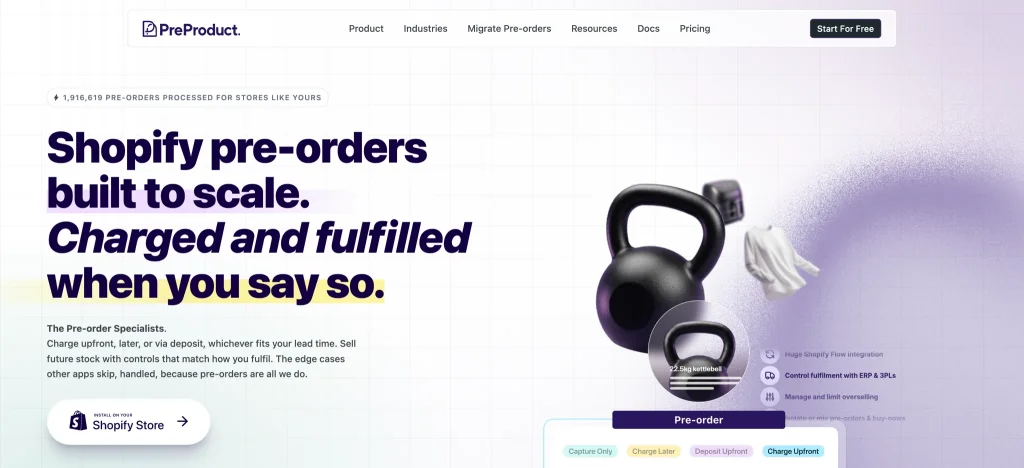
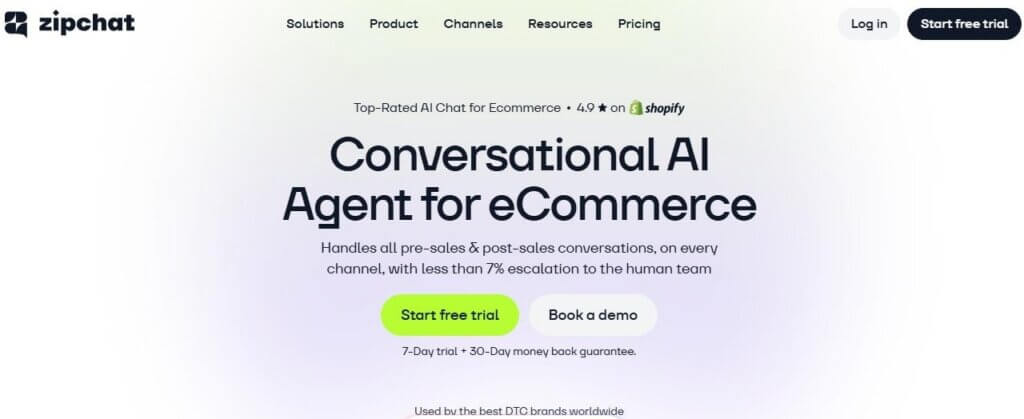
PreProduct is our top pick for the pre-order checkout layer. Zipchat is our top pick for AI chat. Stack the two, and the launch holds together from order to ship.
How We Picked These 10 Apps
Pre-order is its own model. The cash lands weeks or months before the goods do, and the support load lives in that gap.
We picked apps that hold up across the three jobs in the title: AOV, support, and launch speed. Each one had to install on Shopify in under an hour, work with deferred billing or a delayed ship date, and earn its slot from public Shopify App Store or G2 reviews. We scored on fit for pre-order workflows first, then price, then how well the app plays with the rest of a Shopify stack.
Handles the “when will it ship?” wave on autopilot
3
Back in Stock by Swym
Waitlists + restock alerts
$19.99/month
4.7/5
Captures demand before the next drop
4
Klaviyo
Email + SMS for launches
Custom-based pricing
4.7/5
Deepest segmentation for pre-order lifecycles
5
AfterShip
Tracking + delay comms
$29/month
4.5/5
Cuts “where is my order” tickets in half
6
Growave
Loyalty + retention
$15/month
4.8/5
Rewards and VIP early access keep pre-order buyers coming back
7
ReConvert
Post-purchase upsells
$19.99/month
4.6/5
Lifts AOV on the thank-you page
8
Loop Returns
Returns + exchanges
$155/month
4.7/5
Exchanges keep revenue when pre-orders arrive late
9
Judge.me
Reviews + social proof
$15/month
5.0/5
Reviews soften the wait for new buyers
10
Kark Multi Location Inventory
Multi-location stock
$6.99/month
5.0/5
One stock record per location, ready for the drop
1. PreProduct: Best for Pre-Order Checkout and Deposits
PreProduct is a Shopify-native pre-order app. It lets you take a deposit, charge in full at order, or hold the card and bill later. The whole flow stays inside Shopify checkout, so the buyer never sees a third-party page. Pre-order lines are held back from fulfillment until stock lands, so only what’s ready is released to ship.
Pre-order brands use it to protect cash flow when stock lands six or twelve weeks out. A 20% deposit holds the order, and the rest is charged when the goods are ready.
Key features
Deposit, full payment, or pay-later pre-orders.
Deferred charges on a vaulted card, triggered by hand or on automation.
Mixed or pre-order-only carts, alongside in-stock products.
Variant-level pre-order toggles.
Built-in pre-order email comms.
Controlled fulfillment: pre-order lines held back until stock lands, then released by listing, by customer or automatically as stock is added. Pre-order limits per variant and customer.
Pricing: Free Starter plan available (5% of paid pre-order revenue); paid plans from $59.99/month.
Rating: 4.9/5.
Pros
Sits inside the native Shopify checkout.
Deposit logic that does not need manual reconciliation.
Built for brands shipping four to sixteen weeks after order.
Cons
Email comms inside the app are simpler than a dedicated ESP, so pair it with Klaviyo.
Best for: Brands running pre-orders at scale, from a seasonal launch or sold-out hero product to thousands of SKUs alongside in-stock items. Also deposit-led and made-to-order operations.
2. Zipchat: Best for AI Customer Support
Zipchat is an AI sales and support agent built for Shopify. It reads your live catalog, order data, and policies, then answers shopper questions on a Shopify store, website, WhatsApp, Instagram, Messenger, and email.
Pre-order brands feel the support load most in the gap between order and ship. The same five questions repeat for weeks: when will it ship, can I change the size, will I be charged now, and can I cancel. Zipchat answers all five without a human.
When a customer asks for a different size that is sold out, the out-of-stock assistant recommends an alternative instead of dropping the conversation. When the buyer wants to cross-sell into a bundle, AI product recommendations handle it inside the chat.
Key features
AI chat trained on your live catalog and policies.
Order lookup and shipping status inside the chat.
WhatsApp, Instagram, and Messenger in one inbox.
95+ languages, no translation work.
Custom Tools to call your own APIs (CRM, WMS, ESP).
Pricing: Starts at $49/month with a free trial.
Rating: 4.9/5.
Pros
Handles the WISMO wave that a pre-order launch always produces.
Recovers carts before checkout, not after.
Tied to the live catalog, so it does not invent stock answers.
Cons
Brands that prefer a human-first inbox will want a clear escalation rule from day one.
Best for: Pre-order brands with global buyers, long shipping windows, and a small support team that cannot run 24/7.
3. Back in Stock by Swym: Best for Waitlists and Stock Alerts
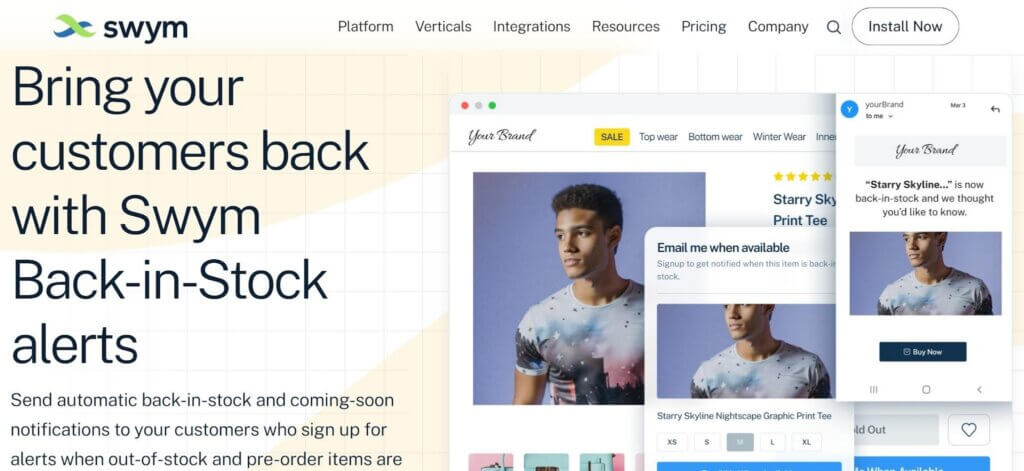
Back in Stock by Swym lets shoppers sign up for a stock alert when an out-of-stock product returns. For pre-order brands, this is the demand-capture layer that sits next to the pre-order toggle.
The app sends restock alerts by email or SMS, integrates with Klaviyo, and feeds intent data into your next drop forecast.
Key features
Notify-me form on every product page.
Email and SMS alerts on restock.
Klaviyo, Shopify Email, and Mailchimp integrations.
Per-variant waitlist tracking.
Demand data export for forecasting.
Pricing: Starts at $19.99/month.
Rating: 4.7/5.
Pros
Captures buyers who would otherwise leave.
Variant-level lists tell you which size or color sold out fastest.
Light setup, often under thirty minutes.
Cons
The free plan caps alerts, which is tight for high-traffic stores.
Best for: Pre-order brands that drop in waves and want a hard signal on what to order next.
4. Klaviyo: Best for Launch Email and SMS
Klaviyo is the marketing engine most pre-order brands run on. Email, SMS, and reviews from a single contact record. The reason it works for pre-order is segmentation. You can split buyers by ship window, by deposit status, or by which drop they signed up for.
A clean pre-order flow keeps the buyer warm for the eight weeks between order and delivery, which is when most refund requests happen.
Key features
Drag-and-drop email and SMS flows.
Pre-built pre-order flow templates.
Segmentation by purchase date, product, and ship window.
A/B testing on subject lines and SMS copy.
Reviews capture in the same tool (Klaviyo Reviews).
Pricing: Free plan available; custom-based pricing.
Rating: 4.7/5.
Pros
Deepest segmentation in the Shopify ESP space.
One platform for email, SMS, and reviews.
Strong template library for product launches.
Cons
The pricing curve is steep above 50,000 contacts.
Best for: Brands that build hype before the drop and need to nurture buyers through a long ship window.
5. AfterShip: Best for Tracking and Delay Comms
AfterShip turns the post-purchase wait into a branded experience. It pulls tracking data from 1,100+ carriers and gives buyers a page they can check without emailing support.
For pre-order, the magic is the delay comms. When a drop slips by a week, AfterShip can push a branded update by email and SMS so the buyer hears it from you first.
Key features
Branded tracking page for every order.
Carrier coverage across 1,100+ couriers.
Delivery delay detection with proactive alerts.
Estimated delivery date on the order page.
Returns add-on (separate product) for full lifecycle.
Pricing: Starts at $29/month.
Rating: 4.5/5.
Pros
Cuts WISMO tickets by half for most brands that install it.
Branded tracking page replaces the bare carrier link.
Works well alongside Zipchat as the data source for shipping questions.
Cons
The free plan does not cover SMS alerts.
Best for: Pre-order brands shipping internationally where carrier delays are normal and proactive comms protect trust.
6. Growave: Best for Loyalty and Retention
Growave is an all-in-one retention platform for Shopify. It rolls loyalty points, VIP tiers, referrals, reviews, and wishlists into one app, so you are not stitching four tools together to keep customers coming back.
For pre-order brands, loyalty is how you turn a one-off deposit into a repeat buyer. Reward points for placing a pre-order, give VIP tiers early access to the next drop, and let wishlists capture who wants the product before it is live. The wait becomes part of the relationship instead of a reason to churn.
Key features
Loyalty points, rewards, and VIP tiers with store credit.
Referral programs with fraud protection.
Product reviews with AI summaries.
Wishlists with back-in-stock alerts.
Integrations with Klaviyo, Shopify Flow, Gorgias, Recharge, and Shopify POS.
Pricing: Free plan available (up to 200 orders/month); paid plans start from $15/month.
Rating: 4.8/5.
Pros
Replaces several single-purpose apps with one dashboard.
VIP tiers and early access suit drop-based pre-order launches.
Built for Shopify, with checkout and customer account extensions.
Cons
Pricing is tied to monthly order volume, so costs climb as you scale.
Best for: Brands that want to turn pre-order buyers into repeat customers and reward the community that backs each launch.
7. ReConvert: Best for Post-Purchase Upsells
ReConvert sits on the Shopify thank-you page and turns it into a second revenue moment. Buyers who already gave you a card are far more likely to add a low-friction item.
For pre-order, the play is to bundle a fast-shipping accessory with the long-lead-time main product. The accessory ships in three days. The buyer feels progress while they wait for the drop.
Key features
One-click post-purchase upsells.
Thank-you page builder with drag-and-drop.
Survey blocks to learn why a buyer chose you.
Birthday capture for next-year remarketing.
Funnel analytics on accepted vs declined offers.
Pricing: Starts at $19.99/month.
Rating: 4.6/5.
Pros
The lowest-effort AOV lift on the list.
Pre-built funnels you can ship in under an hour.
The free plan is enough to test the model.
Cons
Best results need a fast-shipping SKU to pair with the pre-order item.
Best for: Pre-order brands that have a small range of in-stock add-ons (stickers, cleaning kits, accessories) to attach to the main drop.
8. Loop Returns: Best for Returns and Exchanges
Loop Returns is built around one idea: keep the revenue. Instead of pushing every return into a refund, the portal steers shoppers toward an exchange or a credit.
That matters for pre-order. When a drop ships late or the fit is wrong, Loop holds the dollars inside your store. A 30% exchange rate on returns is the difference between a refund line and a fresh order.
Key features
Self-serve returns portal for shoppers.
Exchange-first logic with bonus credit options.
Workflow rules by SKU, country, or order date.
Carrier label generation with discounted rates.
Reports on return reason and exchange rate.
Pricing: Starts at $155/month.
Rating: 4.7/5.
Pros
Exchange-first design holds revenue better than refund-default tools.
Strong fit for fashion, footwear, and home, where size returns are normal.
Cuts manual ops time on every return.
Cons
Pricing is steep for sub-$1M brands.
Best for: Pre-order brands at scale where one in five orders comes back and the exchange rate moves the P&L.
9. Judge.me: Best for Reviews and Social Proof
Judge.me is the most-installed review app on Shopify for a reason. It is fast, it is cheap, and it ships every feature most brands need on day one.
For pre-order, reviews from a past drop hold the next launch together. A shopper deciding to wait twelve weeks needs proof that the last batch arrived in good shape.
Key features
Photo and video reviews.
Star ratings on Google Shopping.
Review request emails timed to delivery.
Q&A widget for product pages.
Multilingual reviews.
Pricing: Free plan available; paid plans start from $15/month.
Rating: 5.0/5.
Pros
Free plan covers most pre-order brands until they scale.
Review request timing can be set to “after delivery,” not “after order”.
Reviews flow into Google Shopping with one toggle.
Cons
The look is plain. Brands with strong design teams may want more theme control.
Best for: New and growing pre-order brands that need social proof on the cheap before the next drop.
10. Kark Multi-Location Inventory: Best for Multi-Location Stock
Kark Multi Location Inventory is built for Shopify brands with stock spread across several warehouses or stores. It holds one record per SKU per location, in real time, and feeds the storefront the right number on every product page.
For pre-order, the value lands on drop day. When the inventory hits the dock, Kark routes it to the right region, and the chat layer (Zipchat reads from this same feed) tells global buyers exactly what is shipping from where.
Key features
Real-time stock per location.
Multi-warehouse and retail location support.
Native Shopify inventory integration.
Per-location product page badges.
Reports on regional sell-through.
Pricing: Starts at $6.99/month.
Rating: 5.0/5.
Pros
Clean single feed for downstream tools (AI chat, ESP, returns).
Built for brands with two to ten locations, not single-warehouse setups.
Cuts manual stock reconciliation across regions.
Cons
Single-warehouse brands will not feel the gain.
Best for: Pre-order brands with two or more fulfillment locations and global buyers who ask, “Is it shipping from my country?”
How To Choose Your Pre-Order Stack
You do not need all ten apps on day one. Most brands grow into the stack over two or three quarters.
A simple rule works here.
Stage
Annual revenue
Apps to install first
Launching
Under $500k
PreProduct, Zipchat, Back in Stock, Klaviyo
Scaling
$500k to $5M
Add AfterShip, ReConvert, Judge.me, Growave
Mature
$5M+
Add Loop Returns, Kark
Three filters help when you pick between two apps in the same slot.
Filter 1: Does it cover the pre-order wait? A tool that ignores the four-to-twelve-week ship gap will not earn its slot on a pre-order brand. Test by asking the vendor how the app handles a delayed ship date.
Filter 2: Does it work with Shopify checkout? Apps that pull buyers off the native checkout cost conversion. Push hard on this.
Filter 3: Can it run while you sleep? Pre-order brands sell globally. AI chat, branded tracking, and waitlist alerts have to run on their own.
When This Stack Fails
The stack is not magic. Three patterns kill the ROI even when every app is installed.
The stack is bigger than the team. Five apps with five dashboards and no owner is a recipe for ignored alerts. Pick one operator to own the stack and review it weekly.
The data is not joined up. If Klaviyo, Zipchat, and AfterShip pull from different order records, the buyer gets three answers to the same question. Run one source of truth (Shopify) and let the apps read from it.
The ship date keeps slipping. No app fixes a broken supply chain. If the drop date moves three times, the trust loss is bigger than any tool can recover. Be honest in the comms, refund fast when you have to, and rebuild on the next launch.
A working threshold for a pre-order stack: ticket volume under five percent of orders, refund rate under three percent of pre-orders, and at least one in three returns turned into an exchange.
Conclusion
The cleanest pre-order opener is two apps: PreProduct for the checkout and Zipchat for the support layer. PreProduct holds the deposit and the ship window. Zipchat answers every “when will it land” question that the wait produces. Together, the buyer feels held from order to delivery.
Add the rest as orders grow. The stack pays back when the launch lands clean and the ship window stays quiet.
What is the best Shopify store app for pre-orders in 2026?
PreProduct is our top pick for the pre-order checkout layer. It handles charge-upfront, charge-later and deposit pre-orders inside Shopify’s native checkout, then holds pre-order lines from fulfillment until stock lands. Pair it with Zipchat for support, Klaviyo for email and SMS, and AfterShip for shipping comms.
Do I need a separate app for pre-orders, or can Shopify handle it?
Shopify’s native pre-order options are basic. They mark a product as “pre-order” but do not handle deposits, deferred billing, or pre-order-specific email flows. For anything beyond a one-off campaign, a dedicated app pays back fast.
How do I cut support volume on a pre-order launch?
Two moves help most. First, install an AI chat like Zipchat that reads your live catalog and order data, so it can answer “when will it ship” without escalating. Second, install AfterShip to give buyers a branded tracking page and proactive delay alerts.
Does AI chat work for pre-order brands?
Yes, when the AI reads the live order and catalog data. Zipchat handles the WISMO wave that follows every pre-order launch, answers in 95+ languages, and recommends alternatives when a size sells out. Read more in our guide to the best AI chatbot for Shopify.
Akinwale Ojo
Content Strategist @Zipchat.ai
Akinwale Ojo is a Content Strategist with over six years of experience in SEO and technical content writing. He helps B2B, B2C, and SaaS companies grow through data-driven content strategies, turning complex product insights into search-optimized articles that improve organic visibility, support lead generation, and strengthen brand positioning.
Just want to generate a pre-order policy? Click here.
Pre-orders vary dramatically between stores. Some charge upfront and ship within 30 days. Others vault customer cards but don’t charge until fulfillment, sometimes 120+ days later. Some take deposits, others require full payment. Lead times range from weeks to months. Your pre-order policy is how you communicate these differences to customers, and without one, you risk disputes, payment failures and refund headaches that could have been avoided with transparent terms. If you haven’t set up pre-orders yet, our Shopify pre-order guide covers the technical setup first.
Setting up Pre-orders on Shopify opens opportunities to capture demand early, validate new products and improve cash flow. But taking payment before you ship comes with legal obligations and customer expectations you need to manage carefully. A well-written Shopify pre-order policy protects your store while building trust with customers who are committing to products that aren’t yet in their hands.
This guide walks you through everything you need to create a compliant, customer-friendly pre-order policy for your Shopify store. You’ll learn about FTC requirements and guidelines, what to include based on your payment model, and get free copy-paste templates tailored to charge-upfront, charge-later and deposit pre-orders.
Why Your Shopify Store Needs a Pre-order Policy
Legal Requirements You Can’t Ignore
The FTC Mail, Internet, or Telephone Order Merchandise Rule sets clear requirements for Pre-orders. (Learn more from the FTC) If you advertise a shipping timeframe, you must have a reasonable basis to ship within that window. If you don’t specify a date, you’re required to ship within 30 days of receiving payment. Other countries have similar requirements, although Europe can be stricter with payment and stock certainty.
When you can’t meet the promised timeline, you must notify customers promptly and explain their right to cancel or receive a full refund. If the customer cancels due to delay, you have seven business days to process the refund. These are federal requirements that generally apply to US-based ecommerce stores taking Pre-orders, though specific circumstances may vary.
Beyond federal rules, some states have additional disclosure requirements. Your Shopify pre-order policy should clearly state when payment occurs, when shipping happens and what customer rights exist if delays occur.
Customer Trust and Transparency
Clear policies reduce disputes and set realistic expectations. When customers understand exactly when they’ll be charged, when their order will ship and how to cancel if needed, you reduce support tickets and payment failures.
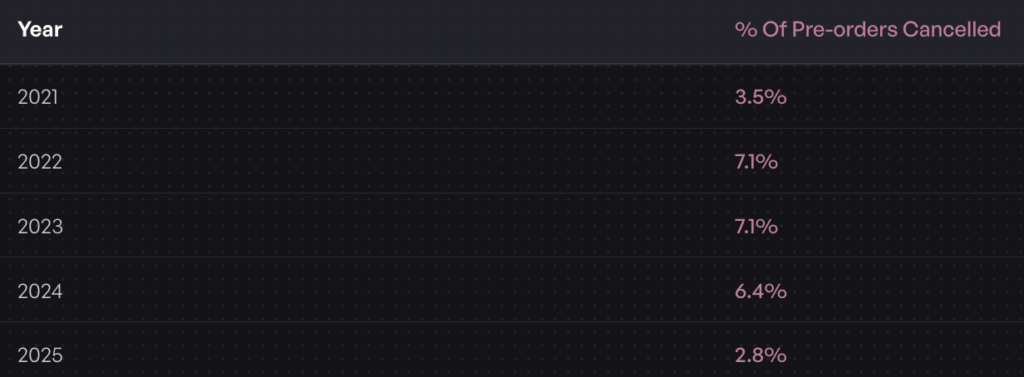
The average pre-order cancellation rate sits at 5.4% across the data we’ve collected. A transparent policy that explains your process upfront helps you maintain that baseline rather than seeing cancellations spike due to confusion or unmet expectations.
Pre-orders require more customer patience than standard purchases. Your policy is where you earn that patience by being upfront about timelines, payment terms and what happens if things change.
Platform-Specific Requirements
Shopify has technical requirements that affect your pre-order policy language. Pre-orders currently work only with Shopify Payments or PayPal Express. Customers can’t use accelerated checkouts like Shop Pay, Apple Pay or Google Pay, nor local payment methods like Klarna or Sofort for pre-order purchases.
If you’re using charge-later or deposit pre-orders, you’ll need Shopify Payments enabled and a Shopify pre-order app that supports vaulted card payments. These technical requirements should be disclosed in your policy so customers understand any checkout limitations.
Your policy also needs to address Shopify’s authorization period if you’re charging upfront and holding fulfillment. Payment authorizations typically expire after seven days, which matters for stores with longer lead times using charge-upfront models.
What to Include in Your Shopify Pre-order Policy
Essential Policy Components
1. Estimated Shipping and Delivery Dates
You must provide realistic estimated delivery dates and have a reasonable basis for those dates. Avoid vague language like “ships soon” in favor of specific windows: “Estimated to ship by March 15, 2026” or “Ships within 30-60 days of order placement.”
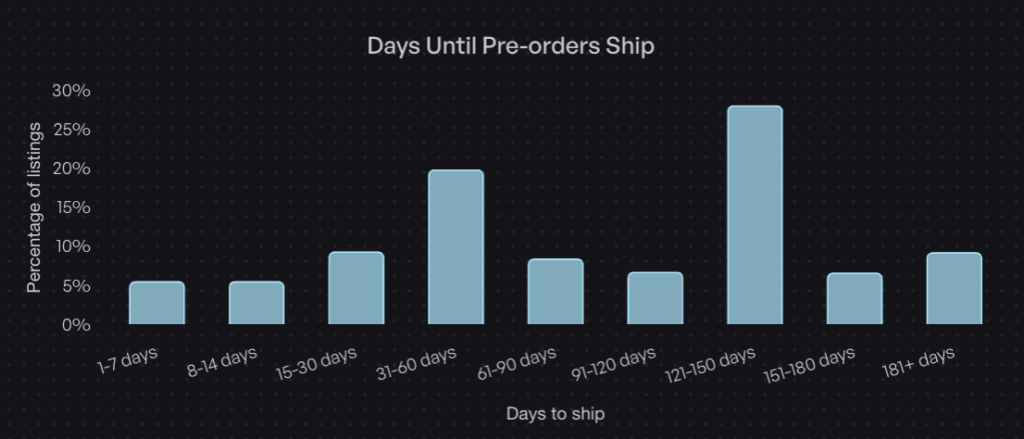
Data from over one million Pre-orders shows that 28.1% of pre-orders have fulfillment windows between 121-150 days, the most common lead time range. If your product has a longer timeline, communicate that clearly and explain why (custom manufacturing, overseas production, etc.).
Include language about what happens if the estimated date changes. Specify how you’ll notify customers and what options they have if the new timeline doesn’t work for them.
2. Payment Terms and Timing
This is where your policy must be crystal clear about when and how customers will be charged. The language varies significantly based on whether you’re using charge-upfront, charge-later or deposit models.
For charge-upfront pre-orders, state that payment is collected immediately at checkout. For charge-later pre-orders (our most popular pre-order type), explain that you’ll vault the customer’s payment method with your payment processor, but won’t capture funds until you’re ready to ship. Include information about card vaulting and that the customer’s payment method will be securely stored.
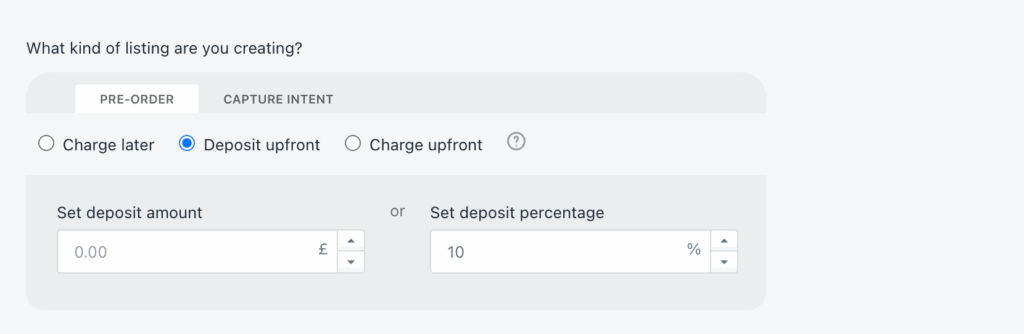
For deposit-based pre-orders, specify the percentage or amount taken upfront, when the balance will be charged and how customers will be notified before the balance charge occurs.
Include language about payment failures and what happens if a deferred charge or balance payment doesn’t go through. This protects you operationally and sets expectations with customers.
3. Refund and Cancellation Rights
Your policy must explain customer rights to cancel before shipping and how to receive refunds. Under FTC rules, if you can’t ship within the promised timeframe and the customer chooses to cancel, you must issue a full refund within seven business days. It’s also a good idea to mention if customers should cancel via a customer portal or your email support.
Specify whether customers can cancel after you’ve charged them but before you’ve shipped. Many stores allow cancellations up until the point of dispatch, which builds goodwill and reduces friction.
For deposit-based pre-orders, clarify whether deposits are refundable and under what circumstances. Some stores make deposits non-refundable after a certain point to manage production commitments, while others offer full refunds until shipping.
Address partial refunds for situations where you can only fulfill part of an order or need to substitute products.
4. Shipping and Fulfillment
Explain what happens once your pre-order stock arrives. Will orders ship immediately or will there be additional processing time? If you’re fulfilling pre-orders in the order they were placed, state that clearly.
If you allow mixed carts (pre-order items with buy-now items), explain how shipping works. Will you split the shipment and send in-stock items first, or hold everything until the pre-order is ready? Note that 62.1% of stores prohibit mixed carts to keep operations simple, but if you allow them, your policy needs to address the logistics.
Include information about shipping costs, international orders and any fulfillment holds that prevent accidental early shipping.
5. Delay and Communication Procedures
Supply chain disruptions happen. Your policy should outline what you’ll do if shipping dates change and how you’ll communicate updates to customers.
Specify how customers will be notified (email is standard), how much advance notice you’ll provide and what options customers have if they don’t agree to the new timeline. Include language about significant delays (typically four weeks or more beyond the original estimate) and customer rights to cancel with full refunds in those situations.
Consider adding a force majeure clause that addresses circumstances beyond your control, manufacturing delays, shipping disruptions or supply chain issues. This sets realistic expectations while maintaining your commitment to transparency.
6. Customer Rights and Contact Information
Make it easy for customers to reach you with questions about their pre-order. Include your support email, phone number if applicable and typical response times.
For US customers, reference their rights under the FTC Mail Order Rule. For EU customers, disclose the 14-day cooling-off period and their right to cancel for any reason within that window. For Australian customers, reference Australian Consumer Law protections.
Provide clear instructions on how to cancel a pre-order, request a refund or update payment information if needed.
Region-Specific Considerations
US Market
Your policy must comply with the FTC Mail, Internet, or Telephone Order Merchandise Rule. This means clear shipping timelines (or the default 30-day window), prompt delay notifications and seven-day refund processing when customers cancel due to delays.
Some states require additional disclosures. California, for example, has specific requirements around subscription-like charges. If your pre-order involves multiple payments over time, check state-level regulations.
EU Market
EU customers have a 14-day cooling-off period under the Consumer Rights Directive. They can cancel for any reason within 14 days of receiving the product and receive a full refund. Your policy must explicitly state this right.
As of December 2024, the EU’s General Product Safety Regulation (GPSR) requires you to appoint an EU-based Authorized Representative and provide comprehensive product safety information. If you’re selling pre-orders to EU customers, your policy should reference compliance with GPSR.
You must proactively inform EU customers of any changes to expected delivery dates and clearly explain their rights if delays occur. The communication requirements are more formal than in the US.
Other Markets
Australian Consumer Law provides strong protections for customers, including guarantees about product quality and delivery timelines. Your policy should acknowledge these rights without trying to limit them.
Canadian requirements are similar to US rules but reference the Competition Act and provincial consumer protection laws. If you ship to Canada, note any differences in processing times or returns.
Free Shopify Pre-order Policy Generator
Use this generator to create a pre-order policy template based on your store:
Pre-order Policy Generator
Generate a customized pre-order policy for your store.
Generated Policy:
How to Display Your Pre-order Policy on Shopify
Create a Dedicated Policy Page
Add your pre-order policy as a dedicated page in your Shopify admin:
Go to Online Store > Pages in your Shopify admin
Click Add Page
Title it “Pre-order Policy” or “Pre-order Terms”
Paste your policy content into the page editor
Set the visibility to visible and save
Alternatively, add it to your existing policies:
Go to Settings > Policies in Shopify admin
Scroll to the bottom and look for custom policy options
Select the pre-existing “Purchase options cancellation policy” policy
Paste your template and customize
Save changes
Link From Product Pages
Make your pre-order policy easy to find from product pages where Pre-orders are available:
Add a line in your product description: “This is a pre-order item. Please review our Pre-order Policy before purchasing.”
Optionally, you can also add terms and conditions at checkout requiring customers to acknowledge pre-order terms. Optin in Shopify’s “Online store” -> click 3 dots -> “Edit default theme content” -> search for “pre-order” -> edit the “Purchase options agreement label” field -> click “Save”
Email Communication Touchpoints
Your policy should be reflected in automated emails:
Order Confirmation Email Include a reminder that this is a pre-order with a link to full terms: “Thank you for your pre-order! Your payment [will be charged when ready to ship / has been collected]. Review our [Pre-order Policy] for details on estimated shipping dates and cancellation rights.”
Upcoming charge notification email (for charge-later and deposit balance) Optionally sent 24 hours before charging: “Your pre-order for [PRODUCT] is almost ready! We’ll charge your payment method on [DATE]. If you need to update payment information or cancel, please do so by [DEADLINE]. Full details in our [Pre-order Policy].”
Best Practices for Pre-order Customer Communication
Setting Expectations Early
Clear communication starts on the product page. Your pre-order button, product description and estimated delivery date should all align with your policy.
Examples of effective product page copy:
“Pre-order: Ships by March 15, 2026”
“Pre-order: Estimated delivery 90-120 days from order date”
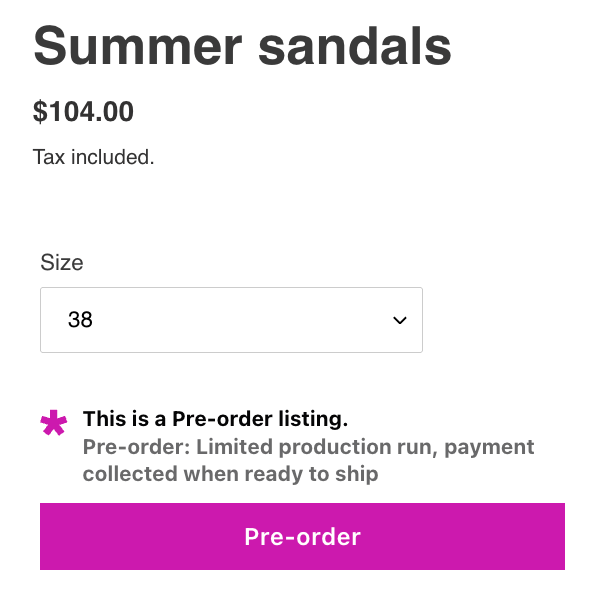
“Pre-order: Limited production run, payment collected when ready to ship”
Customize your add-to-cart button text to say “Pre-order Now” instead of “Add to Cart” so customers understand what they’re buying. Most Shopify pre-order apps, including PreProduct, let you customize front-end wording across the storefront to match your brand and set clear expectations.
Proactive Updates During Lead Time
Don’t wait for customers to ask for updates. Communication reduces anxiety, support tickets and cancellations.
Send emails when something changes, plus the initial order confirmation:
Order confirmation: Immediate (standard)
Upcoming charge notification: 24 hours before charging (for charge-later/deposit)
Shipping update: When item ships with tracking
Delay notification: Immediately when you learn of delays or timeline changes
Let customers know they can check their customer portal anytime for up-to-date information on their order status, estimated delivery dates and payment schedules. This reduces the need for frequent email updates while keeping customers informed.
PreProduct offers customizable email templates and customer portals where pre-order customers can check their order status, estimated delivery dates and payment schedules anytime without contacting support.
Managing Delays and Changes
Delays happen. How you handle them determines whether customers stay committed or cancel.
When you learn of a delay:
Calculate the new estimated timeline with buffer
Draft clear notification email explaining what happened and new date
Explain customer options (keep order with new date or cancel for refund)
Set a deadline for customers to respond if they want to cancel
Send the notification immediately, don’t wait
Email template for delay notifications:
“Subject: Update on Your Pre-order: New Estimated Ship Date
Hi [NAME],
We’re reaching out about your pre-order for [PRODUCT] (Order #[NUMBER]).
Due to [BRIEF REASON: manufacturing delays / shipping disruptions / supplier issues], the estimated ship date has changed from [ORIGINAL DATE] to [NEW DATE].
We understand this is disappointing. Here are your options:
Option 1: Keep your order with the new ship date of [NEW DATE] No action needed. We’ll proceed with your order and notify you when it ships.
Option 2: Cancel for a full refund Email us at [SUPPORT EMAIL] by [DEADLINE DATE] to cancel. [Refunds are processed within 7 business days / No payment will be collected if you cancel].
We sincerely apologize for this delay and appreciate your patience. If you have questions, please reply to this email or contact [SUPPORT EMAIL].
Thank you, [YOUR STORE NAME]”
Common Pre-order Policy Mistakes to Avoid
Being Vague About Shipping Times
“Ships soon” or “available later this year” probably doesn’t meet your local legal requirements and frustrate customers. If you don’t know when a product will ship, it’s better to use a date range with clear caveats: “Estimated to ship between April and June 2026, subject to manufacturing timeline” is better than vague promises.
If production schedule is uncertain, use charge-later or deposit models rather than collecting full payment upfront. This reduces your refund risk and keeps customers committed without their money tied up indefinitely.
Not Disclosing Payment Timing
Customers need to know exactly when they’ll be charged. “Payment will be processed” is too vague. Your policy should state:
Charge-upfront: “Your card is charged immediately when you place your order”
Charge-later: “Your payment method will be vaulted with our processor now but won’t be charged until we’re ready to ship, approximately [TIMEFRAME] from now”
Deposit: “You’ll pay [AMOUNT/PERCENTAGE] now and the remaining [AMOUNT/PERCENTAGE] when we’re ready to ship, approximately [TIMEFRAME] from now”
Also disclose if there are limitations on payment methods (no Shop Pay, Apple Pay, etc.) so customers aren’t surprised at checkout.
Ignoring Regional Requirements
If you sell internationally, your policy can’t be US-only. EU customers have 14-day cooling-off periods. Australian customers have strong consumer guarantees. Canadian provinces have their own consumer protection laws.
Include a section that acknowledges regional rights: “For EU customers: You have a 14-day righxt to cancel under the Consumer Rights Directive. See our full returns policy for details.”
“For Australian customers: Nothing in these terms limits your rights under Australian Consumer Law.”
Don’t try to write separate policies for each region unless you have a legal team. A single comprehensive policy that acknowledges major regional differences is sufficient for most stores.
Incomplete Refund Policies
Your refund section must address:
Timeline for processing refunds (FTC requires seven business days)
What triggers a refund (cancellation before ship, failure to meet timeline, etc.)
How refunds are issued (back to original payment method)
What happens to deposits if order is cancelled
Partial refunds if you can only fulfill part of an order
Don’t leave customers guessing about whether they can get their money back and how long it takes.
No Delay Contingency Plans
Your policy should have clear language about what happens when shipping dates slip. Include:
How you’ll notify customers of delays
How much advance notice you’ll provide
Definition of “significant delay” (typically four weeks or more)
Customer options when delays occur
How long customers have to decide whether to keep or cancel
Consider adding a force majeure clause: “If delays occur due to circumstances beyond our reasonable control (natural disasters, pandemics, shipping disruptions, trade restrictions, etc.), we will notify you as soon as possible and provide updated timelines. You will have the option to cancel for a full refund if the delay exceeds [NUMBER] weeks.”
Technical Requirements for Shopify Pre-orders
Payment Gateway Setup
To offer deferred-charge Pre-orders on Shopify, you must use either Shopify Payments or PayPal automatic payments. Other payment gateways don’t support the vaulting and capture workflows needed for charge-later pre-orders. Most payment gateways support charge-upfront pre-orders.
For charge-later and deposit Pre-orders specifically, you need:
Shopify Payments enabled
A pre-order app that supports vaulted card payments (storing payment details to charge later)
Note: Charge-later pre-orders use card vaulting, not authorization holds, so there’s no expiration window to manage
PreProduct and similar apps handle the technical complexity of vaulting cards and managing deferred charges so you don’t have to build custom checkout flows. The app securely stores customer payment details with Shopify Payments, PayPal or Stripe and charges them when you say so, by hand or on automation, never early or twice. For deposit-based Pre-orders, check out Shopify deposit payments for detailed setup guidance.
Inventory and Fulfillment Settings
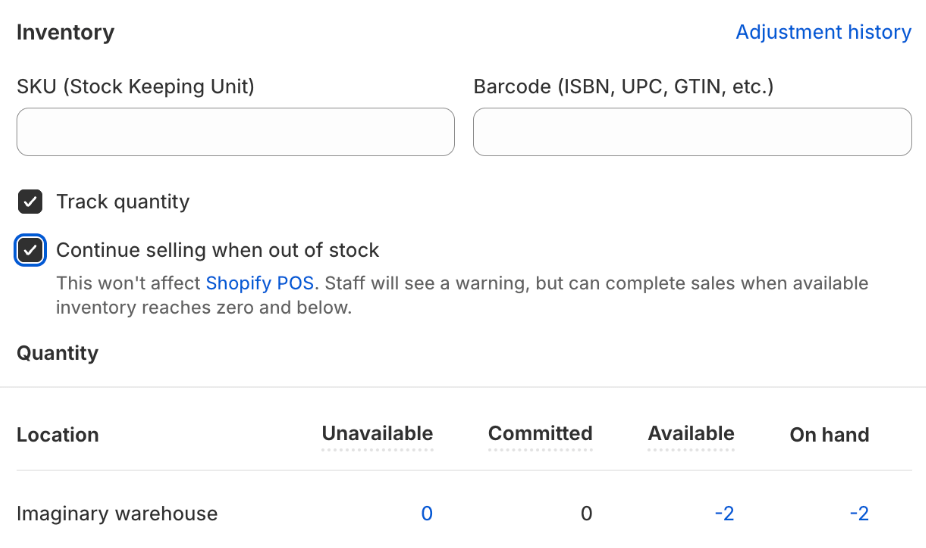
Enable the “Continue selling when out of stock” for pre-order products so customers can purchase even when inventory is at zero. Most pre-order apps toggle this setting automatically when you create a listing.
For Shopify stores, make sure that your pre-order app implements fulfillment holds to prevent pre-orders from flowing automatically to your 3PL or warehouse management system. When you’re ready to fulfill, you can release them, either manually or via automation.
For BigCommerce and WooCommerce stores using PreProduct, orders are kept entirely separate from your platform admin until you release fulfillment. This prevents premature shipping and keeps pre-orders out of your normal fulfillment workflows.
Track pre-order inventory separately from regular inventory if you’re managing both simultaneously. Use separate SKUs or variants to prevent overselling and maintain accurate reporting.
Pre-order App Integration
Shopify’s native pre-order functionality is limited. To offer charge-later, deposit or multi-step payment plans, you’ll need a dedicated pre-order app.
Customizable front-end wording for product pages and checkout
Fulfillment holds or order management
Automated email notifications for charges and shipping updates
Customer portals where customers can view order status and payment schedules
Integration with Shopify Flow for automation
PreProduct offers all of these features plus deep Shopify Flow integration with 15 custom Flow actions and 16 triggers, on the Scale and Scale Plus plans. This lets you automate pre-order listing creation, charge triggering and fulfillment releases based on inventory changes and other conditions in your Shopify store.
Real-World Pre-order Policy Examples
Example 1: Short Lead Time (30-60 Days)
A fashion brand is restocking a popular jacket. Lead time is 45 days from manufacturer. They use a charge-upfront model because the timeline is short and predictable.
Their policy focuses on:
Clear estimated ship date: “Ships by April 15, 2026”
Immediate payment collection
Simple cancellation: “Cancel any time before shipment for full refund”
Standard return policy applies after delivery
This straightforward approach works because the short timeline minimizes complexity. Customers know exactly when to expect their order and when they’ll be charged.
Example 2: Long Lead Time (120+ Days)
A custom furniture maker takes pre-orders for made-to-order pieces. Production takes 120-150 days. They use a deposit model: 30% upfront, balance charged when ready to ship.
Their policy emphasizes:
Detailed production timeline explanation
Deposit amount and balance payment schedule
Mid-production email update at 60-day mark
Clear communication about delays (custom manufacturing is unpredictable)
Deposit refund policy: Full refund before balance charge, non-refundable after balance charged
The longer timeline requires more detailed communication and a payment structure that commits customers without tying up all their money for months. This matches the 28.1% of pre-orders with 121-150 day windows, the most common extended lead time range.
Example 3: Mixed Cart Approach
An outdoor gear store allows customers to buy in-stock items with pre-order items. They default to shipping everything together but offer split shipment for an additional fee.
Their policy clarifies:
Default: All items ship together when pre-order is ready
Split shipment available for $15 additional
In-stock items charged immediately
pre-order items (charge-later model) charged when ready to ship
Separate return windows for items that ship separately
This approach increases average order value but requires clear policy language to prevent customer confusion about why in-stock items haven’t shipped yet.
Note that 62.1% of stores using PreProduct prohibit mixed carts specifically to avoid this operational complexity. Whether you allow mixed carts depends on your fulfillment setup and customer service capacity.
Conclusion
A well-written Shopify pre-order policy protects your store legally while building customer trust. The key is transparency: clear payment terms, realistic shipping estimates and straightforward cancellation rights reduce disputes and support tickets.
Remember these essentials:
Include all required components: shipping timelines, payment terms, refund procedures, delay protocols and customer contact information
Comply with local laws and regulations (30-day default, delay notifications, seven-day refunds) and regional requirements (EU 14-day cooling-off, GPSR compliance, etc.)
Tailor your policy to your payment model (charge-upfront needs different language than charge-later or deposit)
Display policy clearly on product pages, checkout and confirmation emails
Communicate proactively throughout the pre-order lifecycle with scheduled updates and immediate delay notifications
Use the free templates in this guide as starting points. Customize them with your specific terms, timelines and contact information. Consider having legal counsel review your policy, especially if you’re taking deposits or operating across multiple regions.
Ready to set up pre-orders with built-in policy compliance? PreProduct helps Shopify stores run pre-orders at scale from listing to fulfillment, with customizable policy language, automated customer communications, charges that fire when you say so and fulfillment holds that keep pre-order lines back until stock lands. Start taking pre-orders alongside your in-stock range today.
Launched a pre-order with a 60-day ship date, only to realize Shopify’s payment authorization expires in seven days? You’re not alone. The Shopify authorization period is one of the most common operational challenges pre-order merchants face, especially when lead times stretch beyond a week or two.
In this guide, we’ll break down how Shopify’s authorization period works, why it matters for pre-orders, and how to handle pre-orders with lead times that exceed the standard seven-day window. Whether you’re running restock campaigns, made-to-order launches, or seasonal pre-sales, understanding authorization periods helps you choose the right payment strategy for your business.
We’ll cover extended authorization options for Shopify Plus merchants, vaulted card solutions that eliminate time constraints entirely, and the cost implications of each approach. By the end, you’ll know exactly which payment method fits your pre-order model.
What is a Shopify authorization period?
Payment authorization basics
A payment authorization is essentially a hold placed on a customer’s credit card. When someone enters their card details at checkout, the card issuer verifies that funds are available and reserves that amount. The merchant can then capture (collect) those funds later, within a specific timeframe.
This system exists for several reasons. It protects customers from unauthorized charges, reduces fraud risk for card issuers, and gives merchants flexibility in when they collect payment. For example, a merchant might authorize payment immediately but wait to capture until the product ships.
The authorization period is the window during which a merchant can capture an authorized payment. Once this period expires, the hold is released, funds return to the customer’s available balance, and the merchant can no longer collect payment through that original authorization.
Shopify Payments standard authorization period
For most Shopify merchants using Shopify Payments, the standard authorization period is seven days. This means you have seven days from the moment a payment is authorized to capture those funds. If you don’t capture within this window, the authorization expires.
After expiration, the customer’s card is released and you cannot collect payment. The order remains in your Shopify admin, but you’ll need to contact the customer to arrange new payment, either through a new order or by sending a payment link.
This seven-day standard isn’t unique to Shopify. It’s an industry-wide norm set by major card networks like Visa and Mastercard. Most payment processors, regardless of platform, operate under similar constraints.
What happens when an authorization expires
When a Shopify authorization period expires, several things occur. First, the hold on the customer’s card is automatically released by their card issuer. No charge goes through, and the customer sees the pending amount disappear from their statement.
In your Shopify admin, the order status remains but shows that payment wasn’t captured. You’ll see a notification that the authorization has expired. At this point, you have two main options: cancel the order and create a new one with fresh payment details, or contact the customer directly to collect payment through alternative means.
This creates friction for both you and your customer. The customer may be confused about whether their order is still valid. Your team needs to spend time following up, and there’s a risk the customer decides not to complete the purchase. For pre-order merchants with longer lead times, this scenario becomes inevitable unless you plan ahead.
Authorization periods and pre-orders: The core challenge
Why authorization periods matter for pre-orders
Pre-orders often involve lead times that extend well beyond seven days. Whether you’re manufacturing custom products, waiting on supplier shipments, or running seasonal campaigns, 30 to 90-day lead times are common. Understanding authorization periods is essential when setting up Shopify pre-orders, as it directly impacts which payment model you should use.
The standard seven-day Shopify authorization period simply doesn’t align with these timelines. If you authorize payment at checkout for a product that won’t ship for two months, that authorization will expire 53 days before you’re ready to fulfill.
This creates operational complexity. You either need to charge customers upfront (potentially months before they receive anything) or find an alternative payment method that accommodates your timeline. Neither option is ideal without careful planning.
Common merchant scenarios
Consider a fashion brand producing made-to-order pieces with a six-week production cycle. Customers place orders in early September for items shipping in late October. With standard authorization, payment would need to be captured within seven days, forcing the brand to collect funds more than a month before fulfillment.
Or take a furniture maker offering build-to-order pieces with 90-day lead times. Standard authorization is completely incompatible with this model. The authorization would expire 83 days before the product is ready to ship.
Seasonal products present similar challenges. A brand taking holiday pre-orders in September for November delivery faces a 60-day gap between order placement and fulfillment. The seven-day authorization window closes long before products are ready.
Restock pre-orders can work with standard authorization if the restock arrives within a week, but supplier delays are common. A planned seven-day restock can easily stretch to two or three weeks, causing authorization issues.
Extended authorization periods for Shopify Plus merchants
How extended authorization works
Shopify Plus merchants have access to extended authorization periods, a feature that extends the payment capture window from seven days to up to 30 days. This feature launched in October 2020, specifically to address fulfillment delays and give merchants more flexibility.
Extended authorization is available for specific card types: Visa, Mastercard and American Express. Not all cards support extended holds, so even on Shopify Plus, you may encounter cards that revert to the standard seven-day period.
To use extended authorization, manual payment capture must be enabled in your payment settings. Shopify sends automatic notifications one day before an authorization expires, giving you time to capture before losing the hold.
Setting up extended authorization
Navigate to Settings, then Payments in your Shopify admin. Under Payment authorization, select “Manually capture payment for orders.” This enables you to control when payments are captured rather than collecting automatically at checkout.
Once manual capture is enabled, Shopify Plus stores using Shopify Payments automatically gain access to extended authorization for supported card types. There’s no additional setup required beyond enabling manual capture.
You’ll receive email notifications when authorizations are approaching expiration, typically 24 hours before the 30-day window closes. This gives you a final opportunity to capture payment before the hold releases.
Extended authorization fees and limitations
While extended authorization provides more time, it comes with an additional cost. Shopify charges a 1.75% fee when you capture payment after the standard seven-day period. This fee applies on top of your regular credit card processing rates.
For example, if you capture a $100 payment on day 15 (after the seven-day window), you’ll pay your standard Shopify Payments rate (typically 2.9% + 30¢ for online stores) plus the additional 1.75% extended authorization fee. The total comes to $4.95 in fees instead of $3.20.
The 30-day maximum still presents limitations. For pre-orders with longer lead times (60, 90, or 120+ days), even extended authorization isn’t sufficient. You’ll need a different solution.
Card type dependency is another limitation. If a customer’s card doesn’t support extended authorization, you’re back to the seven-day window regardless of being on Shopify Plus.
Vaulted cards: The better solution for long lead time pre-orders
What are vaulted cards and how do they work
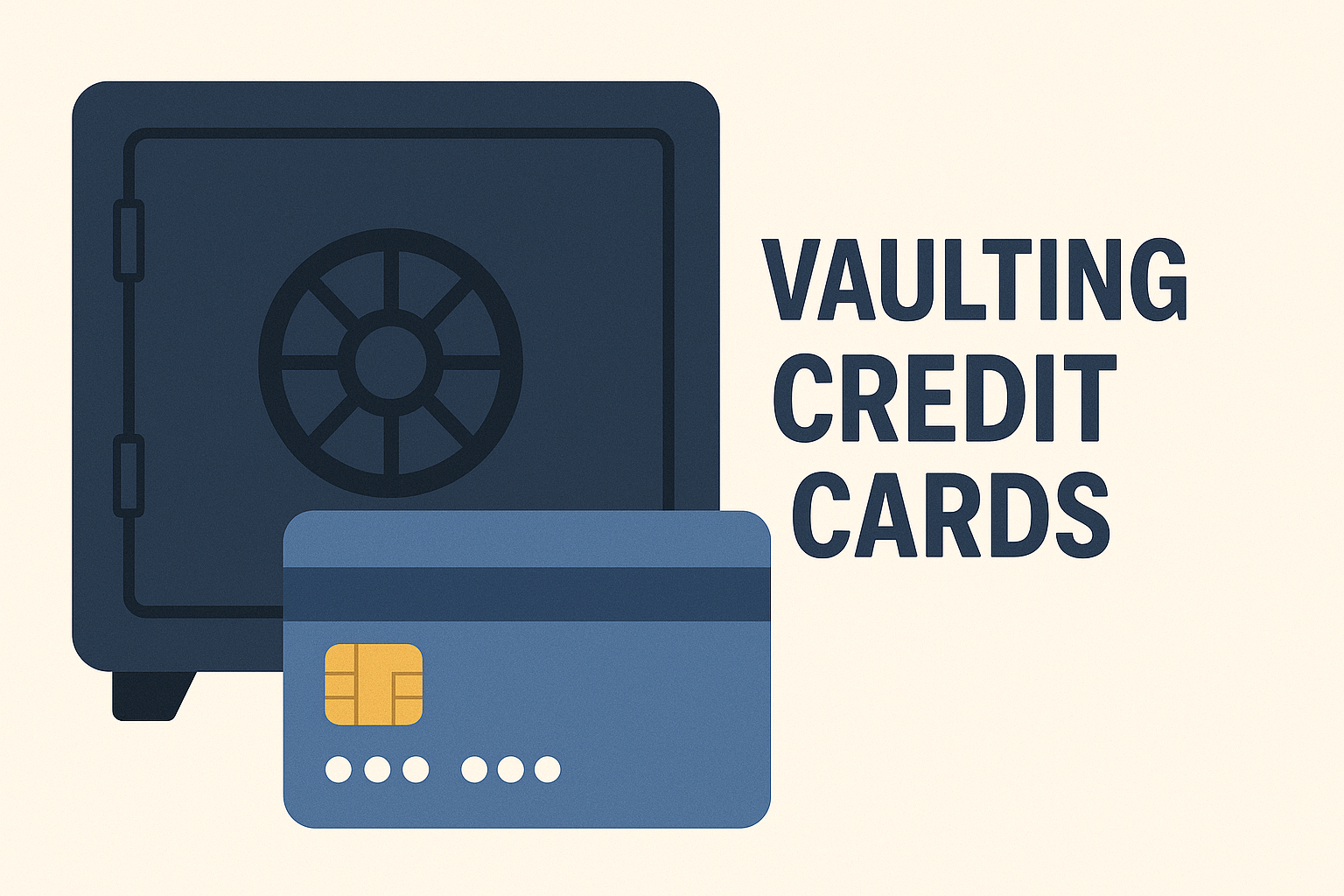
Vaulted cards, also called deferred payments, offer a fundamentally different approach. Instead of authorizing payment and racing against a countdown, vaulted card payments securely store customer payment details for future use, with no time limit.
Here’s how it works: At checkout, the customer enters their card details and agrees to a future charge. Shopify or your payment provider (like Stripe) securely stores (vaults) these payment details in a PCI-compliant manner. Later, when you’re ready to fulfill the order, you trigger the charge. The customer’s card is processed at that point.
This eliminates the authorization period problem entirely. Whether your lead time is 30 days, 90 days, or six months, you can charge the customer when it makes sense for your operations and their expectations.
Vaulted card payments became widely available on Shopify in 2022, transforming pre-order operations for merchants who needed charge-later flexibility without authorization period stress.
Vaulted cards vs authorization periods
The differences between standard authorization, extended authorization, and vaulted cards are significant:
Feature
Standard Authorization
Extended Authorization (Plus)
Vaulted Cards
Time Limit
7 days
30 days
Unlimited
Additional Fee
Standard rates
+1.75% after day 7
Standard rates
Plan Required
All plans
Shopify Plus only
All plans with Shopify Payments
Card Type Support
All
Visa, MC, Amex
All
Best For
1-week lead times
2-4 week lead times
30+ day lead times
Standard authorization works fine for quick turnarounds. Extended authorization suits Shopify Plus merchants with moderate lead times who can absorb the extra fee. Vaulted cards are the most flexible and cost-effective option for longer timelines.
Why 56.4% of pre-order listings use vaulted cards
According to data from one million pre-orders, 56.4% of pre-order listings charge a vaulted card later: 43.8% use charge-later and 12.6% use deposit-upfront. Charge-later is the single most popular pre-order payment method. This isn’t surprising given the flexibility it provides.
Merchants choose vaulted cards because they eliminate authorization expiration anxiety. You’re not watching the clock or manually tracking when to capture payments. The payment details are safely stored until you’re ready.
Customers often prefer charge-later arrangements too. Being charged when the product ships (rather than weeks or months before) feels fairer and builds trust. They know their money isn’t tied up for an extended period before receiving anything.
The data shows only 25% of pre-orders are charged at day 0, and 47.8% are charged within 30 days of the order being placed. That means most pre-orders are charged after day 0, and more than half aren’t charged within 30 days, well beyond the standard seven-day authorization period. Vaulted cards provide that solution without additional fees.
When to use vaulted cards for your pre-orders
Vaulted cards make the most sense when your lead times regularly exceed 30 days. If you’re manufacturing products to order, sourcing from overseas suppliers, or running seasonal campaigns with multi-month gaps, vaulted cards eliminate timing stress.
They’re also ideal when lead times are uncertain or variable. If you’re not confident about exact ship dates, you don’t want to be racing against an authorization deadline. Vaulted cards let you charge when you’re actually ready to fulfill.
Customer expectations matter too. If your audience prefers to pay when products ship rather than months in advance, charge-later pre-orders align with that preference. This is particularly common in sustainable fashion and made-to-order categories where customers understand production takes time.
From a cost perspective, vaulted cards are more economical than extended authorization for longer timelines. You pay standard Shopify Payments rates regardless of when you charge, whereas extended authorization adds 1.75% after day seven.
Alternative payment capture strategies for pre-orders
Charge upfront pre-orders
Charging upfront means capturing payment immediately at checkout. This eliminates any authorization period concerns because you’re not deferring the charge at all.
According to the one million pre-order dataset, 14.9% of pre-order listings use the charge-upfront method. This works best when you have high customer trust, shorter lead times (even if beyond seven days), or strong cash flow needs that justify collecting payment early.
The trade-off is customer experience. Charging someone in August for a product arriving in November can feel uncomfortable for customers, particularly if they’re unfamiliar with your brand. Clear communication about payment timing is essential.
Charge-upfront pre-orders work well for restock scenarios where customers are familiar with the product, limited edition launches with high demand, or when you’re offering significant discounts that justify early payment.
Deposit-based pre-orders
Deposit pre-orders capture a portion of the payment upfront (typically 10-50%) and collect the balance later via vaulted card. This approach accounts for 12.6% of pre-order listings based on PreProduct’s dataset.
Deposits work particularly well for high-ticket items where you want to secure customer commitment without charging the full amount months in advance. The upfront deposit reduces cancellation risk while the deferred balance maintains goodwill.
For example, you might take a 30% deposit at checkout and charge the remaining 70% when the product is ready to ship. The deposit is processed immediately (no authorization period issue), and the balance uses vaulted card technology.
This approach balances cash flow needs with customer experience. You get some revenue upfront to fund production or offset supplier costs, while customers appreciate not paying the full amount until fulfillment is imminent.
Payment links and capture-only pre-orders
The capture-only method, used by 28.7% of pre-order listings, involves collecting payment information without any upfront charge. You then send a payment link or invoice when ready to fulfill.
This approach offers maximum flexibility for merchants but requires more manual work. You’re essentially managing payment collection separately from the initial order, which can lead to customer drop-off if they don’t complete the payment when invoiced.
Capture-only makes sense for lower-volume merchants, custom orders, or situations where you want to give customers maximum flexibility. It works well when you have strong customer relationships and low risk of non-payment.
The downside is operational complexity and potential revenue loss if customers don’t respond to payment requests. You also need systems in place to track which orders are awaiting payment vs. fully paid.
Third-party payment gateways and authorization periods
Do third-party gateways have longer authorization periods?
One common question is whether switching to a third-party payment gateway (instead of Shopify Payments) provides longer authorization periods. Unfortunately, the answer is generally no.
Authorization period lengths are set by card networks (Visa, Mastercard, etc.), not by Shopify or individual payment processors. The seven-day standard is an industry-wide rule that applies across most processors and platforms.
Certain industries get exceptions. Lodging, car rentals, and cruise lines can hold authorizations for up to 30 days because of the nature of their business. Ecommerce pre-orders don’t fall into these exception categories.
This means whether you use Shopify Payments, Stripe, Authorize.net, or another gateway, you’re generally working within the same seven-day authorization window (with some card-specific variations of 5-10 days).
When third-party gateways make sense
Third-party gateways can still be valuable if they offer vaulted card capabilities or flexible payment capture workflows that suit your needs better than Shopify Payments.
For example, Stripe offers robust APIs for storing payment methods and charging them later, similar to Shopify’s vaulted card functionality. If you’re building custom checkout flows or need specific payment features, a gateway like Stripe or Braintree might provide more flexibility.
The trade-off is that using a third-party gateway instead of Shopify Payments means you lose some Shopify-native features, potentially pay higher transaction fees, and may need more technical setup.
For most merchants, Shopify Payments with vaulted card support provides the simplest solution. But if you have specific requirements or already use a preferred gateway with deferred payment capabilities, that can work too.
How to set up charge-later pre-orders with vaulted cards
Requirements for vaulted card payments
To use vaulted card payments on Shopify, you need Shopify Payments enabled as your payment processor (or PayPal automatic payments). This feature isn’t available with third-party gateways through Shopify’s native checkout.
You’ll need a pre-order app that supports deferred payment functionality. Not all pre-order apps offer charge-later capabilities, so ensure your chosen solution integrates with Shopify’s vaulted card system.
Clear customer communication is essential. Your product pages, checkout flow, and confirmation emails should clearly explain when payment will be collected and what customers can expect.
Step-by-step setup process
Start by enabling Shopify Payments if you haven’t already. Go to Settings > Payments and complete the Shopify Payments setup process.
Next, enable manual payment capture. In Settings > Payments > Payment authorization, select “Manually capture payment for orders” and save your changes.
Install a pre-order app with vaulted card support, such as PreProduct. Configure your app to create charge-later pre-order listings for the products you want to offer on pre-order.
Customize your front-end messaging to clearly indicate payment timing. Your product page should state something like: “Your card details will be securely saved. We’ll charge you one week before your estimated ship date of [DATE].”. We have a post here on legal compliance for pre-orders and minimum communication requirements for pre-orders.
Test the entire customer experience. Place a test order, go through checkout, and confirm that payment details are vaulted properly and that you can trigger the charge from your admin when ready.
Ensure your product has the “Continue selling when out of stock” setting enabled in Shopify. This allows customers to purchase even when inventory shows zero, which is necessary for most pre-order setups.
PreProduct’s approach to authorization periods
PreProduct handles vaulted card setup automatically for charge-later and deposit-upfront pre-orders. When you create a pre-order listing, PreProduct configures the necessary settings to vault customer payment details without authorization period limitations.
You can trigger charges yourself, individually or in bulk, or set up inventory-based automation on the Scale plan and up. For example, when stock is added to a product in your Shopify admin, PreProduct can automatically charge customers and release fulfillment holds.
Failed payment handling is built in. If a customer’s card declines when you attempt to charge, PreProduct can send dunning emails with clear instructions for updating payment methods, reducing lost revenue from expired cards or insufficient funds.
PreProduct also places automatic fulfillment holds on pre-order items, preventing them from being prematurely shipped before you trigger the charge. This keeps operations clean and prevents the nightmare scenario of shipping products before collecting payment.
Customer communication and authorization periods
Setting clear expectations upfront
Product page messaging is your first opportunity to set expectations. Include clear, specific language about when payment will occur. For example: “Pre-order now, pay when it ships. We’ll charge your card one week before your estimated ship date.”
At checkout, reiterate payment timing in your terms or checkout instructions. Customers should explicitly understand they’re agreeing to a future charge, not an immediate one.
Order confirmation emails should reinforce these details. State clearly: “Your order is confirmed. Your card ending in [######] will be charged on approximately [DATE], one week before your estimated ship date of [DATE].”
The estimated ship date should be visible throughout the customer experience. Consider using date ranges if exact timing is uncertain: “Estimated shipping: Late November 2026” rather than committing to a specific day you might miss.
Handling authorization expirations and failed charges
If you’re using standard authorization and it expires, proactive communication is critical. Contact the customer immediately to explain the situation and request updated payment information.
For vaulted card payments, failed charges are a different challenge. The card might have expired, been canceled, or have insufficient funds. Your pre-order system should offer dunning email flows when charges fail.
Effective failed charge emails include a clear subject line (“Action needed: Update payment for your order”), explanation of what happened, and a simple link to update payment details. Customer portals where buyers can self-serve payment updates reduce support burden significantly.
Set a clear policy for how long you’ll attempt to collect payment before canceling the order. Some merchants try for seven days, others for 14-30 days. Communicate this timeline to customers so they know the urgency.
Email sequence best practices
A solid email sequence for charge-later pre-orders includes three potential touchpoints:
Order confirmation: “Thank you for your pre-order. Your card will be charged on approximately [DATE] when your order is ready to ship.”
Charge notification: “Your payment of $[AMOUNT] has been processed and your order is now preparing to ship.” Include tracking information if available, or an estimated ship date.
Failed charge follow-up: If the charge fails, send immediate notification with clear instructions for updating payment details and a deadline for action before the order is canceled.
Authorization periods and your tech stack
How authorization timing affects fulfillment integrations
Pre-orders shouldn’t flow through to your 3PL or fulfillment center until you’ve collected payment and are ready to ship. This is where fulfillment holds become critical.
Shopify’s fulfillment hold status prevents orders from syncing to connected fulfillment systems. For charge-later pre-orders, this hold should remain in place until you trigger the charge and release fulfillment simultaneously.
PreProduct automatically manages this workflow. When you create a charge-later listing, fulfillment holds are applied. When you trigger charges (individually or via automation), PreProduct releases those holds at the same time, allowing orders to flow to your 3PL integration.
Without proper hold management, you risk shipping products before collecting payment, which creates accounting headaches and potential losses if payments subsequently fail.
ERP and inventory management considerations
If you use an ERP or inventory management system connected to Shopify, pre-order status and payment timing should be reflected accurately. Some ERPs only pull “paid” orders, which means charge-later pre-orders won’t appear until payment is captured.
This can be beneficial for cash flow tracking (you only see paid orders in your ERP) or problematic for demand planning (you can’t see full pre-order demand). Understand how your specific ERP integration handles unpaid orders.
PreProduct provides visibility into pre-order demand regardless of payment status. You can view all pre-orders, filter by charge status, and export data for demand planning and ERP integration purposes.
When setting up integrations, test how pre-orders flow through your system. Place test orders with different payment types and verify they appear correctly in your ERP, inventory system, and fulfillment platform at the appropriate times.
Shopify Flow automation and authorization periods
Shopify Flow allows you to build automated workflows based on events in your store. For pre-orders, you can create flows that trigger actions based on payment capture timing.
For example, you might build a flow that automatically tags orders when payment is captured, triggering a fulfillment workflow or customer notification sequence. Or you could create flows that alert your team when authorizations are approaching expiration.
On the Scale plan and up, PreProduct offers 15+ Shopify Flow actions specifically for pre-orders, allowing you to automate charge triggers, fulfillment releases, customer notifications, and more based on inventory changes or custom conditions.
Flow integration lets you connect pre-order events to the rest of your Shopify ecosystem. Tag customers who complete pre-orders, trigger email campaigns in Klaviyo when charges succeed, or update inventory systems when pre-order limits are reached.
Cost analysis: Authorization strategies compared
Standard 7-day authorization costs
If you can fulfill within seven days and capture payment within the standard authorization period, you’ll pay Shopify Payments’ standard rates with no additional fees. For most merchants, this is 2.9% + 30¢ per transaction for online orders.
On a $100 order, standard fees total $3.20. There’s no additional cost for authorization, as long as you capture within the seven-day window.
The risk with standard authorization isn’t financial (if you meet the deadline), it’s operational. Miss that seven-day window and you lose the authorization, requiring manual follow-up and potentially losing the sale entirely.
Extended authorization costs (Shopify Plus)
Shopify Plus merchants capturing payment between days 8-30 pay an additional 1.75% fee on top of standard credit card processing fees. This fee only applies to the capture amount, not to refunds or partial captures.
For a $100 order captured on day 15, you’d pay the standard 2.9% + 30¢ ($3.20) plus the 1.75% extended authorization fee ($1.75), totaling $4.95 in payment processing fees.
For a $500 order captured on day 20, standard fees are $14.80 (2.9% + 30¢) plus $8.75 (1.75%), totaling $23.55 in fees.
Extended authorization makes financial sense if you’re on Shopify Plus, need the 8-30 day window, and the 1.75% fee is acceptable for your margins. For lower-margin products or longer timelines, vaulted cards are more cost-effective.
Vaulted card costs
Vaulted card payments using Shopify Payments incur only the standard credit card processing fees, regardless of when you trigger the charge. There’s no authorization period fee, no extended authorization fee, no time-based penalty.
A $100 order charged via vaulted card on day 60 costs exactly the same as one charged on day 1: 2.9% + 30¢ = $3.20 in fees.
A $500 order charged via vaulted card 90 days after the initial order costs: 2.9% + 30¢ = $14.80 in fees, compared to $23.55 if you’d used extended authorization beyond day 7.
The cost advantage of vaulted cards increases as your lead time extends. For timelines beyond 30 days, vaulted cards are the only option that doesn’t require upfront payment or manual reinvoicing.
Choosing the right payment strategy for your pre-orders
Decision framework
Choosing the right payment approach depends on several factors: your typical lead times, whether you’re on Shopify Plus, your cash flow needs, customer expectations, and operational preferences.
Use standard 7-day authorization when your lead time is consistently under seven days, you can fulfill quickly and predictably, and you want to avoid additional setup complexity.
Use extended authorization (Shopify Plus) when your lead time falls between 8-30 days, you’re already on Shopify Plus and have access to this feature, and you’re comfortable paying the 1.75% fee for the convenience of a longer capture window.
Use vaulted cards (charge-later) when your lead time regularly exceeds 30 days, your lead time is uncertain or variable, you want to charge customers closer to ship date rather than months in advance, your customers prefer “pay when ships” models, or you want the most cost-effective option for long timelines.
Use charge-upfront when you need cash flow immediately to fund production, you have high customer trust and brand familiarity, you’re offering significant discounts that justify early payment, or you’re running limited edition or restock campaigns where customers expect immediate charges.
Use deposits when you’re selling high-ticket items where full upfront payment feels like too much, you want to secure customer commitment while maintaining goodwill, or you need some cash flow upfront but want to defer the bulk of payment until closer to fulfillment.
Real merchant examples
A fashion brand with six-week production cycles uses vaulted cards to charge one week before shipping. Customers appreciate not paying months in advance, and the brand avoids authorization period stress. Cash flow is predictable because they charge in batches as production completes.
A made-to-order furniture maker with 90-day lead times uses deposit pre-orders, collecting 30% upfront to secure commitment and fund materials, then charging the remaining 70% via vaulted card when pieces are ready to ship. This balances cash flow needs with customer experience.
A Shopify Plus merchant running seasonal products with 30-day lead times uses extended authorization. The 1.75% fee is acceptable for their margins, and the convenience of a longer capture window without needing to set up vaulted card workflows fits their operations.
A fast-moving restock campaign with 10-day lead times uses standard 7-day authorization paired with expedited fulfillment. Products typically ship within six days, allowing them to capture within the authorization window without issues.
Conclusion
The Shopify authorization period is a fundamental constraint that affects how you structure pre-order payments. The standard seven-day window works fine for quick fulfillment, but becomes a significant challenge as lead times extend.
Shopify Plus merchants gain access to extended authorization periods up to 30 days, though this comes with an additional 1.75% fee after day seven. For moderate lead times (8-30 days) and merchants already on Plus, this can be a convenient solution.
Vaulted cards represent the most flexible and cost-effective approach for longer pre-order timelines. With no authorization period limitations and no additional fees, charge-later pre-orders let you collect payment when it makes sense for your operations and your customers. The data backs this up: 56.4% of pre-orders use a vaulted card pre-order method, making it the most popular choice among merchants.
Understanding these options helps you choose the payment strategy that aligns with your lead times, cash flow needs, customer expectations, and operational complexity tolerance. There’s no single right answer, only the right answer for your specific business model.
Take stock of your typical pre-order lead times, evaluate the costs of different approaches, consider what your customers prefer, and test your chosen method end-to-end before launching. Pre-orders are powerful for capturing demand early and reducing inventory risk. Don’t let authorization period confusion hold you back from leveraging them effectively.
PreProduct runs Shopify pre-orders at scale, charged and fulfilled when you say so. It handles charge-later, deposit and charge-upfront pre-orders natively on Shopify, with built-in vaulted card support, no authorization period limitations and fulfillment holds until stock lands. If you’re ready to start taking pre-orders on Shopify without worrying about authorization windows, explore how PreProduct can help streamline your pre-order operations.