Shopify Pre-Order Best Practices: 10 Data-Driven Strategies from $85M in Sales
Prefer to see a video? Click here to watch Oli go through the 10 best practises.
Most pre-order advice is generic theory. We analyzed over $85 million in actual Shopify pre-order sales across 1M+ orders to find what really works. This guide shares battle-tested Shopify pre-order best practices based on real data, not guesswork.
Running pre-orders on Shopify can transform your cash flow and validate product demand before committing to inventory. Shopify’s pre-order system lets merchants sell products before they’re available, but execution matters. Some stores see conversion lifts while others deal with high cancellation rates and operational chaos.
The difference comes down to execution. In this guide, you’ll learn 10 proven best practices backed by the last 5+ years of our experience in the space. We’ll include when to charge upfront versus later, how to prevent fulfillment mistakes, and which metrics actually matter. Whether you’re launching your first pre-order or optimizing an existing campaign, these strategies will help you run pre-orders that work.
What Makes a Pre-Order Strategy Successful?
Before diving into specific best practices, it’s worth understanding what separates successful pre-order campaigns from failures. After analyzing 1M+ pre-orders, three pillars consistently appear in high-performing campaigns.
The Three Pillars of Pre-Order Success

Clear customer expectations: Customers need to know exactly when their product ships, how payment works, and what happens if delays occur. Vague language like “coming soon” creates uncertainty that kills conversions.
Smart payment structure: The right payment model depends on your lead times, price points, and risk tolerance. Charge-upfront works great for short timelines but can hurt conversion for longer waits. Charge-later and deposits offer flexibility but require more operational setup.
Operational readiness: Pre-orders touch fulfillment, inventory, customer service, and sometimes your 3PL or ERP. Without proper workflows, you risk shipping too early, overselling, or creating support ticket storms.
Framework: How to Think About Best Practices
The best approach is to start small, test your workflows, then scale what works. List one or two products for pre-order first. Validate your payment flow, customer communication, and fulfillment process. Learn what resonates with your customers before expanding catalog-wide.
Match your strategy to your business model. A fashion brand doing seasonal drops has different needs than a tech accessories company with 90-day production timelines. The following best practices apply broadly, but you’ll need to adapt them to your situation.
Best Practice 1: Choose the Right Payment Model for Your Lead Times
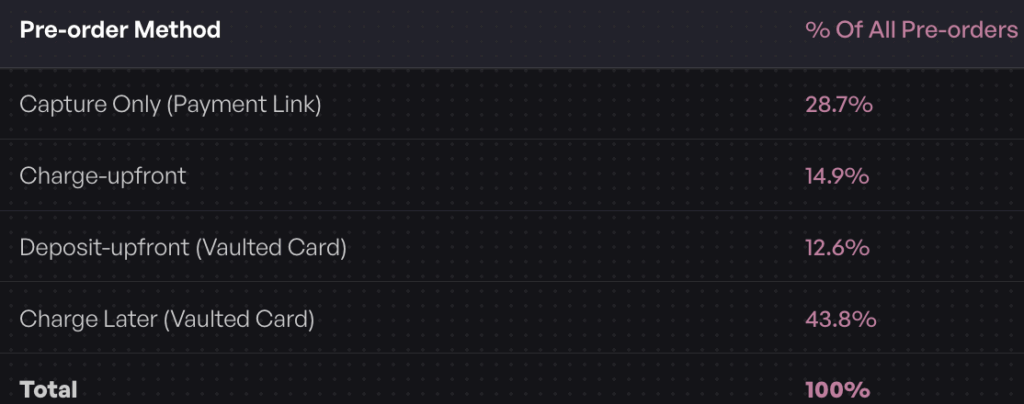
Payment structure is the most critical decision you’ll make. Our data shows 43.8% of pre-order listings use charge-later (vaulted card), making it the most popular approach. But that doesn’t mean it’s right for every campaign.
When to Charge Upfront vs Later vs Deposits
Charge-upfront works best for lead times under 30 days. When products ship quickly, customers are comfortable paying immediately. You get instant cash flow and avoid the complexity of deferred charging. This approach dominates short restocks and quick turnaround launches.
Charge-later shines for longer or uncertain timelines beyond 30 days. Vaulting the customer’s card without immediate capture reduces refund risk for extended waits. If your production timeline shifts or supply chain delays happen, you haven’t charged customers yet. The data backs this up: 43.8% of merchants choose this model.
Deposits reduce barriers for high-ticket items. Taking 10-50% upfront on a $300+ product shows customer commitment while making the purchase more accessible. You get some cash flow now and collect the balance when ready to ship. Our data shows 12.6% of listings use deposits, often concentrated in premium categories.

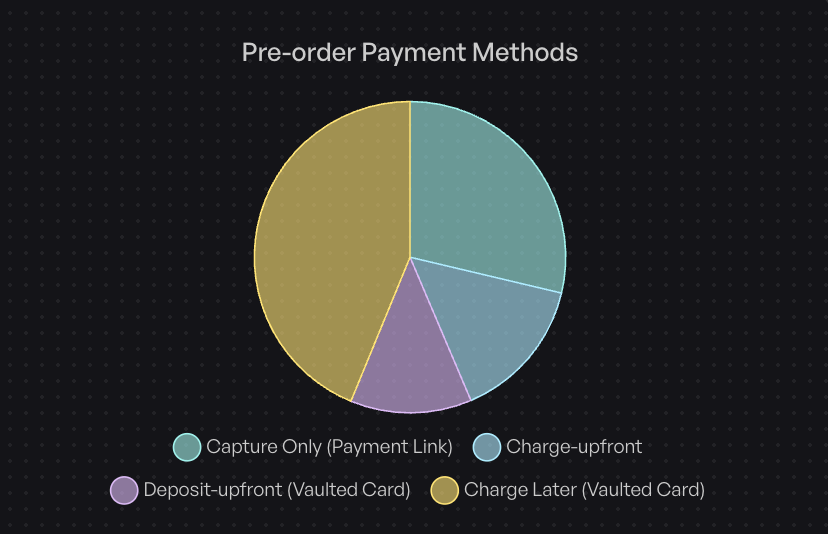
Payment Model Distribution from 1M+ Pre-Orders
From our data, here’s how merchants actually charge for pre-orders:
- 43.8% use charge-later (deferred capture with vaulted card)
- 28.7% use capture-only (payment links or manual capture)
- 14.9% charge upfront (immediate payment)
- 12.6% use deposits (partial upfront payment)
Your lead time and price point should drive this decision. A beauty brand launching limited-edition palettes in 14 days? Charge upfront. An apparel company with 120-day production runs? Charge-later makes more sense. A premium tech brand selling $500 products? Consider deposits.
Best Practice 2: Set Clear, Specific Shipping Timelines
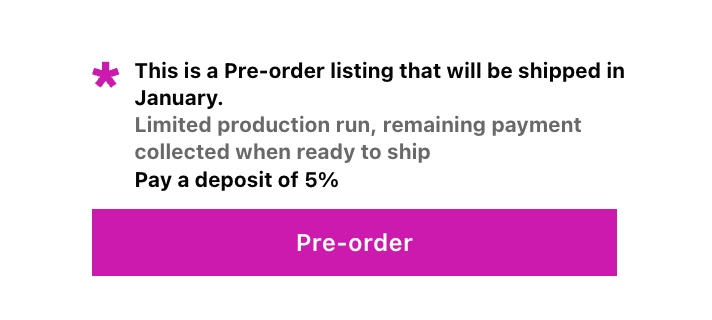
Generic language hurts conversions. “Ships soon” or “coming soon” creates uncertainty that makes customers hesitate. Specific dates build confidence, even if those dates are months away.
Why Vague Language Hurts Conversions
When customers can’t assess if the wait is acceptable, they bounce. “Ships in March” lets them decide if they’re willing to wait. “Available soon” forces them to guess, and most won’t take that risk.
Clear timelines also reduce customer service volume. When expectations are set upfront, fewer people email asking “when will this ship?” Your team spends less time answering the same question repeatedly.
The Data on Lead Times
28.1% of pre-orders ship within 121-150 days, making four to five months the most common window. But plenty of successful campaigns run shorter (30-60 days) or longer (180+ days).
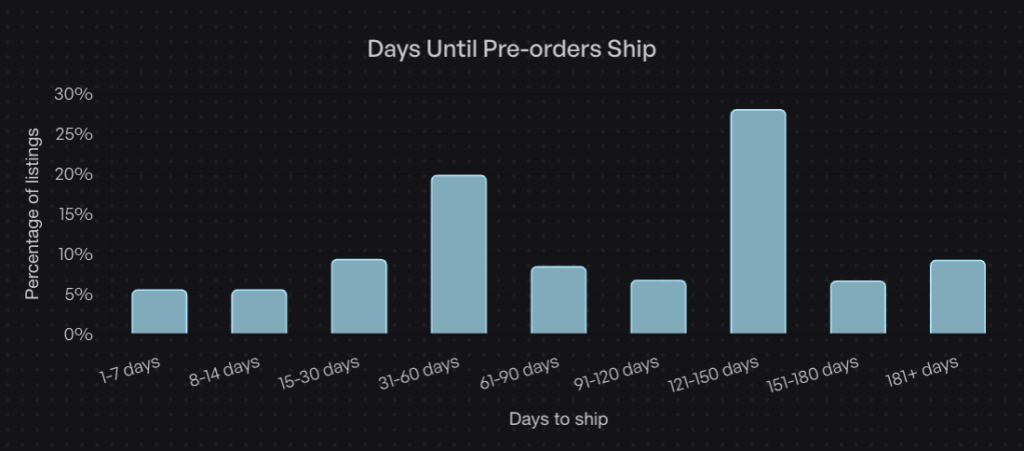
Pre-order periods between two to six weeks work well for maintaining excitement without losing interest. Shorter feels rushed; longer and customers might forget or lose enthusiasm. But if your production timeline demands 120 days, own it. Transparency beats false urgency.
How to Communicate Delays
Production delays happen. Supply chains shift. The key is proactive communication. Send updates before customers ask. Even “no news” updates showing progress build trust.
Automated email sequences work best here. Set up triggers for key milestones: production started, quality checks complete, items shipped to warehouse, ready to fulfill. Customers appreciate knowing their order hasn’t been forgotten, especially during longer waits.
Best Practice 3: Start With One to Two Products Before Scaling
One of the biggest mistakes merchants make is rolling out pre-orders across their entire catalog too quickly. Start small, learn your workflows, then scale.
Why the “Test Small” Approach Works
Listing one or two products for pre-order lets you validate every touchpoint. You’ll discover friction points in checkout, identify unclear messaging, and find operational gaps before they affect hundreds of orders.
Maybe your fulfillment team needs better pre-order tagging. Maybe customers ask the same question 20 times that should be in your FAQ. Maybe your 3PL doesn’t recognize pre-order holds properly. Better to find these issues with 50 orders than 500.
Starting small also helps you gauge customer appetite. If your first pre-order campaign sees strong uptake, you know the model works for your audience. If conversions lag, you can adjust payment terms, messaging, or timing before expanding.
Common Mistakes When Scaling Too Fast
Operational overwhelm: Your team suddenly manages regular orders and dozens of pre-order campaigns simultaneously. Fulfillment holds don’t get released on time. Customer emails pile up. Mistakes happen.

Customer service spike: Support volume often increases with pre-orders, especially if messaging isn’t clear. Scale before your team is ready, and response times suffer. Negative experiences spread faster than positive ones.
Inconsistent execution: When you’re learning, each campaign teaches you something. Rush to scale, and you repeat the same mistakes across multiple products instead of iterating quickly on a smaller set.
Best Practice 4: Decide on Mixed Cart Strategy Early
Should customers be able to buy in-stock items and pre-orders in the same cart? This operational decision significantly impacts fulfillment complexity.
The Mixed Cart Dilemma
Allowing mixed carts increases average order value. A customer buying a pre-order item might add in-stock accessories, boosting their total spend. From a revenue perspective, it’s attractive.
But mixed carts create fulfillment challenges. Do you split shipments (ship in-stock now, pre-order later)? That doubles shipping costs. Do you hold everything until the pre-order ships? That delays immediate items and frustrates customers who expected them sooner.
The Data: 62% Prohibit Mixed Carts
62.1% of stores prohibit mixing pre-orders with regular inventory in the same cart. The operational simplicity wins for most merchants. Separate carts mean clear workflows: pre-orders follow one path, regular orders another. No confusion, no split shipments, no delayed in-stock items.
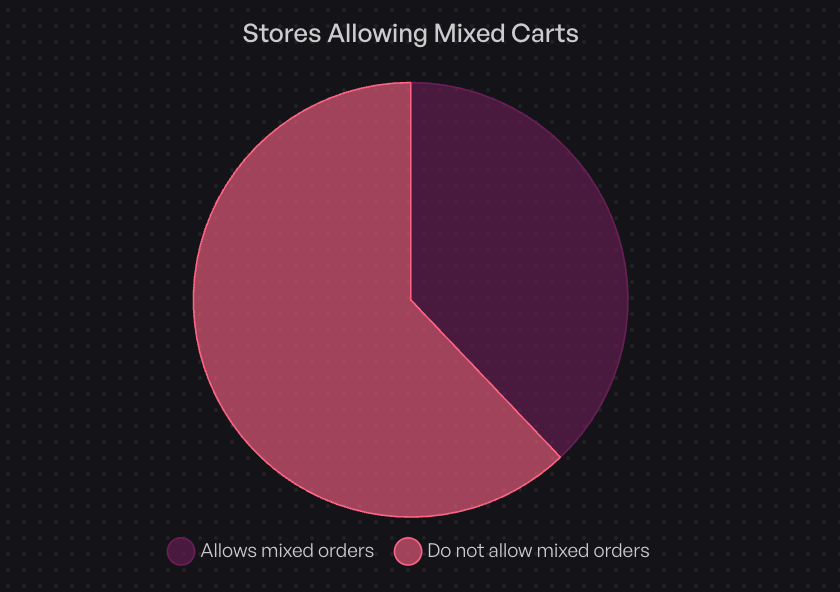
The 38% who allow mixed carts typically have sophisticated fulfillment setups. They’ve figured out split shipment logistics or have operational slack to manage the complexity. If you’re starting out, isolated carts are the safer bet.
When to Allow Mixed Carts
Consider mixed carts if you have:
- Automated fulfillment systems that can handle split shipment logic
- Higher margins that absorb dual shipping costs
- Strong operational bandwidth to manage increased complexity
- Customer segments who prioritize convenience over speed
For most Shopify stores, especially early in their pre-order journey, keeping carts isolated reduces headaches. You can always relax this restriction later once your operations are dialed in.
Best Practice 5: Use Fulfillment Holds to Prevent Premature Shipping
The number one operational mistake with pre-orders is accidental early shipment. A pre-order flows into your fulfillment system, someone doesn’t notice it’s a pre-order, and it attempts to ship too early. Now you’ve got an angry warehouse team and a stock/order system mismatch.
How Fulfillment Holds Work
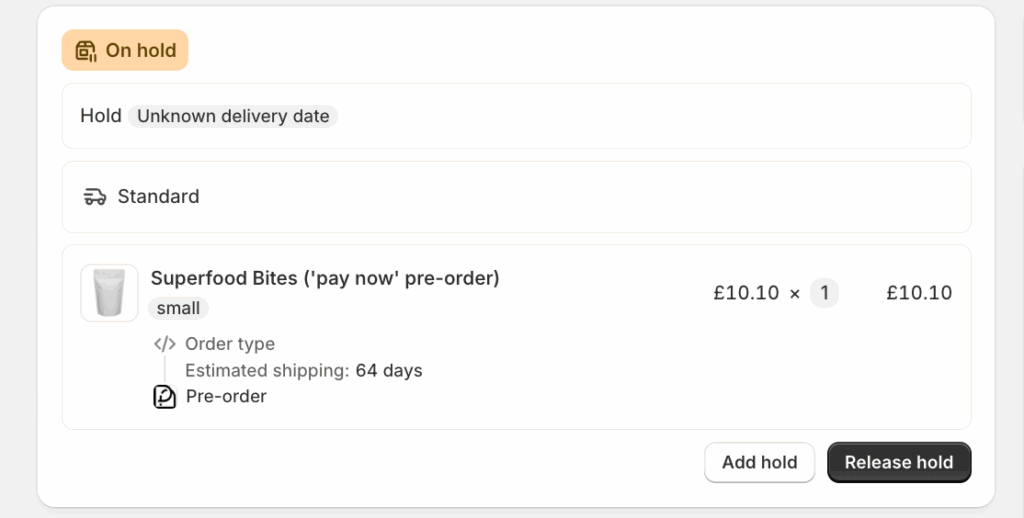
Fulfillment holds automatically block pre-order items from shipping until you explicitly release them. When you create a pre-order listing, the system tags those orders. Your fulfillment system (whether in-house or a 3PL) sees the hold and skips them in processing.
When stock arrives and you’re ready to fulfill, you release the hold. Orders flow into your normal fulfillment queue. This separation keeps pre-orders out of the way until you’re ready.
For Shopify stores, PreProduct automatically applies fulfillment holds at the order level. For BigCommerce and WooCommerce, orders stay entirely out of your platform admin until you release them for fulfillment.
Integration With 3PLs and ERPs
Not all systems understand pre-orders natively. If you use a third-party logistics provider or ERP system, you’ll need to ensure they respect hold states. Some integrations handle this automatically; others require manual workflows initially.
The key is testing before you scale. Place test pre-orders, let them flow through your systems, and confirm they don’t accidentally ship. Managing pre-orders with your 3PL requires upfront coordination but saves major headaches later.
Best Practice 6: Optimize Your Product Page Messaging
Your product page is where conversions happen or don’t. Clear pre-order messaging sets expectations and builds confidence.
What to Display Prominently
“Pre-order” button: Replace “Add to Cart” with “Pre-order Now” or similar. This immediately signals that the product isn’t shipping today. Customers who miss this detail often create support tickets or cancellations later.
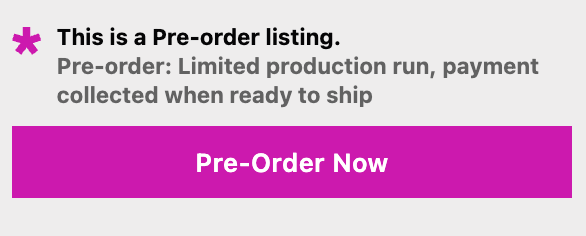
Expected ship date: Put this above the fold, impossible to miss. “Ships March 15, 2026” or “Estimated delivery: April 2026” gives customers the information they need to commit.
Payment terms: State clearly how payment works. “Pay now, ships later” for charge-upfront. “Pay 50% now, 50% when shipped” for deposits. “Reserve now, charged when shipped” for charge-later. No surprises.
Copy That Converts
Focus on benefits, not just logistics. Instead of “Pre-order now,” try “Reserve yours before they sell out” or “Lock in early access pricing.”
Use scarcity elements if genuine. “Only 200 units available for pre-order” creates urgency. But don’t manufacture false scarcity; customers see through it and trust erodes.
Include social proof when available. “Over 500 pre-ordered in the first week” validates demand. Customer reviews from previous launches build credibility. Testimonials about your brand’s reliability help overcome pre-order hesitation.
Best Practice 7: Automate Customer Communication
Pre-orders require more customer communication than regular orders. Automated email sequences reduce manual work while keeping customers informed, whether its through your pre-order application or ESP like Klaviyo.
Essential Email Touchpoints
Order confirmation: Immediately after purchase, confirm the order, restate the ship date, explain payment terms, and set clear expectations. This is your chance to address common questions proactively.
Progress updates: For longer waits (60+ days), send periodic updates. “Production underway,” “Quality checks complete,” “Arriving at warehouse next week.” These touchpoints maintain excitement and show the order is progressing.
Shipping notification: When the item finally ships, celebrate it. “Your pre-order is on the way!” Include tracking details and thank them for their patience.
For charge-later or deposit campaigns, also send a “payment upcoming” email a few days before charging the balance. This reduces payment failures and gives customers a heads-up.
Reducing Support Burden
If you’re not using a pre-order app that provides customer portals, add a comprehensive FAQ section (or link to a pre-order policy) to your pre-order product pages. Address common questions:
- When will this ship?
- How does payment work?
- Can I cancel or modify my pre-order?
- What happens if there’s a delay?
- Can I add other items to my order?
Customer portals also help. Let customers check their order status, see estimated ship dates, and view payment schedules without contacting support. Self-service reduces ticket volume significantly.
Proactive communication equals fewer tickets. Every email update prevents 10 “when will this ship?” inquiries.
Best Practice 8: Track the Right Metrics
Revenue matters, but other metrics reveal campaign health and areas for optimization.
Beyond Revenue: What to Measure
Cancellation rate: The industry average is 5.4% annually. If you’re significantly above this, investigate why. Common causes include unclear timelines, poor communication, or payment issues. High cancellation rates signal friction in your process.
Conversion rate versus regular products: Compare pre-order product conversion to in-stock items. Are customers hesitating? The average ecommerce conversion rate sits between 2.5 and 3%, so use that as a baseline. If pre-order conversion lags significantly, test different payment models, clearer messaging, or shorter timelines.
Support ticket volume: Track pre-order-related support requests. If tickets spike, your messaging probably needs work. The most common questions reveal gaps in your product page copy or email communication.
Average order value (AOV): Do pre-orders increase or decrease AOV compared to regular orders? This helps inform mixed cart strategy and bundling opportunities.
Using Data to Optimize
High cancellation rate? Check if your shipping timeline is clear enough. Look at when cancellations happen; if they cluster around payment capture, that’s different friction than early cancellations.
Low conversion? Test different payment options. Some products convert better with deposits; others with charge-later. Run A/B tests on product page messaging. Even small copy changes can move the needle.
Rising support tickets? Audit your FAQs. Add the most common questions to your product page. Improve email communication to proactively address concerns.
Best Practice 9: Be Strategic About Discounting
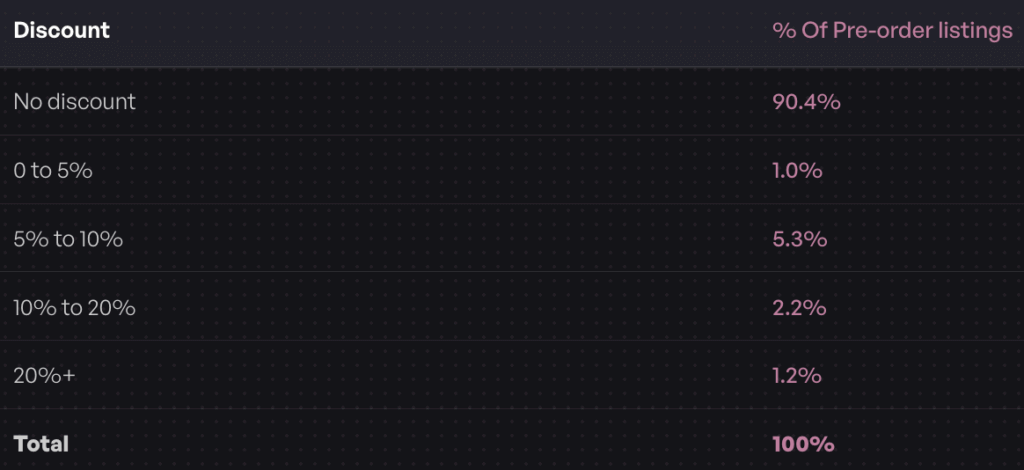
Here’s a surprise: 90.4% of pre-orders have no discount applied. Pre-orders already offer early access value. You don’t need to discount to drive demand.
When Discounts Make Sense
Early bird incentives: Tiered discounts can accelerate early orders. “25% off first week, 15% off second week, 10% off until launch.” This rewards commitment and helps forecast demand sooner.
Large order commitments: Offering a discount for customers who pre-order multiple units can boost order size. “Buy three, save 15%” works well for products with gift-giving potential or bulk-buy appeal.
First-time launches: If you’re an unknown brand validating a new product, a modest discount can reduce risk perception and get initial traction.
When to Skip Discounts
Already compelling products: If demand is strong without discounting, don’t leave money on the table. Limited editions, highly anticipated releases, and products with strong brand equity don’t need discounts.
Premium positioning: Discounting can signal lower quality or desperation. If your brand trades on premium positioning, maintain that with pre-orders. Full price reinforces value.
Margin-sensitive products: If margins are already thin, discounting hurts profitability. Remember, pre-orders improve cash flow but don’t fundamentally change unit economics.
The data shows most merchants succeed without discounting. Test it, but don’t assume you need to discount to drive pre-order conversions.
Best Practice 10: Plan for Delays and Communicate Proactively
Supply chain issues happen. Production runs late. Shipping delays occur. The difference between a disaster and a minor hiccup is how you communicate.

Reality: Delays Happen
No matter how careful your planning, some pre-order campaigns face delays. Components arrive late. Quality issues require rework. Shipping logistics shift. Accepting this reality lets you plan for it rather than scramble when it happens.
Build buffer into your timelines. If production typically takes 90 days, quote 120 days. Under-promise and over-deliver works better than the reverse.
How to Handle Delays Like a Pro
Communicate early and often: As soon as you know there’s a delay, tell customers. Don’t wait until the promised ship date passes. Proactive transparency builds trust; reactive excuses destroy it.
Explain what happened: Customers appreciate honesty. “Our supplier experienced production delays due to equipment failure” is better than vague corporate speak. You don’t need to overshare, but context helps.
Offer options: Give customers a choice. “We’re delayed by four weeks. You can wait for your order, or we can process a full refund. Let us know.” Respecting their decision maintains trust for future launches.
Provide updates: Don’t go silent after announcing a delay. Send progress updates as the situation evolves. “We’ve received the delayed components and resumed production” shows forward momentum.
Consider compensation: For significant delays, offering a discount on future purchases or a small refund can maintain goodwill. It’s not always necessary, but it’s a tool in your toolkit.
The merchants who handle delays well often retain customer loyalty. Those who go silent or make excuses burn bridges.
Bonus: Advanced Automation With Shopify Flow
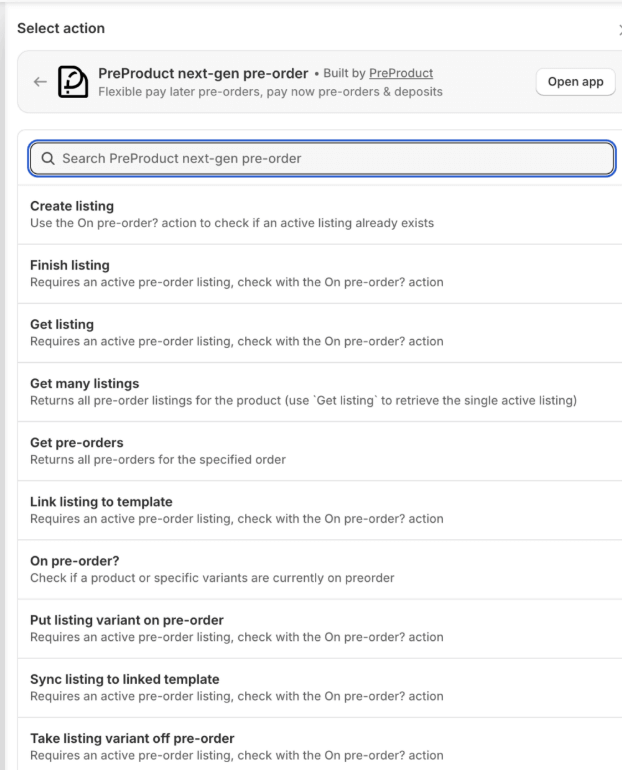
Once your manual processes are dialed in, automation can scale your operations significantly. Shopify Flow offers powerful pre-order automation for Plus merchants, but earlier plans also benefit from app-based automation.
When You’re Ready to Scale
Start with simple automations: auto-tagging pre-order customers for segmented email campaigns, triggering customer service notifications when pre-orders are placed, or updating inventory tracking spreadsheets automatically.
Shopify Flow pre-order automation can trigger workflows based on inventory changes. When stock is added to a pre-order product, automatically capture payments and release fulfillment holds. When a pre-order cancellation happens, fire a refund workflow and update your demand forecast.
You can build conditional logic: if a pre-order customer also bought in-stock items (mixed cart), route to a different fulfillment workflow. If a charge fails, send an automated dunning email and schedule a retry.
The Maturity Model
Manual: You create listings, manage holds, trigger charges, and send emails manually. This works great for your first few campaigns and helps you learn the workflow.
Semi-automated: You automate customer emails and basic tagging but still manually manage fulfillment releases and charging. Good middle ground for growing stores.
Fully automated: Inventory triggers charges, fulfillment releases happen automatically, customer communications fire based on events, and reporting updates in real-time. This is where high-volume pre-order merchants operate.
Don’t jump to full automation too quickly. Master the manual process first. Automation only scales what you already understand.
Frequently Asked Questions
What is the best payment method for Shopify pre-orders?
It depends on your lead time. Charge-upfront works best for shipping within 30 days. Charge-later (vaulted card) is ideal for 30+ day timelines or uncertain schedules. Deposits make sense for high-ticket items above $250 to reduce purchase barriers. The data shows 43.8% of merchants use charge-later, making it the most common approach.
How long should a pre-order window be?
Two to six weeks is the sweet spot for maintaining interest without overwhelming customers. However, your production timeline drives this more than ideal preferences. If manufacturing takes 120 days, be transparent about it. The data shows 28.1% of pre-orders ship within 121-150 days, so longer windows can work if expectations are clear.
Should I allow mixed carts with pre-orders and in-stock items?
Most stores (62.1%) prohibit mixed carts to keep fulfillment simple. Mixed carts require either split shipments (higher costs) or holding all items until pre-orders ship (frustrated customers). If you’re starting out, separate carts reduce operational complexity. Consider mixed carts only if you have sophisticated fulfillment systems and margins that support split shipping.
What’s a good pre-order cancellation rate?
The industry average is 5.4% annually. If your cancellation rate exceeds 8-10%, investigate your timeline clarity, payment communication, and customer expectations. High cancellations often signal unclear messaging or unrealistic timelines rather than product issues.
How do I prevent pre-orders from shipping too early?
Use fulfillment holds that automatically block pre-order items from your regular fulfillment queue. These holds tag pre-orders so they don’t accidentally ship when someone processes standard orders. When stock arrives and you’re ready, release the holds to flow pre-orders into fulfillment. This prevents the most common operational mistake: premature shipping.
Start Running Smarter Pre-Orders
These 10 Shopify pre-order best practices come from analyzing $85M+ in actual sales, not theory. Choose the right payment model for your lead times, set clear expectations, start small to test workflows, and scale what works. Track cancellation rates and conversion metrics. Communicate proactively, especially when delays happen.
Pre-orders let you take orders and revenue sooner, validate demand before inventory commitments, and build hype for new launches. But execution separates successful campaigns from operational headaches. Start with one or two products. Master your workflows. Then expand.
Ready to run pre-orders that actually work? PreProduct helps Shopify stores manage everything from payment flexibility to fulfillment holds, with data-backed tools built for founders who need pre-orders to just work.
Pre-sell With PreProduct
7 day free trial with all plansMigrate pre-orders
