Pre-order Purchase Order Management: A Practical Guide for Shopify Merchants
Running a pre-order campaign without knowing when your inventory will arrive is like flying blind. You risk overselling, frustrating customers with delays, or leaving money on the table by listing too late. Effective pre-order purchase order management is the key to getting this right, connecting your incoming inventory to your sales strategy.
This guide walks through how to connect your PO workflow to your pre-order strategy. You will learn when to list products based on PO status, how to set quantity limits that prevent overselling, and how to time charges so you collect payment when inventory actually lands. Whether you are managing this manually or looking to automate, these frameworks will help you run cleaner pre-order campaigns.
Why Shopify Purchase Orders and Pre-orders Must Work Together
The Core Challenge
Purchase orders represent future inventory. They tell you what is coming, how much, and when it should arrive. Pre-orders sell that future inventory before it hits your warehouse.
The problem? These two systems often operate independently. Your procurement team creates POs in one system while your ecommerce team runs pre-orders in another. When they are not connected, things go wrong:
- Overselling: You accept 200 pre-orders but only 150 units are coming
- Missed sales: You wait until stock arrives to list, losing weeks of potential orders
- Customer frustration: You promise shipping dates based on optimistic PO timelines that slip
- Cash flow chaos: You charge customers before knowing if or when you can fulfill
Getting this alignment right matters. Pre-order inventory management is one of the most common operational challenges we see merchants struggle with.
Key Decisions POs Should Inform
Your purchase order data should drive four critical pre-order decisions:

- When to list: Start accepting pre-orders once a PO is confirmed, not before (unless you are crowdfunding or using easily cancellable pre-order types like charge-later or capture-only)
- Quantity limits: Cap pre-orders based on PO quantities minus buffers
- Charge timing: Match your payment model to the PO arrival window
- Customer communication: Set shipping expectations based on realistic PO timelines
The Shopify Purchase Order Limitation
Before diving into workflows, there is an important reality to address. Shopify has a native purchase order feature that lets you track pre-order incoming inventory, record supplier details, and mark stock as “Incoming.” It works well for basic PO management.
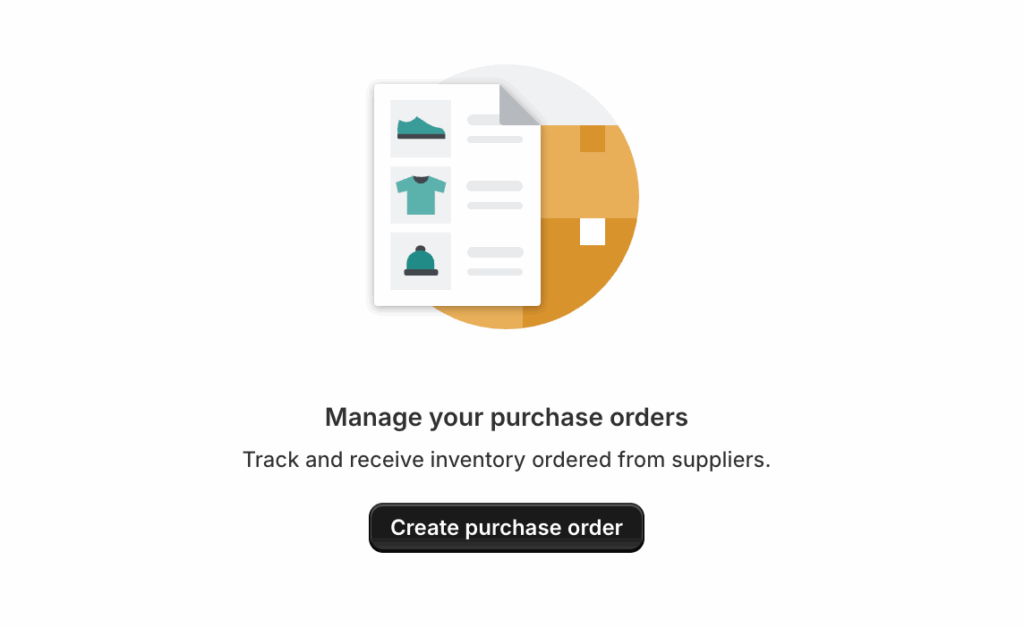
What Shopify’s Native PO Feature Does
- Track incoming inventory with expected arrival dates
- Record supplier details, costs, and payment terms
- Update inventory counts when POs are received
- Provide visibility into what stock is on the way
What It Does Not Do
Here is the challenge: Shopify’s purchase order feature has no API. You cannot:
- Create or read POs programmatically
- Automate workflows between POs and pre-order apps
- Sync PO arrival dates with your pre-order campaigns
- Trigger actions when PO status changes
This is not a temporary gap. As of late 2025, Shopify confirmed there are no immediate plans for a Purchase Order API. The legacy Stocky API, which offered read-only access, has been deprecated.
Workarounds for Automation
If you need to connect POs to pre-orders automatically, you have three options:
Third-party PO software: Tools like Cogsy, Inventory Planner, or Fabrikator manage purchase orders outside Shopify and can integrate with Shopify Flow. You can then connect Flow to a pre-order app like PreProduct that exposes Flow actions and triggers.



ERP systems: For larger operations, ERP integrations can bridge the gap between purchase orders and pre-order management.
Manual workflows: For most merchants, a well-structured manual process works fine. Track POs in Shopify or a spreadsheet, then update your pre-order listings accordingly.
When to List Products for Pre-order
Purchase order pre-order timing matters. List too early and you risk customer frustration if the PO gets delayed or canceled. List too late and you miss the window to capture demand before stock arrives.
Timing Framework Based on PO Status
| PO Status | Pre-order Action |
|---|---|
| PO drafted or planned | Too early. Wait for supplier confirmation. |
| PO confirmed and ordered | Safe to list. Build in buffer days for customer timelines. |
| PO in transit | Shorter pre-order window. Tighter timeline but lower risk. |
| PO received, not yet processed | Transition to regular “in stock” sale. |
The key threshold is supplier confirmation. Once you have a confirmed PO with an expected arrival date, you have enough certainty to start accepting pre-orders.
Buffer Days: Building in Safety Margin
Never promise customers the exact date your PO is expected to arrive. Suppliers miss deadlines. Shipments get delayed. Customs holds things up. Inventory needs inspection before it is sellable.
Add buffer days to every customer-facing timeline:
- 7-10 days minimum for domestic suppliers with reliable track records
- 14-21 days for international shipments or new suppliers
- 30+ days for complex products requiring quality checks
Example: Your PO shows an expected arrival of August 20. Display a shipping window of “September 1-5” to customers. This gives you two weeks to receive, inspect, and process the inventory before fulfillment.
Matching Pre-order Windows to PO Arrival
Your payment model should align with how long customers will wait:
| PO Arrival Window | Recommended Payment Model |
|---|---|
| Within 7 days | Charge upfront. Low risk, fast turnaround. |
| 8-30 days | Capture-only or deposit. Cards are vaulted, charged on arrival. |
| 31-90 days | Charge-later or deposit. Flexibility for timeline uncertainty. |
| 90+ days | Charge-later with deposit option. |
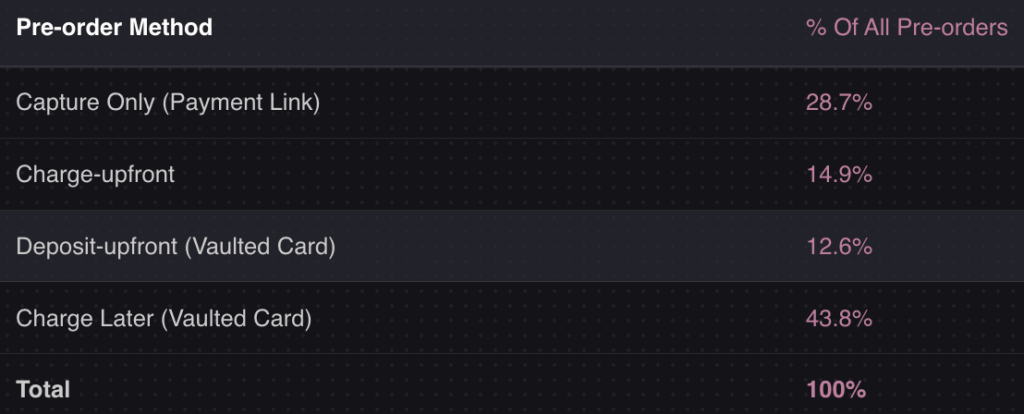
Longer lead times or less certain ones often benefit from deferred-charge pre-orders, whether that is charging all later or taking a deposit upfront and charging the balance when stock arrives. According to data from over one million pre-orders, 43.8% of pre-order listings use a charge-later model. This flexibility is valuable when PO timelines are uncertain, because you are not sitting on customer money while waiting for suppliers to deliver.
Setting Pre-order Inventory Limits Based on PO Quantities
This is where many merchants make costly mistakes. They list products for pre-order without limits, assuming they can always adjust. Then the campaign takes off, they oversell, and suddenly they are issuing refunds and apologizing to customers.
Calculating Available-to-Promise Inventory
Start with your PO quantity, then subtract buffers:
- PO quantity: Total units on order
- Buffer stock (10-15%): Safety margin for damaged or defective units
- Cancellation buffer (5-6%): Expected pre-order cancellations based on industry data
- Result: Maximum pre-orders you should accept
Example Calculation
- PO quantity: 150 units
- Buffer stock (10%): -15 units
- Cancellation buffer (5%): -7 units
- Maximum pre-orders: 128 units
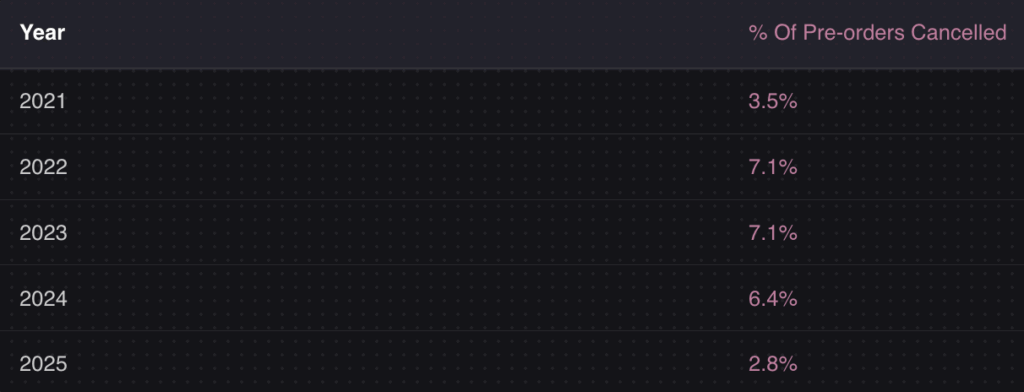
Why the cancellation buffer? Data shows an average pre-order cancellation rate of 5.4%, with some years reaching 6.4%. If you accept 150 pre-orders expecting 150 units, cancellations actually work in your favor. But if you are at risk of underselling relative to your PO, factor this into your planning.
Variant-Level Allocation
For products with multiple variants (sizes, colors, configurations), you need to split your PO quantity across each SKU:
- Use historical sales data to predict size distribution
- If launching a new product, use industry benchmarks for your category
- Monitor early pre-order patterns and reallocate if one variant is outpacing others
A fashion brand might allocate a 150-unit PO across sizes like this:
| Size | Historical % | Allocated Units | Pre-order Limit (with buffers) |
|---|---|---|---|
| XS | 8% | 12 | 10 |
| S | 22% | 33 | 28 |
| M | 35% | 53 | 45 |
| L | 25% | 37 | 31 |
| XL | 10% | 15 | 13 |
Preventing Overselling
Set hard limits in your pre-order app. PreProduct allows variant-level quantity limits that automatically hide buy buttons once reached. This prevents overselling without manual monitoring.
Key practices:
- Set limits at campaign creation, not after launch
- Configure auto-delist behavior when limits are reached
- If selling across multiple channels, use centralized inventory allocation
Timing Charges to PO Arrival
When you charge customers matters for cash flow, refund rates, and customer trust. Charge too early and you are sitting on customer money without product to ship. Charge too late and you miss the cash flow benefit of pre-orders.
Triggering Charges on Inventory Receipt
You have three approaches depending on your operational maturity:
Manual: When your PO is received and inventory is processed, log into your pre-order app and trigger charges. Simple, but requires discipline.
Semi-automated: Use Shopify Flow to trigger actions when inventory levels update. PreProduct exposes Flow triggers that can initiate charges based on inventory changes. This requires a pre-order app with Flow integration but does not need an ERP.
Fully automated: If you use an OMS or ERP that tracks PO receipt, you can trigger charges via webhooks when inventory is confirmed available. This is the enterprise approach.
Most merchants start manual and add automation as they scale. There is nothing wrong with processing charges yourself when a PO arrives, especially if you are running a few campaigns per month.
Handling PO Delays
Supplier delays happen. When they do:
- Communicate early: Do not wait until the original ship date passes. Send update emails as soon as you know there is a delay
- Use your customer portal: Give customers a place to check their order status and see revised timelines. PreProduct’s customer portal lets customers view their pre-order status, payment schedule, and expected shipping dates without contacting support
- Offer options: Let customers wait, get a refund, or switch to a different variant
- Delay charges: If using charge-later, do not trigger charges until you have inventory confirmed
- Update listings: Adjust ship date estimates on your product page for new pre-orders

Having a communication template ready saves time when delays occur. Your pre-order policy should cover how you handle delays before customers ever place an order.
What to Do When Pre-orders Undershoot PO Quantities
Most content about pre-orders focuses on preventing overselling. But what happens when demand is lower than expected? You pre-ordered 50 units but have 150 arriving.
The Underperforming Campaign Scenario
This is more common than merchants expect. Maybe the product did not resonate. Maybe your marketing did not reach the right audience. Maybe you ordered based on optimistic forecasts.
Now you have excess inventory arriving with no pre-order customers waiting for it.
Mitigation Strategies
Immediate conversion: As soon as the PO lands, convert remaining inventory to regular “in stock” status. Remove pre-order messaging and ship times.
“Now in stock” campaign: Email your pre-order customers that the product has arrived. Even if they did not pre-order, they may have been watching. Create urgency around immediate availability.
Adjust future PO quantities: Use pre-order data to right-size future orders. If you consistently see 30% of expected demand, reduce PO quantities accordingly.
Smaller, more frequent POs: Instead of one large order, negotiate smaller batches with your supplier. This reduces risk if demand does not materialize.
Using Pre-order Data for Demand Planning
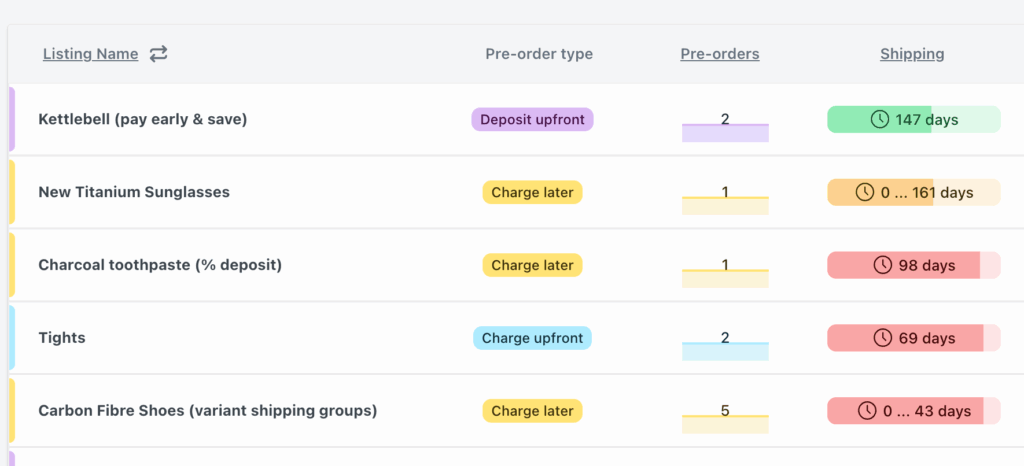
Pre-orders are the most accurate demand signal you can get. Unlike surveys or intent data, pre-orders represent actual purchase commitments.
Use this data to inform procurement:
- Track pre-order velocity by day and week
- Compare pre-order demand across variants to optimize future assortment
- Build a feedback loop between pre-order performance and PO planning
For more on this topic, see our guide on demand planning and forecasting for ecommerce.
Manual Pre-order Purchase Order Management Workflow
Here is a practical workflow you can implement today, without expensive software or complex integrations.
Phase 1: PO Creation and Pre-order Setup
- Create your PO in Shopify or your tracking system with expected arrival date
- Calculate your pre-order limit: PO quantity minus 10-15% buffer, minus 5% cancellation buffer
- Create your pre-order listing in PreProduct with the calculated limit at the variant level
- Set customer-facing ship date: PO expected arrival plus 7-14 day buffer
- Configure payment model based on timeline (charge-later for 30+ days, upfront for shorter windows)
Phase 2: Campaign Monitoring
- Track pre-order count daily against your limits
- Compare demand signals across variants. Reallocate limits if one is selling out while others lag
- Monitor PO status with your supplier. Any timeline changes should trigger customer updates
- Send milestone updates if running a long campaign (30+ days). Keep customers engaged
Phase 3: PO Arrival and Fulfillment
- Receive and process inventory: Confirm quantities match PO, inspect for defects
- Trigger charges on vaulted cards (manual or via Flow automation)
- Release fulfillment holds so orders flow to your 3PL or fulfillment team
- Update customers with shipping confirmation and tracking
- Convert remaining inventory to regular in-stock status
Tools That Support This Workflow
- PreProduct: Pre-order management with variant-level limits, charge-later, and Flow integration
- Shopify Flow: Basic automation for inventory-triggered actions
- Spreadsheet or Shopify POs: Simple PO tracking for manual workflows
- Third-party PO apps: Cogsy, Inventory Planner, or Fabrikator for more sophisticated PO management
Key Takeaways
Pre-order purchase order management comes down to timing, limits, and communication:
- Wait for PO confirmation before listing products for pre-order (or use deferred-charge models if you need to start earlier)
- Add buffer days to all customer-facing timelines (7-14 days minimum)
- Calculate realistic limits using PO quantity minus buffers and expected cancellations
- Match payment models to timelines: Charge upfront for short windows, charge-later for longer ones
- Start manual, then automate: A simple workflow beats complex systems you do not maintain
The Shopify purchase order API limitation means most merchants will run this manually or use third-party tools. That is fine. What matters is having a process that prevents overselling and sets accurate customer expectations.
Pre-orders are one of the most effective ways to validate demand, improve cash flow, and reduce inventory risk. But they only work when your pre-order campaigns are grounded in the reality of your incoming inventory. Get your pre-order purchase order management right, and you will run campaigns that customers trust and that your operations team can actually fulfill.
Ready to start? PreProduct makes it easy to run pre-order campaigns with variant-level limits, flexible payment models, and Shopify Flow automation. Start for free and align your next launch with your incoming inventory.
Pre-sell With PreProduct
7 day free trial with all plans


