How Do Pre-Orders Work? Everything You Need to Know
Pre-orders let customers buy products before they’re available to ship. It’s a simple concept, but the mechanics behind how pre-orders work can vary depending on the payment model, the platform and the type of product being sold.
At PreProduct, we’ve processed over $85 million in pre-order sales across more than 1 million orders. That dataset gives us a clear picture of how pre-orders actually work in ecommerce, who uses them, what payment models perform best and how long customers are willing to wait.
This guide breaks down how pre-orders work from both sides of the transaction. Whether you’re a customer wondering what happens when you pre-order something or a merchant exploring whether pre-orders make sense for your store, this covers everything you need to know.
What Does Pre-Order Mean?
So what does pre-order mean exactly? The pre-order meaning is straightforward: it’s an order placed for a product that isn’t yet available or in stock. The customer commits to buying the item, and the merchant commits to delivering it once it’s ready.
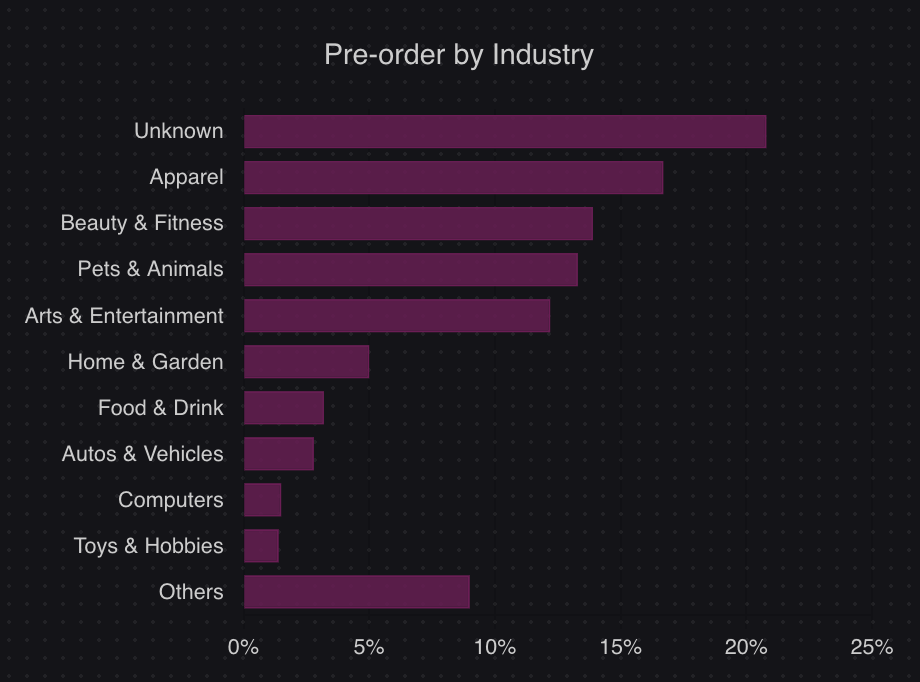
Pre-orders are common across ecommerce, not just gaming and entertainment. According to data from 1 million+ pre-orders processed through PreProduct, the top industries using pre-orders are apparel (16.7%) and beauty and fitness (13.9%). Fashion brands, tech companies, beauty labels and food producers all use pre-orders to take orders before stock arrives.
It’s worth noting the differences between related concepts. A pre-order is for a product that’s coming soon or being restocked. A backorder is for a product that’s already listed but temporarily out of stock. A waitlist collects interest without any purchase commitment. Each serves a different purpose, and you can read our full breakdown of pre-orders vs backorders vs waitlists for more detail.
How Pre-Orders Work Step by Step
Understanding how pre-ordering works is easier when you see the full process laid out. The pre-order flow follows a straightforward path, whether you’re selling on Shopify, BigCommerce, WooCommerce or any other platform.
1. The merchant lists a product for pre-order.
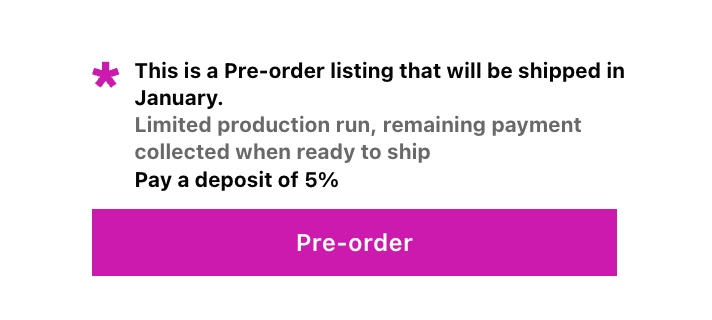
This could be an upcoming launch, a restock of a sold-out item or a made-to-order product. A pre-order app or tool replaces the standard “add to cart” button with a pre-order button and displays companion wording like estimated shipping dates or payment terms.
2. The customer places a pre-order.
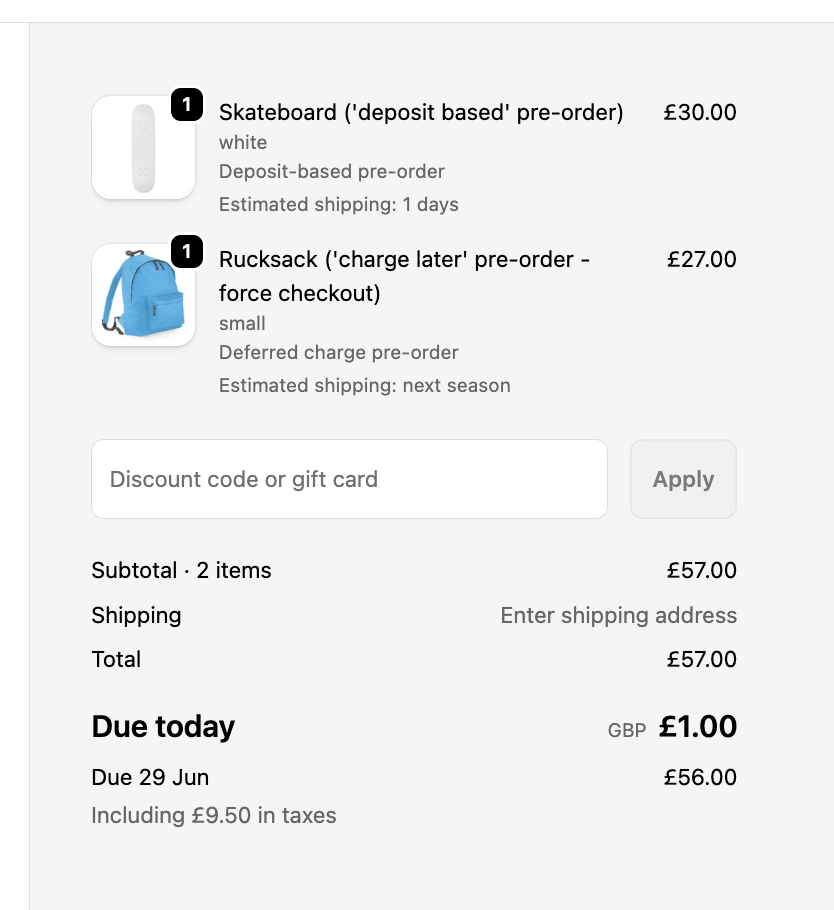
They browse the product page, see the pre-order terms and click to buy. The checkout experience is similar to a regular purchase, with any pre-order-specific details (like estimated shipping dates) shown before they confirm.
3. Payment is collected.
This is where pre-orders diverge from regular orders. Depending on the merchant’s setup, the customer might be charged immediately, later when the product ships, or asked to pay a deposit upfront. We’ll cover the payment models in detail below.
4. The merchant communicates updates.
Good pre-order experiences depend on communication. Merchants keep customers informed about production progress, shipping timelines and any changes to the expected delivery date.
5. Stock arrives and the merchant fulfils orders.
Once stock is in hand, the merchant processes the pre-orders. If payment was deferred, charges are triggered at this stage. Fulfilment holds are released, and orders flow through to shipping.
6. The customer receives their product.
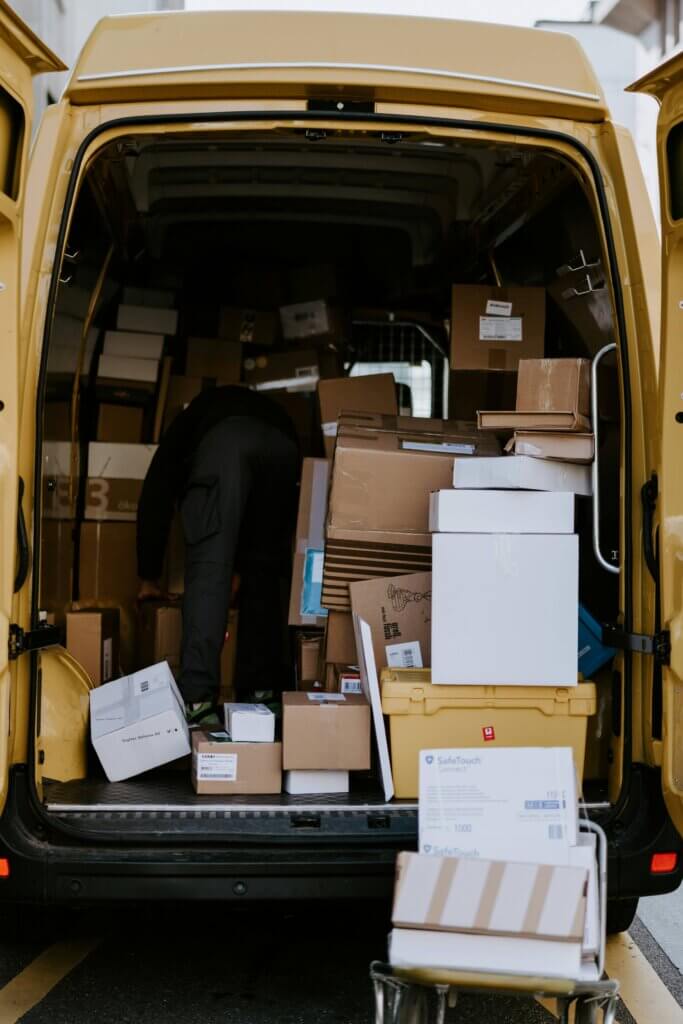
The pre-order is complete. From the customer’s perspective, the main difference between a pre-order vs a regular order is the wait, which can range from a few days to several months.

That’s how pre-ordering works at a high level. However, the payment step is where things get interesting.
How Do You Pay for a Pre-Order?
One of the most common questions about how pre-orders work is whether you pay for pre-orders immediately. The answer depends on the payment model the merchant uses.
Based on data from over 1 million pre-orders, here are the four main payment models and how often merchants use them:
| Payment Model | % of Listings | When You’re Charged |
|---|---|---|
| Charge-later | 43.8% | When product is ready to ship |
| Capture-only / payment link | 28.7% | When merchant sends payment link |
| Charge-upfront | 14.9% | Immediately at checkout |
| Deposit-upfront | 12.6% | Partial now, balance later |
Charge-later (43.8% of listings)
The most popular model on PreProduct (Shopify and BigCommerce). The customer’s card is vaulted (saved securely) at checkout, but they’re not charged until the product is ready to ship. This gives customers confidence that they won’t pay for something that isn’t ready, while still letting the merchant secure the order.
Capture-only / payment link (28.7% of listings)
The merchant collects the customer’s payment intent and sends a payment link when the product is ready. This works well for merchants who want to avoid holding customer payment details for extended periods.
Charge-upfront (14.9% of listings)
The customer pays the full price at checkout, just like a regular order. The merchant gets immediate cash flow, but takes on more responsibility to deliver on time. This model works best when the product is close to shipping.
Deposit-upfront (12.6% of listings)
The customer pays a partial amount (the deposit) at checkout, with the balance collected later. This strikes a balance between securing commitment and reducing risk for the customer. It’s popular for higher-ticket items where paying the full amount months in advance feels like a bigger ask. Learn more about how deposit pre-orders on Shopify work.
Each model suits different situations. Short lead times pair well with charge-upfront. Longer waits tend to favour charge-later or deposits. For a deeper comparison, see our pre-order payment models guide.
Why Do Merchants Offer Pre-Orders?
Merchants run pre-orders for practical reasons, not just to build hype. Here’s what drives them:
Take orders and revenue sooner. You don’t have to wait until stock is sitting in your warehouse to start selling. Pre-orders let you capture demand as soon as a product is announced or listed, whether it’s a brand new launch or a restock of something that sold out.

Validate demand before committing to inventory. Pre-orders give you real purchase data for demand forecasting, not just interest or email signups. If 500 people place pre-orders for a new product, you know exactly how much to manufacture. This reduces the risk of overproducing and having to discount or write off unsold stock.
Improve cash flow. With charge-upfront or deposit models, revenue starts coming in before you’ve paid for manufacturing or shipping. That cash can fund the production run itself, which is why pre-orders are especially popular with smaller brands and independent makers.
Avoid missed sales on out-of-stock products. When a popular product sells out, most stores put up a “sold out” message and lose the sale. Pre-orders keep the revenue flowing by letting customers secure their order and wait for the restock.

Build anticipation for product launches. A well-run pre-order campaign creates momentum. Customers who pre-order are invested in the product and often share it with others. Brands like Daylight Computer have turned pre-orders into a VIP experience, offering a “Founders Edition” insider club that transforms the wait into part of the appeal.
Use data to plan production. Pre-order numbers give you concrete demand forecasting data. Instead of guessing how many units to produce, you can base manufacturing decisions on actual orders. This is especially valuable for brands producing in small batches or working with seasonal suppliers.
One insight from our dataset that surprises people: 90.4% of pre-orders are not discounted. Customers pre-order for access, not savings. They want to be first in line, not to get a deal. That’s a meaningful signal for merchants who assume they need to offer a discount to make pre-orders work.
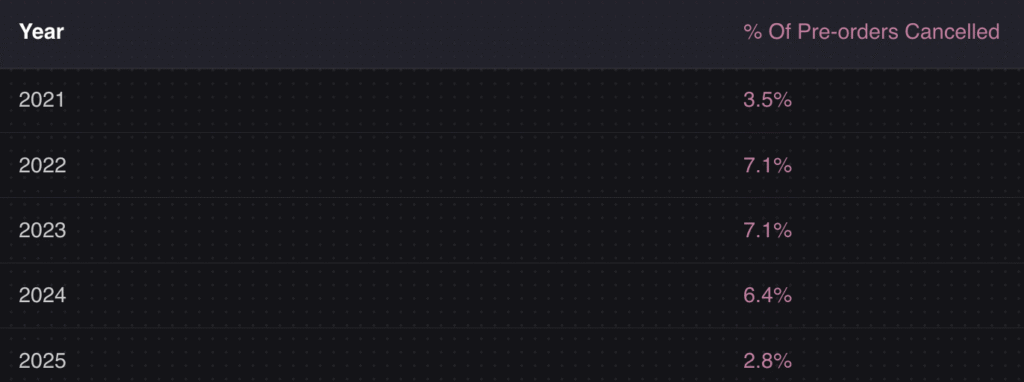
Cancellation rates are low too. The average across our dataset is just 5.4%, which suggests customers who pre-order are genuinely committed. Understanding how pre-orders work from the merchant side makes it clear why so many brands build them into their launch strategy.
When Do Pre-Orders Make Sense (and When They Don’t)
Pre-orders aren’t the right fit for every situation. Here’s a practical framework for deciding.
Pre-orders work well for:
- New product launches. You’re confident the product is coming. Pre-orders let you build demand and take revenue before it ships.
- Restocks of popular items. A product sold out and you know it’s coming back. Pre-orders capture customers who don’t want to miss it again.
- Limited editions and seasonal collections. Scarcity and time-sensitivity make pre-orders a natural fit.
- Higher-value items. Products priced at $250 or more make up 26.8% of pre-order listings in our dataset. Customers are willing to commit early for items they’ve been eyeing.
- Made-to-order products. Brands like Frahm Jackets use pre-orders as a core part of their business model. As they put it: “Each design is made once a year. We deliberately don’t make enough to meet demand, so we don’t overbuy.”
Pre-orders are less ideal for:
- Very short timelines (under seven days). If the product is shipping that soon, a regular order is simpler for everyone.
- Products with uncertain specs or timelines. If you don’t know what the final product looks like or when it’ll be ready, you’re setting up for frustrated customers.
- Merchants without communication systems in place. Pre-orders require keeping customers informed. If you can’t send updates about shipping timelines or production status, the experience falls apart.
The simplest test: if you know you’re going to sell the product and just need time for stock to arrive, pre-orders are a good fit.
How Long Do Pre-Orders Take to Ship?
How long do pre-orders take? Shipping timelines vary widely depending on the product, the manufacturer and the supply chain involved.
From our dataset, the most common pre-order shipping timeframe is 121-150 days, accounting for 28.1% of all pre-order listings. However, 20.6% of pre-orders ship within 30 days, so there’s a wide range.
| Shipping Timeframe | % of Listings |
|---|---|
| 0-30 days | 20.6% |
| 31-60 days | 13.2% |
| 61-90 days | 11.9% |
| 91-120 days | 15.4% |
| 121-150 days | 28.1% |
| 150+ days | 10.8% |
The specific duration matters less than transparency. Customers are willing to wait months for a product they want, as long as they know what to expect. The merchants who run successful pre-order campaigns communicate estimated shipping dates clearly on the product page and send updates if anything changes.
If you’re managing inventory around pre-orders, our guide on how to manage pre-order inventory in Shopify covers the operational side in detail.
Pre-Order FAQs
Do you get charged right away for a pre-order?
It depends on the merchant. 43.8% of pre-order listings on PreProduct use a charge-later model, meaning you won’t be charged until the product is ready to ship. Others charge upfront or take a deposit. The payment terms should be clearly stated on the product page before you checkout.
Can pre-orders sell out?
Yes. Merchants can set limits on how many pre-orders they accept. This is common for limited-edition releases or products with capped production runs. Once the limit is reached, the pre-order option is removed.
Can you cancel a pre-order?
In most cases, yes. The average cancellation rate across our dataset is 5.4%, which means the vast majority of customers keep their pre-orders. Cancellation policies vary by merchant, so check the store’s pre-order policy before placing your order.
Do pre-orders cost more than regular orders?
Typically no. 90.4% of pre-orders in our dataset are sold at the regular price with no discount applied. Some merchants offer an early-bird discount or deposit incentive, but this is the exception rather than the rule.
What’s the difference between a pre-order and a backorder?
A pre-order is placed before a product launches or while it’s being restocked. A backorder is placed for a product that was in stock, sold out and is being replenished. The customer experience is similar, but the context is different. Read our full pre-orders vs backorders vs waitlists comparison for more detail.
What’s the difference between a pre-order vs a regular order?
The main difference is timing. A regular order ships from available stock straight away. A pre-order is placed before the product is ready, with the customer waiting for fulfilment. Payment handling also differs. Pre-orders may use charge-later, deposit or payment-link models, while regular orders are always charged immediately at checkout.
Are pre-orders worth it for small businesses?
Yes. Pre-orders help smaller merchants validate demand and reduce inventory risk. Instead of guessing how much stock to order, you can use real pre-order numbers to plan your production run. The charge-later and deposit models also reduce the financial commitment required from customers, which can help smaller brands compete with larger ones.
How do I set up pre-orders on Shopify?
You’ll need a pre-order app to handle the checkout flow, payment collection and customer communication. Our complete guide on how to do pre-orders on Shopify walks through the full setup process.
Wrapping Up
Now you know how pre-orders work, from the step-by-step process to the four payment models and the data behind what makes them successful.
Pre-orders let you take orders before stock arrives, with flexible options for when and how to charge customers. Whether you use a charge-later model to reduce customer risk or a charge-upfront model to improve cash flow, the right approach depends on your product, your lead times and your customers.
The data from over 1 million pre-orders shows that customers are willing to wait, cancellation rates are low and discounts aren’t necessary to drive pre-order sales. Pre-orders work because customers want access to products they care about.
If you’re thinking about adding pre-orders to your store, start with our guide on how to pre-sell online or jump straight to setting up pre-orders on Shopify.
Pre-sell With PreProduct
7 day free trial with all plans


