Can Pre-orders Sell Out? Yes, Here’s Why and How to Set Limits
A pre-order is just an order placed before stock has landed in your warehouse. So yes, a pre-order can absolutely sell out, the moment a merchant runs out of the supply they’ve allocated to that campaign.
If you’re a shopper wondering why a pre-order page suddenly says sold out, this is by design, not a glitch. If you’re a merchant trying to figure out how to cap pre-orders without overselling, this guide walks through the formula, the variant-level controls and the per-customer limits that keep your pre-order campaign in your control.
For the full setup walkthrough, see our complete guide on how to do pre-orders on Shopify.
Yes, Pre-orders Can Sell Out (And Here’s Why)
Pre-orders are inventory-aware. Each listing draws down against an allocation set by the merchant, usually tied to an incoming purchase order, a production run or a deposit cap. When that allocation is gone, the buy button disappears or switches to a waitlist state. From a customer’s perspective, it reads as “sold out” because functionally it is.
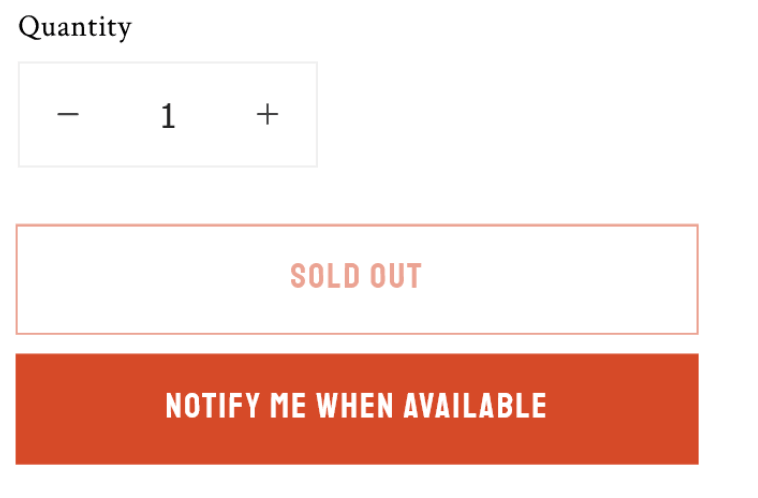
Major retailers handle this the same way. Target’s own help centre notes that “when an item is available for preorder, there is a limited quantity of Preorder inventory available”, and once the limit is met, no additional pre-orders can be placed (see Target’s pre-order help page). It’s standard practice, not a quirk of small brands.
The simplest framing: a pre-order is a merchant making a promise to deliver. If you can only realistically deliver 150 units, you shouldn’t be taking 300 pre-orders. Caps protect the brand from refunds, chargebacks and the worst kind of customer service emails.
According to Wikipedia, pre-orders exist so manufacturers can gauge demand and sellers can be assured of minimum sales. The cap is what keeps that gauge accurate.
Why Merchants Cap Pre-order Quantities
There’s no single reason to set a pre-order limit, but four come up over and over.
- PO-bound stock. The most common case. You’ve placed a purchase order for a fixed quantity. You don’t want pre-orders to outrun what’s actually coming in.
- Made-to-order capacity. A small studio or maker can only produce so many units a week. Pre-orders need to respect that capacity, not the appetite for the product.
- Deposit risk. With deposit pre-orders, you’ve collected only part of the revenue. Over-promising puts cash flow and operations at risk if you can’t deliver.
- Brand strategy. Founders editions, capsule drops and limited runs use scarcity intentionally. The cap is part of the marketing.
If you’re managing pre-orders against incoming purchase orders or an ERP, the cap is usually the single most important number to get right. We’ve covered the operational side of that in our guide on managing pre-orders on your ERP.
How to Calculate a Safe Pre-order Limit
The cap shouldn’t be the raw PO quantity. There are two buffers worth subtracting before you set the public-facing limit.
The formula:
Maximum pre-orders = PO quantity − defect/buffer stock − expected cancellations
The defect buffer covers units that arrive damaged, fail QA or get held back as warranty stock. 10 to 15% is a reasonable starting point depending on your supplier reliability.
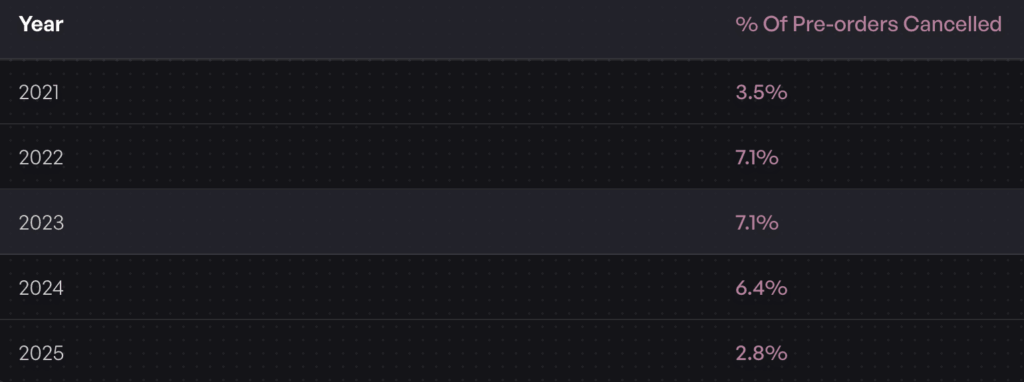
The cancellation buffer covers customers who change their mind before fulfilment. Across the 1 million pre-orders dataset, the average cancellation rate sits at 5.4%, with 2025 Q1 trending lower at 2.8%. If you’re charging a deposit or charging upfront, expect the lower end. If you’re using charge-later, expect closer to the average.
A Worked Example
You have an incoming purchase order for 150 units.
- Subtract 15% defect/buffer stock: 150 − 23 = 127
- Subtract 5.4% expected cancellations on the remaining stock: 127 − 7 = 120
So your safe pre-order cap is roughly 120 units. You could comfortably push to 130 if you’re using a deposit or charge-upfront model, since those tend to commit customers more strongly. Push past 150 and you’re betting on every single unit arriving in perfect condition and zero customers cancelling. Not a bet worth making.
Setting Pre-order Limits at the Variant Level
Product-level caps aren’t always enough. Demand rarely splits evenly across sizes, colours or configurations. If you’re allocating 120 units across five sizes, you don’t want one popular size selling 80 pre-orders while two others sell three each, then having to refund the oversold size when stock lands.
Variant-level allocation matters. The practical approach:
- Use historical sales data to weight the allocation. If size M historically sells 35% of units, allocate 35% of the cap to size M.
- If you don’t have historical data, look at industry-standard size curves for your category.
- Build in the ability to reallocate mid-campaign. If size L is selling out fast and size XS is barely moving, shift the cap. Pre-order software should let you do this without taking the campaign down.
Once a variant hits its cap, the pre-order button should automatically delist for that variant only, leaving the rest of the listing live. Native Shopify settings can stop a product from selling at zero stock, but they can’t manage allocations the way a pre-order tool can. For the bigger picture on inventory operations, see our guide on how to manage pre-order inventory in Shopify.
Customer Purchase Limits, a Separate Lever
Inventory caps stop your campaign from overselling. Per-customer limits stop one buyer from wiping out the campaign. They’re different tools for different problems.
Common scenarios where per-customer caps make sense:
- Hype-driven launches. Sneaker drops, limited collabs and trading-card style releases where resellers will buy 20 units if you let them.
- Founders editions. Fair distribution matters more than max revenue.
- Made-to-order capacity. Per-customer caps prevent a single bulk order from blocking out everyone else’s lead time.
Shopify has a native quantity-per-order field at the product level, but it’s blunt and doesn’t enforce across separate orders. For pre-orders specifically, the app layer is where the real enforcement happens. PreProduct lets you set per-customer caps that hold across multiple sessions, so one buyer can’t make three separate orders to grab nine units of a one-per-customer drop.
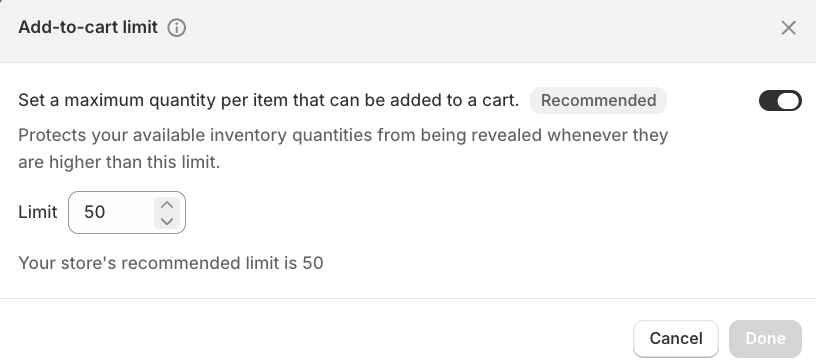
How you communicate the cap matters too. Make the limit visible on the product page so customers don’t feel ambushed at checkout. Our breakdown of pre-order button design best practices covers where to surface details like this without breaking the page layout.
Preventing Overselling Once the Cap Is Hit
The worst pre-order experience: a customer adds an item to cart, checks out, gets a confirmation email, and a week later receives a refund saying the product is no longer available. That’s not a cap, that’s a broken cap.
Three behaviours need to fire the moment a cap is reached.
- The buy button switches state. Either hidden, replaced with a “notify me” button, or replaced with a “join the waitlist for the next batch” CTA. Don’t leave it as a live pre-order button against a depleted cap.
- The cart and checkout reject further attempts. Even if a customer has the product in cart from before the cap closed, the checkout should validate against current availability.
- Channels stay in sync. If you’re selling on Shopify, Amazon and in-person via POS, the cap needs to reflect across all of them. A pre-order tool should be the source of truth, not three separate spreadsheets.
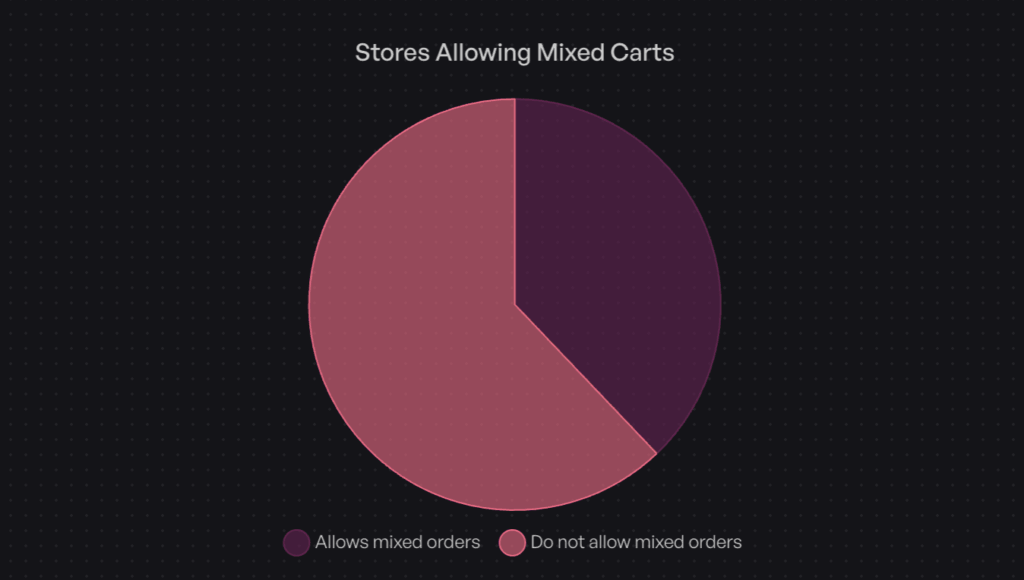
Carting policy matters here too. 62.1% of stores in the 1 million pre-orders dataset isolate pre-orders to their own cart, partly because it makes overselling easier to control. Mixed carts work, but the inventory logic has to be tighter.
What to Do When Your Pre-order Sells Out
Selling out is a good problem. Handle it badly and you waste demand. Handle it well and you set up the next campaign with stronger signal.
A clean post-sellout flow:
- Open a waitlist for the next batch. The customers who arrived too late are the highest-intent leads you’ll get for the next PO. Our guide on back-in-stock notifications on Shopify covers the setup.
- Communicate the lead time clearly. Tell the waitlist when the next batch is expected. If you don’t know yet, say so honestly.
- Resist the urge to raise the cap mid-campaign. If scarcity was real, don’t undermine it. If you can supply more, prep a second campaign instead.
- Use the demand signal. Cancellations stayed below 5.4% in your last campaign? Use that for next time’s buffer. The next PO can be sized with much more confidence.
For the distinction between pre-orders, backorders and waitlists in this context, our pre-orders vs backorders vs waitlists comparison breaks down when each tool earns its place.
Frequently Asked Questions
Does Pre-order Mean Sold Out?
No. A pre-order means the product hasn’t shipped yet, usually because stock hasn’t landed. Pre-orders only show as sold out when the merchant’s cap has been reached. The two states are different: pre-order is an active sales channel, sold out is the end of one.
Are Pre-orders Guaranteed?
Pre-orders are a commitment from both sides. The customer commits to buy, the merchant commits to deliver against the timeline shared at checkout. If a merchant can’t deliver, the standard remedy is a full refund. That’s why setting the cap correctly matters: a missed pre-order delivery is more damaging than a smaller, sold-out campaign.
How Do I Limit Pre-orders on Shopify?
Shopify’s native inventory settings can stop a product from selling at zero stock, but they don’t handle pre-order-specific caps, variant-level allocation or per-customer limits. A dedicated pre-order app handles all three. With PreProduct, you set the cap, the variant allocation and the per-customer rules at listing creation, then the app enforces the rest automatically.
Can I Set a Different Pre-order Limit Per Variant?
Yes, and you usually should. Allocating one product-level cap to a multi-variant listing almost always means some variants oversell and others underperform. Variant-level limits keep the allocation honest and let you reallocate mid-campaign if demand skews.
How Do I Stop One Customer Buying All My Pre-order Stock?
Use per-customer purchase caps. These are different from inventory caps. They limit how many units a single customer can pre-order across one or more orders. For limited drops, founders editions or any campaign where fair distribution matters, this is the lever to use.
Pre-orders Sell Out by Design
Pre-orders can sell out, and that’s a feature of running pre-orders properly, not a bug.
The recap:
- Pre-orders draw against a merchant-set cap, usually tied to an incoming PO or a production run.
- A safe cap subtracts a defect buffer (10 to 15%) and an expected cancellation buffer (around 5.4% on average).
- Variant-level allocation prevents lopsided overselling within a multi-variant listing.
- Per-customer limits are a separate tool for managing fair distribution on hype-driven drops.
- When the cap is hit, the buy button needs to change state and a waitlist should open for the next batch.
If you’re setting up pre-orders on Shopify and want variant-level caps, per-customer limits and automatic state changes when a cap is reached, PreProduct handles all of that natively, so you can run pre-orders at scale alongside in-stock products without overselling. Start a free trial and set your first pre-order cap in minutes.
Pre-sell With PreProduct
7 day free trial with all plansMigrate pre-orders
