Best Shopify Pre-Order App: Data-Driven Buying Guide for 2026
Choosing the right Shopify pre-order app impacts everything from cash flow to customer satisfaction. After analyzing over $85M in pre-order sales, we’ve identified what separates apps that drive revenue from those that create operational headaches.
This isn’t another generic listicle. We’ve built this guide on real data from thousands of merchants running pre-orders at scale. You’ll learn which features drive results, which payment models work best for different business types, and how to match your store’s specific needs to the right solution. If you want to understand how pre-orders work on Shopify before evaluating apps, start there. By the end of this guide, you’ll have a clear framework for evaluating Shopify pre-order apps based on what actually moves the needle for your business.
What to look for in a Shopify pre-order app
Choosing the right Shopify pre-order app starts with understanding which features impact your bottom line and what timelines you’re working with. After processing over one million pre-orders, we’ve identified the capabilities that separate apps and drive revenue from those that create operational headaches.
Payment flexibility: The #1 feature merchants overlook
43.8% of all pre-order listings use charge-later payment, while only 14.9% charge upfront. That ratio surprises most merchants, especially the ones who just picked an app that only supports upfront charging.
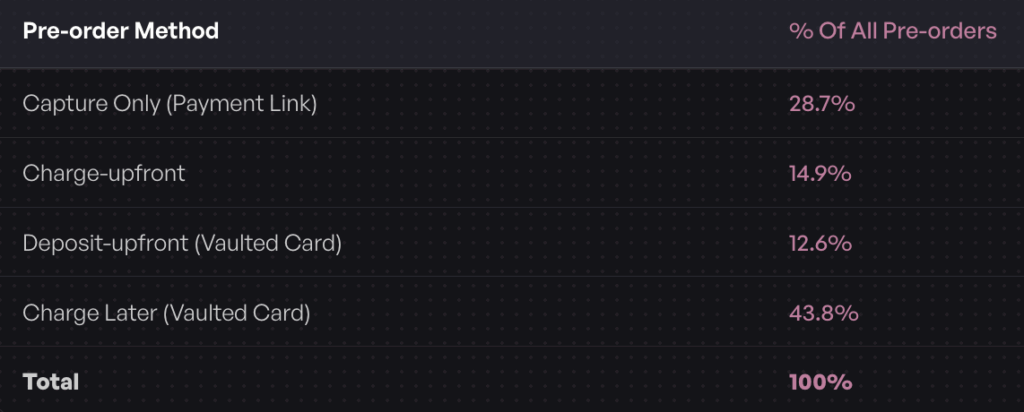
Payment flexibility matters because it affects three critical areas: authorization periods, cash flow timing, and customer psychology. When evaluating a Shopify pre-order app, verify it supports the payment types you need:
- Charge-upfront: Collect full payment at checkout (works for short lead times)
- Charge-later: Vault customer’s card with Shopify, charge when ready to ship (requires vaulted card technology)
- Deposit-upfront: Take a portion now, charge the outstanding balance later via vaulted card
- Capture-only: Payment link method, capture on your schedule
Most free Shopify pre-order apps only support upfront charging. If you need to charge later and have lead times over 30 days, you need an app that supports deferred charging with proper card vaulting. Without this, you’re limited by Shopify’s standard authorization period, which typically expires after 7 days. Learn more about understanding Shopify authorization periods for pre-orders to avoid payment capture issues.
Integration with your existing tech stack
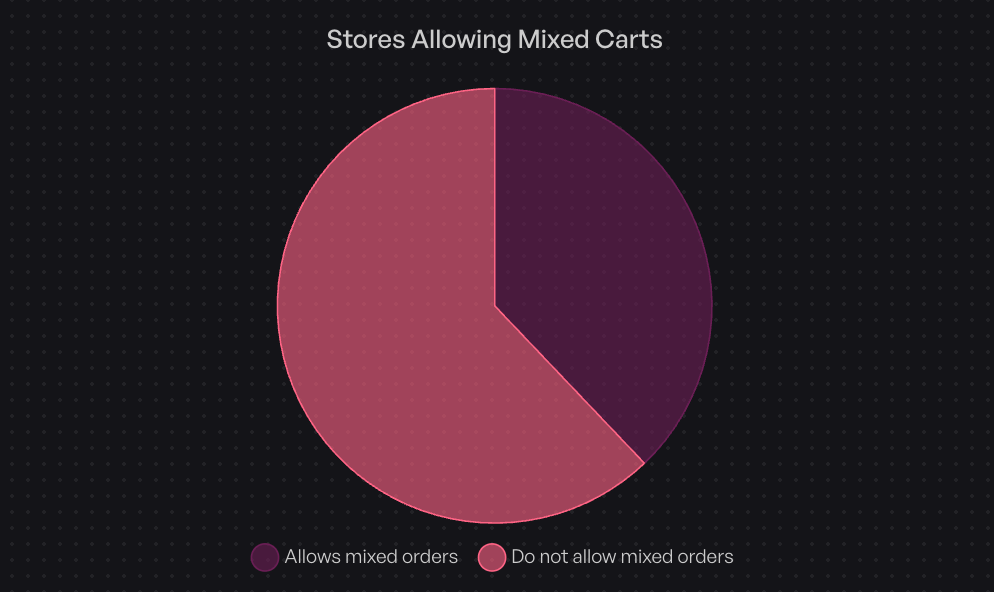
Your pre-order app needs to work with your 3PL, ERP, and any inventory systems that don’t respect Shopify’s “On Hold” status. Without proper integration, automated warehouses can ship pre-orders before you have stock, creating expensive customer service issues and fulfillment nightmares. In fact, 62% of stores don’t allow mixing pre-orders with ready-to-ship items to avoid these fulfillment complications.
Shopify native vs. third-party checkout: Apps built with Shopify’s native checkout provide the smoothest customer experience and best compatibility with Shopify Payments. Third-party checkout solutions can introduce friction and compatibility issues.
Fulfillment holds and 3PL integration: If your 3PL automatically ships orders, you need an app that can place fulfillment holds on pre-order items. Without this, pre-orders can ship prematurely, creating expensive customer service issues. Your app should either integrate directly with your 3PL or provide clear order tagging so your warehouse knows which orders to hold.
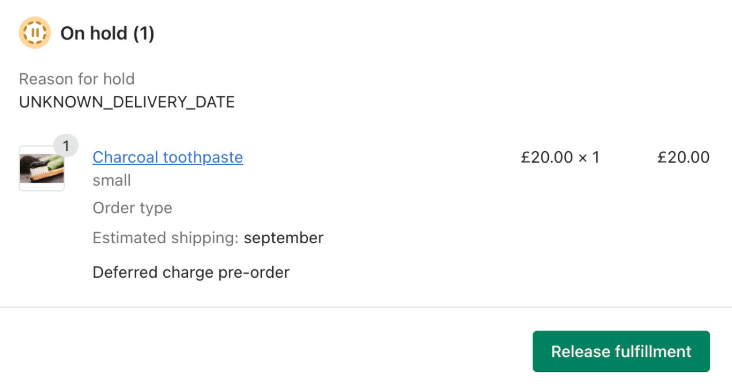
ERP and inventory sync: For stores with complex inventory management, your pre-order app should offer multiple signals that your ERP system can use to properly route orders, for example: tags, line item properties and order fulfillment status. This prevents overselling and congruent operations.
Marketing and automation integration: Look for apps that offer their own automations, as well as consider integrations with Shopify Flow (for automation) and your email platform (e.g. Klaviyo) (for email campaigns). Also, if they have a good API, this can be very handy in the age of AI for custom integrations. These connections let you automate workflows like notifying customers when stock arrives or tagging orders for special handling.
Customization and customer communication
Pre-orders require clear communication to set expectations and maintain trust. Your app should give you control over how and when you communicate with customers.
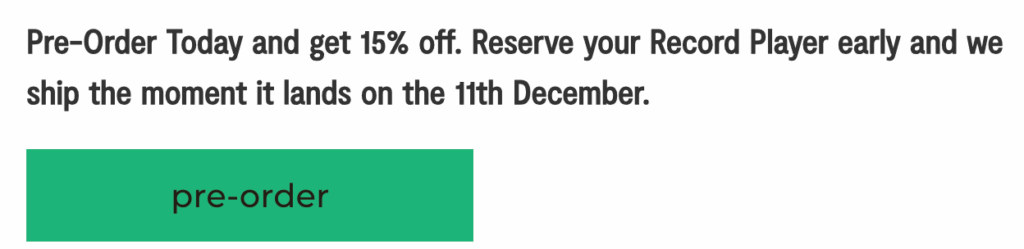
Front-end customization: Consider if you need to customize button text, badges, and messaging on product pages. Just having a buy button saying “Pre-order” is the start, but consider adding specific messaging like “Ships in 4-6 weeks” or “Reserve yours – shipping March 2026.”
Customer portals: A dedicated portal where customers can check order status, view estimated shipping dates, and see payment schedules reduces support tickets and builds trust. This becomes especially important for charge-later pre-orders where customers want reassurance their order is still active.
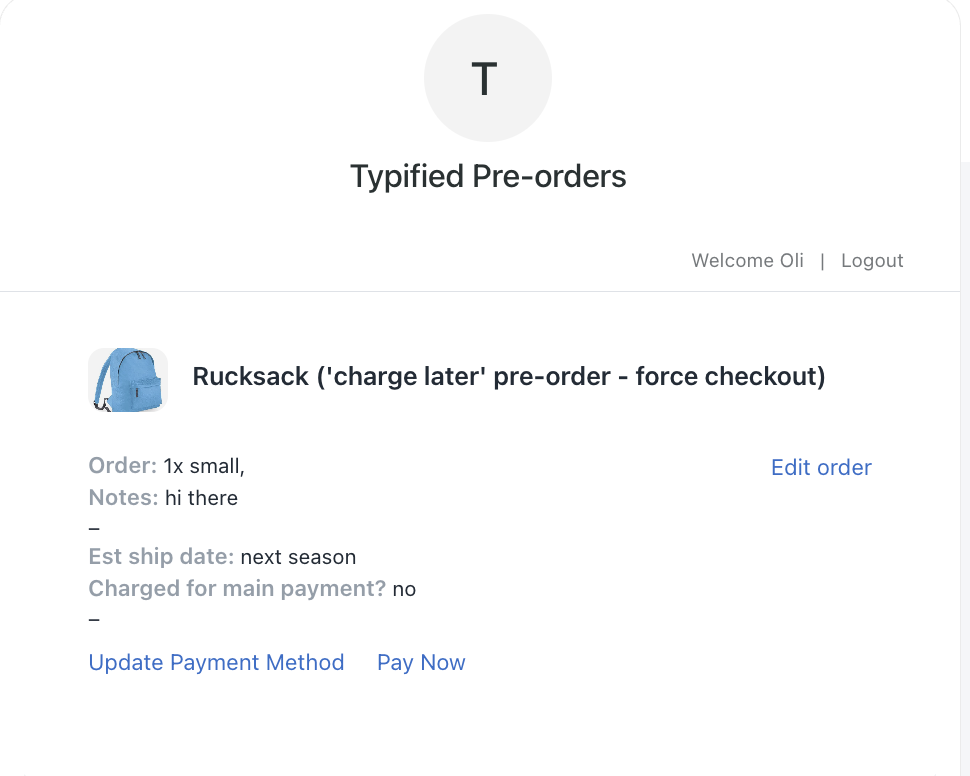
Email automation: Your app should handle confirmation emails, payment notifications, and shipping updates. Look for apps that let you customize these emails to match your brand voice and include specific details about lead times, discounts etc.
Mobile optimization: Over 70% of Shopify traffic comes from mobile devices. Test the complete checkout flow on mobile before committing to any app.
Scalability and pricing structure
App pricing varies widely, from free options with limited features to enterprise solutions with custom pricing. Understanding the pricing structure helps you avoid surprises as you scale.
Free vs. paid tiers: Free apps typically support only basic upfront charging and lack advanced features like charge-later, integrations and automations. They work for testing pre-orders, but most growing stores need paid features quickly.
Transaction fees vs. flat monthly: Some apps charge a percentage of each pre-order (typically 1-5%), while others use flat monthly pricing. Calculate which model costs less based on your expected pre-order volume. For stores processing over $5,000 in monthly pre-orders, flat pricing usually wins.
Shopify Plus features: If you’re on Shopify Plus, look for apps that unlock advanced capabilities like multi-step payment plans, bulk management tools, and API access for custom integrations.
Decision framework: Matching Shopify pre-order apps to your business model
Not every store needs the same pre-order features. A tech startup launching a $500 product has different requirements than a fashion brand doing limited drops. Here’s how to match your business model to the right Shopify pre-order app.
For early-stage stores (< $10k/month revenue)
At this stage, you’re testing whether pre-orders work for your product and audience. You need simple setup, low commitment, and minimal upfront costs. If you’re still evaluating pre-orders on Shopify versus crowdfunding platforms like Kickstarter, that comparison guide can help you choose the right launch model.
Recommended approach: If you can get away with charging upfront, start with apps offering free plans or low monthly fees with basic features. Focus on apps that let you test the pre-order concept without complex configuration.
Key features to prioritize:
- Simple button swap on product pages
- Basic email notifications
- Upfront charging (simpler than deferred payment)
- Easy setup without code changes
What you can skip for now: Advanced automation, complex payment schedules, extensive integrations. These add complexity you don’t need while validating product-market fit.
For growing DTC brands ($100k+/month)
You’ve proven pre-orders work and now need features that scale with your business. This is where payment flexibility, automation, and integration become important.
Recommended features:
- Charge-later capabilities with proper card vaulting
- Fulfillment holds to prevent premature shipping
- Shopify Flow integration for automation
- Customer portals for self-service order tracking
- Basic analytics to track pre-order performance
Apps like PreProduct fit this segment well, offering flexible payment options, native Shopify integration, and automation capabilities without enterprise complexity. Other mid-tier options include specialized apps with strong charge-later support.
What matters most at this stage: Operational efficiency. You need your pre-order app to work smoothly with your 3PL and existing workflows. Look for apps with fulfillment flows that match your 3PL’s workflow, as well as clear documentation in general.
For Shopify Plus and enterprise (> $1m/month)
At this scale, you need advanced features, bulk management, and deep integrations with your tech stack.
Required features:
- API access for custom integrations
- Bulk campaign management
- Advanced reporting and analytics
- Dedicated support and onboarding
- ERP integration capabilities
Special considerations: Your pre-order app needs to handle high volume without performance issues. Look for apps with proven track records at enterprise scale and dedicated support teams. For enterprise requirements, explore specialized Shopify Plus pre-order solutions designed for high-volume operations.
By product type
Your product category influences which pre-order features matter.
High-ticket items (> $500): You need deposit functionality to reduce customer friction while securing commitment. Look for apps that can take a percentage or fixed amount upfront, then automatically charge the balance when ready to ship. Our complete guide to Shopify partial payments and deposits explains how to structure deposit campaigns for high-ticket items.
Fashion and limited drops: Variant max limits, early-bird discounts, and self-service order tracking. Choose apps which allow for front-end customization, as well as controlled overselling.
Made-to-order or custom products: Long lead times (60+ days) require chargeing later. Your app should handle extended fulfillment windows and allow for customer updates throughout the process.
Restocks: AKA ‘back orders’, you need automated pre-order listing capabilities, and/or back-in-stock alerts. Some apps combine waitlist functionality with pre-orders, converting interest into secured sales.
Comparing top Shopify pre-order solutions
Here’s a look at leading Shopify pre-order apps, including where each excels and their limitations. We’re bias as PreProduct is our app, but there are pros and cons across all options.
PreProduct

Best for: Growing DTC brands or stores at scale who need flexible payment options, multiple customer touch points and extensive integration options.
Pricing:
- Starter: $0/month + 5% of paid pre-order revenue
- Scale: $59.99/month + 0.5% commission on paid pre-order revenue over $5,000
- Scale Plus: $259.99/month, 0% commission
Payment types: Charge-upfront, charge-later, deposit-upfront, capture-only, multi-step payment plans (Plus)
Key features:
- Full Shopify native integration with catalogue, checkout, orders and payments
- Shopify extensions for theme app blocks, order status pages and Flow
- Fulfillment holds prevent auto-shipment to 3PLs
- Customer portals for self-service order tracking
- Automations including auto-charge and listing management
- Option to isolate pre-order carts from in-stock items
- Dunning flows for failed payments
- Third-party integrations, such as Klaviyo, Peronsizely and Headless
Strengths: Built for stores that need flexible payment options, customer communication and integration options. Strong automation capabilities natively and through Shopify Flow. Transparent pricing model scales with your business.
Limitations: Not free to start (though commission-only option available). On the higher end of the pricing scale.
Best use case: Growing or larger stores looking for a Shopify pre-order app to pre-sell products in a flexible way that will intergrate with their supply chain and tech stack.
Timesact Discount & Pre-Order

Best for: Brands who would like to offer waitlists and pre-orders
Pricing: Free plan available, paid plans from $9.99/month
Payment types: Primarily charge-upfront
Key features:
- Countdown timers and urgency messaging
- Discount capabilities for early birds
- Coming soon badges
- Basic pre-order button customization
Strengths: out-of-the-box visual elements for creating urgency. Affordable.
Limitations: Does not mention integrations with other parts of Shopify, like Flow, Order status pages etc.
Best use case: A use case where an app that handles waitlists and pre-orders is needed.
WOD: Pre-Order Now

Best for: Merchants looking to charge upfront for pre-orders by tag based rule configuration
Pricing: From $19.95/month, scales with features
Payment types: Charge-upfront, partial payments
Key features:
- Tag or stock based rules
- Mixed cart warning
- Pre-order scheduling
Strengths: Specific GA4 integration, pre-order scheduling and mixed-cart alerts
Limitations: Limited charge-later functionality. Fewer automation features compared to newer apps.
Best use case: Stores looking to schedule in pre-order listings accross their catalogue.
Globo Pre-Order
Best for: Re-stock alerts + wait lists + pre-orders
Pricing: Free plan available, Pro from $9.99/month
Payment types: Charge-upfront with customer selected payment options
Key features:
- Pre-order scheduling
- Countdown timers
- Pre-order button and badge customization
- Low monthly cost
Strengths: Cheapest plan for first pre-orders (20 without paying + 0 % commission) Good for stores who;d like to use re-stock alerts and wait lists too.
Limitations: Limited payment options, which are selected by the customer as opposed to the merchant.
Best use case: Merchants looking to take pre-orders, re-stock alerts and wait lists + incentivise with countdown timers.
Stoq: Back in Stock, PreOrder
Best for: ‘Notify me’ alerts alongside pre-orders/back-orders with low pricing
Pricing: From $19/month (with free plan for the first 10 pre-orders)
Payment types: Charge-upfront and notification focus
Key features:
- Back-in-stock alerts convert to pre-orders
- Email + SMS notifications (additional cost for SMS)
- Analytics dashboard
Strengths: Seamless transition from waitlist to pre-order. Good for managing restocks. Strong notification system.
Limitations: Number of pre-orders capped per plan, more focus on notifications than pre-order payment options.
Best use case: Brands who want to take interest for restocks and pre-orders, whilst communicating with customers via email and SMS.
Feature comparison at a glance
| Feature | PreProduct | Timesact | Pre-Order Now | Globo | Stoq |
|---|---|---|---|---|---|
| Charge-later | ✓ | as customer chosen option | ✗ | ✗ | ✗ |
| Deposits | ✓ | as customer chosen option | as customer chosen option | as customer chosen option | as customer chosen option |
| Fulfillment holds | ✓ | ✓ | ✓ | ✓ | ✓ |
| Shopify Flow | ✓ | ✗ | ✗ | ✗ | ✗ |
| Customer portal | ✓ | ✗ | ✗ | ✗ | ✗ |
| Free plan | ✗* | ✓ | ✗** | ✓ | ✓ |
| Multi-step payment plans | as customer chosen option | ✗ | ✗ | ✗ | ✗ |
| Waitlist integration | ✗ | ✗ | ✗ | ✗ | ✓ |
| Isolated pre-order carts | ✓ | ✗ | ✗ | ✗ | ✗ |
| SMS notifications | ✗ | ✗ | ✗ | ✗ | ✓ |
*PreProduct offers commission-only pricing (no fixed monthly fee)
**Pre-Order Now offers the first pre-order for free
Common mistakes when choosing a Shopify pre-order app
Avoid these pitfalls that cost merchants time and money.
Ignoring payment processor compatibility
Not all payment processors support deferred charging. Shopify Payments and Stripe can vault cards for charge-later pre-orders, but many other gateways can’t. Before choosing an app with charge-later features, verify your payment processor supports it.

Shopify automatically hides unsupported payment providers at checkout, which can create confusion if you haven’t planned ahead. If you’re using a regional payment gateway, confirm charge-later compatibility before launching your first deferred-payment campaign.
Overlooking fulfillment integration
If your 3PL automatically fulfills orders pushed to your system, you need an app with fulfillment hold capabilities. Without this, pre-orders can ship before stock arrives, creating expensive problems.
According to our data, 62% of stores prevent mixing pre-orders with in-stock items specifically to avoid fulfillment issues. Your app should either place fulfillment holds directly in Shopify (for compatible 3PLs) or provide clear order tagging so your warehouse knows which orders to hold.
Focusing only on price at scale
A free Shopify pre-order app is great for starting out, but if your app doesn’t support certain features you’ll need later on, it can be a pain to switch. Also, pre-orders can touch a lot of different parts of your business, so you’ll want to make sure your app has good customer support and documentation.
Not testing mobile checkout
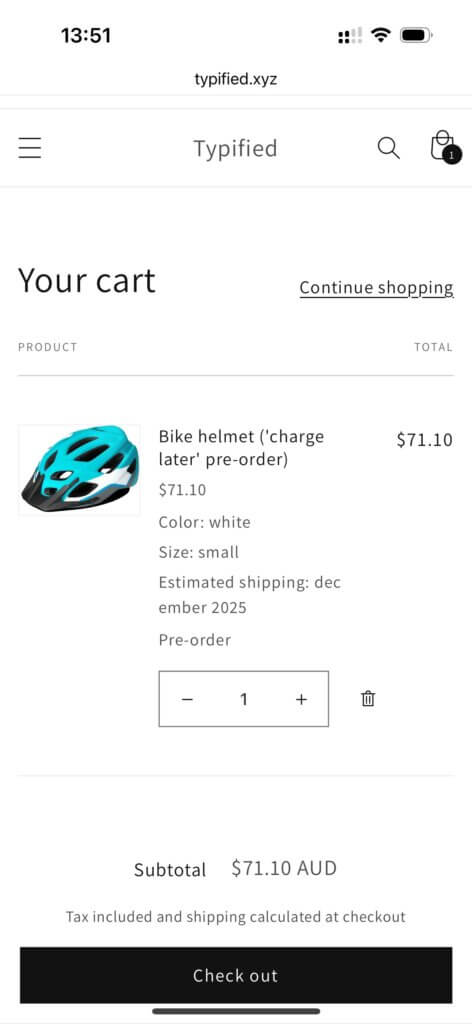
Over 70% of Shopify traffic comes from mobile devices, yet many merchants only test the desktop experience. Install your chosen app, then complete the entire purchase flow on your phone. Check for:
- Button sizing and positioning on mobile
- Clear pre-order messaging that doesn’t get cut off
- Smooth checkout flow without extra steps
- Readable confirmation emails on mobile
A clunky mobile experience kills conversions regardless of which features your app offers.
Choosing based on feature count rather than features you’ll use
More features don’t equal better results. An app loaded with capabilities you’ll never use just adds complexity to your setup and training.
Start by listing the 3-5 features you absolutely need, then find apps that excel at those specific capabilities. You can always upgrade later if you need more advanced functionality.
How to implement your chosen Shopify pre-order app
Once you’ve selected an app, follow this checklist for smooth implementation.
Setup checklist
- Install from Shopify App Store: Browse pre-order apps on the Shopify App Store, download your chosen app, and grant the required permissions
- Configure pre-order listing settings: Choose between upfront charging, deferred payment, or deposit models based on individual products or automations/rules.
- Customize front-end elements: Update button text, badges, and product page messaging to set clear expectations
- Test complete flow: Purchase a pre-order yourself, from product page through to checkout. Wait 5 minutes, then check your admin, then trigger payment/fulfilment and re-check your admin. It’s good to see the order state throughpout the process, so there’s no surprises.
- Check email flows: Set up notification sequences for order confirmation etc. A lot of apps will have a default email sequence that you can tweak.
Best practices for your first pre-order campaign
Don’t launch pre-orders across your entire catalog immediately. Start strategically:
Start small: Test with 1-2 products to validate your workflow and customer communication. Learn what works before scaling up.
Communicate clearly: Display lead times prominently on product pages. Customers need to know when to expect their order before they commit. Use specific dates or timeframes, not vague language. In the US, if there isn’t an advertised shipping date, you must ship within 30 days.
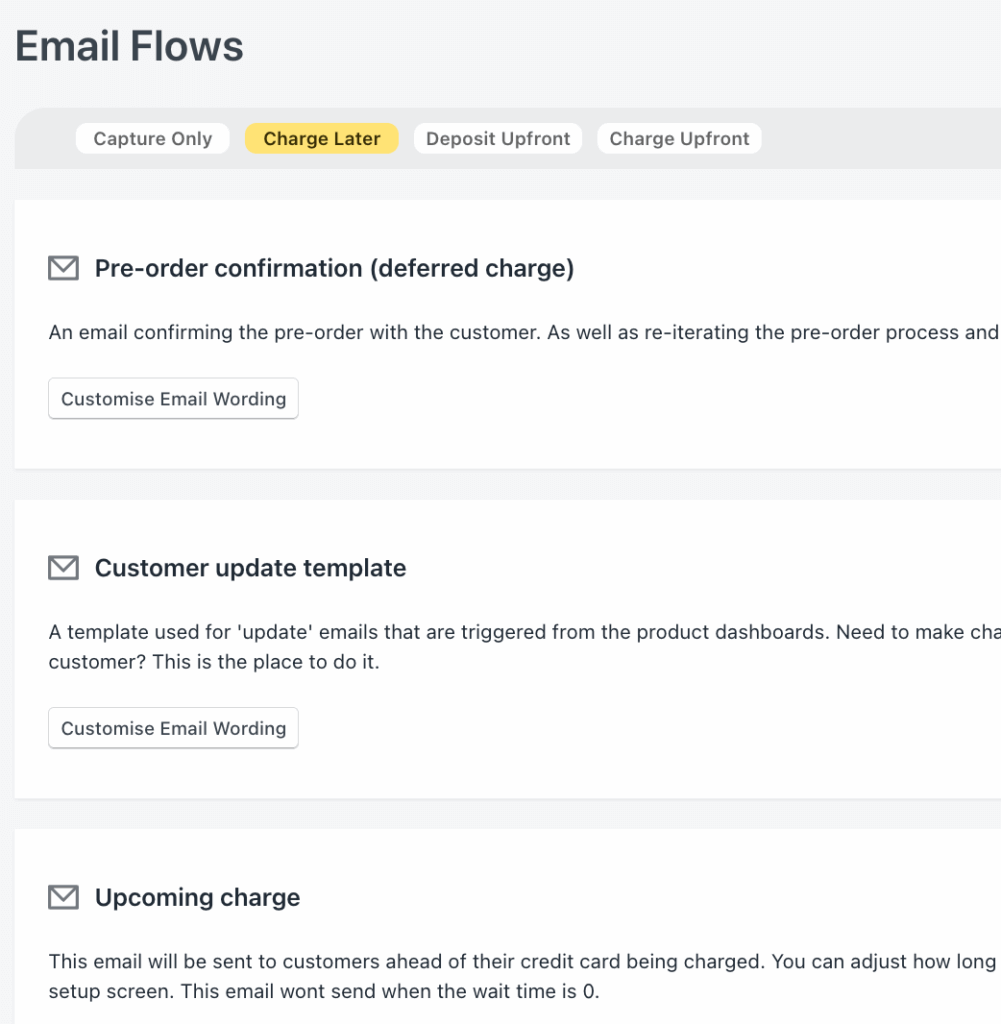
Send immediate confirmation: Your confirmation email should emphasize the pre-order status and estimated shipping date. This sets expectations and reduces “where’s my order” inquiries.
Keep customers updated: Send pro-sctive updates if the estimated shipping date changes or if there are delays. Transparency builds trust and reduces cancellations.
Track key metrics: Monitor conversion rates compared to regular products, cancellation rates (average is 5.4%), and customer support tickets. These metrics tell you if your pre-order experience needs adjustment. For deeper strategic guidance on optimizing your campaigns, check out our pre-order strategy based on $85M in sales data.
FAQ
What’s the best free Shopify pre-order app?
Ultimately, it depends on your specific needs and budget. We reccomend reading the feature comparison at the top of the page, and then reading the reviews and testimonials for each app.
If your lead times exceed 30 days or you need to validate demand before committing to production, consider apps with deferred payment capabilities. The additional conversion from charge-later often pays for the app fee.
Do I need Shopify Plus for pre-orders?
No. Most pre-order functionality works on standard Shopify plans. However, Shopify Plus unlocks advanced features like multi-step payment plans (installments), higher API limits, and some other related features (Shopify Flow HTTP Requests for example).
If you’re on a standard Shopify plan, you can still access charge-upfront, charge-later, and deposit pre-orders through apps like PreProduct or other third-party solutions.
Can I mix pre-order and in-stock items in one cart?
Yes, but 62% of merchants prevent mixed carts to simplify fulfillment. Mixing pre-orders with ready-to-ship items creates operational complexity: you either hold the entire order until everything is ready (frustrating customers waiting for in-stock items) or split shipments (increasing costs and complexity).
Some Shopify pre-order apps let you choose whether to allow mixed carts. For cleaner operations, especially when starting out, prevent mixing by redirecting pre-order items to a separate checkout. Then consider moving to mixed carts when you’re sure your back-of-house can handle.
What’s the difference between pre-orders and backorders?
Pre-orders are for products not yet available, often upcoming launches or new items you’re validating demand for. Backorders are for products temporarily out of stock that you plan to restock soon.
One big difference is promotional approach: with backorders, its very rare that they’re formerly ‘launched’. Where as you might choose to promote a pre-orders ‘pre-launch’.
Also, there’s often less risk with backorders as the designs/suppliers have already been tested . Learn more in our complete comparison of pre-orders vs backorders vs waitlists.
Should I charge upfront or later for pre-orders?
We reccomend charging upfront for pre-orders with smaller lead times (under 30 days), and charge-later for pre-orders with longer lead times (over 30 days). Then for high-ticket items, consider using deposits.
- Lead time: Over 30 days? Charge-later typically gives you more leaniency with the customer, but also gives them more time to cancel.
- Price point: High-ticket items (> $500) often work better with deposits
- Customer psychology: Charge-later removes friction for uncertain customers
- Cash flow needs: Upfront charging improves immediate cash flow
From our numbers, charge-later is by far the most popular payment type (43.8% of all pre-order listings). Read more about Shopify deposit pre-orders for guidance on partial payment strategies.
How do pre-order apps handle refunds?
Refund processes vary by payment type:
Charge-upfront: Standard Shopify refund process through your admin
Charge-later: Cancel the pre-order before charging (no refund needed), or process refund if already charged
Deposits: Refund the deposit through Shopify or app, cancel any pending balance charges
Most apps provide admin interfaces for handling refunds and cancellations. Average cancellation rate across all pre-orders is 5.4%, though this varies significantly by lead time and product type.
(PreProduct also allows merchants to surface a cancellation button in the customer portal)
Can pre-order apps integrate with my ERP or 3PL?
Integration capabilities vary widely by app. Look for:
- Direct integrations: Some apps connect directly with major ERPs (NetSuite, QuickBooks) and 3PLs (ShipBob, ShipStation)
- API: More flexible apps offer API access that can push pre-order events to your systems
- Order tagging: Apps that tag pre-orders clearly in Shopify make it easier for connected systems to handle them differently
- Line item properties: Apps that use line item properties to pass pre-order metadata to your ERP make it easier for connected systems to handle them differently
- Fulfillment holds: Helpful for 3PL integration to prevent premature shipping. Not always supported though, so line-item properties and/or order tags are often used instead.
For detailed guidance, see our guides on managing pre-orders with ERPs and managing pre-orders with your 3PL.
Conclusion: Choose the right app for your specific needs
The right Shopify pre-order app depends on your payment requirements, integration needs, and lead times. Don’t choose based on star ratings alone, focus on matching features to your specific use case.
If you’re just testing pre-orders with short lead times, free apps like Globo or Timesact get you started. For growing DTC brands with longer lead times who need charge-later functionality, apps like PreProduct offer the flexibility and automation you need to scale. Enterprise stores benefit from solutions with API access, bulk management, and deep ERP integration.
Start by identifying your must-have features: Do you need charge-later? Fulfillment holds? Shopify Flow automation? Then evaluate apps based on those criteria, test the mobile checkout flow, and start with a small pilot before rolling out across your catalog.
Pre-sell With PreProduct
7 day free trial with all plans


