How to Build a Pre-Order Email Sequence That Converts (With Templates)
Running a pre-order email sequence campaign without the right email sequence is like launching a product and going silent until it ships. Once you’ve finished setting up pre-orders on Shopify, your email strategy becomes the bridge between purchase and delivery.
You’ve built demand, captured pre-orders, and then…
nothing.
Customers start wondering if their order went through.
Support tickets pile up.
Refund requests follow.
The difference between a one-time sale and a loyal customer often comes down to communication. A well-structured pre-order email sequence keeps customers informed, reduces anxiety, prevents chargebacks, and turns pre-order buyers into repeat customers.
This guide shows you the exact email sequence to run for pre-order email sequence campaigns, with templates for every payment model. We’ll cover everything from order confirmation through delivery, including the often-overlooked failed payment recovery emails that can salvage 30-50% of at-risk orders.
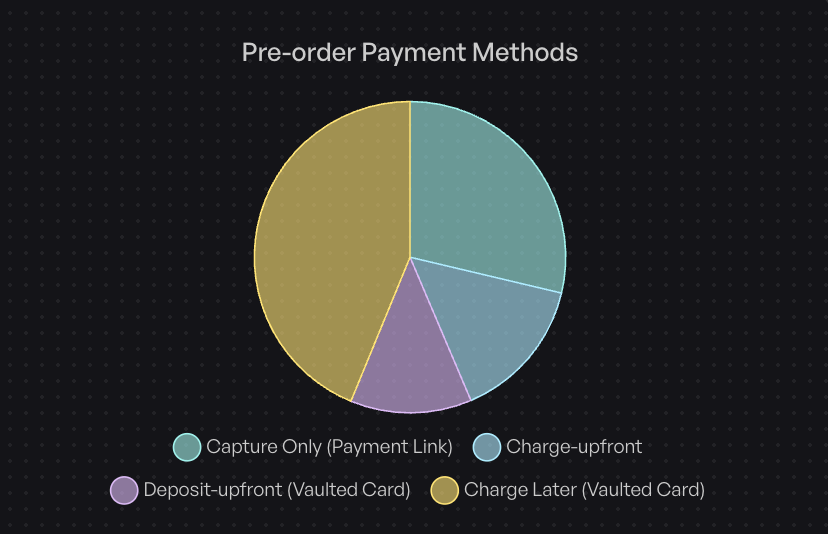
Data from $85 million in pre-orders shows that 43.8% of pre-orders use charge-later payments, making payment reminder emails critical. Get your pre-order email sequence right, and you could reduce support tickets by upwards of 20% while building trust that lasts beyond the first sale.
What Is a Pre-Order Email Sequence?
A pre-order email sequence is a series of automated and manual emails sent from the moment customers place a pre-order through final delivery. These emails serve different purposes than standard order confirmation emails because pre-orders involve longer timeframes, variable payment timing, and heightened customer expectations.
Standard ecommerce orders ship within days. Pre-orders can take weeks or months. That gap creates anxiety. Customers worry: Did my order go through? When will I be charged? Is this still happening?
Your email sequence bridges that gap. It manages expectations, confirms payment timing, provides progress updates, and maintains excitement during the wait. Done right, a pre-order email sequence turns uncertainty into confidence.
The structure of your sequence depends heavily on your payment model. Charge-upfront pre-orders need fewer touchpoints than charge-later campaigns, which require payment reminders and charge notifications. Deposit pre-orders split the difference, with emails at both payment stages.
The Anatomy of a High-Converting Pre-Order Email Sequence
Every pre-order email sequence campaign needs a core set of emails, regardless of payment model. These form the foundation of customer communication and set expectations from purchase through delivery.
Core Email Types Every pre-order email sequence Campaign Needs
Pre-announcement/Teaser Email: Sent 1-2 weeks before pre-orders open to build anticipation and create a waitlist. This email teases the product without full reveal and drives early interest.
Pre-order Launch Email: Sent the day pre-orders open. This email announces availability, highlights benefits and exclusive perks, and drives immediate conversions with clear calls-to-action.
Order Confirmation Email: Sent immediately after purchase. This critical email confirms the order, sets payment processing expectations, provides an order number, and establishes what happens next.
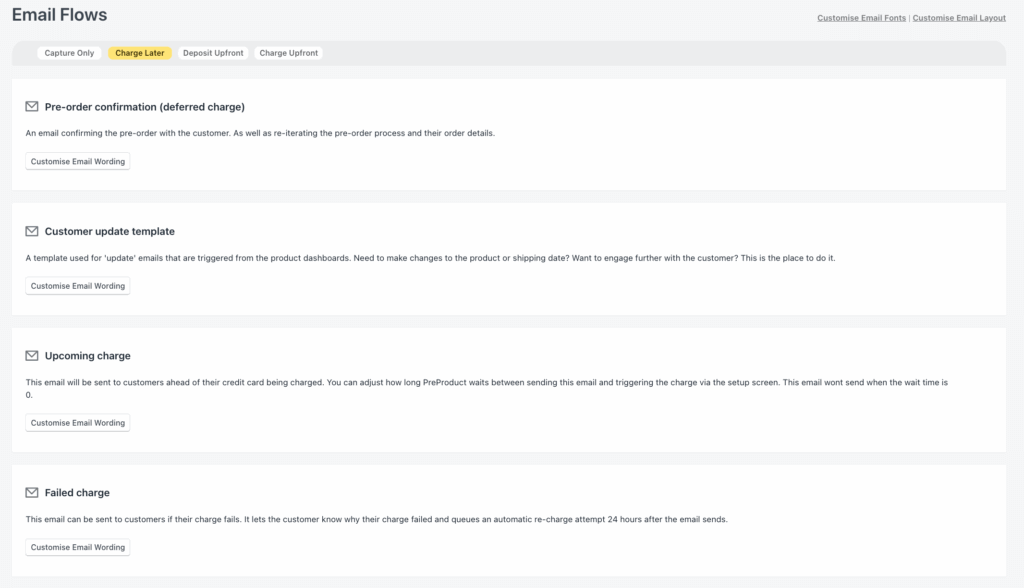
Payment Reminder Email: For charge-later pre-orders only. Sent 2 days before charging to notify customers of upcoming payment and allow time for payment method updates.
Charge Notification Email: Sent the day payment processes. Confirms the charge amount and signals that shipping is imminent.
Shipping Update Email: Sent when tracking becomes available. Provides carrier information, tracking number, and estimated delivery date.
Delivery Confirmation Email: Sent 2-3 days after delivery. Closes the loop, requests feedback, and encourages engagement with future launches.
Bonus Emails for Advanced Sequences
Beyond the core emails, certain situations call for additional touchpoints:
Progress Update Emails: For lead times exceeding 60 days, send updates every 30-45 days to maintain engagement and reduce anxiety about long waits.
Failed Payment Recovery Emails: When charge-later payments fail, a 3-email dunning sequence can recover 30-50% of orders that would otherwise be lost.
Re-engagement Emails for Waitlist: If you built a waitlist during pre-announcement, send exclusive early access when pre-orders open, creating urgency and rewarding engaged subscribers.
Pre-Order Email Sequence Strategy by Payment Model
Not all pre-orders charge the same way. Your email sequence must match your payment model. According to PreProduct’s analysis of over 1 million pre-orders, 43.8% use charge-later, 14.9% charge upfront, and 12.6% use deposits with vaulted cards.
Each pre-order type requires different communication touchpoints.
For Charge-Upfront Pre-Orders
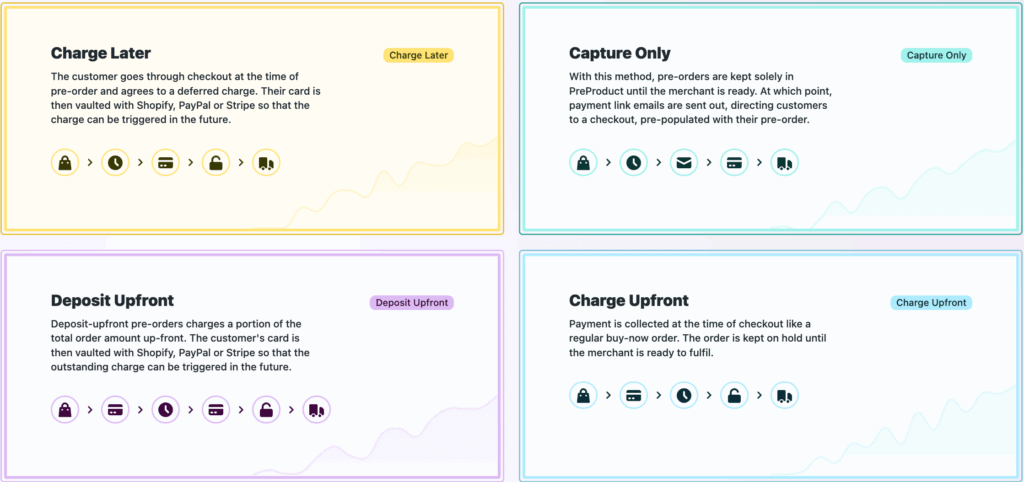
Charge-upfront is the simplest payment model. Customers pay in full at checkout, just like a regular order. The main difference is the delayed shipping timeline.
Email sequence:
- Order confirmation (immediate)
- Fulfillment progress updates (optional, for long waits)
- Shipping notification
- Delivery confirmation
Example Timeline: Order confirmation → [30-60 days] → Shipping → Delivery
This streamlined sequence works because payment is already captured. Your focus shifts entirely to managing shipping expectations and maintaining excitement during the wait.
For Charge-Later Pre-Orders
Charge-later pre-orders vault a customer’s payment method at checkout but don’t charge until products are ready to ship. This model represents 43.8% of all pre-orders, making it the most critical sequence to optimize.
Email sequence:
- Order confirmation (“You won’t be charged until…”)
- Payment reminder (2 days before charge)
- Charge notification (“Your card has been charged”)
- Shipping notification
- Delivery confirmation
- Failed payment recovery (if needed)
Example Timeline: Order confirmation → [Lead time] → Payment reminder → Charge → Ship → Deliver
The payment reminder email is critical. Sending it 2 days before charging gives customers time to update expired cards or add funds, preventing failed charges and order cancellations.
For Deposit Pre-Orders
Deposit pre-orders collect a portion upfront (often 25-50%) and charge the balance later. This model works well for higher-ticket items or made-to-order products where you want commitment without full payment.
Email sequence:
- Deposit confirmation (“Deposit received, balance due…”)
- Balance reminder (2 days before final charge)
- Final charge notification
- Shipping notification
- Delivery confirmation
Example Timeline: Deposit → [Lead time] → Balance reminder → Final charge → Ship → Deliver
Deposit sequences require clear communication at both payment points. Customers need to know exactly when the balance will be charged and how much they’ll pay.
The 7 Pre-Order Emails you should consider sending (With Templates)
Here are copy-paste templates for every essential pre-order email sequence email. Customize these to match your brand voice and product specifics.
Pre-order email sequence email #1: Pre-Announcement Teaser (Optional)
When to Send: 1-2 weeks before pre-orders open
Goal: Build anticipation and create waitlist
Subject Line: “Something’s coming [First Name]…”
Email Copy:
Hi [First Name],

We've been working on something special for the past [timeframe].

[Brief teaser without full reveal - share inspiration, problem it solves, or glimpse of design]

Want early access? Join the waitlist and you'll be the first to pre-order email sequence when it launches on [DATE].

[CTA Button: Join Waitlist]

[Your Brand]
Key Elements:
- Curiosity without full reveal keeps readers engaged
- Concrete launch date builds urgency
- Clear next action (join waitlist) captures intent
Email #2: pre-order email sequence Launch Announcement
When to Send: Day pre-orders open
Goal: Drive immediate pre-order conversions
Subject Line: “Pre-orders are live: [Product Name]”
Email Copy:
Hi [First Name],

[Product Name] is now available for pre-order.

What you get:
* [Key benefit 1]
* [Key benefit 2]
* [Key benefit 3]

pre-order perks:
* [Discount/exclusive bonus]
* Guaranteed allocation
* Ships [DATE/timeframe]

Payment timing: pre-order email sequence now. Your card will be charged [when - immediately/when it ships/etc.].

[CTA Button: pre-order Now]

Questions? Reply to this email.

[Your Brand]
Key Elements:
- Focus on benefits, not just features
- Payment timing stated upfront prevents confusion
- Shipping expectations set early
- Easy support access (reply to email) builds trust
Pre-order email sequence email #3: Order Confirmation (Charge-Later Version)
When to Send: Immediately after pre-order placement
Goal: Confirm order, set expectations, reduce anxiety
Subject Line: “pre-order confirmed: Order #[ORDER_NUMBER]”
Email Copy:
Thanks for your pre-order, [First Name]!

Order #[ORDER_NUMBER]
[Product Name] × [Quantity]
Total: $[AMOUNT]

Payment: Your card ending in [XXXX] will be charged on approximately [DATE], one week before your estimated ship date of [SHIP_DATE].

What happens next:
1. We'll email you updates as we get closer to fulfillment
2. You'll receive a payment notification before we charge your card
3. Your order ships on approximately [DATE]

Update payment info: [Link to customer portal]

Questions? Reply anytime.

[Your Brand]
Key Elements:
- Order number prominent for reference
- Payment timing crystal clear to prevent surprises
- Roadmap of what happens next reduces anxiety
- Easy way to update payment method
Pre-order email sequence email #3 Alternative: Order Confirmation (Charge-Upfront Version)
Subject Line: “Order confirmed: #[ORDER_NUMBER]”
Email Copy:
Thanks for your order, [First Name]!

Order #[ORDER_NUMBER]
[Product Name] × [Quantity]
Total: $[AMOUNT] (charged to card ending in [XXXX])

Estimated ship date: [DATE/timeframe]

We're working to get your order to you as soon as possible. You'll receive shipping updates as we get closer to [DATE].

Track your order: [Link]

Questions? Reply anytime.

[Your Brand]
Pre-order email sequence email #4: Payment Reminder (Charge-Later Only)
When to Send: 2 days before charging
Goal: Notify customers of upcoming charge, allow payment updates
Subject Line: “Heads up: Your pre-order payment is coming up”
Email Copy:
Hi [First Name],

Your pre-order email sequence for [Product Name] is almost ready to ship!

We'll charge your card ending in [XXXX] on [DATE] for $[AMOUNT].

Everything on track? You're all set.

Need to update payment? [Link to update]

Your order ships approximately [SHIP_DATE].

Thanks for your patience!

[Your Brand]
Key Elements:
- Clear charge date prevents surprises
- Proactive notification prevents failed charges
- Easy payment update option
- Reinforces excitement (shipping soon)
This single email can prevent 60-70% of failed charges by giving customers time to update expired cards or add funds.
Pre-order email sequence email #5: Charge Notification
When to Send: Same day payment processing processes
Goal: Confirm charge, announce imminent shipping
Subject Line: “Payment processed for Order #[ORDER_NUMBER]”
Email Copy:
Hi [First Name],

Your payment of $[AMOUNT] has been processed.

Order #[ORDER_NUMBER] is now preparing to ship.

What's next:
* Your order is being packed
* You'll receive tracking within 2-3 business days
* Estimated delivery: [DATE]

Track your order: [Link]

[Your Brand]
Key Elements:
- Payment confirmation (no surprises)
- Immediate next steps (packing/shipping)
- Delivery timeline set
Pre-order email sequence email #6: Shipping Notification
When to Send: When tracking is available
Goal: Provide tracking, manage delivery expectations
Subject Line: “Your order has shipped!”
Email Copy:
[First Name], your order is on the way!

Order #[ORDER_NUMBER]
Carrier: [Carrier Name]
Tracking: [Tracking Number/Link]

Estimated delivery: [DATE]

Track your package: [Link]

[Your Brand]
Key Elements:
- Tracking immediately visible
- Carrier information included
- Estimated delivery date
- Direct tracking link
Pre-order email sequence email #7: Delivery Confirmation / Thank You
When to Send: 2-3 days after delivery
Goal: Close the loop, encourage engagement, request feedback
Subject Line: “Did your order arrive?”
Email Copy:
Hi [First Name],

Your order should have arrived by now!

How's everything looking? If there are any issues, let us know and we'll make it right.

Love it? We'd appreciate it if you left a review: [Link]

Thanks for supporting [Brand]. You made this launch possible.

[Your Brand]

P. S. Follow us on [social] for updates on what's next.
Key Elements:
- Check-in shows you care
- Review request (social proof for future launches)
- Community building
- Future product teases maintain engagement
Advanced Pre-Order Email Strategies
Beyond the core sequence, certain situations require specialized email approaches. These advanced strategies help you recover revenue, maintain engagement during long lead times, and segment communication for different customer types.
Failed Payment Recovery Sequence (Dunning Emails)
Payment failures are inevitable with charge-later pre-orders. Cards expire, accounts run low on funds, or billing addresses change. With 43.8% of pre-orders using charge-later payments, having a dunning sequence isn’t optional.
A well-executed recovery sequence can salvage 30-50% of failed payments.
Recovery Sequence Timeline:
Email 1 (Day 0): “Action needed: Update payment for Order #[NUMBER]”
Email 2 (Day 3): “Your order is on hold – update payment to secure it”
Email 3 (Day 7): “Final reminder: Order #[NUMBER] will be cancelled in 48 hours”
Template (First Attempt):
Subject Line: “Action needed: Update payment for Order #[NUMBER]”
Hi [First Name],

We tried to charge your card ending in [XXXX] for your pre-order email sequence, but the payment didn't go through.

No problem - this happens sometimes. Update your payment info here: [Link]

We'll hold your order for 7 days. After that, we'll need to release it.

Update payment: [Link]

Questions? Reply to this email.

[Your Brand]
Key Elements:
- Non-judgmental tone (it happens)
- Clear deadline (7 days)
- Easy fix link
- Emphasize scarcity (order will be released)
Tone matters in dunning emails. Don’t shame customers for failed payments. Instead, position it as a simple fix that preserves their order.
Progress Update Emails (For Long Lead Times)
When lead times exceed 60 days, silence breeds doubt. Customers start wondering if their pre-order email sequence is still happening. Progress updates maintain engagement and reduce support inquiries.
When to Use: Lead times longer than 60 days
Frequency: Every 30-45 days
Template:
Subject Line: “Quick update on your pre-order”
Hi [First Name],

Just wanted to keep you in the loop on your pre-order email sequence for [Product Name].

We're currently [stage]: [Brief update - manufacturing underway, quality testing in progress, final production run, etc.].

Still on track to ship [TIMEFRAME].

Thanks for your patience - we'll keep you posted.

[Your Brand]
What to Include:
- Current stage (manufacturing, testing, shipping)
- Reassurance you’re on schedule
- Appreciation for patience
- No over-promising (use ranges, not specific dates)
These emails don’t need to be long. A simple check-in shows you’re actively working toward fulfillment and haven’t forgotten about their order.
Segmentation Strategies
Not all pre-order email sequence customers are the same. Segmenting your email sequence by customer type, payment model, or cart composition improves relevance and conversion.
By Customer Type:
VIP/Repeat Customers: Send early access emails before public pre-order launch. Offer exclusive perks (larger discount, limited edition bonus item, free shipping). Use language that acknowledges their loyalty.
First-Time Buyers: Include additional brand education and trust-building content. Explain your quality standards, return policy, or brand story in order confirmation emails.
Waitlist Subscribers: When pre-orders open, send “You’re in!” messaging that rewards them for signing up early. Create urgency with limited allocation language.
By Payment Model:
Charge-Upfront: Simpler sequence focusing on shipping timeline (confirmation → progress → ship → deliver).
Charge-Later: Extended sequence with payment reminders and charge notifications (confirmation → reminder → charge → ship → deliver).
Deposit: Split payment touchpoints clearly marked (deposit confirmation → balance reminder → final charge → ship → deliver).
By Cart Type:
Pre-order Only Carts (62.1% of stores): Straightforward messaging focused on single ship date.
Mixed Cart (37.9% of stores): Clarify what ships when. Example: “Items A and B ship today. Item C (pre-order) ships [DATE].” Consider splitting fulfillment communication to avoid confusion.
Email Automation Setup
Manual email sequences don’t scale. As your pre-order volume grows, automation becomes essential. Here’s how to set up pre-order email sequences across different platforms.
Shopify pre-order email sequence Email Automation
Using shopify Flow:
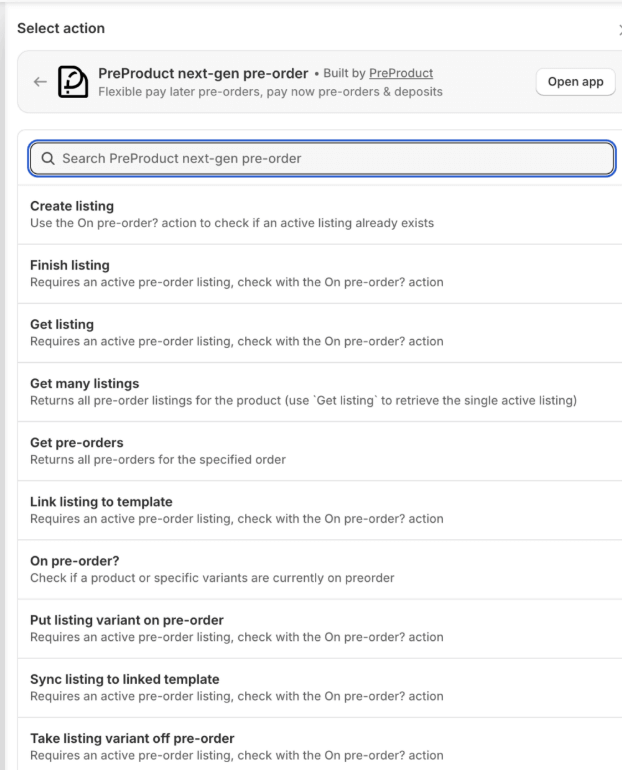
Shopify Flow enables powerful pre-order automations through triggers and actions. If you use PreProduct, you get access to 15 custom Flow actions and 16 triggers specifically for pre-orders.
Example Flow: Auto-tag pre-order customers for segmentation
- Trigger: Order created
- Condition: Order contains pre-order item
- Action: Add tag “pre-order-customer”
- Action: Send to email platform (Klaviyo, Omnisend)
Example Flow: Payment reminder email
- Trigger: 2 days before charge date
- Action: Send email reminder
- Action: Update customer metafield
Learn more about Shopify Flow pre-order automation.
Klaviyo Integration
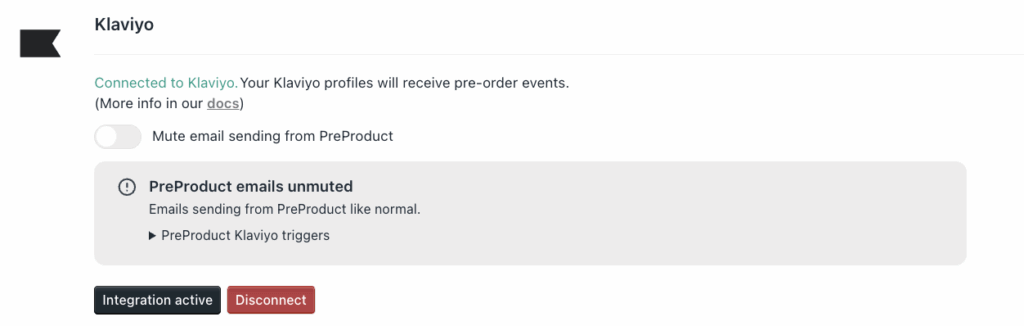
Klaviyo is the most popular email platform for Shopify stores. Setting up pre-order email sequence sequences in Klaviyo requires proper customer segmentation. PreProduct has a Klaviyo integration with it’s own specific events, but I’ll keep the below pre-order app agnostic.
Step 1: Create pre-order segment
- Filter: Order contains tag “pre-order” OR custom property “is_preorder = true”
Step 2: Set up flows
- Flow 1: Order confirmation (trigger: placed order, filter: pre-order segment)
- Flow 2: Payment reminder (trigger: custom event “payment_reminder_due”)
- Flow 3: Charge notification (trigger: order fulfilled, filter: pre-order segment)
Step 3: Use dynamic content for payment timing
- Insert order properties for charge date, ship date, payment model
- Personalize copy based on charge-upfront vs charge-later
PreProduct pre-order email sequence email Features
PreProduct handles pre-order email automation automatically:
Automated Emails:
- Order confirmation (customizable templates)
- Payment reminders (2 days before charge)
- Charge notifications
- Failed payment recovery (dunning sequence)
Custom Email Campaigns: Send manual updates about shipping delays, progress milestones, or product changes through PreProduct’s campaign tool.
Customer Portals: Let customers view order status, estimated ship dates, payment schedules, and update payment methods self-service.
Best Practices for pre-order email sequence email Automation
Test Before Launch: Send test pre-orders through your full sequence before opening to customers. Verify timing, personalization, and links.
Personalize Beyond First Name: Use order details (product name, charge date, ship date) to make emails feel custom, not templated.
Mobile-Optimize Everything: Most order emails are opened on mobile devices. Test on multiple screen sizes.
Keep Subject Lines Under 50 Characters: Longer subject lines get truncated on mobile, reducing open rates.
Include Clear CTAs: Every email should have one primary action (update payment, track order, leave review).
Key Metrics to Track
You can’t improve what you don’t measure. Tracking the right metrics helps you identify weak points in your pre-order email sequence and optimize for better results.
Pre-order email sequence email Performance Metrics
Open Rate: Transactional pre-order emails typically achieve 35-45% open rates, higher than marketing emails. Order confirmations often hit 60-70% because customers actively look for them.
Target: 35-45% for transactional pre-order emails
Red Flag: Below 25% suggests deliverability issues or poor subject lines
Click-Through Rate: Measures how many recipients clicked links in your email (tracking, payment update, customer portal).
Target: 2-5% average for informational emails
Red Flag: Below 1% suggests unclear CTAs or low engagement
Conversion Rate: For pre-order announcement emails, conversion rate measures how many recipients placed pre-orders.
Target: 5-15% for announcement emails (varies widely by list engagement)
Industry Benchmark: Email marketing delivers an average 2-5% conversion rate, but pre-order campaigns to engaged lists can exceed 10%
Pre-order email sequence Specific Metrics
Payment Success Rate: Percentage of charge-later pre-orders where payment succeeds on first attempt.
Target: 95%+ success rate
Red Flag: Below 90% suggests inadequate payment reminders or expired card issues
Track by payment model. Charge-later typically has lower success rates than charge-upfront (no payment required at checkout means more time for cards to expire).
Dunning Recovery Rate: How many failed payments you successfully recover through your dunning sequence.
Target: 30-50% recovery
Industry Benchmark: Well-executed dunning sequences recover 30-50% of failed payments
This metric directly impacts revenue. If you process $100,000 in charge-later pre-orders with a 10% failure rate and 40% recovery rate, you save $4,000 that would otherwise be lost.
Support Ticket Reduction: Compare support tickets per pre-order before and after implementing your email sequence.
Target: 40% reduction
Expected Impact: Good email sequences reduce “where’s my order?” and payment confusion tickets by approximately 40%
Calculate: (Tickets before sequence – Tickets after sequence) / Tickets before sequence
Common Pre-Order Email Mistakes to Avoid
Even experienced merchants make predictable mistakes with pre-order email sequence emails. Here are the most common pitfalls and how to avoid them.
Going Silent After Confirmation
The Mistake: Send order confirmation, then nothing until shipping notification arrives weeks or months later.
Why It Fails: Long silence creates anxiety. Customers wonder if their order is still happening, if the company is legitimate, or if they’ll ever receive their product.
The Fix: For lead times exceeding 30 days, send at least one progress update. For lead times beyond 60 days, send updates every 30-45 days. Even a simple “still on track” email maintains trust.

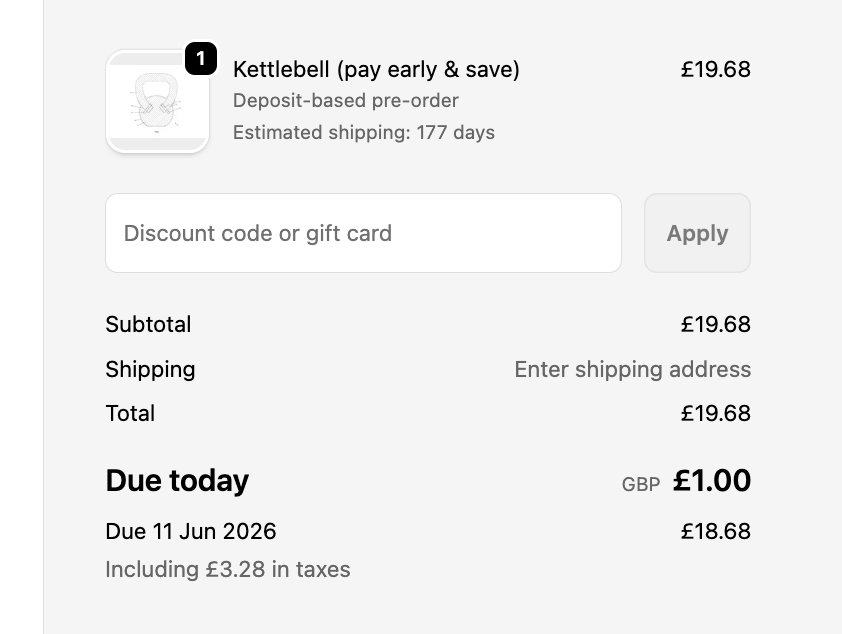
Vague Payment Timing
The Mistake: Order confirmation says “You’ll be charged when it ships” without specific date or timeframe.
Why It Fails: Vague timing causes failed charges (expired cards), surprise charges (customers forget), and support tickets asking for specifics.
The Fix: Provide approximate dates. Example: “Your card will be charged on approximately [DATE], one week before estimated ship date of [DATE].” Using “approximately” with specific dates sets expectations without over-promising.
No Failed Payment Recovery
The Mistake: Payment fails, order gets automatically cancelled, customer experience discovers weeks later they never received their product.
Why It Fails: You lose revenue, damage customer relationships, and waste the marketing cost of acquiring that pre-order. With charge-later representing 43.8% of pre-orders, failed charges are inevitable.
The Fix: Implement a 3-email dunning sequence with clear deadlines. Email 1 (immediate), Email 2 (Day 3), Email 3 (Day 7 final warning). Recover 30-50% of failed payments that would otherwise be lost.

One-Size-Fits-All Messaging
The Mistake: Send identical email marketing sequence to charge-upfront and charge-later pre-orders.
Why It Fails: Charge-upfront customers don’t need payment reminders. Charge-later customers need multiple payment touchpoints. One template doesn’t fit both.
The Fix: Segment by payment model. Create separate templates for charge-upfront (simpler sequence) and charge-later (extended sequence with payment reminders).
Missing Customer Portal Links
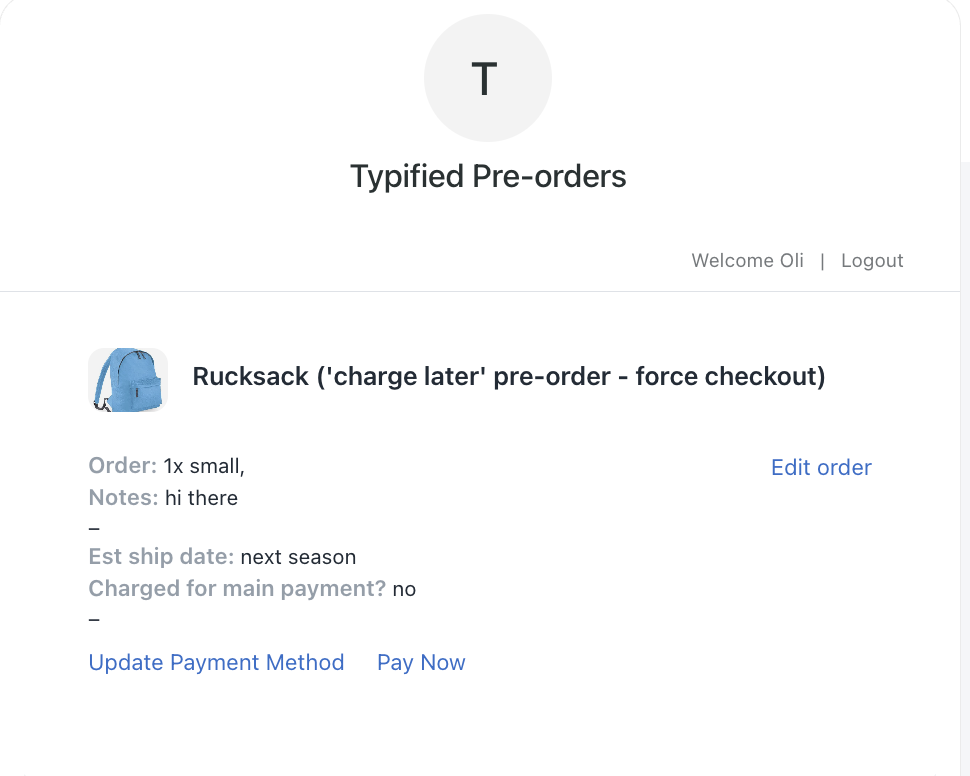
The Mistake: Force customers to email support to update payment methods, check order status, or view estimated ship dates.
Why It Fails: Every support email costs time and money. Self-service options scale without increasing support load.
The Fix: Include customer portal links in every payment-related email. Let customers update payment info, view order status, and check shipping estimates without contacting support. PreProduct’s customer portals handle this automatically.
Wrapping Up
Pre-order email sequences do more than keep customers informed. They build trust, reduce refunds, prevent failed charges, and turn one-time buyers into repeat customers who eagerly await your next launch.
Your pre-order email sequence email strategy should match your payment model. Charge-upfront pre-orders need straightforward communication focused on shipping timelines. Charge-later pre-orders (43.8% of all pre-orders) require payment reminders and charge notifications to prevent failures. Deposit pre-orders need clear touchpoints at both payment stages.
Start with the essential sequence: order confirmation, payment reminder (if charge-later), charge notification, shipping update, and delivery confirmation. Layer in progress updates for long lead times and dunning emails to recover failed payments.
Key takeaways:
- Charge-later pre-orders need payment reminder emails 2 days before charging
- Failed payment recovery sequences salvage 30-50% of at-risk orders
- Transparency reduces support tickets by approximately 40%
- Multi-email sequences (5-7 touchpoints) outperform single confirmation emails
- Segmentation by payment model improves relevance and conversion
The most important email in your sequence is the payment reminder. Sending it 2 days before charging charge-later pre-orders gives customers time to update expired cards, preventing 60-70% of potential payment failures.
Need help automating your pre-order email sequences? PreProduct handles payment timing, fulfillment holds, and automated customer communication for Shopify, BigCommerce, and WooCommerce stores. Map out your touchpoints, identify gaps in your current sequence, and set up automation for payment reminders and failed charge recovery.
Get your pre-order email sequence communication right, and your customers will thank you with loyalty, not refund requests.
Pre-sell With PreProduct
7 day free trial with all plansMigrate pre-orders
