🟣 Purple Dot winding down your plan? See our Migration Guide →

Back in Stock Notifications on Shopify: Complete Setup Guide

Stockouts cost retailers serious money. According to industry research, global stockouts are responsible for roughly $1 trillion in missed sales each year. For Shopify merchants, a sold-out product page can mean losing customers to competitors, or worse, losing them forever.
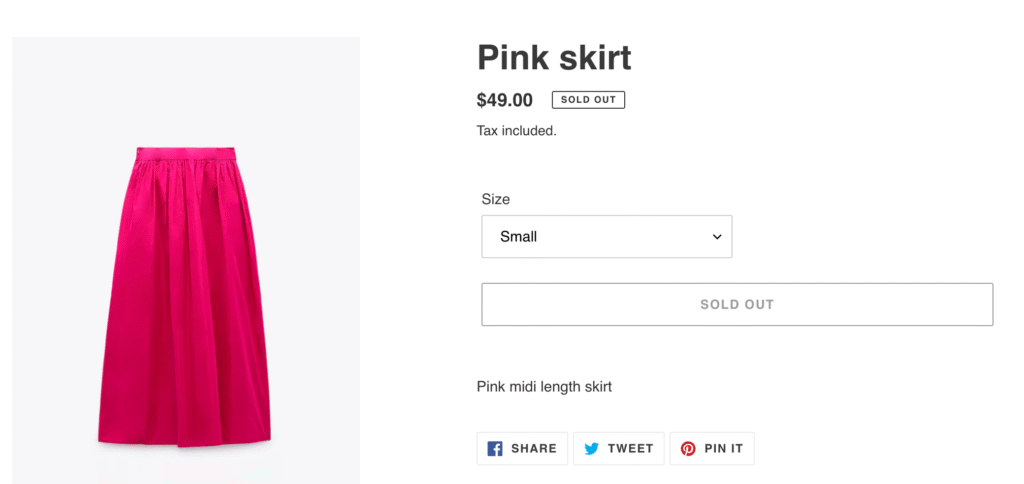
Back in stock notifications on Shopify offer a way to recover some of those lost sales. Instead of showing a “Sold Out” label and hoping customers return later, you can collect their email address and automatically alert them when inventory is available again.

In this guide, you’ll learn exactly how to set up back in stock notifications on Shopify, from third-party apps to email platform integrations. But we’ll also cover something most guides skip: when pre-orders are actually the smarter choice for capturing revenue upfront, rather than just collecting emails and hoping for the best.

What Are Back in Stock Notifications?

Back in stock notifications are automated alerts that let customers know when a previously sold-out product becomes available again. The workflow is straightforward:

  1. A customer visits a product page that’s out of stock
  2. Instead of a “Buy Now” button, they see a “Notify Me When Available” button
  3. They enter their email address (and sometimes phone number)
  4. When you restock the product, an automated email or SMS goes out
  5. The customer clicks through and hopefully completes a purchase

The customer experience is simple, but the backend requires some setup. Shopify doesn’t include native back in stock alert functionality, so you’ll need either a dedicated app, an email marketing platform with this feature, or custom code.

Why doesn’t Shopify build this in? It’s a feature that requires ongoing email sending, subscriber management, and inventory syncing. Shopify keeps its core platform lean, leaving this functionality to apps and integrations that specialise in it.

Why Back in Stock Notifications Matter for Your Store

Back in stock emails have some of the strongest performance metrics in ecommerce marketing. According to Omnisend’s 2025 data, these emails achieve:

  • 58.03% open rate (compared to ~20% for standard promotional emails)
  • 21.19% click-through rate (well above typical ecommerce benchmarks)
  • 6.46% conversion rate (the highest of any email automation type)

These numbers make sense when you think about the psychology. Someone who signed up for a back in stock notification has already expressed clear purchase intent. They wanted your product, they just couldn’t buy it at that moment. When the notification arrives, it’s not a cold promotional email; it’s the answer they were waiting for.

Beyond direct conversions, back in stock notifications help you:

Capture demand signals. Every signup tells you someone wanted that product. Aggregate this data across your catalogue and you have real-time demand intelligence for inventory planning.
Reduce customer frustration. Instead of bouncing away from a “Sold Out” page, customers feel like they have a path forward. This keeps them engaged with your brand.

Build your email list. Even if a customer doesn’t convert when the product returns, you’ve added a qualified lead to your marketing list. They’ve demonstrated product interest, making them valuable for future campaigns.

Create urgency when you restock. Back in stock emails naturally drive urgency. The product was gone, now it’s back, and it might sell out again. This psychology converts browsers into buyers.

How to Set Up Back in Stock Notifications on Shopify

There are three main approaches to implementing back in stock alerts on your Shopify store. Each has trade-offs around cost, complexity, and features.

Option 1: Third-Party Shopify Apps

The most common approach is installing a dedicated back in stock notification app from the Shopify App Store. These apps handle everything: the “Notify Me” button, subscriber management, automated sending, and analytics.

How app setup typically works:

  1. Install the app from the Shopify App Store
  2. The app automatically adds a “Notify Me” button to sold-out product pages (or you configure where it appears)
  3. Customise the button styling to match your theme
  4. Configure your email templates and sending rules
  5. Connect SMS if you want multi-channel notifications

Most apps can be set up in 15-30 minutes. The “Notify Me” button replaces your standard buy button when a product variant hits zero inventory.

Popular app categories include:

  • Standalone back in stock apps (focused solely on restock alerts)
  • Combined pre-order and back in stock apps (offering both notification capture and pre-order purchasing)
  • Email marketing platforms with back in stock features built in

Pricing varies significantly. Some apps charge monthly fees ($10-50/month is common), while others charge based on notification volume or take a percentage of attributed sales. Consider your expected volume when evaluating pricing models.

Key features to look for:

  • Multi-channel support (email + SMS)
  • Theme compatibility (especially with Shopify 2.0 themes)
  • Integration with your existing email platform
  • Customisable signup forms and email templates
  • Analytics and conversion tracking
  • Asynchronous loading (so the button doesn’t slow your page)

Option 2: Email Platform Integrations

If you already use an email marketing platform like Klaviyo, Omnisend, or Dotdigital, you may be able to handle back in stock notifications without a separate app. These platforms often include built-in back in stock forms and automated flows.

Klaviyo’s back in stock feature, for example, works like this:

  1. Add Klaviyo’s back in stock script to your theme
  2. Customise the “Notify Me” button appearance in Klaviyo’s form editor
  3. Set up a back in stock flow that triggers when inventory is added
  4. Klaviyo automatically matches subscribers to restocked products and sends notifications

The advantage of this approach is consolidation. Your back in stock subscribers live alongside your other email segments, making it easier to include them in broader marketing campaigns.

The downside? Email platform back in stock features can be less robust than dedicated apps. You may have fewer customisation options, less sophisticated variant-level tracking, or limited SMS capabilities.

Option 3: Custom Code Solutions

Technically savvy merchants or development teams can build custom back in stock functionality using Shopify’s APIs, webhooks, and theme code. This approach offers maximum control but requires significant development resources.

A custom solution typically involves:

  • Theme modifications to display signup forms on sold-out products
  • A backend system to store subscriber data
  • Integration with inventory webhooks to detect restocks
  • Connection to an email service (SendGrid, Mailgun, etc.) for sending notifications
  • Custom analytics and reporting

This approach makes sense for large stores with unique requirements or merchants who want complete ownership of their customer data. For most Shopify stores, however, the time and cost of custom development outweighs the benefits compared to existing app solutions.

Best Practices for Back in Stock Notifications

Setting up the technical infrastructure is just the first step. How you execute your back in stock strategy determines whether you actually recover those lost sales.

Email Best Practices

Write compelling subject lines. Your subject line needs to cut through inbox noise. Be direct: “Good news: [Product Name] is back” or “[Product Name] is back in stock, grab it now” work well. Include the product name so subscribers immediately know why they’re receiving the email.

Personalise the content. Address customers by name. Reference the specific product they signed up for. Include the product image prominently. The email should feel like a personal update, not a mass broadcast.

Create urgency (honestly). If the product previously sold out, it might sell out again. You can mention limited quantities or high demand, but only if it’s true. Fake scarcity erodes trust.

Make the CTA obvious. One clear button: “Shop Now” or “Buy [Product Name]”. Don’t clutter the email with other products or offers that distract from the primary action.

Send immediately. Back in stock notifications should go out the moment inventory is added. Delays reduce conversion rates; someone else might buy the product first, or the customer’s interest may have cooled.

Multi-Channel Approach

Email isn’t your only option. SMS and push notifications can significantly boost your reach:

SMS alerts have open rates above 98% and are particularly effective for fast-moving products where speed matters. If someone signed up for a limited-edition drop, an SMS ensures they see the restock notification immediately.

Push notifications (web or app) offer another touchpoint for customers who have opted in. They’re especially useful for mobile shoppers.

WhatsApp is gaining traction for customer communications in many markets. Some back in stock apps now support WhatsApp notifications alongside email and SMS.

The key is letting customers choose their preferred channel during signup. Offering multiple options captures more subscribers and ensures notifications reach them on the channel they’re most likely to engage with.

Timing and Automation

Automate everything. Manual restock notifications don’t scale. Your back in stock system should automatically detect inventory changes and trigger notifications without human intervention.

Consider follow-up sequences. If someone doesn’t convert from the initial notification, a follow-up 24-48 hours later can capture additional sales. Just don’t overdo it; two touchpoints are usually enough.

Use low-stock alerts too. Some apps let you notify subscribers when inventory is running low, even before it sells out. This creates urgency and can drive purchases before you hit zero stock.

When Pre-orders Beat Back in Stock Notifications

Here’s what most back in stock guides won’t tell you: sometimes capturing an email address is the wrong strategy. If you know when inventory is coming, pre-orders let you capture revenue now instead of just collecting signups and hoping customers return later.

The Revenue Timing Problem

Consider the standard back in stock workflow:

  1. Product sells out
  2. Customer signs up for notification
  3. You wait for inventory (weeks or months)
  4. You send the notification
  5. Customer hopefully opens the email
  6. Customer hopefully clicks through
  7. Customer hopefully completes a purchase

That’s a lot of “hopefully.” Even with a 6.46% conversion rate (the best-case scenario), you’re losing over 93% of the interested customers who signed up.

Now consider pre-orders:

  1. Product sells out (or you launch a new product)
  2. Customer places a pre-order
  3. You charge upfront, later, or take a deposit
  4. Inventory arrives
  5. You fulfill the order

The sale is captured when interest is highest, not weeks later when the customer may have found an alternative or simply forgotten about your product.

Conversion Comparison

Back in stock notifications measure interest. Pre-orders measure commitment.

An email signup says “I was interested enough to give you my email address.” A pre-order says “I’m committed enough to give you my payment information.”

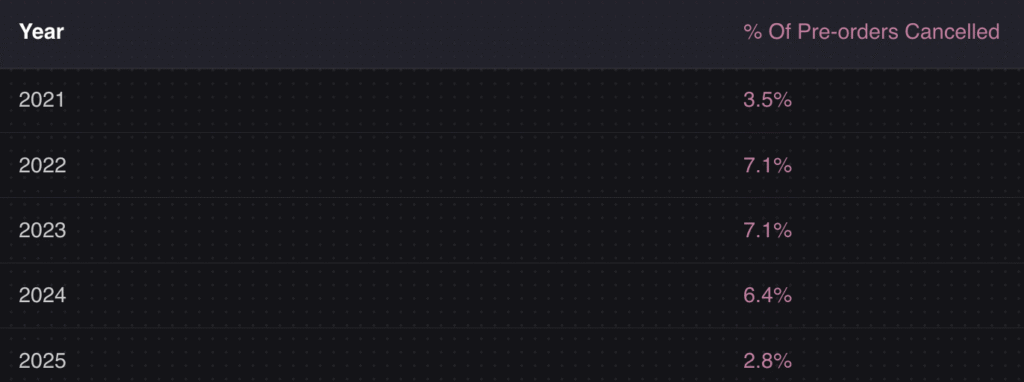
Data from over 1 million pre-orders shows that pre-order cancellation rates average just 5.4%. That means 94.6% of customers who place a pre-order follow through to purchase. Compare that to the 6.46% who convert from a back in stock email.

The math is clear: if you can take pre-orders instead of collecting email signups, you capture dramatically more revenue.

When to Use Pre-orders Instead

Pre-orders make more sense than back in stock notifications when:

You have a confirmed restock date. If you know inventory is arriving in 4 weeks, why collect emails when you could collect orders? Customers get the certainty of a secured product; you get the certainty of committed revenue.

You’re launching a new product. Pre-orders let you build hype, validate demand, and fund production before you’ve invested in inventory. This is especially valuable for brands launching new SKUs.

You have high-demand items with waitlists. If your back in stock signup list is growing into the hundreds or thousands, that’s demand you could be capturing as revenue. Long waitlists signal you should be taking pre-orders.

You need cash flow now. Back in stock notifications don’t generate revenue until inventory arrives and customers convert. Charge-upfront pre-orders bring revenue in immediately. Even charge-later models vault the customer’s payment method, creating a committed sale.

Your product has a long lead time. For made-to-order products, custom items, or products with extended manufacturing timelines, pre-orders are the natural fit. Customers understand they’re ordering in advance.

Payment Flexibility with Pre-orders

One reason merchants default to back in stock notifications is uncertainty about payment timing. Pre-orders solve this with flexible payment models:

Charge upfront: Collect full payment at checkout. Revenue is immediate, and there’s zero risk of failed future charges. Best for products with short lead times or when you need immediate cash flow.

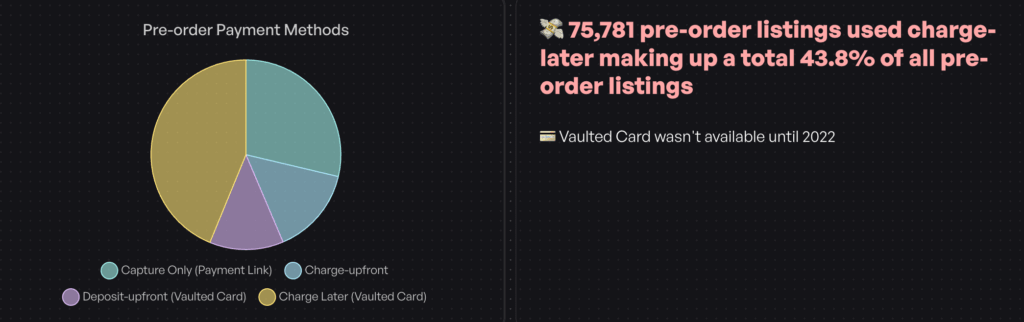
Charge later: Customers go through checkout, but you vault their card and charge when inventory arrives. This works well when you’re not sure exactly when stock will land. 43.8% of pre-order listings use this approach.

Deposits: Collect a partial payment upfront (10-50% is common), then charge the balance later. Deposits reduce cancellation risk while being less intimidating than full upfront payment for higher-priced items.

These options give you more control than back in stock notifications, where the only “commitment” you capture is an email address.

Combining Back in Stock with Pre-orders

You don’t have to choose one strategy exclusively. Many Shopify merchants use both, depending on the situation.

Use back in stock notifications when:

  • You genuinely don’t know if or when a product will return
  • The product is being discontinued or is a limited run
  • Restock timelines are unpredictable

Use pre-orders when:

  • You have confirmed inventory incoming
  • You’re launching a new product
  • Lead times are known and communicable to customers
  • You want to capture revenue rather than just interest

The hybrid approach: Some merchants start with back in stock signups when inventory status is uncertain, then transition to pre-orders once they have restock confirmation. You can even re-engage your back in stock signup list with a “pre-orders now open” email, converting passive interest into active orders.

For a deeper comparison of these approaches, see our guide on pre-orders vs backorders vs waitlists.

Measuring Your Back in Stock Performance

Whatever approach you choose, tracking performance is essential. Key metrics to monitor:

Signup rate: What percentage of visitors to sold-out product pages sign up for notifications? Low signup rates may indicate a visibility problem (button placement, design) or a product problem (customers don’t want it enough to wait).

Open rate: Industry benchmark for back in stock emails is around 58%. Significantly lower rates suggest deliverability issues or weak subject lines.

Click-through rate: Benchmark is around 21%. Low CTR with high opens suggests the email content or CTA isn’t compelling.

Conversion rate: The 6.46% benchmark is for customers who receive the notification. Track your actual conversion to see how you compare.

Revenue per notification: How much revenue does each back in stock notification generate on average? This helps you understand the true value of the feature.

If your back in stock conversions are underperforming benchmarks, it may be time to test pre-orders instead. Converting even a fraction of your signup list into pre-order customers will likely generate more revenue than waiting for restock notifications.

Conclusion

Back in stock notifications are a valuable tool for recovering lost sales on Shopify. With conversion rates around 6.46%, significantly higher than standard email campaigns, they’re worth implementing for any store that regularly experiences stockouts.

But here’s the key takeaway: back in stock notifications capture emails, while pre-orders capture revenue. If you know when inventory is coming, pre-orders let you turn interested browsers into committed buyers today, not weeks from now when they may have moved on.

For managing out of stock products on Shopify, consider your situation carefully:

  • Uncertain restock? Use back in stock notifications
  • Confirmed restock date? Consider pre-orders to capture revenue now
  • High demand product? Pre-orders with deposits let you gauge commitment without full upfront payment

The best strategy often combines both approaches, using back in stock for unpredictable inventory and pre-orders when you have clarity on when products will ship.

Ready to capture more revenue from your out-of-stock products? Explore how pre-orders work on Shopify to see if they’re right for your store.


Frequently Asked Questions

Does Shopify have built-in back in stock notifications?

No, Shopify doesn’t offer native back in stock alerts. You’ll need a third-party app from the Shopify App Store or an email platform integration like Klaviyo to add this functionality to your store.

What is the conversion rate for back in stock emails?

Back in stock emails have an average conversion rate of 6.46%, making them the highest-converting email automation type. Open rates average around 58%, with click-through rates of 21%.

What’s the difference between back in stock notifications and pre-orders?

Back in stock notifications collect customer emails and alert them when products restock. Pre-orders capture payment or payment intent upfront, securing the sale before inventory arrives. Pre-orders convert interested customers immediately; back in stock notifications require customers to return and complete a purchase later.

Can I use both back in stock and pre-orders on Shopify?

Yes. Many merchants use back in stock notifications for uncertain restock timelines and pre-orders when they have confirmed inventory coming. The two strategies complement each other and can be used together based on your inventory situation.

How quickly should back in stock notifications be sent?

Immediately. Back in stock notifications should trigger automatically the moment inventory is added. Delays reduce conversion rates because customers may find alternatives or lose interest. Most back in stock apps send notifications within minutes of a restock.

Pre-sell With PreProduct

7 day free trial with all plans

Backorder vs Out of Stock: What’s the Difference (and When to Use Each)

Understanding backorder vs out of stock is essential for any ecommerce merchant facing inventory gaps. Stockouts cost retailers $1.2 trillion globally every year in direct lost sales alone. When customers land on a product page and can’t buy what they want, the consequences ripple through your revenue, customer loyalty and brand perception.

But there’s more than one way to handle out of stock ecommerce situations. You can mark products as “out of stock” and block purchases entirely. You can accept backorders and let customers buy now for later delivery. Or you can take a third approach that some merchants overlook: pre-orders.

Understanding the difference between backorder vs out of stock (and knowing when each makes sense) can mean the difference between capturing revenue and losing customers to competitors. By the end of this guide, you’ll know exactly which approach fits your situation.

What Does Backorder Mean? Understanding Backorder Meaning

So what does backorder mean exactly? A backorder happens when a product is temporarily unavailable but customers can still purchase it. The backorder meaning is simple: the item isn’t in your warehouse right now, but you’ve confirmed that more inventory is coming. Customers place their order, you take payment (or vault their card), and you ship once stock arrives.

Think of backorders as a promise: “We don’t have it today, but we will soon, and we’re holding your spot.”

The key characteristics of a backorder:

  • Customers can still purchase the product despite zero inventory
  • Restocking is confirmed with a known or estimated timeline
  • Payment is typically collected upfront or at time of shipment
  • Fulfillment is delayed until inventory is replenished

Backorders usually work best for short restocking windows. On average, it takes 14-21 days to fulfill a backorder, though this varies by product and supply chain. The shorter the window, the more willing customers are to wait.

From an operational perspective, backorders let you continue taking orders rather than turning customers away. But they also create fulfillment complexity. You need systems to track incoming inventory, manage customer expectations, and process payments at the right time.

What Does Out of Stock Mean?

When a product is marked “out of stock,” customers cannot purchase it at all. The buy button is disabled, replaced with a “Sold Out” badge, or the product may be hidden from your store entirely.

An out-of-stock status signals uncertainty. Unlike backorders, there’s no guarantee the product will return, and no commitment to a timeline. Customers have to wait and hope, or look elsewhere.

The key characteristics of out of stock:

  • Customers cannot purchase the product
  • Restocking timeline is unknown or uncertain
  • No payment is collected
  • The product may or may not return

Out of stock is the default setting for most ecommerce platforms when inventory hits zero. It’s the safest approach from a fulfillment standpoint because you’re not making promises you can’t keep. But it’s also the most expensive from a revenue standpoint.

When customers encounter out-of-stock products, 69% abandon their purchase entirely and shop elsewhere. And 43% will go directly to a competitor. Every “Sold Out” badge is a potential lost customer.

Key Differences Between Backorder and Out of Stock

The fundamental difference comes down to purchase availability and customer commitment. Here’s how they compare:

FactorBackorderOut of Stock
Can customers purchase?Yes, with delayed fulfillmentNo, purchase blocked
Restocking timelineConfirmed or estimatedUnknown or indefinite
Payment timingUpfront or deferredNone
Customer expectation“My order is coming soon”“Maybe it will come back”
Revenue impactPreserved (delayed)Lost
Operational complexityHigherLower

From a customer psychology perspective, the difference is significant. A backorder customer has made a commitment. They’ve decided to buy, entered their payment details and are waiting for delivery. An out-of-stock customer hasn’t committed to anything. They’re still in consideration mode and can easily be distracted by a competitor.

This psychological difference matters for your business. Customers who have already committed are less likely to cancel or shop around. But backorder customers also have higher expectations. They expect clear communication, accurate timelines and a smooth delivery experience.

When to Use Backorders

Backorders work best in specific scenarios where you have confidence in your restocking timeline and customers are willing to wait.

Fast-moving bestsellers

When a popular product sells out faster than expected, backorders let you continue capturing demand. If you have a reliable supplier and predictable restocking timeline, accepting backorders keeps sales flowing while you wait for the next shipment.

Core catalog items

For products that are a permanent part of your catalog, backorders make sense during temporary stockouts. These are items you’ll definitely restock, and customers know they’re getting a product that’s proven and available.

Short restocking windows

Backorders work best when the wait time is measured in days or weeks, not months. The sweet spot is typically 2-6 weeks. Beyond that, customer patience wears thin and cancellation risk increases.

Reliable supplier relationships

Only offer backorders when you’re confident in your restocking timeline. If your supply chain is unpredictable, making promises you can’t keep will damage customer trust more than simply saying “out of stock.”

When NOT to use backorders:

  • Seasonal items unlikely to restock this season
  • Products with uncertain supply chains
  • Wait times beyond 8-12 weeks
  • Items being discontinued or phased out

The risk with backorders is overpromising. If you tell customers their order will ship in two weeks and it takes six, you’ve created a support headache and potentially lost their trust for future purchases.

When to Mark Products Out of Stock

Sometimes the safest approach is to be upfront: this product isn’t available, and you can’t make promises about when it will return.

Discontinued products

If you’re not bringing a product back, don’t pretend otherwise. Mark it out of stock (or redirect to an alternative) and move on. Accepting backorders for discontinued items is a recipe for refunds and complaints.

Uncertain restocking timelines

When you genuinely don’t know when inventory will arrive, it’s better to be honest. Telling customers “out of stock” is more trustworthy than making up a timeline you can’t guarantee.

Supply chain disruptions

Major supply chain issues can make restocking timelines impossible to predict. During periods of uncertainty, marking products out of stock protects both customer expectations and your operations team.

Quality or compliance issues

If a product is unavailable due to quality concerns or regulatory issues, you need to resolve those before selling again. Out of stock is the appropriate status while you work through the problem.

The downside of out of stock is lost revenue. But the upside is operational simplicity and honest customer communication. Sometimes it’s better to lose a sale today than damage trust with a broken promise.

For Shopify merchants dealing with stockouts, we’ve written a comprehensive guide on what to do when products are out of stock on Shopify, covering strategies from hiding products to setting up notifications. Understanding Shopify backorder functionality is crucial for maintaining sales during inventory gaps.

The Third Option: Preorder vs Backorder

Here’s where most backorder vs out of stock discussions fall short. They treat these as the only two options when there’s a third approach that often works better for ecommerce: pre-orders.

Understanding preorder vs backorder differences is crucial for choosing the right strategy. Pre-orders are different from backorders in a few important ways:

  • Proactive vs reactive: Pre-orders are typically used for new products or planned restocks, while backorders are reactive responses to unexpected stockouts
  • Longer acceptable timeframes: Customers willingly wait months for pre-orders but lose patience after a few weeks with backorders
  • Different psychology: Pre-order customers are excited early adopters; backorder customers are frustrated buyers whose item wasn’t available

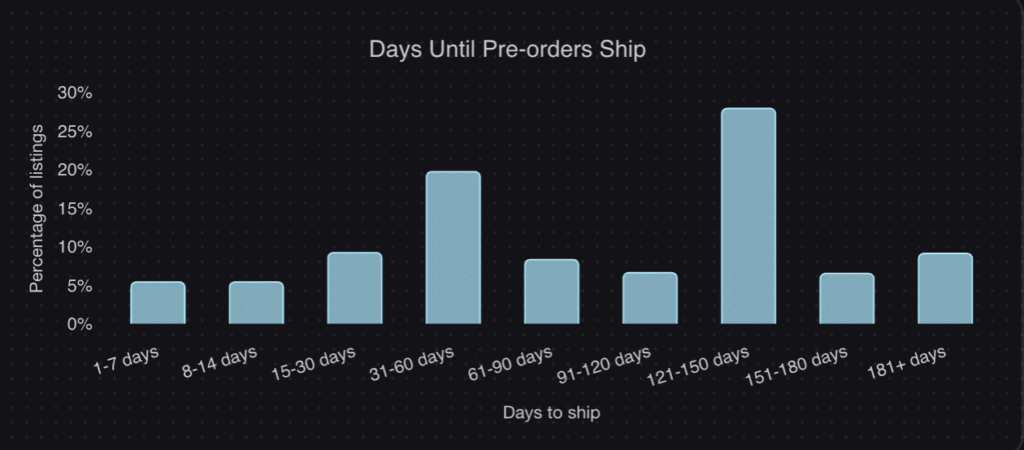
The data backs this up. According to our analysis of over one million pre-orders generating $85M+ in revenue, the most common pre-order shipping timeframe is 121-150 days. That’s 4-5 months. Customers don’t just tolerate these wait times, they expect them.

The average pre-order cancellation rate? Just 5.4%. Despite wait times that would be unacceptable for a backorder, pre-order customers stay committed because they’ve made a conscious choice to wait for something they want.

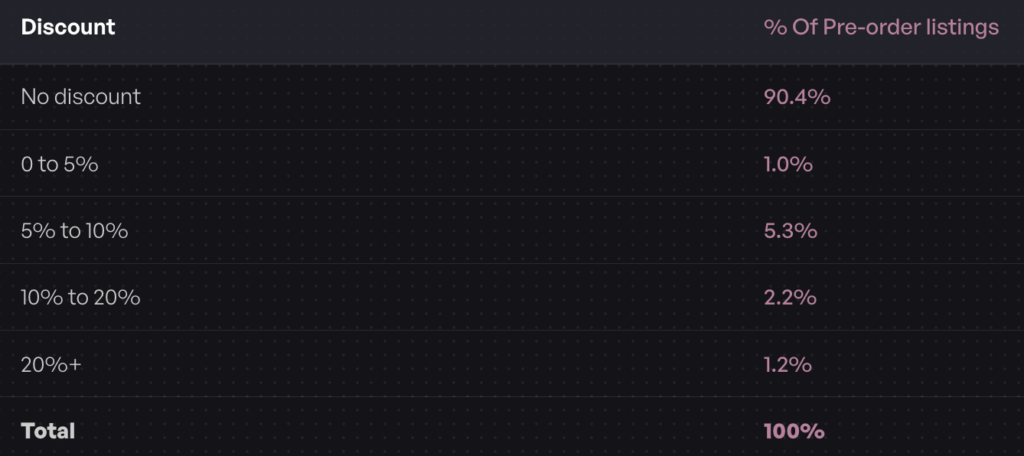
Another insight: 90.4% of pre-orders carry no discount. Customers aren’t waiting because they got a deal. They’re waiting because they want early access to the product. This is fundamentally different psychology than a backorder, where customers often feel they’re being inconvenienced.

When pre-orders work better than backorders:

  • New product launches (build anticipation before inventory arrives)
  • Restocks with longer lead times (4+ weeks)
  • Made-to-order or custom products
  • Limited edition drops (create scarcity and urgency)
  • Seasonal products returning next season

Pre-orders also give you payment flexibility that backorders typically don’t. With charge-later pre-orders, you can vault a customer’s card at checkout and charge when you’re ready to ship. This reduces refund risk for longer timelines while still capturing customer commitment.

For a deeper comparison, see our guide on pre-orders vs backorders vs waitlists.

How to Choose Between Backorder vs Out of Stock

With three options available, how do you decide which approach fits your situation? Here’s a decision framework based on the most common backorder vs out of stock scenarios:

ScenarioBest ApproachWhy
Known restock date (2-4 weeks)BackorderShort wait, high confidence, keep sales flowing
Known restock date (4-12 weeks)Pre-order with charge-laterLonger wait needs proper expectation-setting
Unknown restock timelineBack-in-stock notificationDon’t make promises you can’t keep
New product launchPre-orderBuild anticipation, capture early demand
Seasonal product (returning later)Pre-order or notificationDepends on how far out the restock is
Product being discontinuedOut of stock + redirectDon’t accept orders you can’t fulfill
Made-to-order itemsPre-order with depositCollect commitment before production
High-ticket itemsPre-order with depositReduce risk for both parties

The key questions to ask:

  1. How confident are you in the restock timeline? High confidence = backorder or pre-order. Low confidence = out of stock or notification.
  2. How long will customers wait? Under 4 weeks = backorder probably works. Over 4 weeks = consider pre-orders with proper messaging.
  3. Is this a new launch or a restock? New launches benefit from pre-order anticipation. Restocks can go either way.
  4. What’s the price point? Higher-ticket items may warrant deposit-based pre-orders to secure customer commitment.
  5. How will this affect your operations? Backorders and pre-orders both require systems to track orders, manage fulfillment holds and communicate with customers.

Best Practices for Shopify Backorder and Out of Stock Management

Regardless of which approach you choose, clear communication is essential. Customers can handle waiting. What they can’t handle is uncertainty. Here are best practices for managing backorder vs out of stock situations in your store.

Set expectations on the product page

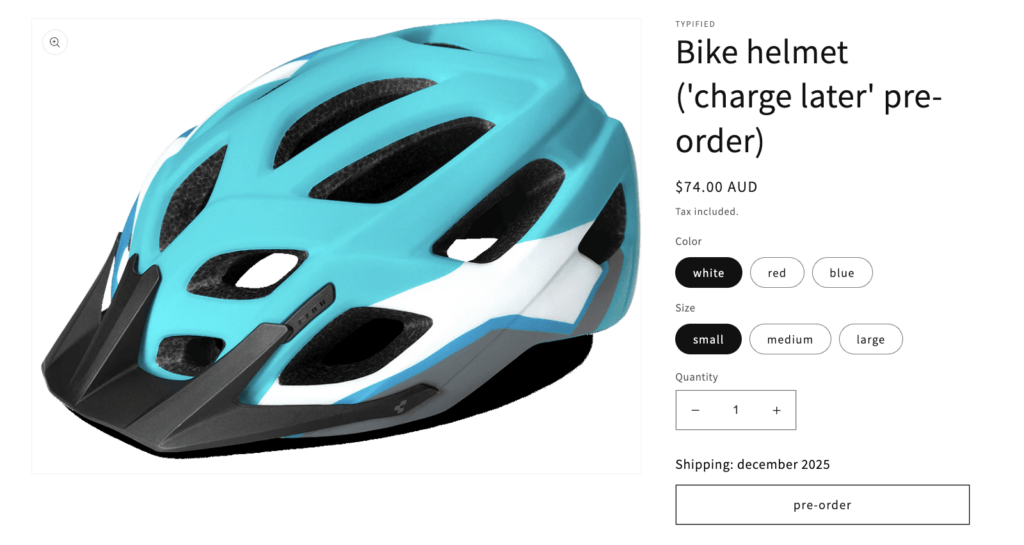
Don’t bury the shipping timeline in fine print. If an item is on backorder or pre-order, make the expected delivery date prominent. “Ships in 2-3 weeks” or “Expected ship date: April 15” gives customers the information they need to decide.

Use dedicated buttons and messaging

A generic “Add to Cart” button doesn’t tell customers they’re committing to a delayed order. Use clear labels like “Pre-order Now” or “Backorder” to signal that this isn’t a standard purchase.

Send automated updates

Keep customers informed throughout the wait. A simple “Your order is still on track to ship next week” email can prevent support tickets and build trust. If timelines change, communicate proactively.

Consider payment timing carefully

For short backorders, charging upfront is usually fine. For longer waits (especially 30+ days), consider charge-later options where you vault the customer’s card and charge closer to shipment. This reduces refund requests and expired card issues.

Our data shows that 43.8% of pre-order listings use charge-later, which suggests merchants are finding value in delaying payment for longer lead times.

Forecast demand to prevent stockouts

The best backorder strategy is avoiding backorders in the first place. Use inventory forecasting tools and pre-order inventory management to predict demand and set reorder points that give you buffer before running out.

Don’t overcommit

If you’re not sure how much inventory you’ll receive, consider capping backorders or pre-orders to avoid overselling. It’s better to turn away some orders than to cancel orders after customers have committed.

Putting It All Together: Backorder vs Out of Stock

The backorder vs out of stock decision isn’t just about definitions. It’s about choosing the right tool for your specific out of stock ecommerce situation.

Backorders keep sales flowing during short, predictable stockouts. They work best when you have confidence in your restocking timeline and customers are willing to wait a few weeks.

Out of stock is the honest approach when you can’t make promises. It protects customer trust and operational simplicity, even though it means lost sales in the short term.

Pre-orders offer a third path that many merchants overlook. When comparing preorder vs backorder options, pre-orders handle longer timelines, build anticipation for new products and give you payment flexibility that backorders don’t. For most ecommerce scenarios beyond simple restocks, Shopify pre-orders are worth considering.

The common thread across all three approaches? Communication. Customers can handle delays when they know what to expect. What they can’t handle is uncertainty, broken promises or radio silence.

If you’re running a Shopify store and want to explore pre-orders as an alternative to Shopify backorder management, our guide on how to do pre-orders on Shopify covers the full setup process. And for managing inventory across pre-orders and regular stock, see our guide on managing pre-order inventory in Shopify.

Whatever approach you choose, the goal is the same: capture demand, keep customers informed and deliver on your promises.

Pre-sell With PreProduct

7 day free trial with all plans

Pre-Orders vs Backorders vs Waitlists: Ultimate Comparison

Running out of stock doesn’t have to mean lost sales, but should you take pre-orders vs backorders vs build a waitlist? Each approach serves different business needs, timelines, and customer expectations. The right choice depends on factors like product availability, cash flow requirements, and how much commitment you need from customers.

Based on insights from over $85.3 million in pre-order sales, this guide breaks down the key differences between pre-orders, backorders, and waitlists. You’ll learn exactly when to use each strategy, how they impact your cash flow, and what customers expect from each approach.

What Are Pre-Orders, Backorders, and Waitlists?

Before diving into comparisons, let’s define each approach clearly.

Pre-Orders: Selling Before Stock Arrives

Pre-orders let customers purchase products before they’re manufactured or released. This is an advance sale where customers commit to buying something that doesn’t physically exist yet in your warehouse. For example, a fashion brand might open pre-orders for a new seasonal collection 90 days before production completes. If you’re running a Shopify store, our guide on how to do pre-orders on Shopify covers the technical setup in detail.

Pre-orders work particularly well for new product launches, limited edition releases, or made-to-order items where you want to validate demand before committing to inventory. According to our analysis of over one million pre-orders, 43.8% of merchants use charge-later payment models, meaning customers provide payment details but aren’t charged until the product ships.

Backorders: Selling Temporarily Out-of-Stock Items

Backorders are orders taken for products that were previously available but are temporarily out of stock. The key difference from pre-orders is timing: these products have already been released and sold before, and customers expect them to be restocked soon. Think of a popular electronics item that sells out faster than expected but will be replenished within 2-3 weeks.

Backorders are reactive rather than proactive. They help you capture demand during unexpected stockouts while you wait for replenishment. Most backorders require full payment upfront since the product is proven and the restock timeline is typically shorter and more certain.

Waitlists: Capturing Interest Without Commitment

Waitlists enable customers to sign up for notifications about when products become available or launch. Unlike pre-orders and backorders, waitlists don’t involve immediate purchases. Instead, customers provide their email address to be notified when the product is ready to buy.

Waitlists work well for demand testing, uncertain timelines, or building anticipation for upcoming launches. They’re particularly valuable for email list building, as waitlists almost always collect contact information. The trade-off is lower customer commitment: signing up for a notification requires far less commitment than completing a purchase.

Quick Comparison Table

ApproachProduct StatusPayment TimingCustomer CommitmentBest For
Pre-OrderNot yet manufactured/releasedFlexible (upfront, later, or deposit)HighNew launches, validating demand
BackorderTemporarily out of stockTypically upfrontMedium-HighFast-moving items with known restock
WaitlistUpcoming or uncertainNo payment (notification only)LowTesting demand, building email lists

The Key Differences: Timing, Psychology and Cash Flow

Understanding when and why to use each approach requires looking at three critical factors: timing, customer psychology, and financial impact.

Timing: When Each Approach Makes Sense

Pre-orders work best when you have a planned launch with a known or estimated arrival date. Most pre-orders in our dataset have shipping timeframes averaging 121-150 days, though this varies widely by industry. Fashion brands might run 60-90 day pre-order windows, while custom manufacturers might need 6+ months. The key is having enough certainty to set customer expectations, even if the exact date shifts slightly.

Backorders are reactive solutions to stockouts. Use them when you have a clear replenishment timeline, typically within 2-8 weeks. Backorders make sense for core catalog items you’ll definitely restock. They work less well for seasonal products or items with uncertain supply chains. If you can’t confidently say “back in stock by [date range],” a waitlist might be safer.

Waitlists are ideal when timelines are uncertain or you’re testing whether to produce something at all. They’re also powerful for drop culture brands that want to build anticipation before opening sales. Use waitlists when you need to gauge interest before committing to production or when supply chain uncertainty makes it risky to take payment.

Customer Psychology and Expectations

Each approach taps into different psychological motivators and creates distinct expectations.

Pre-order psychology centers on anticipation, exclusivity, and being “first.” Customers who pre-order often want early access to new releases or limited editions. They’re willing to wait because they’re excited about the product and don’t want to miss out. According to our data, 90.4% of pre-orders carry no discount, showing that access matters more than price for most pre-order customers.

The average pre-order cancellation rate sits at 5.4%, relatively low considering the long wait times involved. This suggests that when customers commit to a pre-order, they generally follow through. Clear communication about shipping dates and regular updates help maintain this commitment.

Backorder psychology requires patience rather than excitement. Customers making backorder purchases typically want a specific item they know and have decided to buy. They’re willing to wait because they’ve already decided this is the product they want. The key difference from pre-orders is that backorder customers expect a shorter wait and a more certain timeline since the product already exists in the market.

Waitlist psychology leverages FOMO (fear of missing out) and scarcity. Signing up for a waitlist makes customers feel like they’re part of an exclusive group who will get first access. The low commitment barrier (just an email) means more people will join, but fewer will convert compared to pre-orders. Waitlists work particularly well for building anticipation and collecting qualified leads for future marketing.

Financial Impact and Cash Flow

The three approaches have dramatically different effects on your cash flow and financial risk.

Pre-orders offer the most flexibility in payment timing. Based on our analysis of over one million pre-orders:

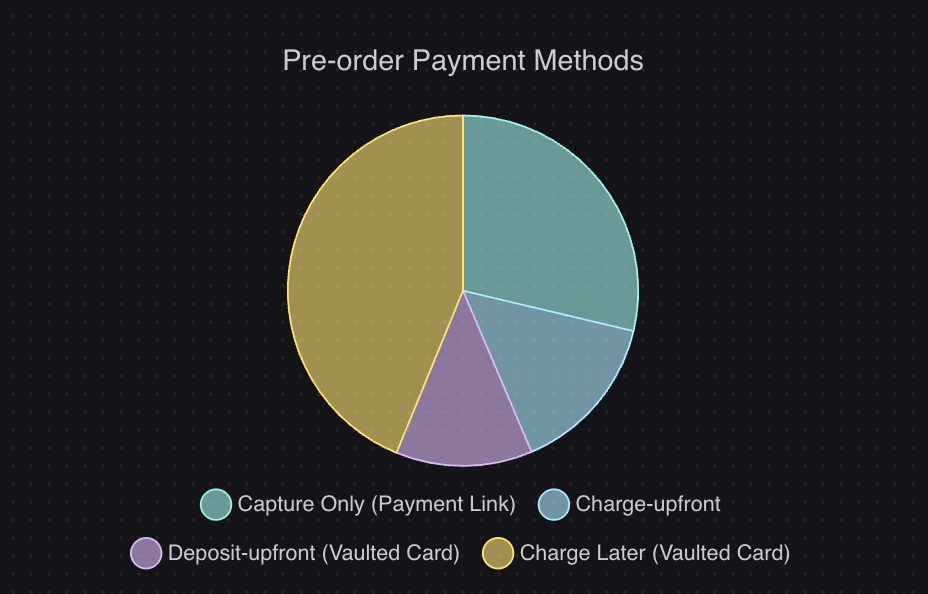
  • 43.8% use charge-later (customers aren’t charged until shipping)
  • 28.7% use capture-only (payment link sent when ready)
  • 14.9% charge upfront (immediate payment)
  • 12.6% use deposit-upfront (partial payment now, balance later)

This flexibility lets you match payment timing to your cash flow needs and customer comfort level. Charge-later pre-orders reduce refund risk since customers haven’t paid yet if timelines change. Upfront payments provide immediate revenue to fund production. Deposits offer a middle ground that shows customer commitment while lowering the barrier to purchase.

Backorders typically require full payment upfront. Since the product is proven and the restock timeline is shorter, customers expect to pay immediately. This provides faster cash flow than charge-later pre-orders but less flexibility. The shorter timeline reduces cancellation risk compared to long pre-order windows.

Waitlists generate no immediate revenue. They’re an investment in future sales and email list growth. The value comes from demand validation and the qualified leads you capture. You’ll need to convert waitlist signups to actual purchases later, which typically happens through email campaigns announcing availability.

When to Use Pre-Orders

Pre-orders work best in specific scenarios where you want to validate demand, take revenue earlier, or build anticipation before a product physically exists.

Best Use Cases for Pre-Orders

1. New Product Launches
Pre-orders let you validate demand before committing to large production runs. This is particularly valuable for brands testing new product lines or designs. By taking pre-orders, you get real purchase commitments (not just survey responses) that help you make informed inventory decisions.

2. Limited Edition Releases
When releasing limited or exclusive items, pre-orders build hype and ensure your most dedicated customers don’t miss out. Pre-orders also help you set the right production quantity for limited runs.

3. High-Value Items
For products over $250 (which represent 26.8% of pre-order listings in our data), deposits can lower the barrier to purchase while still securing customer commitment. A 20-30% deposit shows serious intent without requiring customers to part with the full amount months in advance.

4. Seasonal Collections
Fashion and seasonal brands can open pre-orders before production completes, allowing them to adjust quantities based on actual demand rather than forecasts. This reduces the risk of overstock that needs to be discounted later.

Payment Options for Pre-Orders

One of pre-order’s biggest advantages is payment flexibility. Here’s how merchants use different payment models:

Charge-Later (43.8% of listings) works well when timelines are uncertain or longer than 90 days. Customers provide payment details but aren’t charged until you’re ready to ship. This reduces refund risk if timelines shift and makes customers more comfortable committing to purchases months in advance.

Charge-Upfront (14.9% of listings) provides immediate cash flow to fund production. Use this when you have reliable timelines and need upfront capital. It’s most common with shorter pre-order windows or established brands with high customer trust.

Deposit-Upfront (12.6% of listings) offers a middle ground. Collect 20-50% now to gauge commitment and fund initial production, then charge the balance when shipping. Deposits work particularly well for higher-ticket items where full upfront payment creates too much friction.

Capture-Only (28.7% of listings) delays even authorization until you’re ready to ship. You send a payment link when the product is ready. This creates the least customer friction but provides no revenue until fulfillment.

Pre-Order Best Practices

To run successful pre-orders:

Set Clear Expectations
Display expected shipping dates prominently on product pages. Most pre-orders average 121-150 day shipping windows, but transparency matters more than specific duration. If your timeline is “late spring,” say that rather than guessing a specific date you might miss.

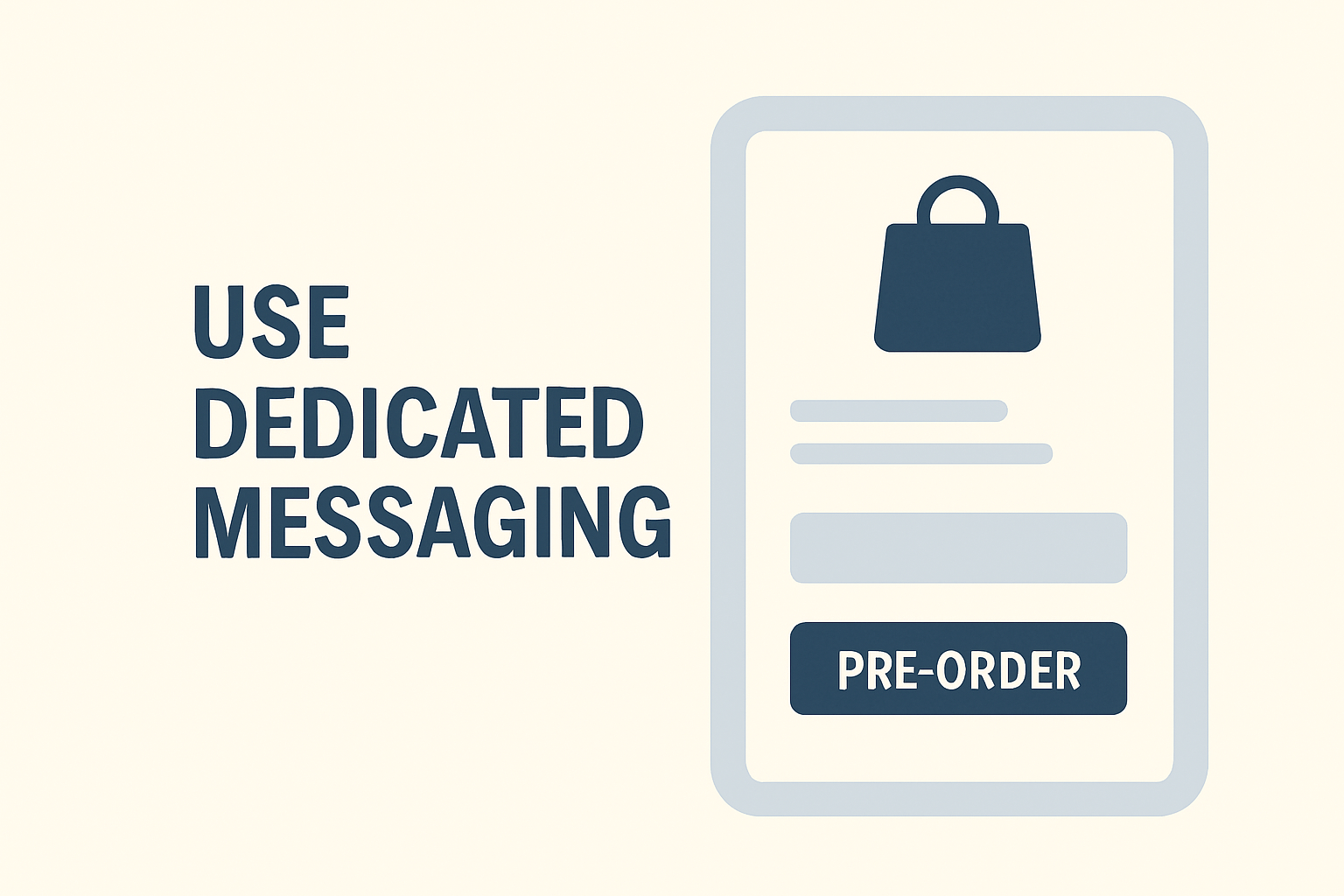
Use Dedicated Messaging
Replace generic “Add to Cart” buttons with clear “Pre-Order” buttons that indicate the purchase is for a future-dated product. This reduces confusion and sets proper expectations from the start.

Communicate Proactively
Keep customers updated throughout the pre-order period. Send confirmation emails, progress updates, and immediate notification of any timeline changes. Transparent communication maintains trust during long wait periods.

Consider Mixed Carts Carefully
According to our data, 37.9% of stores allow customers to mix pre-order items with in-stock products in the same cart. This can increase average order value but complicates fulfillment. Decide based on your operational complexity: isolated pre-order carts simplify logistics, while mixed carts improve customer experience.

For detailed implementation guidance, see our guide on how to set up pre-orders on Shopify.

When to Use Backorders

Backorders serve a different purpose than pre-orders: capturing demand during temporary stockouts of proven products.

Best Use Cases for Backorders

1. Fast-Moving Bestsellers
When a popular item sells out faster than expected, backorders let you continue taking orders rather than losing sales. This works best when you have reliable suppliers and predictable restock timelines.

2. Core Catalog Items
Backorders make sense for staple products you’ll definitely restock. If it’s a core part of your catalog that consistently sells, capture that demand even during temporary stockouts.

3. Short Restocking Windows
Use backorders when you know the restock timeline and it’s relatively short, typically 2-6 weeks. The shorter the window, the better backorders work because customer patience has limits.

4. Preventing Lost Sales
The primary benefit of backorders is capturing revenue that would otherwise go to competitors. When customers want your specific product and are willing to wait a few weeks, backorders prevent them from buying elsewhere.

Backorder Best Practices

Only Offer for Reliable Restocks
Don’t charge backorders upfront unless you’re confident in a shorter replenishment timeline. Broken promises damage customer trust more than saying “out of stock” upfront. Instead take charge-later back-orders where you collect payment until the product is ready to ship.

Set Clear Expectations
Display the expected restock date or date range prominently. “Back in stock by March 15” or “Expected restock: 2-3 weeks” sets clear expectations. Update this date if timelines change.

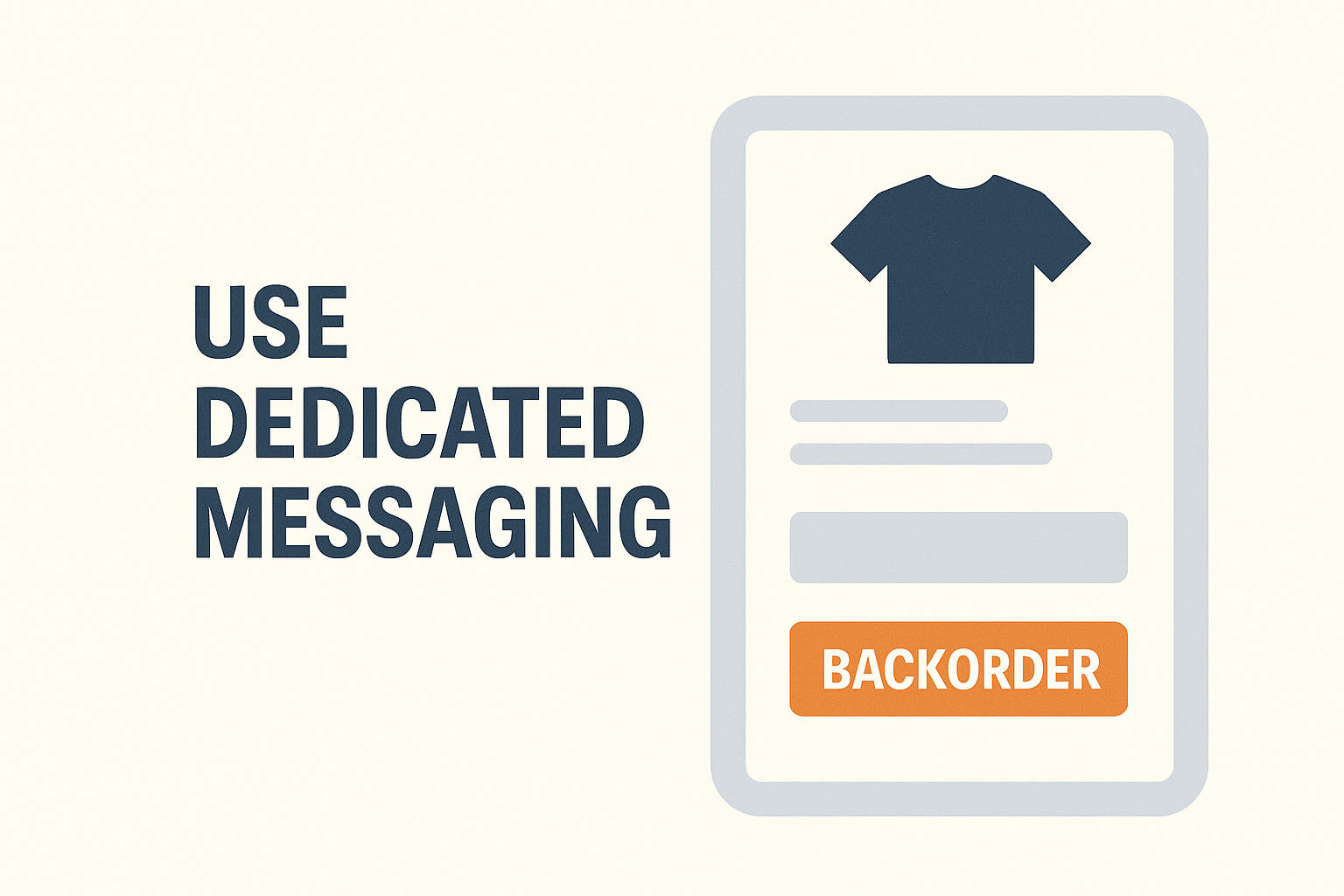
Use Dedicated Buttons
Like pre-orders, use clear “Backorder” or “Pre-order (Restock)” buttons instead of generic “Add to Cart.” This immediately signals that the item isn’t available for immediate shipment.

Consider Backorder Limits
For items with uncertain restock quantities, consider capping backorders to avoid over-committing. This prevents situations where you can’t fulfill all backorders when stock arrives.

When NOT to Use Backorders

Avoid backorders in these situations:

  • Seasonal items unlikely to restock this season
  • Uncertain supply chains Especially when charging upfront, where you can’t commit to timeframes
  • Very long wait times beyond 90 days (use pre-orders with charge-later instead)
  • Products being discontinued or phased out

When to Use Waitlists

Waitlists serve a different function: capturing interest without the commitment of a purchase.

Best Use Cases for Waitlists

1. Demand Testing
When considering whether to produce a new product, waitlists let you gauge interest before committing. The number of signups gives you directional data about potential demand, though actual conversion will be lower than pre-orders since there’s no payment commitment.

2. Drop Culture Brands
Brands built on limited drops and scarcity can use waitlists to build FOMO and anticipation. Waitlist members become your launch day audience, creating initial sales momentum.

3. Uncertain Timelines
When you can’t commit to specific dates or aren’t sure if a product will be produced at all, waitlists provide a safe way to capture interest without the legal and customer service burden of taking payment.

4. Email List Building
Waitlists “almost always collect email addresses,” making them valuable for growing your marketing list with qualified, interested prospects. These contacts have already expressed interest in specific products, making them highly targeted leads.

5. Inventory Planning
Waitlist signup numbers help inform production quantities and inventory decisions. While not as reliable as pre-order commitments, they provide useful directional guidance.

Waitlist Best Practices

Make Signup Frictionless
Only ask for essential information (typically just email). The easier it is to join, the more signups you’ll get.

Set Clear Expectations
Tell customers what happens next and approximately when. “We’ll email you when pre-orders open in March” or “You’ll get 24-hour early access when we launch” manages expectations and reduces support questions.

Create Scarcity Perception
Position waitlist membership as exclusive access. “Join the waitlist for first access” or “Waitlist members get 24-hour early access” creates additional motivation to sign up.

Plan Your Conversion Strategy
Have a clear plan for converting waitlist signups to purchases. Will you offer early access? A discount? A limited time window? Plan this before building your list.

Converting Waitlists to Sales

Waitlist signups aren’t revenue until you convert them. Effective conversion tactics include:

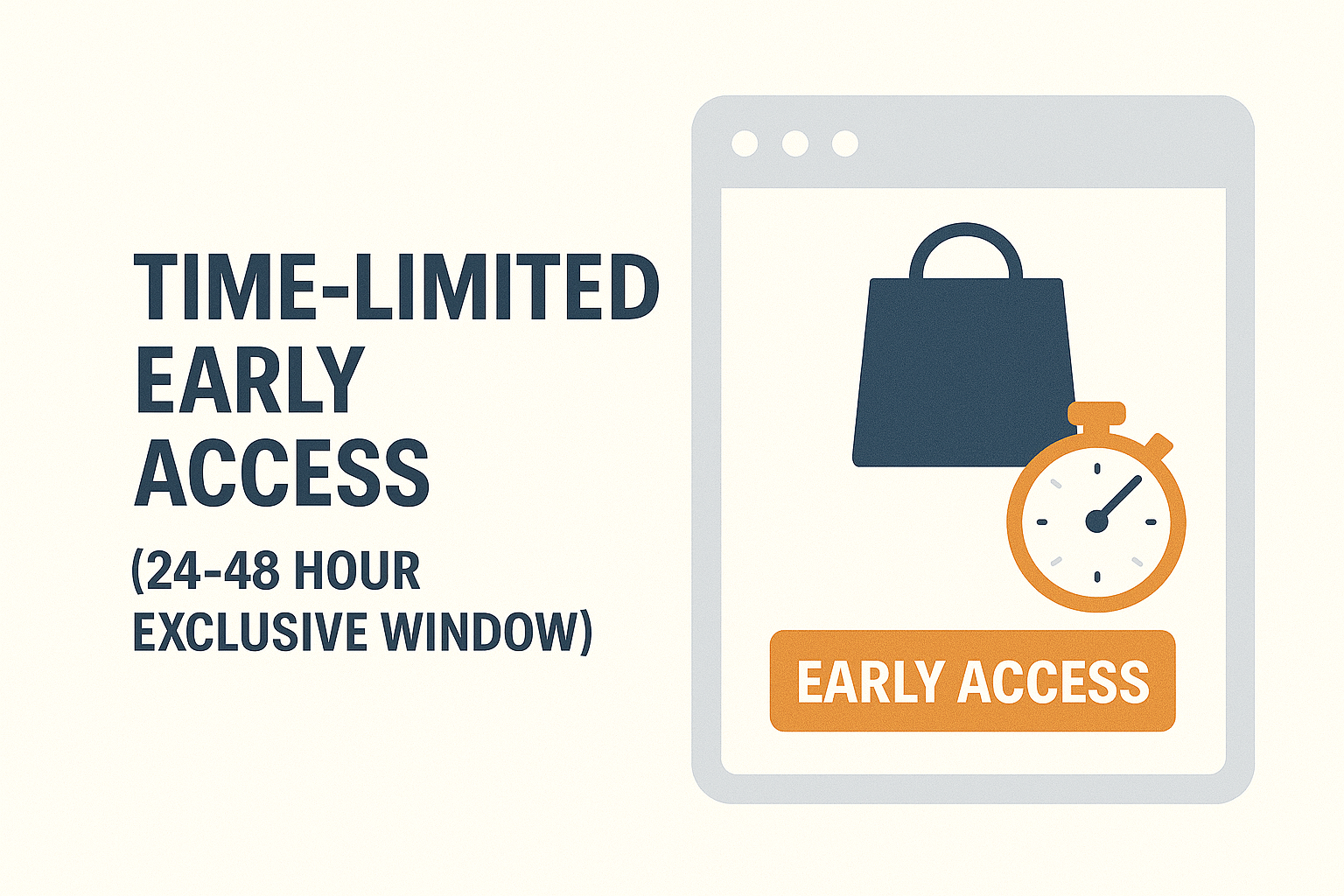
  • Time-limited early access (24-48 hour exclusive window)
  • Exclusive discounts for waitlist members (10-15% off)
  • Transition to pre-order when timeline becomes clearer
  • Scarcity messaging (“Only 500 units available for waitlist members”)

The Decision Framework: Which Approach to Choose

Choosing between pre-orders, backorders, and waitlists requires evaluating several factors specific to your situation.

Decision Tree

1. Is the product already manufactured or available somewhere?

  • No (it doesn’t exist yet) → Consider pre-orders or waitlist
  • Yes, but currently out of stock → Consider backorders or waitlist

2. Do you have a clear restocking or shipping timeline?

  • Yes, under 30 days → Backorders or charge-upfront pre-orders work well
  • Yes, over 30 days → Pre-orders with charge-later preferred
  • No or uncertain → Waitlist or charge-later pre-order is safer; no payment commitment reduces risk

3. What are your cash flow needs?

  • Need immediate revenue → Pre-orders with upfront payment or deposits
  • Flexible cash flow → Charge-later pre-orders or waitlists
  • Want to reduce refund risk → Waitlists or charge-later pre-orders

4. What’s your product price point?

  • High-ticket (>$250) → Deposits reduce purchase barrier (26.8% of pre-orders are >$250 in our data)
  • Mid-range ($50-250) → Any payment model works; choose based on timeline certainty
  • Low-ticket (<$50) → Full payment upfront is typical; administrative overhead of deposits often not worth it

5. What level of customer commitment do you need?

  • High commitment (need to make production decisions) → Pre-orders with payment or deposit
  • Medium commitment (proven product, just out of stock) → Backorders
  • Low commitment (just testing interest) → Waitlists

Real-World Scenarios

Scenario 1: Fashion Brand Seasonal Launch
A clothing brand is releasing a new spring collection in 90 days. Production hasn’t started yet, and they want to gauge demand before finalizing quantities.

Recommendation: Pre-orders with charge-later payment. This captures real purchase commitments (better data than waitlist signups) while minimizing refund risk if production timelines shift. The 90-day window aligns with typical fashion pre-order periods.

Scenario 2: Electronics Retailer Surprise Stockout
A popular gaming console accessory sells out unexpectedly. The supplier confirms restock in 2-3 weeks.

Recommendation: Backorders with full payment upfront. The short, certain timeline and proven product make backorders ideal. Customers know what they’re getting and are willing to pay for a brief wait.

Scenario 3: Indie Maker Testing New Product Idea
A creator has designed a new product but isn’t sure if there’s enough demand to justify production. They want to test interest before committing to manufacturing.

Recommendation: Waitlist initially, then transition to pre-orders if interest is strong. Start with a waitlist to gauge interest without the legal obligations of taking payment. If 500+ people sign up, transition to pre-orders with deposits to confirm actual purchase intent before manufacturing.

Scenario 4: Limited Edition Collectible
A brand is releasing a limited run of 200 collectible items. Demand is expected to exceed supply significantly.

Recommendation: Pre-orders with upfront payment or deposit. The limited quantity and high demand justify requiring payment commitment. Use deposits if the price is high enough to create friction. Close pre-orders once you hit 200 orders (or your production capacity).

Using Multiple Approaches Together

The three strategies aren’t mutually exclusive. Many successful brands use them in combination.

Pre-Orders + Waitlists

Start with a waitlist to build anticipation and capture emails. When you’re ready to open sales, give waitlist members early access to pre-order before opening to the general public.

This two-stage approach builds your email list while rewarding early interest with exclusive access. The waitlist creates anticipation, then pre-orders convert that interest into revenue. Many brands offer waitlist members a 24-48 hour exclusive pre-order window or a small discount (10% off) as a reward for signing up early.

Pre-Orders + Mixed Carts

Our data shows 37.9% of stores allow customers to mix pre-order items with in-stock products in the same cart. This can increase average order value and improve customer experience by letting them order everything they want in one transaction.

The trade-off is operational complexity. Mixed carts typically require split shipments: you ship in-stock items immediately and pre-order items later. This means additional shipping costs and more complex fulfillment workflows. It also requires clear communication so customers understand they’ll receive multiple shipments.

For guidance on integrating pre-orders with your fulfillment operations, see our guides on managing pre-orders with your 3PL and managing pre-orders with your ERP.

Backorders + Pre-Orders

Use both approaches for different parts of your catalog. Run backorders for core items with quick, predictable restocks. Use pre-orders for new releases, seasonal items, or products with longer lead times.

The key is using different messaging and buttons so customers clearly understand which type of purchase they’re making. “Backorder (ships in 2 weeks)” versus “Pre-Order (ships in June)” sets clear expectations.

Platform Implementation: Shopify, BigCommerce, WooCommerce

The technical implementation varies by ecommerce platform.

Shopify Pre-Orders and Backorders

Shopify offers basic built-in functionality through inventory settings, but most merchants need more advanced features. The “continue selling when out of stock” checkbox lets products pass through checkout at zero inventory, which works for simple backorders.

For more sophisticated pre-order management, specialized apps like PreProduct offer:

  • Flexible payment timing (charge-upfront, charge-later, deposits, capture-only)
  • Automatic fulfillment holds to prevent premature shipping
  • Customer communication tools and portals
  • Shopify Flow integration for automated workflows
  • Inventory-based automations

PreProduct’s charge-later capability uses Shopify’s vaulted card technology, letting you capture payment details without charging until you’re ready to ship. This is particularly valuable for pre-orders with uncertain timelines.

BigCommerce Considerations

BigCommerce has native backorder support through inventory settings, but pre-order functionality typically requires third-party apps like PreProduct. The platform’s checkout flexibility allows for custom pre-order implementations, including charge-later models through Stripe integration.

For BigCommerce stores, focus on:

  • Clear product page messaging about pre-order status
  • Expected shipping date display
  • Email communication workflows
  • Integration with your existing fulfillment systems

WooCommerce Options

WooCommerce pre-orders typically work through plugins that extend the platform’s functionality like PreProduct. The open-source nature of WooCommerce means more customization flexibility but requires more technical setup.

Key WooCommerce considerations:

  • Payment gateway compatibility (ensure your gateway supports tokenization for charge-later)
  • Plugin compatibility with your theme and other extensions
  • Email notification customization
  • Stock management integration

Headless and Custom Implementations

For brands with custom storefronts or headless commerce setups, pre-orders require API-based solutions or supporting apps like PreProduct. Stripe pre-orders offer flexibility for charge-later implementations through Stripe’s payment intents and customer tokenization.

Custom implementations provide maximum flexibility but require development resources to build:

  • Payment capture and tokenization logic
  • Customer communication workflows
  • Order management and fulfillment holds
  • Reporting and analytics

Customer Communication and Transparency Best Practices

Success with pre-orders, backorders, and waitlists depends heavily on clear communication.

Setting Clear Expectations

Product Page Messaging
Use clear, prominent labels: “Pre-order,” “Backorder,” or “Join Waitlist.” Avoid generic language like “Add to Cart” that doesn’t signal the purchase type.

Display expected shipping dates or ranges prominently. “Ships in June 2026” or “Expected restock: 2-3 weeks” tells customers exactly what to expect. If you don’t have specific dates, provide ranges: “Ships in 3-4 months.”

Explain What Happens Next
Tell customers what the purchase process looks like. “You’ll be charged today, and we’ll ship when your item is ready” versus “We’ll hold off charging you until we’re ready to ship” makes the experience clear.

Cancellation Policies
State your cancellation and refund policies upfront. Customers are more likely to commit when they know they can cancel if needed. For charge-later pre-orders, make it clear that customers can cancel before being charged with no penalty.

Email Communication Strategy

Order Confirmation
Send immediate confirmation with timeline expectations. Include the expected shipping date or date range, what payment was collected (if any), and how customers can check their order status.

Progress Updates
For pre-orders with long timelines, send periodic updates. “Your spring collection pre-order is on track for March delivery” or “Production is underway and everything is on schedule” maintains excitement and reduces support inquiries.

Proactive Delay Communication
If timelines change, communicate immediately. Don’t wait for customers to ask. “Due to shipping delays, your order will arrive in April instead of March. You can cancel for a full refund if you prefer” maintains trust even when things don’t go according to plan.

Shipping Notifications
When items ship, send tracking information and estimated delivery dates. This is the payoff moment customers have been waiting for.

Legal and Regulatory Compliance

FTC Guidelines
In the United States, the FTC’s Mail or Telephone Order Rule requires you to ship within the timeframe stated or, if no time is stated, within 30 days. For longer pre-order timelines, you must clearly state the expected shipping date and get customer consent.

State Consumer Protection Laws
Various states have specific requirements around pre-orders, deposits, and refunds. Ensure your terms and conditions comply with applicable laws in jurisdictions where you sell.

International Considerations
Different countries have different consumer protection requirements. EU consumer protection laws, for example, require specific cancellation rights and refund timeframes. If you sell internationally, ensure compliance with relevant regulations.

Clear Refund Policies
State your refund policy clearly in your terms and conditions. Be specific about when customers can cancel, how refunds are processed, and what happens if you can’t fulfill an order.

Risk Management: When Things Don’t Go As Planned

Even with careful planning, complications arise. Being prepared reduces stress and maintains customer trust.

Common Challenges

Supply Chain Delays
Manufacturing or shipping delays are the most common pre-order challenge. COVID-19 demonstrated how quickly global supply chains can be disrupted.

Lower-Than-Expected Demand
Sometimes pre-order demand doesn’t meet expectations, requiring production adjustments or minimums you can’t meet.

Higher-Than-Expected Demand
The opposite problem: more orders than you can fulfill. This creates allocation challenges and potential customer disappointment.

Product Quality Issues
Discovering quality problems before shipping means delaying launch to fix issues or accepting returns after shipping.

Mitigation Strategies

Buffer Your Timelines
Under-promise and over-deliver. If you think production takes 90 days, quote 120 days. Early delivery delights customers; delays frustrate them.

Use Charge-Later for Uncertain Timelines
When you’re not confident in timing, charge-later pre-orders reduce refund risk. Our data shows 43.8% of pre-orders use this model, precisely because it provides flexibility when timelines are uncertain.

Maintain Clear Cancellation Policies
Make cancellation easy and fast. This encourages people to commit initially, knowing they can back out if needed. Our data shows just a 5.4% cancellation rate, meaning most customers follow through even when cancellation is easy.

Communicate Transparently
When problems arise, communicate immediately and honestly. Customers are remarkably understanding when you’re transparent, but they’re unforgiving when they feel misled or ignored.

Set Realistic Expectations
Don’t promise what you can’t deliver. It’s better to set conservative expectations and beat them than to promise aggressive timelines you miss.

When to Cancel and Refund

Sometimes the best choice is canceling orders and issuing refunds:

  • Indefinite delays beyond 6 months past original estimates
  • Product quality doesn’t meet standards and can’t be fixed in reasonable time
  • Can’t fulfill all orders due to production issues (consider partial fulfillment or allocation)
  • Supplier goes out of business or can’t deliver

While disappointing, handling cancellations professionally preserves your brand reputation for future launches.

Key Takeaways

Choosing between pre-orders, backorders, and waitlists depends on your specific situation:

Pre-orders work best for new launches and planned releases where you have known (or estimated) timelines. They offer maximum payment flexibility and help validate demand before committing to inventory. Use charge-later for uncertain timelines, upfront payment when you need immediate cash flow, or deposits for high-ticket items.

Backorders are ideal for temporary stockouts of proven products with quick, reliable restock timelines. They prevent lost sales when popular items sell out faster than expected. Keep backorder windows short (under 90 days) and only offer them when you’re confident in restocking.

Waitlists serve demand testing and email list building when timelines are uncertain or you’re not sure if you’ll produce something at all. They create low-commitment interest capture that you can later convert to pre-orders or direct sales.

All three can work together in your overall strategy. Use waitlists to build initial interest, convert to pre-orders when timing is clearer, and run backorders for core items with temporary stockouts.

Success requires clear communication, realistic timelines, and proper technical implementation. Our analysis of over one million pre-orders shows that when executed well, these strategies work: 43.8% of merchants use charge-later payments, 90.4% offer no discount (access matters more than price), and cancellation rates average just 5.4%.

The data proves that pre-orders, backorders, and waitlists all work when matched to the right situations and executed with transparency and clear customer communication.

Ready to start taking pre-orders? PreProduct offers flexible payment options, fulfillment holds, and automated workflows for Shopify, BigCommerce, and WooCommerce stores. Learn more about our Shopify pre-order solution or explore insights from $85M in pre-order sales.

Pre-sell With PreProduct

7 day free trial with all plans