43.8% of pre-orders use charge-later payment models, but multi-step installment plans that let customers split payments across weeks or months? That’s a Shopify Plus exclusive.
If you’re running pre-order campaigns and wondering whether the jump to Shopify Plus is worth it, payment flexibility is just the start. Plus merchants get access to 10x higher API rate limits, extended authorization periods up to 30 days, lower transaction fees and advanced Shopify Flow automation that standard plans simply can’t match.
This guide breaks down the specific Shopify Plus pre-order features that matter most for growing brands. You’ll learn what’s exclusive to Plus, when these features make a real difference and how to decide whether upgrading makes sense for your pre-order operations.
Already familiar with how to do pre-orders on Shopify? Good. This guide picks up where the basics leave off and focuses on what Plus unlocks.
What Makes Shopify Plus Different for Pre-orders
Shopify Plus starts at $2,300 per month, scaling up to $40,000 per month based on revenue. That’s a significant investment compared to standard plans at $39-399 per month. But for pre-order merchants operating at scale, the exclusive features can justify the cost.
Here’s what matters for pre-orders specifically:
| Feature | Standard Shopify | Shopify Plus |
|---|---|---|
| API rate limit | 40 requests/min | 400 requests/min (10x) |
| Authorization period* | 7 days | Up to 30 days |
| Third-party transaction fee | 0.5-2% | 0.15-0.20% |
| Multi-step payment plans | Not available | Available |
| Shopify Flow | Limited | Full access |
| Checkout customization | Limited | Code-level control |
- Vaulted card pre-orders like PreProduct uses aren’t subject to the authorization periods
Standard Shopify handles pre-orders well for most merchants. But when you’re managing high-volume launches, integrating with ERPs and 3PLs or offering complex payment structures, the limitations start to show.
Let’s break down each Plus-exclusive feature and when it actually matters.
Multi-Step Payment Plans: Installments for Pre-orders
Beside the lower Shopify transaction fees, multi-step payment plans are arguably the most compelling Plus-exclusive feature for pre-order merchants. Instead of charging customers once at checkout or once at fulfillment, you can split the total into multiple automatic charges over a defined schedule.
How Multi-Step Plans Work
With multi-step plans, customers select their preferred number of installments at checkout. The system then automatically processes charges based on your configured frequency (daily, weekly or monthly). This differs from third-party buy-now-pay-later services like Klarna or Affirm because you control the schedule and there’s no intermediary taking a cut.
For example, a $400 pre-order product could be structured as:
- 4 monthly payments of $100
- Initial deposit of $100, then 3 payments of $100
- Weekly payments spread across the lead time
The key advantage: customers commit to the full purchase while spreading the cost over time. This reduces the barrier for higher-ticket items without requiring approval from external financing providers.
Customer Experience and Portal
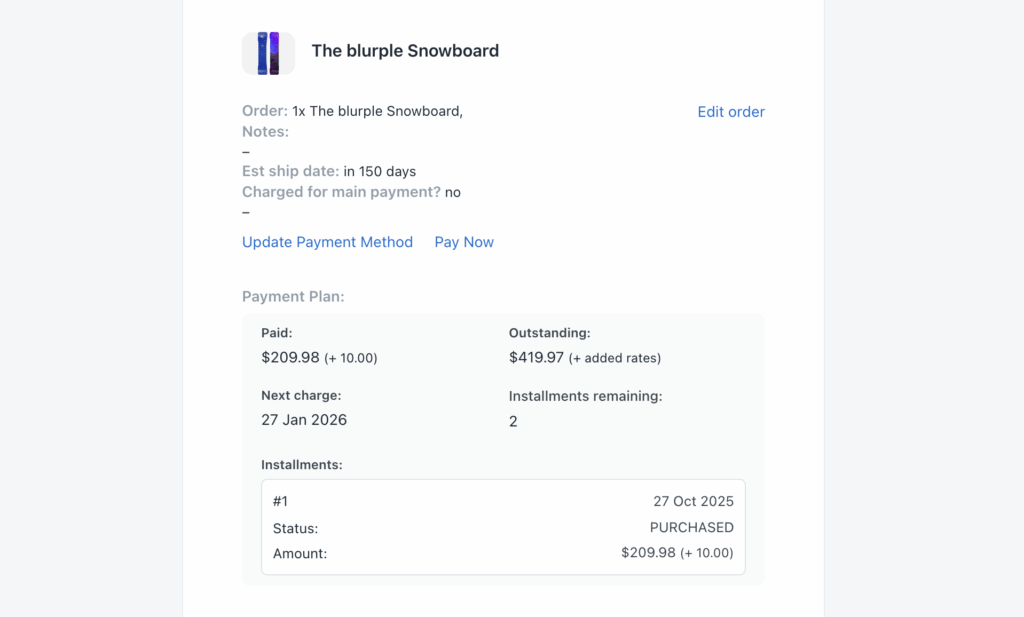
Customers get access to a portal showing their payment history, outstanding balance and upcoming charge dates. They can see exactly when each payment will process, reducing support tickets and building trust during longer lead times.
This transparency matters for pre-orders specifically because customers are already taking a leap of faith by paying before receiving their product. Showing them a clear payment schedule reinforces that commitment.
When to Use Installments
Multi-step plans work best for:
- High-ticket items ($200+): Reduces the upfront commitment barrier
- Long lead times (60+ days): Spreads payments across the waiting period
- Made-to-order products: Matches production milestones to payment collection
- Limited edition drops: Secures commitment from serious buyers
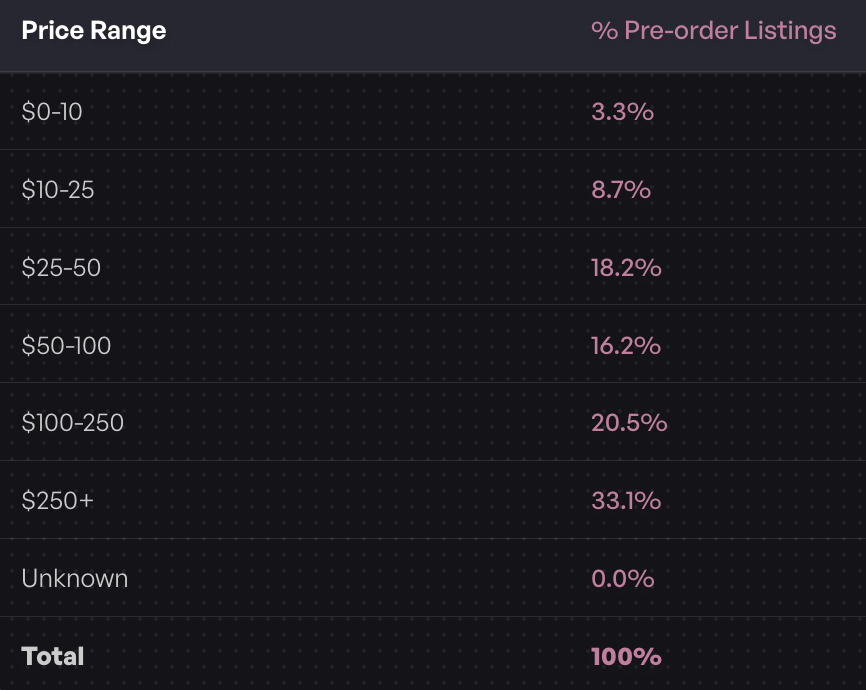
According to PreProduct’s analysis of $85 million in pre-orders, 33.1% of pre-order listings are priced at $250 or more. For these higher-value items, installment plans can meaningfully improve conversion rates.
If you’re on standard Shopify, you’re limited to single-charge options: full payment upfront, full payment later or a deposit with balance due at fulfillment. For Shopify payment plans beyond these basics, Plus is required.
Extended Authorization Periods
If you’re not using vaulted card pre-orders like PreProduct uses, Standard Shopify gives you a 7-day window to capture authorized payments. After that, the authorization expires and you need to re-charge the customer, which often means asking them to re-enter payment details.
Shopify Plus extends this to up to 30 days.
The 7-Day Limitation Problem
For pre-orders with lead times under a week, the standard authorization period works fine. But many pre-order campaigns run 2-4 weeks or longer. When that authorization expires, you’re stuck either:
- Charging customers immediately (poor cash flow timing)
- Re-requesting payment details (friction and drop-off)
- Using vaulted card technology (requires specific setup)
The Shopify authorization period is one of the most common pain points for pre-order merchants on standard plans.
Plus Merchants Get Up to 30 Days
With Shopify Plus, you can capture payments up to 30 days after the initial authorization. This gives breathing room for pre-orders with 2-4 week lead times without requiring additional customer action.
The extended authorization launched in October 2020 specifically to address fulfillment delays that became common during supply chain disruptions. It remains a Plus-exclusive feature.
The 1.75% Fee Explained
There’s a catch: Shopify charges 1.75% when you capture payment after the standard 7-day period. For a $100 pre-order captured on day 15, you’d pay an additional $1.75.
This fee only applies to the extended portion, so if you capture within 7 days, there’s no additional cost. It’s essentially a convenience fee for holding the authorization longer.
Extended Auth vs Vaulted Cards
For lead times beyond 30 days, extended authorization still won’t help. That’s where vaulted card technology comes in. With vaulted cards, customer payment details are stored securely so you can charge them at any point without the authorization expiration limitation.
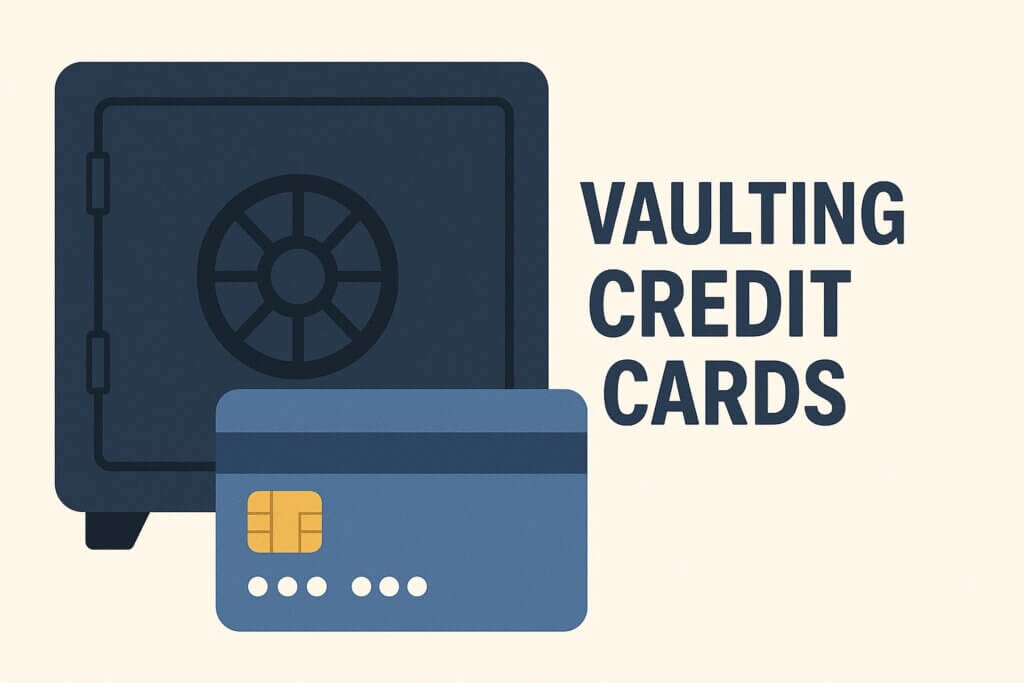
PreProduct’s system uses vaulted cards to bypass the standard authorization window entirely, which is why 43.8% of pre-orders on the platform use the charge-later model regardless of lead time. But for Plus merchants with predictable 2-4 week timelines, extended authorization provides a simpler option.
10x API Rate Limits for High-Volume Launches
This feature sounds technical, but the business impact is significant for pre-order merchants at scale.
Why API Limits Matter for Pre-orders
Every time your systems communicate with Shopify (inventory updates, order syncs, fulfillment status changes), they use API calls. Standard Shopify limits you to 40 requests per app per store per minute.
During a high-volume pre-order launch, this can become a bottleneck. If your ERP is syncing inventory, your pre-order app is updating listings and your analytics tools are pulling data, you can hit rate limits quickly. When that happens, requests get throttled, leading to delayed updates and potential overselling.
Standard vs Plus Rate Comparisons
Shopify increased API rate limits for Plus by 10x in 2023:
- Admin API: 1000 points/second (vs 100 standard)
- Storefront API: No limits
For pre-order merchants, this means:
- Real-time inventory sync across multiple systems
- Smoother integration with ERPs and inventory management systems
- No throttling during high-traffic launch windows
- Support for multiple stores pulling from shared inventory
Impact on Multi-Store Operations
If you’re running pre-orders across multiple storefronts (different regions, B2B and DTC, multiple brands), inventory sync becomes critical. One store selling through available pre-order slots while another hasn’t received the update creates overselling risk.
With Plus’s 10x rate limits, you can maintain real-time or near-real-time sync across stores. This is particularly important for limited edition drops where inventory is tight and demand is high.
Lower Transaction Fees at Scale
Shopify Plus merchants pay significantly lower transaction fees when using third-party payment processors.
Fee Comparison: Standard vs Plus
| Plan | Third-Party Gateway Fee |
|---|---|
| Basic Shopify | 2.0% |
| Shopify | 1.0% |
| Advanced Shopify | 0.5% |
| Shopify Plus | 0.15-0.20% |
If you’re processing pre-orders through a third-party gateway (not Shopify Payments), the savings add up quickly.
Impact on Pre-order Margins
Pre-orders often involve higher-value items with longer lead times. If you’re processing $100,000 in monthly pre-order revenue through a third-party gateway:
- Advanced Shopify: $500/month in transaction fees (0.5%)
- Shopify Plus: $150-200/month in transaction fees (0.15-0.20%)
That’s $300-350/month in savings on transaction fees alone, which partially offsets the higher base cost of Plus.
For merchants using Shopify Payments as their primary gateway, the transaction fee savings are less dramatic since there’s no additional Shopify fee on top of payment processing. But for those with third-party payment requirements, the savings are meaningful.
Advanced Automation with Shopify Flow
Shopify Flow is available on all Shopify plans now, but Plus merchants get the full feature set and unlimited workflows. For pre-order automation, this matters.
Flow Actions for Pre-orders
With a pre-order app like PreProduct integrated with Shopify Flow, you get access to specialized actions:
- Create and update pre-order listings automatically
- Trigger charges when inventory conditions are met
- Release fulfillment holds based on custom logic
- Manage variant limits and deposit rules programmatically
- Tag orders and customers based on pre-order status
PreProduct exposes 15 custom Flow actions and 16 custom Flow triggers specifically for pre-order workflows.
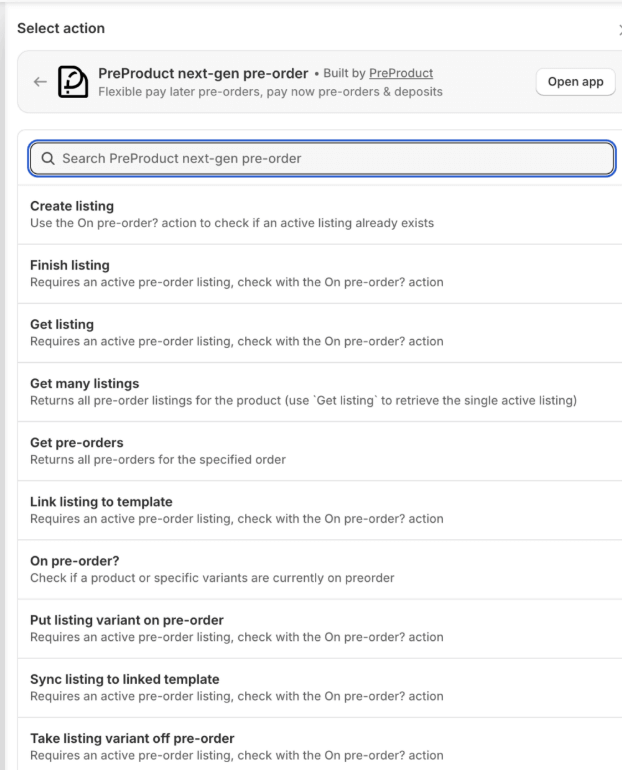
Plus merchants also get access to the Send HTTP request action, which lets you call external APIs directly from Flow. For pre-order operations, this opens up direct integrations with ERPs, 3PLs, notification services and custom internal systems without needing middleware. When a pre-order is created or charged, you can push that data to any system with an API endpoint.
Example Workflows for Plus Merchants
Here are practical Flow automations that Plus merchants commonly implement:
Inventory-triggered pre-orders: When a variant’s inventory hits zero, automatically create a pre-order listing with predefined settings (charge-later, specific lead time messaging, variant limits).
Stock arrival charging: When inventory is added to a variant with active pre-orders, automatically trigger charges and release fulfillment holds.
VIP early access: Tag customers who’ve purchased before and automatically unlock pre-order access before public launch.
Lead time notifications: When a pre-order listing’s estimated ship date changes, trigger email notifications to affected customers.
Connecting to Broader Operations
The real power of Flow for pre-orders is connecting to your broader operations stack. Pre-order events can trigger actions in your CRM, update your support tools with order status or push data to your analytics platform.
For Plus merchants with complex operations, this eliminates manual handoffs and reduces the risk of pre-order customers falling through the cracks.
Checkout Customization Considerations
Shopify Plus gives you code-level access to customize the checkout experience. For pre-orders, this enables specific enhancements like custom messaging, validation rules and dynamic shipping options.
However, there’s an important limitation to understand.
Pre-orders and Custom checkout.liquid
Pre-orders using Shopify’s Selling Plan API (the native approach for deferred payments) are not supported on stores with customized checkout.liquid implementations.
If you’ve heavily customized your checkout using checkout.liquid, you’ll need to choose between those customizations and native pre-order functionality.
checkout.liquid Is Now Deprecated
Shopify sunset checkout.liquid in August 2025. Plus merchants must now use Checkout UI extensions for any checkout customization, which are fully compatible with pre-orders. If you’re migrating from an older checkout.liquid setup, this is no longer optional.
Checkout UI Extensions Alternative
Checkout UI extensions provide a supported path for checkout customization that works with pre-orders. You can add custom messaging, additional fields and validation logic without breaking pre-order functionality.
For most pre-order use cases, the standard checkout with clear messaging about payment terms and lead times is sufficient. Advanced customization is a Plus benefit, but not necessarily required for successful pre-order campaigns.
Is Shopify Plus Worth It for Pre-orders?
The honest answer: it depends on your volume and operational complexity.
Revenue Thresholds to Consider
Shopify Plus makes financial sense when you’re processing roughly $800,000 or more in monthly revenue. Below that threshold, the base fee of $2,000/month often exceeds the savings from lower transaction fees and the value of Plus-exclusive features.
For pre-order specifically, consider:
- What percentage of revenue comes from pre-orders?
- Are your integrations hitting Admin API rate limits during inventory syncs?
- Do you need multi-step payment plans for your price points?
- How complex is your inventory sync across systems?
Pre-order Volume Indicators
Signs that Plus might be worth it for your pre-order operations:
- Processing 1,000+ pre-orders per month
- Managing pre-orders across multiple storefronts
- Average order value above $200 (where installment plans help)
- Lead times in the 2-4 week range (where extended auth helps)
- Integration with ERP/3PL systems that require real-time sync
When to Stay on Standard
For many pre-order merchants, standard Shopify plans are sufficient. Vaulted card technology (available through apps like PreProduct) bypasses the authorization period limitation. Flow automation handles most workflow needs. And API limits only become a real constraint at high volume.
If you’re not hitting clear limitations with standard Shopify, the value proposition of Plus for pre-orders specifically may not justify the cost jump.
Key Takeaways
Shopify Plus unlocks specific capabilities that matter for pre-order merchants operating at scale:
- Multi-step payment plans let customers split pre-order payments, improving conversion on higher-ticket items
- Extended authorization periods (up to 30 days) give breathing room for 2-4 week lead times
- 10x API rate limits prevent throttling during high-volume launches and multi-store operations
- Lower transaction fees (0.15-0.20% vs 0.5-2%) save money at scale with third-party gateways
- Advanced Flow automation connects pre-orders to your broader operations stack
These features don’t make or break pre-order success for most merchants. Brands run successful pre-order campaigns on Basic Shopify every day. But for high-volume operations with complex payment requirements and tight inventory management needs, Plus provides tools that standard plans can’t match.
If you’re evaluating whether to upgrade, focus on the specific limitations you’re hitting today. The Shopify Plus pre-order solution that fits your needs depends on your volume, average order value and operational complexity, not just whether you want access to Plus features.
Start by identifying your current bottlenecks. If they align with what Plus solves, the upgrade likely makes sense. If not, standard Shopify with a capable pre-order app will serve you well.
Pre-sell With PreProduct
7 day free trial with all plans


