Pre-order Payment Models: Complete Guide to Charge Later, Deposits, Installments & More on Shopify
Prefer a video? Click here to see Oli walk through the various types.
In analyzing $85 million in pre-order sales across more than one million transactions, one pattern became clear: the pre-order payment model you choose can make or break your campaign. Yet most merchants struggle to understand when to use charge later versus deposits, or whether upfront payments make sense for their lead times.
The challenge is not a lack of options. Shopify merchants have access to five distinct pre-order payment models, each with different strengths, technical requirements and ideal use cases. The real problem is that guidance on choosing between them has been scattered across dozens of articles, leaving store owners to piece together a strategy through trial and error.
This guide consolidates everything you need to know about pre-order payment models on Shopify. Whether you are setting up pre-orders on Shopify for the first time or optimizing an existing strategy, you will learn when to use each approach based on real data from PreProduct’s analysis of 1M+ pre-orders, understand the technical requirements behind deferred charges, and walk away with a decision framework matched to your specific situation.
What Are Pre-order Payment Models?
A pre-order payment model defines when and how you collect money from customers who purchase products before they ship. This sounds straightforward, but selecting the right pre-order payment model ripples through every aspect of your business, from cash flow and refund rates to customer trust and operational complexity.
The five main approaches
Based on our data, Shopify merchants distribute across these types of pre-order payment models:
- Charge later (deferred payment): 43.8% of pre-orders (75,781 listings)
- Capture-only (payment links): 28.7% of pre-orders
- Charge upfront: 14.9% of pre-orders
- Deposit upfront with balance later: 12.6% of pre-orders
- Multi-step installment plans: Emerging option for high-ticket items
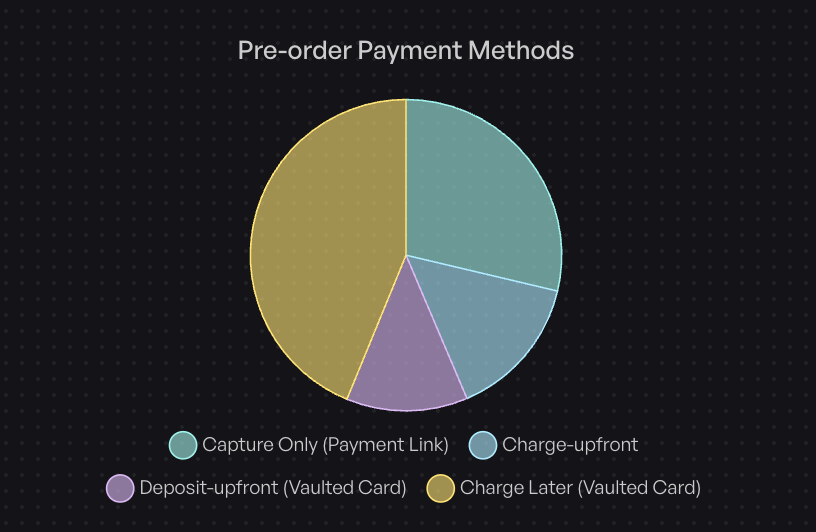
The dominance of charge-later reflects a significant shift in merchant strategy. Until vaulted card technology became widely available through Shopify Payments in recent years, most merchants had no choice but to charge upfront or manually send payment links later.
Why your payment model choice matters
Your payment model affects nearly every metric that matters:
Conversion rates shift dramatically based on payment timing. Charge-later pre-orders remove the friction of paying for something you will not receive for weeks or months. Customers feel more comfortable committing when no money changes hands until the product ships.
Cash flow implications cut both ways. Charging upfront provides immediate revenue, but deposits and charge-later methods can actually improve cash flow predictability by reducing refund rates and cancellations.
Operational complexity increases with deferred charges. You need systems for failed payment recovery, customer communication about upcoming charges, and fulfillment holds to prevent premature shipping.
Technical foundation: vaulted cards
Understanding vaulted cards is essential for grasping why certain payment models work the way they do. When a customer completes checkout on a charge-later or deposit pre-order, their card details are securely stored (or “vaulted”) with Shopify Payments or PayPal. This allows you to charge the card later without the customer re-entering their payment information.
The critical difference between vaulted cards and traditional authorization holds: authorization holds expire. Shopify’s standard authorization period is just 7 days, with extended authorization available up to 30 days on Shopify Plus, but at a 1.75% surcharge.
Vaulted cards have no time limit. You can charge a customer 3 months after checkout at standard processing rates. This is why charge-later has become the dominant model for pre-orders with longer lead times.
Payment Model 1: Charge Upfront
Charge upfront is the simplest pre-order payment model. The customer pays in full at checkout, just like a regular order. The difference is that fulfillment is delayed until your product is ready to ship.
How it works
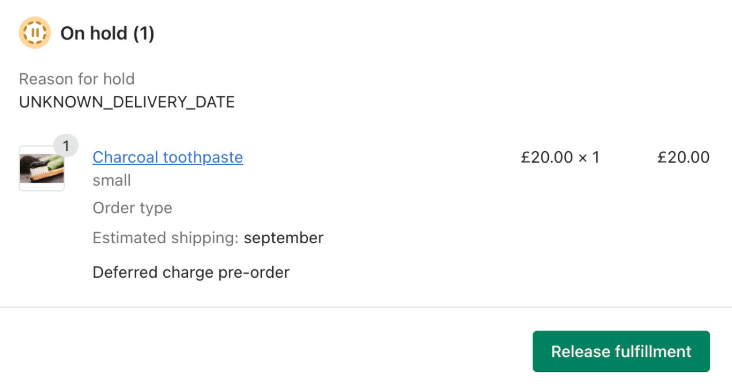
When a customer completes a charge-upfront pre-order, their payment processes immediately. Shopify creates an order in your admin with the payment captured. To prevent premature shipping, you need fulfillment holds configured so the order stays in a “hold” state until you release it.
When to use charge upfront
Charge upfront works best in specific scenarios:
Short lead times under 14 days: When customers will receive their order quickly, the friction of paying upfront is minimal. Restocks and short-timeline launches fall into this category.
Critical cash flow needs: If you need revenue immediately to fund production or cover costs, upfront payment guarantees that cash.
Established customer trust: Brands with loyal followings can ask for payment upfront without damaging conversion rates. Customers who know and trust you are less concerned about paying early.
Low refund risk products: Commodity items or products with predictable demand carry less risk of cancellation requests.
Pros and cons
Pros:
- Immediate revenue recognition
- Simplest operational model
- Payment is verified and funds secured
- Works with any payment gateway
Cons:
- Higher refund request rates for longer lead times
- Customer hesitation reduces conversion
- More support inquiries about order status
- Potential chargeback risk if delays occur
Our data shows 14.9% of merchants use charge upfront, typically for restocks and launches with confirmed, short timelines.
Payment Model 2: Charge Later (Deferred Payment)
Charge later has become the dominant pre-order payment model for good reason. This Shopify deferred payment pre-order approach allows customers to complete checkout without an immediate charge. Their card is vaulted securely, and you trigger the charge when ready to ship.
How it works
The checkout experience feels nearly identical to a regular purchase. The customer enters their payment details and completes the order. Behind the scenes, Shopify creates a payment mandate that vaults the card details. The order enters a “payment pending” state with a fulfillment hold.
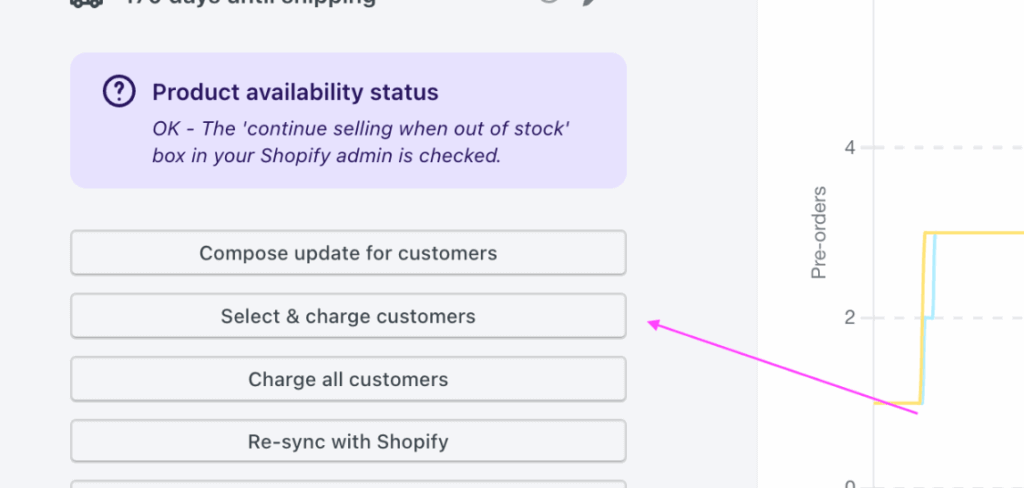
When your inventory arrives or production completes, you trigger the charge. The vaulted card is billed, and the order transitions to paid status ready for fulfillment.
When to use charge later
Lead times over 30 days: This is the sweet spot. Authorization periods cannot cover this timeline, so vaulted cards are your only option for deferred payment without manual intervention.
Maximizing conversion: Customers convert at higher rates when they know payment happens only when the product ships. The psychological barrier of “paying for something I won’t get for months” disappears.
Testing market demand: If you are gauging interest in a new product, charge-later lets you collect real purchase commitments without asking customers to take financial risk.
Uncertain fulfillment timelines: When you cannot guarantee exact ship dates, charge-later gives you flexibility. Customers feel less anxious about delays when they have not paid yet.
Why charge later dominates
The numbers tell the story. 43.8% of pre-orders use charge-later on Shopify, representing 75,781 listings in our dataset. This is not random. Charge-later solves the fundamental tension of pre-orders: customers want products early, but they do not want to pay for products they cannot receive.
From a technical standpoint, vaulted cards eliminate the authorization period constraint entirely. Standard authorization holds expire at 7 days. Extended authorization costs an additional 1.75% and only extends to 30 days. Vaulted cards have no time limit at standard processing rates.
Technical requirements
Charge-later requires specific payment gateway support:
- Shopify Payments: Full support for vaulted cards and deferred charges
- PayPal: Supports vaulted cards for deferred payment
- Other gateways: Generally do not support this model; use capture-only instead
You also need selling plan configuration with payment mandates and fulfillment holds to prevent orders from flowing to your 3PL before payment is collected.
Failed charge management
The main operational consideration with charge-later is handling failed charges. Cards expire, get cancelled, or hit spending limits. Our data shows 95%+ success rate for deferred charges when merchants follow good communication practices.
The keys to minimizing failed charges:
- Send a “heads up” email 48-72 hours before charging
- Provide an easy way to update payment details
- Have dunning workflows for retry logic
- Set clear policies for order cancellation after failed attempts
Payment Model 3: Deposit Upfront (Partial Payment)
The deposit pre-order payment model strikes a balance between charge-upfront and charge-later. You collect a portion of the payment immediately to validate commitment, then charge the balance when ready to ship.
How it works
At checkout, the customer pays a percentage of the total (typically 10-50%). Their card is vaulted for the remaining balance. When you are ready to fulfill, you trigger the balance charge through the vaulted card, then release for fulfillment.
When to use deposits
High-ticket items over $300: Larger purchases benefit from deposits because they validate genuine commitment. A customer willing to put down $200 on a $500 item is unlikely to cancel.

Custom or made-to-order products: When you incur costs to produce an item specifically for a customer, deposits protect you from cancellation losses.
Partial cash flow needs: If you need some revenue to fund production but want to keep conversion rates high, deposits provide a middle ground.
Long lead times with expensive goods: Combining high price points with extended timelines makes deposits particularly valuable.
Optimal deposit percentages
Based on merchant data and industry practices, here are recommended deposit percentages for Shopify pre-orders:
| Price Range | Recommended Deposit |
|---|---|
| $50-$300 | 10-25% |
| $300-$1,000 | 25-40% |
| $1,000+ | 30-50% |
| Custom/made-to-order | 40-50% |
| 6+ month lead times | 30-40% |
The principle is straightforward: higher deposits for higher-risk scenarios. Made-to-order items that cannot be resold need stronger commitment signals. High-ticket items need deposits proportional to your exposure.
Pros and cons
Pros:
- Validates customer commitment and reduces cancellations
- Improves cash flow without charging full amount
- Balances conversion rates with revenue needs
- Protects against order abandonment
Cons:
- More complex than single-payment models
- Requires balance charge management
- Customer support questions about two-part payment
- Failed balance charges create partial-payment scenarios
Our data shows 12.6% of merchants choose deposits, with particular concentration in fashion, furniture, and custom goods. For a deeper dive into deposit and partial payment configurations, see our complete guide to Shopify partial payments.
Payment Model 4: Capture-Only (Payment Links)
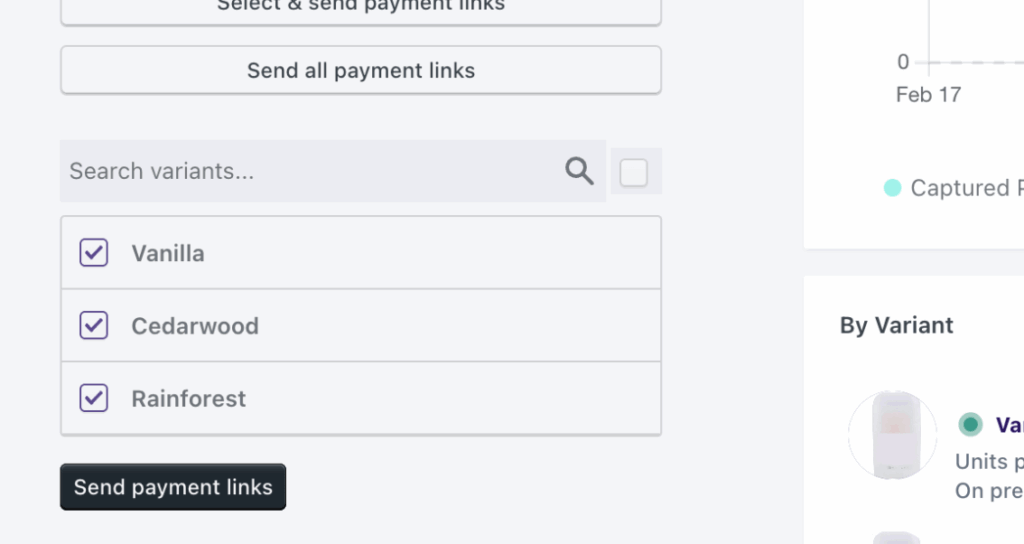
The capture-only pre-order payment model represents the most flexible but least automated approach. Customers express interest and provide contact information at checkout, but no payment is collected or vaulted. When ready to charge, you send a manual payment link.
How it works
The customer completes a simplified checkout that captures their order details and contact information. No payment processes. When your product is ready, you generate and send a payment link. The customer clicks through to complete payment, and you fulfill the order.
When to use capture-only
Uncertain timelines: If you genuinely do not know when a product will ship, capture-only avoids the commitment of vaulting cards for an indefinite period.
Non-Shopify Payments stores: This is the only deferred payment option for stores using payment gateways other than Shopify Payments or PayPal.
Maximum flexibility: Some merchants prefer the explicit customer reconfirmation that comes with payment link conversion.
Demand testing at zero commitment: Capture-only lets you gauge interest with minimal friction, though conversion at payment time will be lower.
Pros and cons
Pros:
- Works with any payment gateway
- Maximum flexibility on timing
- Customer explicitly reconfirms intent
- No failed deferred charge risk
Cons:
- Extra customer friction at payment time
- Lower conversion rate at payment collection
- Requires manual payment link sending
- No payment guarantee from initial checkout
Our data shows 28.7% of merchants use capture-only. Many are stores without Shopify Payments, but others prefer the explicit reconfirmation step.
Payment Model 5: Multi-Step Installment Plans
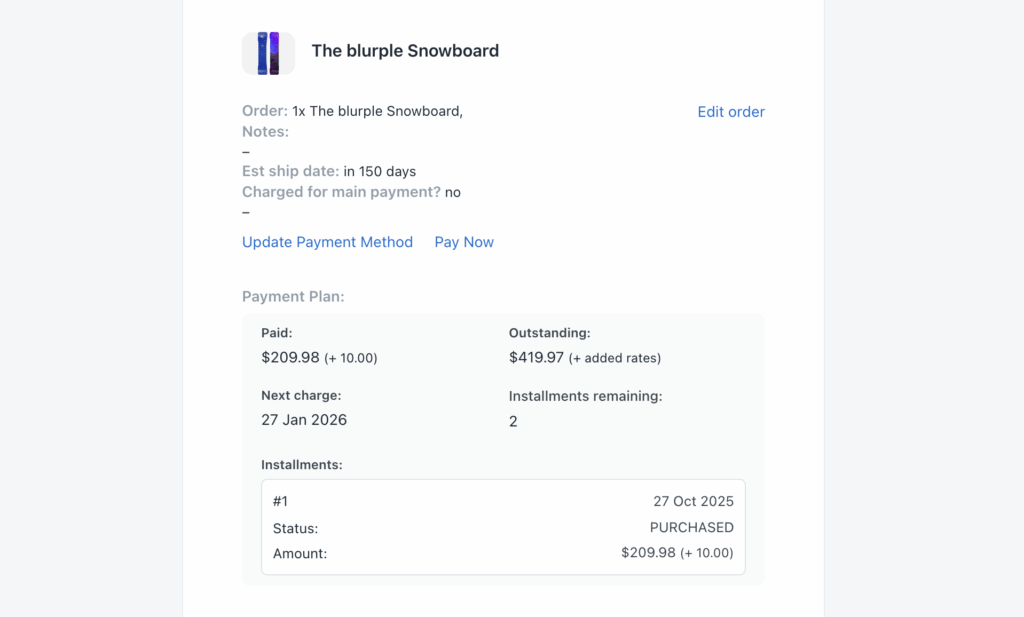
The installment pre-order payment model splits the total into multiple scheduled payments, typically 2-4 charges spread across weeks or months. This approach is growing for high-ticket Shopify pre-order payment options where the full amount creates purchasing friction.
How it works
At checkout, the customer pays the first installment. Their card is vaulted for remaining payments. Subsequent charges trigger automatically on a defined schedule (weekly, monthly, or milestone-based). The customer receives visibility into their payment schedule through a portal.
When to use installments
Very high-ticket items over $1,000: When the total price creates genuine budget friction, spreading payments makes the purchase accessible.

Extended production timelines of 3+ months: Long timelines naturally align with spread payments, as customers pay over time while the product is being made.
Competing with Affirm/Klarna: Rather than sending customers to third-party financing, installment plans let you offer payment flexibility on your terms.
Premium product positioning: Installment options can signal premium status while making purchases accessible.
Setup and configuration
Shopify payment plans for pre-orders require:
- Define the number of installments (2-4 is typical)
- Set payment schedule (first payment at checkout, remaining on dates)
- Configure customer portal for payment visibility
- Optional: offer pay-early discount to encourage faster payment
Platform requirements
Native Shopify installment support requires Shopify Plus. However, apps like PreProduct enable multi-step payment plans for merchants on standard Shopify plans, opening this model to a broader range of stores.
Pros and cons
Pros:
- Enables high-ticket sales that would otherwise not convert
- Merchant-controlled terms (unlike third-party BNPL)
- Spreads payment across production timeline
- Customer portal creates positive touchpoints
Cons:
- Higher operational complexity
- More failed payment points to manage
- Requires robust dunning workflows
- Customer confusion possible with multiple charges
Comparing Pre-order Payment Models: Decision Framework
With five pre-order payment models to choose from, how do you decide? Start with your constraints, then optimize for your goals.
Quick reference comparison table
| Model | Best For | Lead Time | Price Point | Cash Flow | Complexity |
|---|---|---|---|---|---|
| Charge Upfront | Short timelines | Under 14 days | Any | Immediate | Low |
| Charge Later | Long timelines | 30-180 days | Any | Delayed | Medium |
| Deposits | High-ticket | Any | $300+ | Partial | Medium |
| Capture-Only | Uncertain timing | Any | Any | Manual | Low |
| Installments | Very high-ticket | 60+ days | $1,000+ | Spread | High |
Decision flowchart
Work through these questions in order:
1. What is your lead time?
If under 14 days, charge upfront works well. Customers expect quick delivery and do not mind paying immediately for something arriving soon.
If 14-30 days, charge-later or deposits both work. Authorization periods can technically cover this window, but vaulted cards are simpler and cheaper.
If over 30 days, charge-later is strongly preferred. Authorization periods cannot cover this timeline without expensive workarounds, and customer expectations favor paying at ship time.
2. What is your price point?
Under $300: Charge-later maximizes conversion. The amount is not high enough to warrant deposit complexity.
$300-$1,000: Deposits validate commitment on purchases large enough that cancellation creates real loss.
Over $1,000: Consider installments or substantial deposits. The full amount creates genuine budget friction for many customers.
3. What are your cash flow needs?
Need revenue immediately: Charge upfront or deposits provide cash at checkout.
Can wait for fulfillment: Charge-later offers better conversion without immediate revenue.
4. What is your payment gateway?
Shopify Payments or PayPal: All five models are available.
Other gateways: Capture-only is your deferred payment option.
Cost comparison
Understanding the fee implications helps inform your decision:
- Standard processing: 2.9% + 30 cents (typical)
- Extended authorization (after day 7): Additional 1.75%
- Vaulted cards (charge-later/deposits): Standard rates only
This cost difference matters. On a $100 order held for 30 days, extended authorization would cost an extra $1.75 compared to using vaulted cards. At scale, this adds up quickly.
Best Practices for Any Pre-order Payment Model
Regardless of which pre-order payment model you choose, certain principles apply universally.
Clear customer communication
Transparency prevents support tickets and chargebacks:
- Product page: Explain payment timing before the customer reaches checkout
- Checkout: Reinforce terms with consent language
- Confirmation email: Recap what the customer agreed to
- Pre-charge notification: Send 48-72 hours before any deferred charge
Operational considerations
Set yourself up for smooth execution:
- Test manually first: Run through the customer experience yourself before automating
- Configure fulfillment holds: Prevent 3PLs from shipping before payment clears. Learn more about managing pre-order inventory in Shopify
- Document refund policies: Know what happens when customers want to cancel
- Train support team: Ensure they understand payment timing and can answer questions
Compliance requirements
Pre-orders carry regulatory considerations. According to Shopify’s pre-order guidance, merchants must be transparent about shipping timelines and refund policies. For detailed templates and guidance, see our Shopify pre-order policy guide.
- FTC guidelines: In the US, you must ship within stated timeframes or offer cancellation
- Clear policies: Display refund and cancellation terms prominently
- Honest timelines: Under-promise and over-deliver on shipping estimates
Common Pre-order Payment Model Mistakes to Avoid
Learn from merchants who have struggled with pre-order payment model selection:
Payment model selection errors
Using charge upfront for 60+ day lead times: Customers grow anxious when they have paid but see no product. Refund requests spike, and support burden increases.
Missing authorization period deadlines: If you try to capture a held authorization after 7 days (or 30 on Plus), the charge fails. You then need to request payment again from the customer.
Deposits too low or too high: A 5% deposit does not validate commitment. A 75% deposit creates the same friction as charging upfront. Find the balance for your price point.
Technical pitfalls
Wrong payment gateway for deferred charges: Attempting charge-later without Shopify Payments or PayPal leads to failed implementations.
No fulfillment holds: Without holds, orders flow to your 3PL and ship before payment is collected on deferred models. See our guide on managing pre-orders with your 3PL for proper setup.
Missing failed payment recovery: Without dunning workflows, failed deferred charges become lost revenue.
Conclusion: Choosing Your Pre-order Payment Model
Choosing the right pre-order payment model comes down to matching your constraints (lead time, price point, payment gateway) with your goals (conversion, cash flow, operational simplicity).
Key takeaways
- Charge-later dominates for good reason: 43.8% adoption reflects superior conversion for longer lead times
- Deposits validate commitment: For $300+ items, partial payment upfront reduces cancellation risk
- Match model to lead time: Under 14 days favors upfront; over 30 days requires vaulted cards
- Vaulted cards eliminate authorization limits: Shopify Payments and PayPal enable unlimited deferred charge windows
- Communication prevents problems: Clear expectations at every touchpoint reduce support burden
Next steps
Start by assessing your product catalog. Segment by lead time and price point. For each segment, identify the payment model that balances conversion with your operational needs.
If you have not yet chosen a pre-order solution, consider what payment flexibility you need. Not all apps support all five models.
For flexible pre-order payments with charge-later, deposits, and multi-step installments, explore PreProduct’s Shopify pre-order solution. With data from over one million pre-orders and support for all five payment models, you can implement the right approach for your business.
FAQ
Charge-later (deferred payment) is best for lead times over 30 days. Vaulted cards allow you to charge at standard processing rates without authorization period limits. Customers also prefer not paying until closer to shipment.
What is the best pre-order payment model for long lead times?
Yes. Most pre-order apps allow you to configure payment settings per listing. Use charge-upfront for restocks arriving in days, charge-later for new launches with longer timelines, and deposits for high-ticket custom items.
Can I use different payment models for different products?
For items $50-$300, use 10-25%. For $300-$1,000 items, use 25-40%. For items over $1,000 or custom/made-to-order products, 30-50% provides adequate commitment validation without creating excessive friction.
What deposit percentage should I charge?
Yes. Deposits create psychological commitment that reduces cancellation rates compared to charge-later. Customers who have put money down are more likely to complete the purchase. The effect is stronger with higher deposit percentages.
Do deposits reduce cancellations?
Native Shopify installment support requires Plus, but apps like PreProduct enable multi-step payment plans on standard Shopify plans.
Can I offer installments without Shopify Plus?
The card may have expired, been cancelled, or hit a limit. Best practice is sending pre-charge notification emails so customers can update payment details proactively. When charges fail, dunning workflows retry automatically and send update requests to customers.
What happens if a deferred charge fails?
Include payment timing on the product page, in checkout messaging, in confirmation emails, and through pre-charge notifications. Customers should never be surprised by a charge. Transparency builds trust and reduces chargebacks.
How do I communicate payment timing to customers?
Shopify Payments and PayPal support vaulted cards for deferred charges. Other gateways typically require capture-only (payment links) for deferred payment scenarios.
Which payment gateways support charge-later?
Pre-sell With PreProduct
7 day free trial with all plans


