Shopify Coming Soon Pages: Complete Guide to Pre-Launch Success
Coming soon pages are not just placeholders. They are the first step in a two-phase launch strategy that can generate revenue before your product even ships. Whether you are launching a new Shopify store or preparing to release a product line, well-built coming soon pages capture attention, build your audience and set the stage for what comes next.

Most merchants face a frustrating choice: wait until everything is perfect to start marketing, or launch early and risk looking unprepared. Coming soon pages solve this problem by letting you build momentum while you finalize the details. But the real opportunity that most merchants miss is converting that momentum into actual sales through pre-orders.
This guide covers how to create a coming soon page on Shopify, what elements drive the highest conversions, and when to transition from email capture to revenue capture with pre-orders.
What Are Shopify Coming Soon Pages?
Coming soon pages are temporary landing pages that appear before your store or product officially launches. They serve as a preview of what customers can expect while giving you a way to start building your audience immediately.
There are two main types of coming soon pages on Shopify:
Brand launch pages use Shopify’s built-in password protection to show visitors a teaser while you build out your full store. This is ideal when you are launching a new brand and want to capture email addresses before opening for business.

Product launch pages are dedicated landing pages for an upcoming product within an existing store. These work well for new collections, collaborations, or seasonal launches where you want to generate buzz without revealing the full details yet.

The purpose of both is the same: build your audience, capture email leads and create anticipation before the official launch. The difference lies in scope and implementation.
When Do You Need Coming Soon Pages?
Coming soon pages make sense in several situations:
Launching a new Shopify store. If you are building your first store or rebranding an existing business, a coming soon page lets you start marketing before the site is ready. You can begin collecting email addresses and building social proof while you finalize products, photography and checkout flows.
Releasing a new product line. A coming soon website landing page for a new collection builds anticipation and gives you a single URL to share across all marketing channels. This works especially well for seasonal drops or collaborations where timing matters.

Testing market demand. Before committing to inventory or production, a coming soon page lets you gauge interest. If you collect 500 email signups in a week, you have a signal that demand exists. If you collect five, you might want to rethink your approach. Many merchants use this validation step before transitioning to pre-orders, which provide an even stronger demand signal since customers are putting money down. If you are new to the concept, see our guide on how pre-orders work.
Building a pre-launch email list. The merchants who have the strongest launch days are the ones who spent weeks or months building an audience beforehand. A pre-launch landing page is the simplest way to capture those leads.
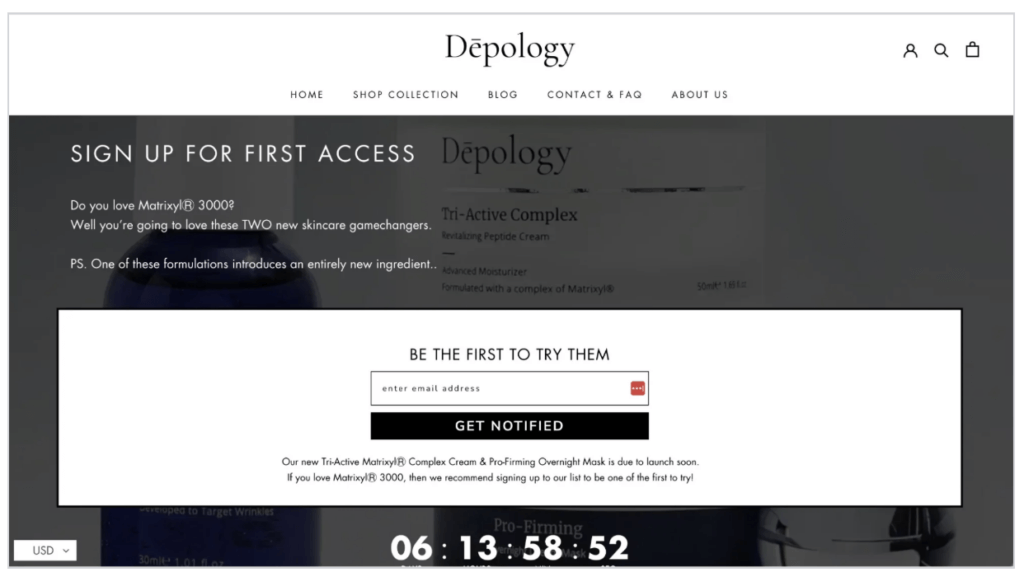
Benefits of Shopify Coming Soon Pages
Beyond the obvious audience-building function, coming soon pages offer several strategic advantages.
Get a head start on SEO. Your domain starts getting indexed as soon as it goes live, even with just a coming soon page. This gives search engines time to discover your site before your full launch, which can help your product pages rank faster once they are published.
Capture qualified leads. Someone who signs up for a “notify me” list has already shown interest in what you are building. These leads are more likely to convert than cold traffic, making your launch day marketing significantly more effective.
Test messaging and positioning. The headlines, imagery and copy you use on a coming soon page can inform your broader marketing strategy. Pay attention to what resonates and refine your positioning before you invest in paid advertising.
Create exclusivity and urgency. Limited access and early-bird positioning make people feel like insiders. This psychological trigger increases signups and builds word-of-mouth before you have a product to sell.
Validate demand before inventory investment. If you are considering a pre-order strategy but are not ready to commit, a coming soon page gives you demand data without financial risk.
How to Create a Coming Soon Page on Shopify
There are three main approaches to building coming soon pages on Shopify, each with different tradeoffs.
Method 1: Shopify’s Built-in Password Page
The simplest option is Shopify’s native password protection. This works best for brand launches where you want to hide your entire store.
Step 1: Go to Online Store > Preferences in your Shopify admin.
Step 2: Scroll to Password protection and check “Enable password.”
Step 3: Add a message for visitors explaining what is coming.
Step 4: Customize the page via Online Store > Themes > Customize > Password page.
From the theme editor, you can modify the headline, add your logo, change colors and add an email capture form. Most modern Shopify themes include a password page template that you can customize without code.
Pros: Free, native to Shopify, no apps required.
Cons: Limited design flexibility, applies to the entire store.
Method 2: Create a Dedicated Landing Page
If you want more control or need a coming soon page for a specific product rather than your whole store, you can create a standalone page.
Option A: Duplicate your theme. Create a copy of your current theme, remove everything except a minimal landing page layout, and publish it temporarily. When you are ready to launch, switch back to your full theme.
Option B: Use the page editor. Create a new page in Online Store > Pages, then build your coming soon content using Shopify’s native editor or a page builder app.
Pros: More design flexibility, can target specific products.
Cons: Requires more setup, may need third-party apps.
Method 3: Shopify Coming Soon Template Apps
Several Shopify apps specialize in coming soon pages, countdown timers and pre-launch functionality:
- PageFly, Shogun, GemPages: Full page builders that can create custom coming soon layouts
- Countdown Timer apps: Add urgency with real-time countdowns
- Email capture apps: Integrate directly with Klaviyo, Mailchimp or other email platforms
Apps make sense when you need features beyond what Shopify’s native tools offer, such as animated elements, A/B testing, or complex integrations.
Pros: More features, easier customization.
Cons: Additional cost, potential performance impact.
Key Elements Every Coming Soon Page Needs
The difference between a coming soon page that collects dust and one that builds a launch-ready audience comes down to a few critical elements.
A clear headline explaining what is coming. Vague teasers like “Something exciting is coming” underperform compared to specific promises like “Premium wireless earbuds for runners, arriving March 2026.” Be direct about what you are launching.
An email capture form. This is the primary purpose of the page. Keep it simple: one field for email is often enough. Research shows that reducing form fields from four to three increases conversions by 50%.
An estimated launch date or countdown timer. Give people a reason to anticipate. A countdown timer creates urgency and gives visitors a sense of when they should expect to hear from you.
Visual content. Product images, renders or lifestyle photography help visitors understand what they are signing up for. Even work-in-progress photos can build excitement if they show the product in a compelling light.
Social media links. Give visitors another way to follow your progress. Not everyone wants to give out their email, but they might follow you on Instagram.
Mobile-optimized design. Over half of ecommerce traffic comes from mobile devices. If your coming soon page does not work on phones, you are losing signups.
Best Practices for High-Converting Coming Soon Pages
The average email opt-in rate for landing pages is around 1.95%. Top performers achieve 10% or higher. Here is what separates the two.
Keep forms simple. Every additional field you add creates friction. For a coming soon page, email alone is usually sufficient. You can collect more information later.

Be specific about what is coming. Mystery might seem intriguing, but it actually hurts conversions. People are more likely to sign up when they know exactly what they are getting.
Offer an incentive for email signup. Early access, exclusive discounts, or bonus content give visitors a reason to share their email. “Be the first to know” is good. “Get 15% off when we launch” is better.
Create urgency with countdowns. A ticking timer reminds visitors that the window to join the early list is closing. This is especially effective in the days leading up to launch.
Include social sharing options. Make it easy for visitors to spread the word. A simple “Share with a friend” link can significantly expand your reach without additional marketing spend.
Use social proof if you have it. Press mentions, testimonials from beta testers, or follower counts add credibility. If you do not have these yet, skip this element rather than faking it.
Coming Soon Pages vs. Pre-orders: What is the Difference?
Understanding when to use each approach is crucial for maximizing your launch.
| Factor | Coming Soon Page | Pre-orders |
|---|---|---|
| Customer action | Email signup | Purchase |
| Revenue captured | None | Partial or full |
| Commitment level | Low | High |
| Best for | Uncertain timelines, early-stage | Confirmed timelines, ready to ship |
| Risk | Email list may not convert | Must deliver on promised timeline |
Coming soon pages capture interest without requiring any commitment from the customer. There is no payment, no obligation. This makes them ideal when you are still finalizing details or testing demand.
Pre-orders capture actual purchases. Customers pay something, whether upfront, as a deposit, or via deferred charge. This requires a higher commitment but also generates revenue and provides a much stronger demand signal. For a detailed comparison of payment options, see our guide on pre-order payment models.
The key difference is commitment level. An email signup costs the customer nothing. A pre-order requires them to put money down, which means far higher intent to purchase.
For more on the mechanics of pre-orders, see the complete guide to pre-orders on Shopify.
When to Transition from Coming Soon Pages to Pre-orders
Coming soon pages work well as a starting point, but they leave money on the table. At some point, you want to convert that email list into actual revenue.
Here are the signals that you are ready to transition:
Your timeline is confirmed. Pre-orders require you to commit to a delivery window. If you are still uncertain about when you can ship, stick with email capture.
You have enough demand signals. If your email list is growing and engagement is high, you have validation that people want your product. Pre-orders let you capture that demand as revenue.
You are ready to commit to delivery. Taking pre-order payments means you are on the hook to fulfill. Make sure your supply chain can deliver before making this switch.
You need to generate revenue before production. For manufacturers or brands with high upfront costs, pre-order revenue can fund production runs. Data from PreProduct’s analysis of over 1 million pre-orders shows that 75,781 pre-order listings used charge-later, making up 43.8% of all pre-order listings. This flexibility lets merchants capture orders without charging immediately.
You want to reduce launch day risk. Pre-orders tell you exactly how much inventory to produce. This is far more reliable than trying to guess based on email list size.
The Two-Step Launch Strategy: Coming Soon Pages to Pre-orders
The most effective approach combines both tactics in sequence. Here is how it works.
Phase 1: Build the email list. Create your coming soon page and start driving traffic. Focus on capturing as many qualified leads as possible. At this stage, you are building anticipation and gathering demand signals. This approach gives you more control than launching on a crowdfunding platform. If you are weighing your options, see our comparison of Shopify vs Kickstarter for product launches.
Phase 2: Convert the list with pre-orders. When you are ready to commit to a timeline, switch from email capture to pre-order functionality. Email your waitlist first with an exclusive window or early-bird discount. This rewards early interest and drives immediate conversions.
This two-step approach captures more revenue than either tactic alone. Coming soon pages build a larger audience than going straight to pre-orders, because the barrier to entry is lower. But pre-orders capture more value from that audience than waiting until launch day.
Nurturing the Transition
The email sequence between “thanks for signing up” and “pre-orders are live” matters. Consider sending:
- Behind-the-scenes updates on product development
- Sneak peeks of final designs or packaging
- Social proof from beta testers or early reviewers
- A countdown to pre-order launch with increasing urgency
When the pre-order goes live, email your waitlist first with an exclusive window or discount. This rewards early interest and drives immediate conversions. For guidance on this sequence, see how to build a pre-order email sequence that converts.
Coming Soon Page Examples for Shopify Stores
Looking at what works in practice helps illustrate these principles.
Paynter Jackets uses a waitlist approach for their limited-edition jacket drops. When a product sells out, they swap the buy button for an email capture form that builds the list for the next release. This creates a self-reinforcing cycle of exclusivity and demand. The simple design focuses entirely on the product and the signup form. See more pre-order landing page examples.

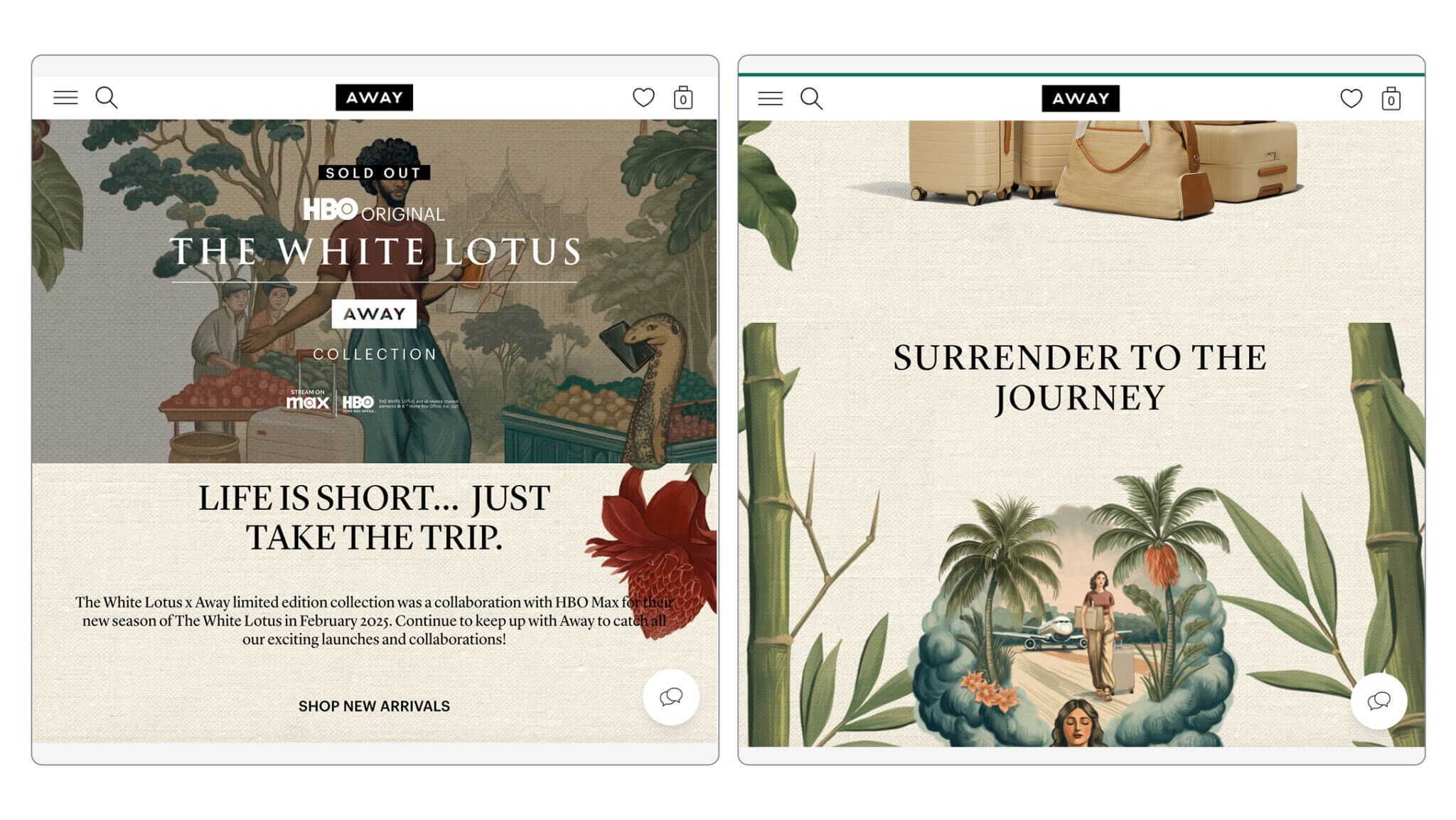
Away builds anticipation for new colorways and collaborations with dedicated landing pages that feature countdown timers and email capture. Their pages combine product photography with lifestyle imagery to paint a picture of who the product is for.
Effective elements to borrow:
- Clean, focused design with minimal distractions
- Clear value proposition in the headline
- Single-field email capture form
- Visual product representation
- Expected timeline or countdown
- Social proof when available
Frequently Asked Questions About Coming Soon Pages
How long should a coming soon page stay up?
There is no fixed rule, but two to four weeks is typical for product launches. Longer periods work for brand launches or high-ticket items that require more consideration. The key is maintaining engagement with regular updates so signups do not forget about you.
Can I accept pre-orders on a coming soon page?
Yes, but at that point it is really a pre-order page, not a coming soon page. The distinction matters for setting expectations. If customers can purchase, make sure your page clearly communicates payment timing, expected delivery and any other pre-order policies.
What is the average email conversion rate for coming soon pages?
The average email opt-in rate across all landing pages is around 1.95%. Well-optimized coming soon pages with strong offers and targeted traffic can achieve 5-10% or higher. The key factors are relevance of traffic, clarity of offer and simplicity of the signup form.
Should I show pricing on a coming soon page?
It depends on your strategy. Showing pricing filters out visitors who cannot afford the product, resulting in a more qualified list. Not showing pricing creates mystery and may capture more signups, but those leads may not convert when they see the final price. Test both approaches if possible.
What tools do I need to create a Shopify coming soon page?
For basic needs, Shopify’s built-in password page works well. For more customization, page builder apps like Shogun or PageFly offer drag-and-drop design. For pre-order functionality, you will need a dedicated pre-order app when you are ready to transition from email capture to purchases.
The Bottom Line on Coming Soon Pages
Coming soon pages are valuable, but they are step one, not the end goal. The real opportunity is capturing the email list you build and converting it into pre-order revenue.
Start with a coming soon page when your timeline is uncertain or you are testing demand. Transition to pre-orders when you are ready to commit to delivery and want to generate revenue before launch.
The merchants who build the biggest launch days use both approaches in sequence: coming soon pages to build the list, pre-orders to convert it.
Next steps:
- If you are not ready to commit to a timeline, start with a coming soon page using one of the methods above
- When your timeline is confirmed, explore how to set up pre-orders on Shopify
- For marketing your pre-order launch, see the complete pre-order marketing strategy guide
Pre-sell With PreProduct
7 day free trial with all plansMigrate pre-orders
