How to Promote Pre-Orders: A Complete Shopify Pre-Order Marketing Strategy
Pre-orders aren’t just about taking payments before stock arrives. They’re a marketing opportunity to build anticipation, gauge demand and drive revenue before you’ve committed to production or inventory.
But running a successful pre-order campaign on Shopify requires more than listing a product and hoping customers show up. You need a deliberate marketing strategy that treats pre-orders as a launch event, not a back-office operation. Once you’ve handled setting up your Shopify pre-orders, this guide will help you drive traffic and conversions.
In this guide, we’ll break down how to promote pre-orders effectively on Shopify, covering everything from pre-launch positioning to post-purchase communication. Whether you’re validating a new product or managing a restock, these tactics will help you maximize visibility, conversions and customer confidence.
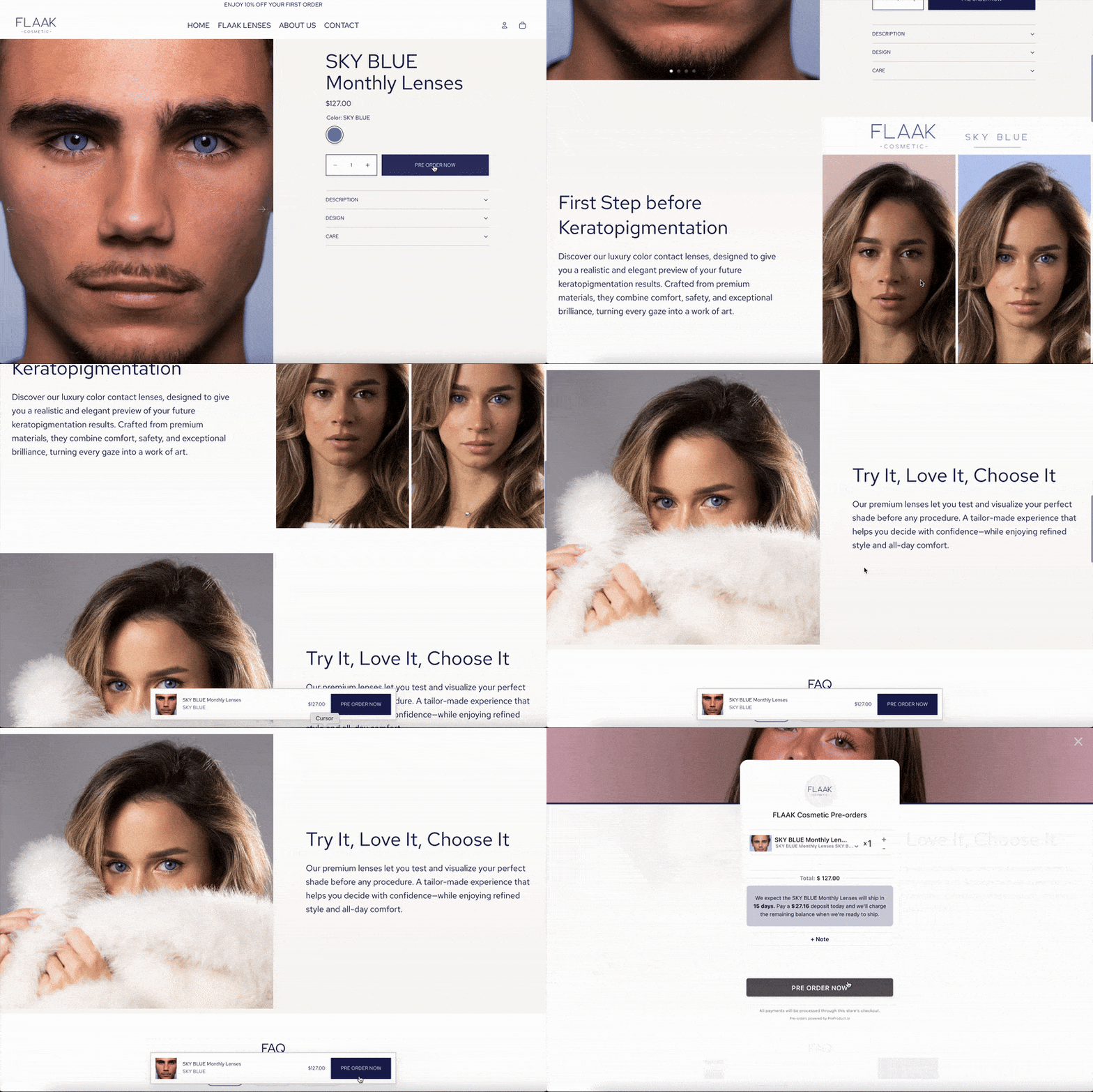
Why Pre-Order Marketing Matters for Shopify Stores
Pre-order marketing isn’t optional, it’s essential. Without visibility and momentum, even the best products can flatline during a pre-sale window.
Here’s why promotion matters:
- Demand is uncertain: Customers need reassurance that your product is worth waiting for, especially when they’re committing weeks or months in advance.
- Competition is high: Other brands are launching constantly. Standing out requires intentional positioning and consistent touchpoints.
- Cash flow depends on it: The more pre-orders you secure upfront, the better your runway for production, marketing and operations.
- Refunds are costly: Poor communication or unclear expectations lead to cancellations and chargebacks. Marketing helps set the right tone from the start.
A strong Shopify pre-order marketing strategy solves all of these. It builds excitement, manages expectations and keeps customers engaged throughout the entire pre-order lifecycle.

Build Hype Before You Launch: Pre-Announcement Tactics
The best pre-order campaigns don’t start on launch day. They start weeks earlier with strategic pre-announcement marketing that primes your audience.
Create a waitlist or early access list
Before you open pre-orders, capture interest with a waitlist. Tools like Klaviyo, Omnisend or even a simple Shopify contact form let you collect emails from people who want first access.
Why waitlists work:
- They let you gauge demand before committing to inventory
- They create urgency when you finally open pre-orders
- They give you a qualified audience to market to on day one
When the pre-order goes live, email your waitlist first with an exclusive window or discount. This rewards early interest and drives immediate conversions.
Tease the product on social media
Start posting sneak peeks, behind-the-scenes content and product teasers across Instagram, TikTok, Facebook and Twitter. Show prototypes, packaging mock-ups or production updates.
Effective tease content includes:
- Short video clips showing the product in action
- Polls asking followers what features or colors they want
- Countdown posts leading up to the pre-order launch
- User-generated content from beta testers or early reviewers
Tag relevant hashtags, engage with comments and build anticipation. The goal is to make your audience feel like they’re part of the journey before the product even launches.
Partner with influencers or brand ambassadors
Influencer marketing can accelerate awareness, especially if you’re targeting a specific niche. Reach out to micro-influencers (10K-100K followers) who align with your brand values and offer them early access in exchange for honest reviews or unboxing content.
Look for:
- Creators who already post about similar products
- Audiences that match your target customer demographic
- Authentic engagement rates (not just follower counts)
When influencers share your pre-order, include trackable discount codes or affiliate links so you can measure impact and optimize spend.
Use a “coming soon” landing page

If your product isn’t ready to pre-order yet, create a dedicated Shopify landing page that teases the launch and collects emails. This gives you a single URL to share across all channels.
Your coming soon page should include:
- High-quality product images or renderings
- A short description of what makes it unique
- An email capture form with clear CTA
- Expected pre-order launch date (or “notify me when available”)
- Social proof if you have early testimonials or press mentions
Tools like PageFly, Shogun or GemPages make it easy to build custom landing pages in Shopify without touching code.
Launch Day: Maximize Visibility and Conversions
When you open pre-orders, your marketing needs to shift from building anticipation to driving conversions. Here’s how to maximize visibility on launch day.
Send a dedicated launch email

Email your waitlist, newsletter subscribers and past customers with a clear, benefit-driven message. Your subject line should create urgency without feeling spammy.
Example subject lines:
- “Pre-orders are open: Be first to get [Product Name]”
- “It’s here: Pre-order now and save [X]%”
- “[Product Name] is live, limited availability”
In the email body, include:
- A compelling headline that reinforces the value proposition
- High-quality product images
- Key features and benefits (not just specs)
- Clear CTA button (“Pre-order now” not “Learn more”)
- Shipping timeline and any deposit or payment terms
- FAQ addressing common pre-order concerns
Send this email within the first hour of going live, then follow up with reminder emails spaced 3-5 days apart throughout the pre-order window.
Announce on all social channels
Post across every platform where your audience is active: Instagram, TikTok, Facebook, Twitter, LinkedIn and Pinterest. Tailor your messaging to each platform’s format and audience expectations.
Social launch posts should:
- Lead with the benefit, not the feature
- Include a direct link to the pre-order page (bio link for Instagram)
- Use video or carousel posts to showcase the product
- Incorporate trending audio or formats (especially on TikTok)
- Pin the post to the top of your profile for visibility
Consider running paid ads on Facebook and Instagram to amplify reach beyond your organic followers. Target lookalike audiences based on past purchasers or website visitors.
Optimize your Shopify pre-order product page
Your product page is where conversions happen. Make sure it’s optimized for clarity, trust and urgency.
Critical elements for a high-converting pre-order page:
- Clear pre-order messaging: Use a Shopify pre-order app like PreProduct to replace the “Add to cart” button with “Pre-order now” and display lead time or expected ship date.
- Compelling product descriptions: Focus on benefits, not just features. Answer “why should I wait for this?”
- High-quality images and videos: Show the product from multiple angles, in use and in context.
- Social proof: Display reviews, testimonials or press mentions if available.
- Trust signals: Highlight your return policy, secure checkout and any guarantees.
- FAQ section: Address common concerns like payment timing, shipping delays and cancellation policies.
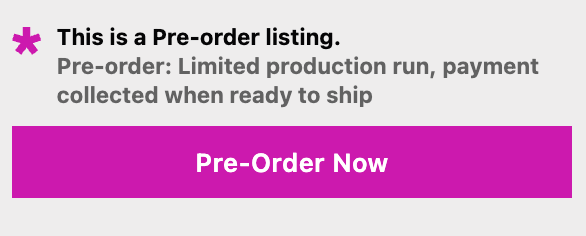
If you’re offering a discount or incentive for pre-ordering, call it out prominently near the CTA.
Leverage your email subscribers
Beyond your launch email, consider setting up a dedicated pre-order email sequence using Klaviyo, Omnisend or Shopify Email. This keeps your pre-order top-of-mind throughout the campaign window.
A basic pre-order email sequence might include:
- Launch announcement (day 1): “Pre-orders are now open”
- Product deep-dive (day 3-4): Highlight a specific feature or use case
- Social proof (day 7): Share customer testimonials or influencer content
- Urgency reminder (day 10-12): “Pre-order window closing soon” or “Limited spots remaining”
- Final call (day 14): “Last chance to pre-order”
Space these emails strategically based on your pre-order window length. For shorter campaigns (7-10 days), condense the sequence. For longer windows (30+ days), add more touchpoints.
Drive Ongoing Momentum Throughout the Pre-Order Window
Launch day is just the beginning. Sustaining momentum throughout the pre-order window requires ongoing marketing efforts.
Share customer stories and testimonials
As pre-orders come in, highlight customer excitement on social media and email. Repost customer comments, tag people who shared your product and create user-generated content campaigns.
This builds social proof and FOMO for people still on the fence.
Create content around the product
Publish blog posts, YouTube videos or TikToks that educate your audience about the product or the problem it solves. This supports SEO and gives you shareable content to promote across channels.
Content ideas:
- How-to guides showing the product in action
- Comparison posts (your product vs alternatives)
- Behind-the-scenes content showing production or design process
- Interviews with your team about why you created the product
Each piece of content should link back to your pre-order page and include a clear CTA.
Run retargeting ads
Most people won’t convert on their first visit. Set up Facebook and Instagram retargeting ads to remind visitors about your pre-order and nudge them toward checkout.
Retargeting ad strategies:
- Show dynamic product ads to people who viewed the pre-order page but didn’t buy
- Offer a limited-time discount or free shipping to cart abandoners
- Use testimonials or social proof in ad creative to build trust
- Create a sense of urgency (“Pre-orders close in 3 days”)
Retargeting typically has higher conversion rates and lower cost-per-acquisition than cold traffic ads.
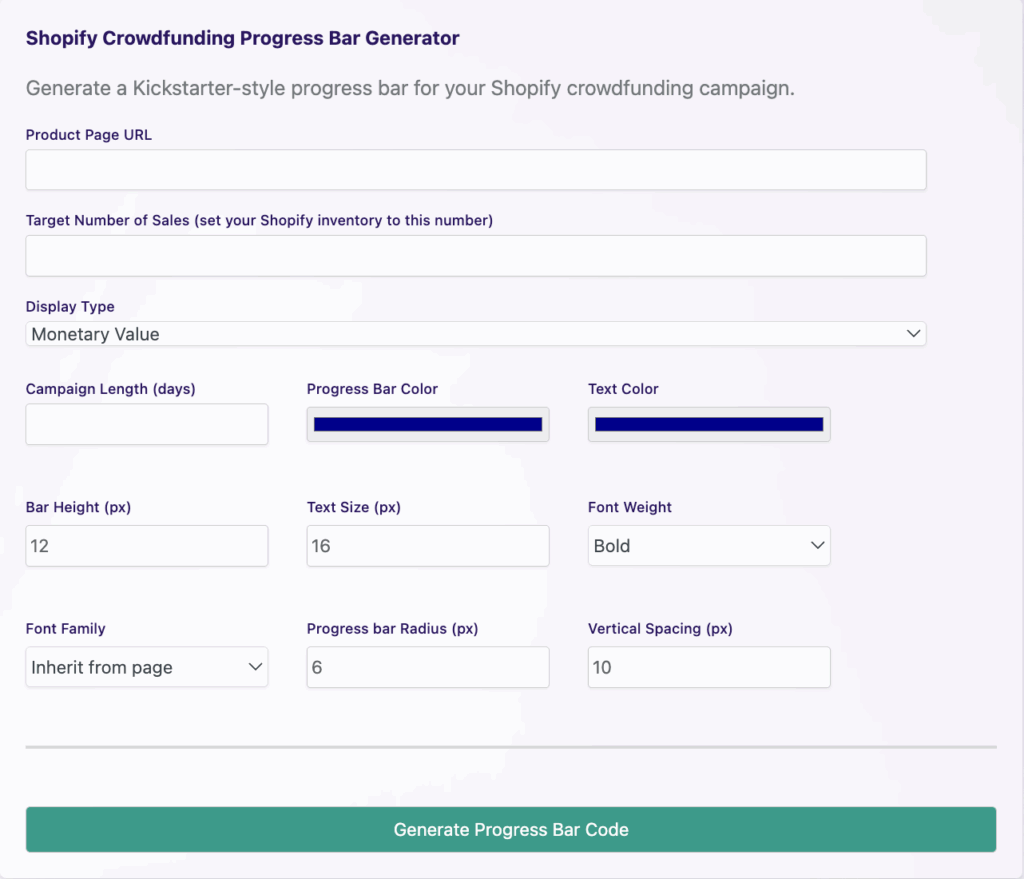
Use a crowdfunding-style progress bar
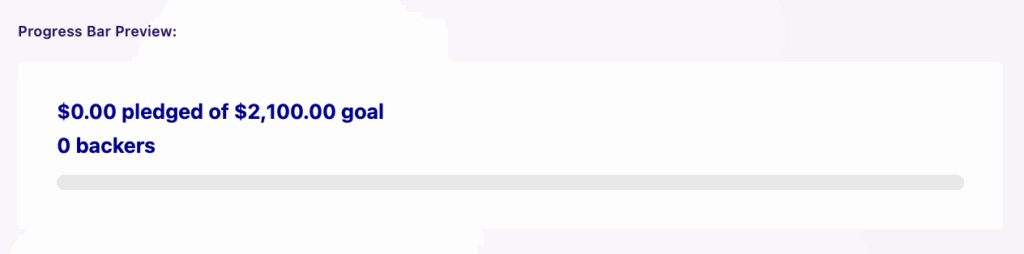
Show real-time social proof with a progress bar that displays how many pre-orders you’ve received or how much revenue you’ve generated. This taps into FOMO and validates demand for hesitant buyers.
PreProduct offers a free Shopify crowdfunding bar generator that you can add to your product page or homepage. This Kickstarter-style visual reinforces momentum and encourages more conversions.
Engage your community
If you have a Facebook group, Discord server or other community space, actively promote your pre-order there. Share updates, answer questions and celebrate milestones with your most loyal fans.
Community-driven marketing feels less promotional and builds stronger brand loyalty over time.
Communicate Clearly: Managing Expectations and Building Trust
Pre-orders require transparency. Unclear expectations lead to refunds, negative reviews and support headaches. Your marketing should prioritize clarity at every touchpoint.
Set realistic shipping timelines
Be honest about when customers can expect their orders. If lead times are uncertain, provide a range (“ships in 8-12 weeks”) rather than a specific date you might miss.
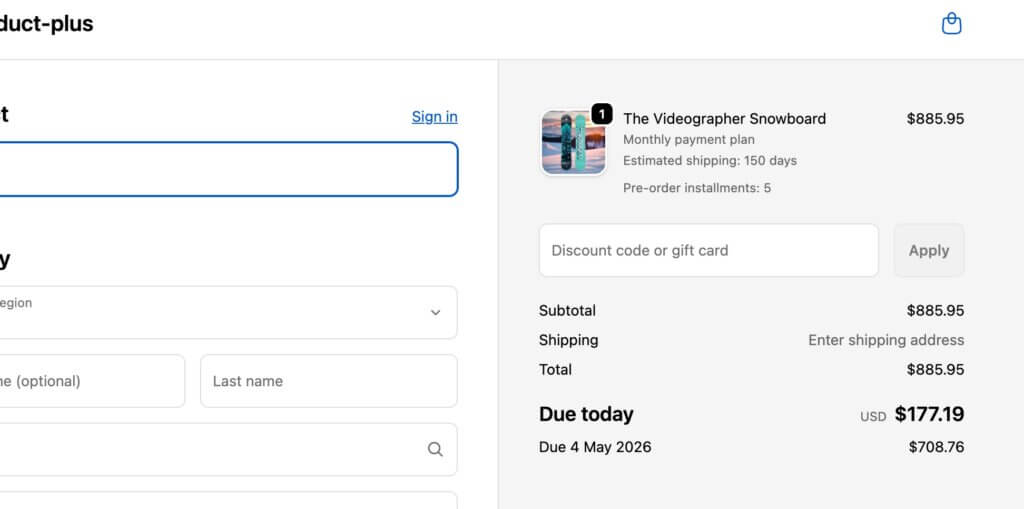
Display shipping timelines:
- On your product page
- In your pre-order button copy
- During checkout
- In your confirmation email
- In your FAQ section
Use a Shopify pre-order policy to formalize your terms and ensure compliance with FTC guidelines.
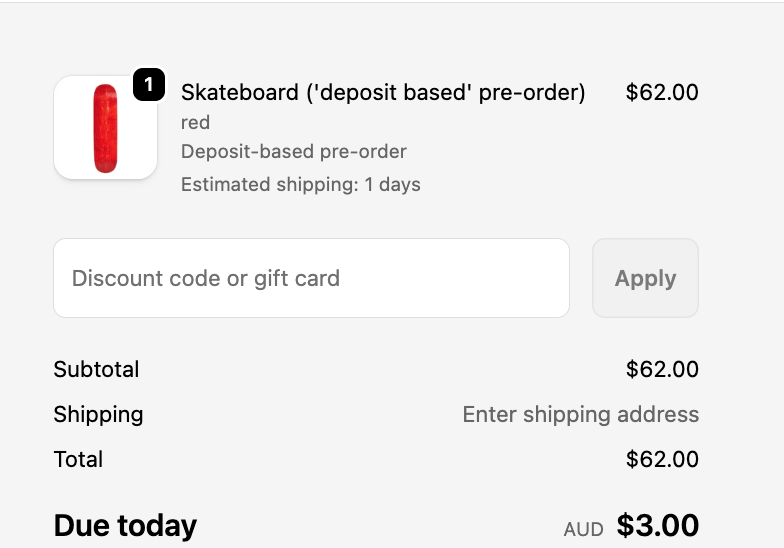
Explain your payment model
Customers need to know when they’ll be charged. Are you collecting payment upfront? Taking a deposit now and charging the balance later? Using charge-later to authorize cards but capture later?
Your Shopify pre-order app should display this clearly before checkout. PreProduct supports multiple payment models including charge-upfront, charge-later and deposit pre-orders, giving you flexibility based on your cash flow needs and customer preferences.
Send regular updates
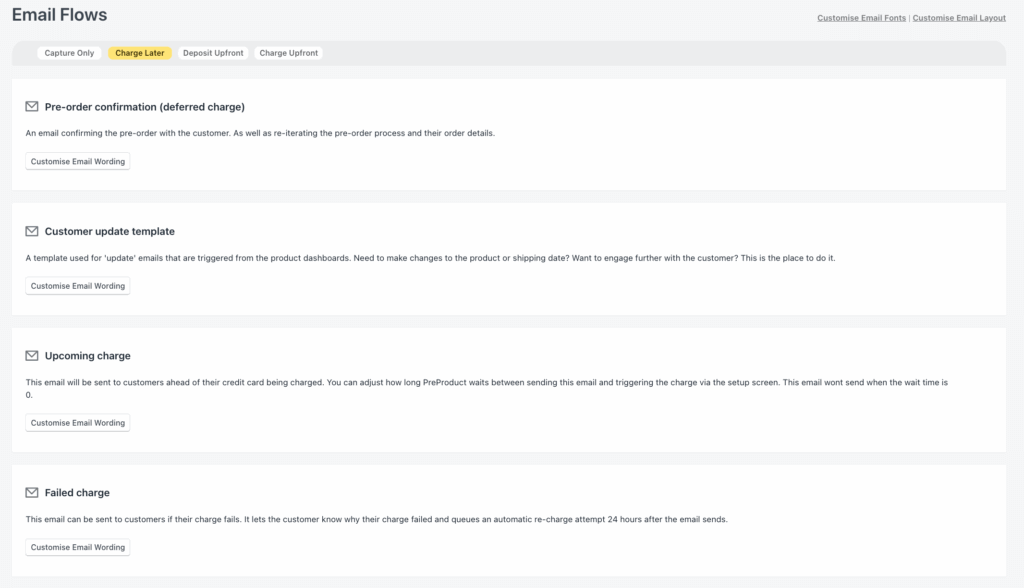
Once someone pre-orders, keep them informed throughout the fulfillment process. Send emails when:
- Their pre-order is confirmed
- Production or shipping timelines change
- Stock arrives and you’re preparing to ship
- Their order ships with tracking info
Use Klaviyo, Shopify Email or your pre-order app’s email automation to handle these touchpoints. Consistent communication reduces anxiety and support tickets.
Be transparent about delays
If production or shipping gets delayed, tell your customers immediately. Explain what happened, provide a new timeline and offer options (wait it out, request a refund, etc.).
Transparency builds trust. Hiding delays or going silent erodes it fast.
Leverage Email Marketing for Pre-Order Success
Email is your highest-ROI channel for pre-order marketing. Here’s how to use it strategically throughout the campaign.
Segment your audience
Not everyone on your email list should get the same message. Segment by:
- Waitlist subscribers: These people explicitly asked for pre-order access. Prioritize them.
- Past customers: They already trust your brand. Remind them of your track record.
- Engaged subscribers: People who open and click emails regularly are more likely to convert.
- Cart abandoners: If someone added the pre-order to cart but didn’t check out, follow up with a reminder or incentive.
Segmentation lets you tailor messaging and timing for better conversion rates.
Craft a dedicated pre-order email sequence
We touched on this earlier, but it’s worth emphasizing: a multi-email sequence outperforms a single launch email. Plan your cadence in advance and automate where possible.
Each email should have a single clear goal:
- Email 1: Announce the pre-order and drive initial conversions
- Email 2: Educate about a key feature or benefit
- Email 3: Share social proof or customer stories
- Email 4: Create urgency with a deadline or limited availability
- Email 5: Final reminder before the pre-order window closes
Use subject lines that create curiosity without clickbait. Test different CTAs and send times to optimize performance.
Include strong CTAs and visuals
Every pre-order email should include a clear, action-oriented CTA button. “Pre-order now” or “Reserve yours today” works better than vague phrases like “Learn more.”

Pair your CTA with high-quality product images or lifestyle shots that show the product in context. Visual content increases click-through rates and helps customers visualize owning the product.
Track and optimize email performance
Monitor open rates, click-through rates and conversion rates for each email. If a particular message underperforms, test different subject lines, preview text or email copy.
Most email platforms (Klaviyo, Omnisend, Shopify Email) include A/B testing tools. Use them to refine your approach mid-campaign.
Use Social Media and Influencer Marketing to Amplify Reach
Social media expands your reach beyond your email list and website visitors. Here’s how to use it effectively for pre-order marketing.
Post consistently across platforms
Don’t just post on launch day and disappear. Create a content calendar with 3-5 posts per week throughout your pre-order window.

Mix up your content types:
- Product announcements and features
- Behind-the-scenes content
- Customer testimonials and unboxings
- Countdown posts creating urgency
- Educational content (how-tos, tips, use cases)
- Polls and engagement posts
Use Instagram Stories, TikTok videos and Reels to reach audiences that prefer short-form video content.
Run paid social ads
Organic reach on social media is declining. Paid ads let you target specific audiences and scale your pre-order campaign beyond your existing followers.
Effective ad formats for pre-orders:
- Carousel ads: Show multiple product images or features in one ad
- Video ads: Demonstrate the product in action
- Dynamic product ads: Retarget people who viewed your pre-order page
- Collection ads: Showcase your pre-order alongside related products
Target audiences based on:
- Lookalike audiences (people similar to past buyers)
- Interest-based targeting (people interested in your product category)
- Retargeting (people who visited your site but didn’t convert)
Start with a modest budget ($10-20/day) and scale up based on performance. Track ROAS (return on ad spend) to ensure profitability.
Partner with influencers and affiliates
Influencer marketing works especially well for pre-orders because it builds credibility fast. Choose influencers who align with your brand and have engaged audiences (not just high follower counts).
Offer influencers:
- Early access to the product
- Exclusive discount codes for their followers
- Affiliate commissions on sales they drive
- Creative freedom to promote authentically
Micro-influencers (10K-100K followers) often deliver better ROI than mega-influencers because their audiences are more engaged and niche-specific.
Track performance using unique discount codes or affiliate links so you know which partnerships are worth repeating.
Encourage user-generated content
Ask customers who pre-order to share their excitement on social media. Create a branded hashtag and repost customer content to your own channels.
UGC builds social proof and makes your marketing feel less promotional. It also gives you a steady stream of content without creating everything yourself.
Optimize Your Pre-Order Product Pages for Conversions
Your product page is where marketing meets sales. If it doesn’t convert, your promotional efforts are wasted.
Write compelling product descriptions
Focus on benefits, not features. Explain how the product improves your customer’s life, solves a problem or delivers a specific outcome.
Instead of: “Made with premium materials and available in three colors”
Write: “Built to last through years of daily use, available in colors that match your style”
Use short paragraphs, bullet points and clear headlines to make your description scannable.
Display clear pre-order messaging
Customers need to know immediately that this is a pre-order, not a regular purchase. Your add-to-cart button should say “Pre-order now” and your product page should clearly display:
- Expected ship date or lead time
- Payment terms (upfront, deposit or charge-later)
- Pre-order discount or incentive (if applicable)
- Cancellation and refund policy
A Shopify pre-order app like PreProduct handles this automatically, replacing your standard button with pre-order messaging and displaying lead times on the product page.
Use high-quality images and videos
Show your product from every angle. Include lifestyle shots that show it in use, not just white-background studio photos.
Video converts even better than static images. A 30-60 second product demo or unboxing video can significantly increase conversion rates.
Add social proof and trust signals
Display customer reviews, star ratings and testimonials prominently. If you don’t have reviews yet, show press mentions, awards or endorsements from industry experts.
Include trust badges near your CTA:
- Secure checkout icons
- Money-back guarantee
- Free returns or easy cancellation policy
- “As seen in” logos if you’ve been featured in media
These signals reduce purchase anxiety, which is especially high for pre-orders.
Optimize for mobile
Over 70% of Shopify traffic comes from mobile devices. Your pre-order page must look great and load fast on phones and tablets.
Test your page on multiple devices. Ensure images load quickly, buttons are thumb-friendly and text is readable without zooming.
Offer Incentives to Drive Pre-Order Conversions
Pre-orders require customers to wait, which adds friction. Incentives reduce that friction and make pre-ordering more appealing than waiting for the regular launch.
Discount early buyers
Offer 10-20% off for customers who pre-order, positioned as a reward for their patience and commitment. This is one of the most common pre-order incentives because it’s simple and effective.
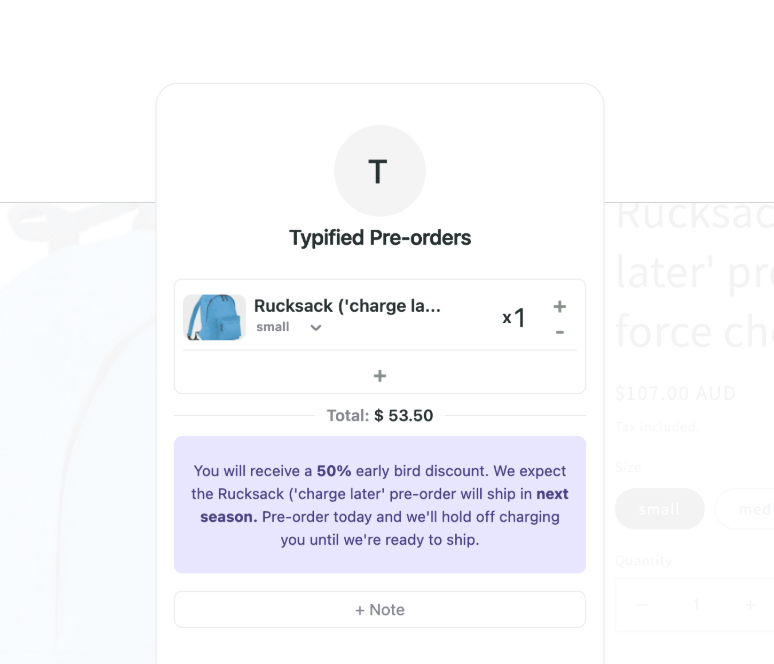
Display the discount prominently on your product page and in your marketing emails. Use phrases like “Pre-order and save 15%” or “Early bird discount: 20% off for the first 100 buyers.”
Include exclusive bonuses
Bundle a free gift, upgrade or exclusive add-on with pre-orders. This could be:
- Free shipping
- A complimentary accessory
- Early access to future products
- A limited-edition version or colorway
Exclusivity taps into FOMO and makes pre-ordering feel like a VIP experience.
Create limited availability
Scarcity drives urgency. Cap the number of pre-orders you’ll accept or set a deadline for the pre-order window.
Messages like “Only 50 pre-orders available” or “Pre-order window closes Friday” push hesitant buyers to act now instead of waiting.
If you’re using caps, make sure you can fulfill them. Overselling and canceling orders damages trust.
Offer flexible payment options
High-ticket items can be tough to sell as pre-orders because customers don’t want to pay hundreds of dollars upfront for a product that won’t ship for weeks.
Solve this with flexible payment models:
- Deposits: Collect a small amount upfront, charge the balance later
- Charge-later: Authorize cards at checkout but only capture payment when you ship
- Payment plans: Let customers split the cost across multiple installments
PreProduct supports all of these payment models natively for Shopify stores, giving you flexibility based on your product price point and customer preferences. Learn more about Shopify payment plans and how to implement them.
Post-Purchase: Keep Customers Engaged After They Pre-Order
Your marketing doesn’t stop once someone pre-orders. Keeping customers engaged throughout the fulfillment process reduces refunds and builds long-term loyalty.
Send a confirmation email immediately
As soon as someone pre-orders, send a confirmation email that:
- Thanks them for their order
- Confirms what they ordered and when it ships
- Explains payment details (when they’ll be charged, etc.)
- Provides a link to track their order status
- Includes your contact info for support questions
This email sets expectations and reassures customers that their order went through.
Provide regular status updates
Don’t go silent after someone pre-orders. Send progress emails every 2-4 weeks with updates on production, shipping timelines or any changes.
Examples:
- “Your pre-order is in production: here’s what’s happening”
- “Good news: your order is ahead of schedule”
- “Quick update: slight delay, but here’s the new timeline”
Transparency builds trust, even when things don’t go perfectly.
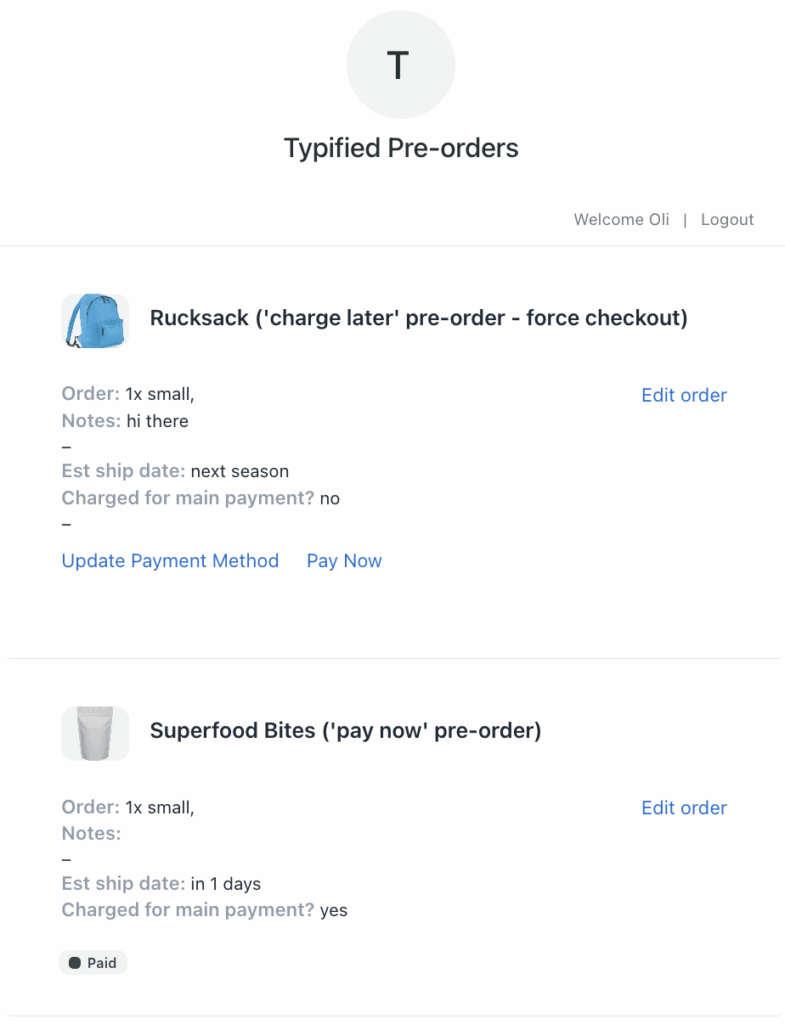
Offer a customer portal for self-service
Let customers check their order status, view payment schedules and manage their pre-orders without emailing support. PreProduct includes a customer portal where pre-order buyers can see expected ship dates, payment history and order details.
This reduces support tickets and gives customers more control over their experience.
Create a post-purchase email sequence
Once the product ships, continue engaging with new customers through a post-purchase email flow:
- Shipping notification: Confirm the order is on its way with tracking info
- Delivery confirmation: Check that they received it and love it
- Review request: Ask for a review or testimonial
- Cross-sell: Recommend related products or accessories
- Loyalty offer: Invite them to join a rewards program or VIP list
This turns one-time pre-order buyers into repeat customers.
Measure Success: Track Key Pre-Order Marketing Metrics
You can’t improve what you don’t measure. Track these metrics to understand what’s working and optimize your pre-order marketing strategy.
Pre-order conversion rate
What percentage of visitors to your pre-order product page actually convert? This tells you if your page is optimized and your offer is compelling.
How to calculate: (Number of pre-orders / Product page visitors) x 100
Benchmark: A good conversion rate for pre-orders is 2-5%, though this varies by industry and price point.
Email performance metrics
Track open rates, click-through rates and conversion rates for your pre-order email campaigns. This shows which messages resonate with your audience.
Key metrics:
- Open rate: 20-30% is solid for most industries
- Click-through rate: 2-5% is typical
- Conversion rate: 1-3% from email clicks is strong
Use A/B testing to improve underperforming emails.
Customer acquisition cost (CAC)
How much are you spending on marketing to acquire each pre-order customer? This helps you understand ROI and allocate budget efficiently.
How to calculate: Total marketing spend / Number of pre-orders
Compare CAC to your average order value (AOV) to ensure profitability. Ideally, your AOV should be at least 3x your CAC.
Refund and cancellation rate
High refund rates signal problems with your marketing, product positioning or fulfillment process. Track how many customers cancel or request refunds before you ship.
How to calculate: (Number of refunds / Total pre-orders) x 100
If your cancellation rate exceeds 10%, investigate why. Common causes include unclear shipping timelines, poor communication or product quality concerns.
Social media engagement
Track likes, comments, shares and saves on your pre-order posts. High engagement indicates your content resonates and can help predict conversion rates.
Also monitor follower growth and reach during your pre-order campaign. If you’re running paid ads, track cost per click (CPC) and return on ad spend (ROAS).
Common Pre-Order Marketing Mistakes to Avoid
Even experienced brands make mistakes when promoting pre-orders. Here are the most common pitfalls and how to avoid them.
Overpromising and underdelivering
Don’t promise a ship date you can’t hit or features you can’t deliver. It’s better to under-promise and over-deliver than the reverse.
If timelines change, communicate immediately and give customers the option to cancel if they’re no longer interested.
Going silent after launch
Launching and disappearing is a fast way to lose customer trust. Stay visible throughout the pre-order window with regular updates, content and engagement.
Ignoring customer questions
When customers have questions about pre-orders (payment timing, shipping, cancellations), answer them quickly and publicly. Unanswered questions kill conversions.
Create a comprehensive FAQ on your product page and in your emails to address concerns proactively.
Failing to set clear expectations
Ambiguity leads to refunds. Be explicit about when customers will be charged, when orders will ship and what happens if there’s a delay.
Use your Shopify pre-order policy to formalize these terms and ensure legal compliance.
Not following up post-purchase
Your relationship with customers shouldn’t end when they pre-order. Keep them engaged with updates, educational content and opportunities to provide feedback.
Post-purchase engagement reduces refunds and increases the likelihood they’ll buy from you again.
Putting It All Together: Your Shopify Pre-Order Marketing Checklist
Here’s a step-by-step checklist to execute a successful pre-order marketing campaign on Shopify:
Pre-launch (2-4 weeks before):
- [ ] Build a waitlist or early access list
- [ ] Create teasers and countdown content for social media
- [ ] Reach out to influencers or affiliates
- [ ] Set up a “coming soon” landing page
- [ ] Draft your launch email and pre-order email sequence
Launch day:
- [ ] Send launch email to waitlist and subscribers
- [ ] Post announcement across all social channels
- [ ] Set up Facebook and Instagram ads
- [ ] Optimize your Shopify pre-order product page
- [ ] Add a crowdfunding-style progress bar (optional)
During the pre-order window:
- [ ] Send regular email updates and reminders
- [ ] Share customer testimonials and UGC
- [ ] Publish blog posts or videos about the product
- [ ] Run retargeting ads for cart abandoners
- [ ] Engage your community (Facebook groups, Discord, etc.)
Post-purchase:
- [ ] Send order confirmation emails
- [ ] Provide status updates every 2-4 weeks
- [ ] Offer a customer portal for self-service
- [ ] Send shipping notifications with tracking
- [ ] Request reviews and testimonials after delivery
Ongoing optimization:
- [ ] Track conversion rates, email metrics and CAC
- [ ] A/B test email subject lines and ad creative
- [ ] Monitor refund rates and investigate high cancellations
- [ ] Survey customers for feedback on the pre-order experience
Final Thoughts: Make Pre-Orders a Growth Engine
Pre-orders aren’t just a way to take revenue before stock lands. They’re a marketing opportunity to build anticipation, validate demand and create momentum for your product launch.
The brands that succeed with pre-orders treat them like launch events. They invest in visibility, communicate transparently and keep customers engaged from pre-announcement through delivery.
Whether you’re a new brand testing your first product or an established store managing restocks, a deliberate Shopify pre-order marketing strategy makes the difference between a quiet launch and a successful campaign.
Start with the tactics that fit your resources and audience, then scale up as you learn what works. With the right tools (like PreProduct), clear messaging and consistent execution, pre-orders can become a reliable growth engine for your Shopify store.
Pre-sell With PreProduct
7 day free trial with all plans


